🔄 5 Java Loops You Must Master (My Honest Take as a Developer)
Java loops were a puzzle to me when I was beginning to write first codes in Java. My question kept on reoccurring in my mind: why can I not simply copy-paste the same piece of code and do without this complex stuff?
But then reality hit. Consider that you have to print the numbers between 1 and 100. Are you really going to type:
No way. Java loops just rescued me there. Loops are not merely repetition, but less code writing, fewer errors and smarter programs.
So let’s dive in. I will have a simple description of Java loops as I would like to be told when I was new.
1. The Classic ‘for’ Loop in Java
The for loop in Java is probably the only loop all beginners learn the first.
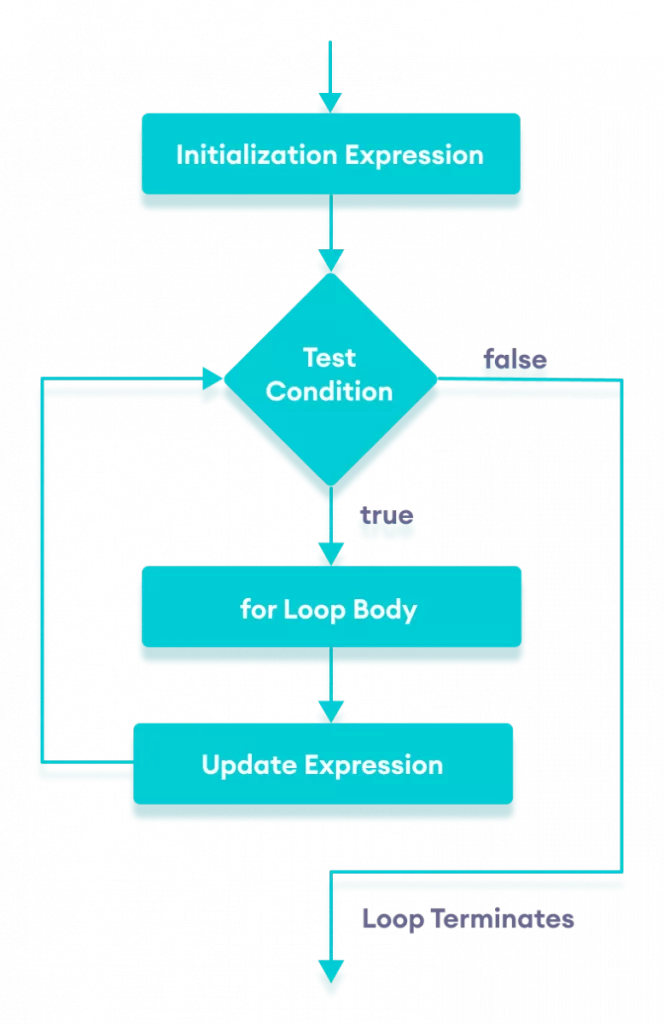
Here’s how it works:
for (int i = 1; i <= 5; i++) {
    System.out.println("Number: " + i);
}
Output:
Number: 1
Number: 2
Number: 3
Number: 4
Number: 5
This simple Java loop prints numbers from 1 to 5.
When I use it:
Printing sequences Searching small ranges.
Quick checks when I am sure of the number of times I do want the loop to repeat.
👉 For loops in Java have been used by you already, even without realizing it in case you have worked with arrays.
2. The ‘while‘ Loop in Java ⏳

The first time I wrote a Java code was to coded a login system, in which I used a while loop. Why? Since I was not aware of the number of tries made by the user to key the right password.
int attempts = 0;
while (attempts < 3) {
    System.out.println("Enter your password");
    // assume input logic here
    attempts++;
}
In this case the while loop in Java continues to execute when the condition is true.
💡 Where I use it:
- Waiting for user input
- Ongoing (such as sensor data checking) activities.
- Limitless loops to servers (with an adequate exit condition, of course).
3. The do-while Loop in Java
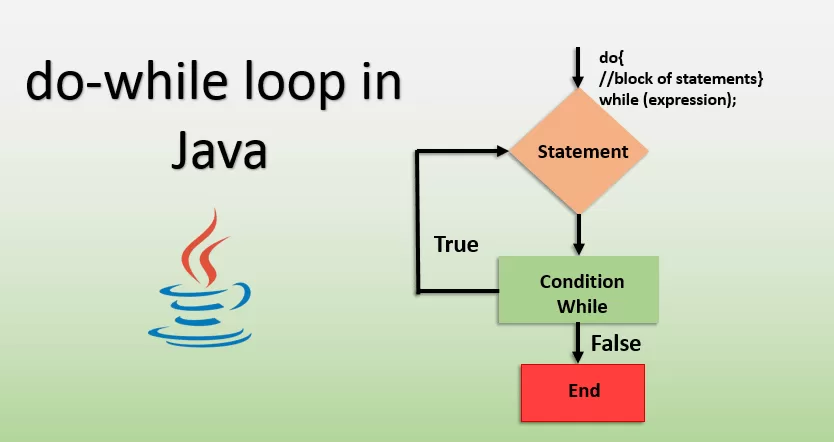
There is a secret here, the do-while loop in Java is underestimated. The loop is what ensures that the code is executed at least once even when the condition is not true.
int num = 5;
do {
    System.out.println("This will print once, even if condition is false");
    num++;
} while (num < 5);
Output:
This will print once, even if condition is false
💡 When I use it:
- Menu-based programs (such as ATM simulation)
- Examples of cases in which the first execution has to occur prior to checking.
4. Enhanced for Loop in Java

When I had to work with arrays, I became sick of writing indexes. Then I found the improved for loop in Java- it was magic.
Example:
int numbers[] = {10, 20, 30, 40, 50};
for (int num : numbers) {
    System.out.println(num);
}
Output:
10
20
30
40
50
No index. No fuss. Just clean iteration.
💡 When I use it:\
- Arrays
- Collections (like ArrayList)
- Just the values when I do not mind the index.
5. Nested Java Loops
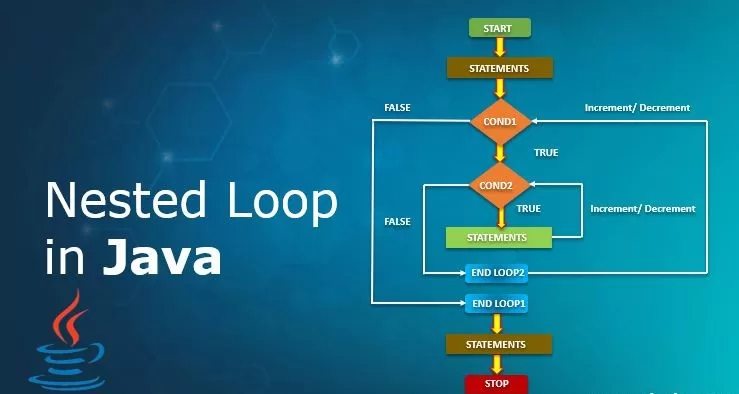
This is where things get interesting. A nested loop in Java is basically a loop inside another loop.
Example:
for (int i = 1; i <= 3; i++) {
    for (int j = 1; j <= 2; j++) {
        System.out.println("i = " + i + ", j = " + j);
    }
}
Output:
i = 1, j = 1
i = 1, j = 2
i = 2, j = 1
i = 2, j = 2
i = 3, j = 1
i = 3, j = 2
💡 Where I use it:
- Multiplication tables
- Matrix operations
- Games (think tic-tac-toe grids)
Real-Life Example: Using Java Loops in a Mini Project
Here’s a real project I worked on as a beginner: a simple number guessing game.
import java.util.Scanner;

public class GuessGame {
    public static void main(String[] args) {
        Scanner sc = new Scanner(System.in);
        int number = 7;
        int guess;

        do {
            System.out.println("Guess a number between 1 and 10:");
            guess = sc.nextInt();
        } while (guess != number);

        System.out.println("🎉 You guessed it!");
    }
}
Without a do-while loop in Java, this program would have been much messier.
When NOT to Use Java Loops 🚫
In some cases novices use loops excessively. I did it too.
Don’t use Java loops when:
- A simple condition (
if) would work - You’re processing huge datasets without optimization
- Recursion (function calling itself) might be cleaner
Conclusion:
Looking back, Java loops felt intimidating at first. But now? I can’t imagine writing Java code without them. They’re the backbone of everything from tiny programs to enterprise applications.
Want to Learn Java Course,
👉 If you’re just starting, practice writing simple loops. Print patterns. Play with arrays. Make silly games. Slowly, Java loops will become second nature.
And trust me—once you master Java loops, the rest of Java feels a whole lot easier.
Related Reads: