7 Scheduling Algorithms in Operating Systems You Must Know

Introduction: Why Scheduling Algorithms
If you’ve ever wondered why your computer doesn’t crash even when you’re juggling 10 tabs, Spotify, and a coding IDE all at once—well, that’s thanks to scheduling algorithms.
When I first studied CPU Scheduling in Operating Systems, I honestly thought it was just some boring concept hidden deep in textbooks. But the more I explored, the more I realized it’s the silent hero behind our smooth digital lives.
Scheduling algorithms decide which process runs next when multiple programs compete for the CPU’s attention. Think of it as a clever manager assigning work so everyone (apps, in this case) gets their fair share of CPU time.
By the end of this post, you’ll not only understand what scheduling algorithms are, but you’ll be able to explain them like a pro — maybe even impress your professor or your tech friends
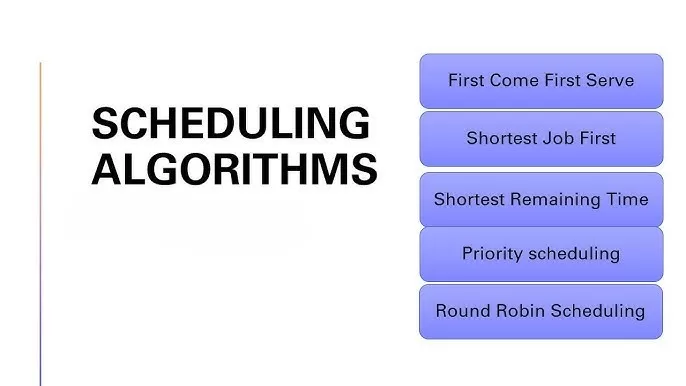
What Is CPU Scheduling in Operating Systems?
In simple words, CPU scheduling is how the operating system decides which process should run next and for how long.
Since the CPU can execute only one process at a time (at least in a single-core system), it needs to switch between multiple processes quickly — that’s where scheduling algorithms come in.
They help in:
- Maximizing CPU utilization
- Minimizing waiting time
- Reducing response time
- Increasing throughput (tasks per second)
1. First-Come, First-Served (FCFS) Scheduling Algorithm
The name says it all — the process that arrives first gets executed first.
Real-life example: Imagine you’re in a queue at a movie ticket counter. Whoever arrives first, gets served first.
Pros:
- Simple and easy to implement
- Works well for small systems
Cons:
- Causes the “convoy effect” (a slow process delays others)
- Not ideal for multitasking systems
Best used for: Background tasks where order matters more than speed.

⏱️ 2. Shortest Job Next (SJN) or Shortest Job First (SJF) Scheduling Algorithm
In this scheduling algorithm, the CPU chooses the process with the shortest burst time next.
Example: Think of it like doing quick chores before tackling a big one — wash a cup, reply to a message, then do the laundry.
Pros:
- Reduces average waiting time
- Improves throughput
Cons:
- Long processes might starve
- Burst time must be known in advance (not always practical)
Best used for: Systems where process length can be predicted easily, like batch jobs.
🔁 3. Round Robin (RR) Scheduling Algorithm
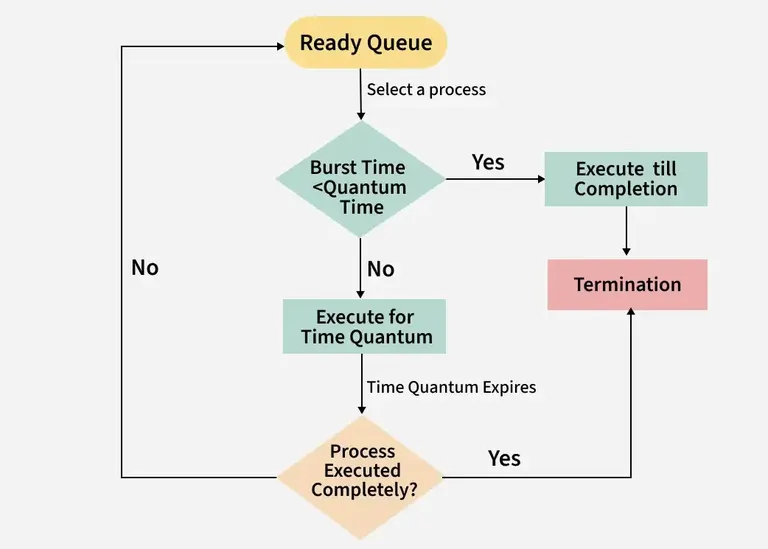
Round Robin is like giving every process a time slice or quantum — say 10ms — and rotating among them.
Example: Picture a teacher giving each student a minute to answer a question. Everyone gets a turn!
Pros:
- Fair to all processes
- Great for time-sharing systems
Cons:
- Choosing the right time quantum is tricky
- Too large → behaves like FCFS; too small → overhead increases
Best used for: Multitasking and interactive systems (like your PC or smartphone).
🧩 4. Priority Scheduling Algorithm
Every process gets a priority number, and the CPU picks the one with the highest priority.
Example: Think of emergency rooms — critical patients are treated first, no matter when they arrived.
Pros:
- Important tasks get done first
- Can handle urgent processes
Cons:
- Lower-priority tasks may starve
- Complex to balance fairness and priority
Best used for: Systems where urgency matters — like real-time applications.
🧮 5. Multilevel Queue Scheduling Algorithm
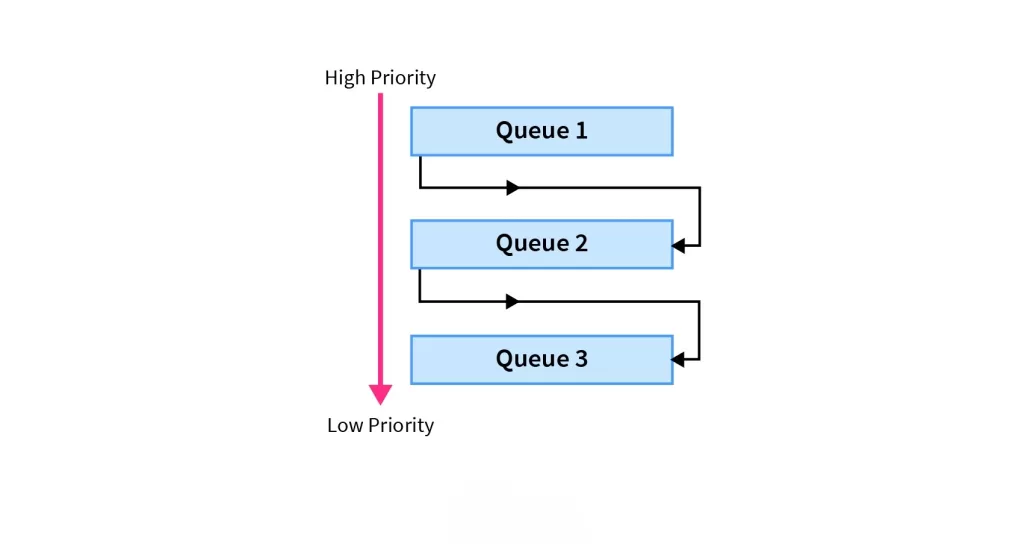
Here, processes are divided into multiple queues based on their type (foreground, background, system, etc.), and each queue has its own scheduling algorithm.
Example: In a restaurant — VIP guests, regular customers, and online orders each have different service rules.
Pros:
- Organized and flexible
- Suitable for complex systems
Cons:
- Hard to manage inter-queue priorities
- Static queue assignment may not be efficient
Best used for: Complex operating systems handling various process types.
🔄 6. Multilevel Feedback Queue (MLFQ) Scheduling Algorithm
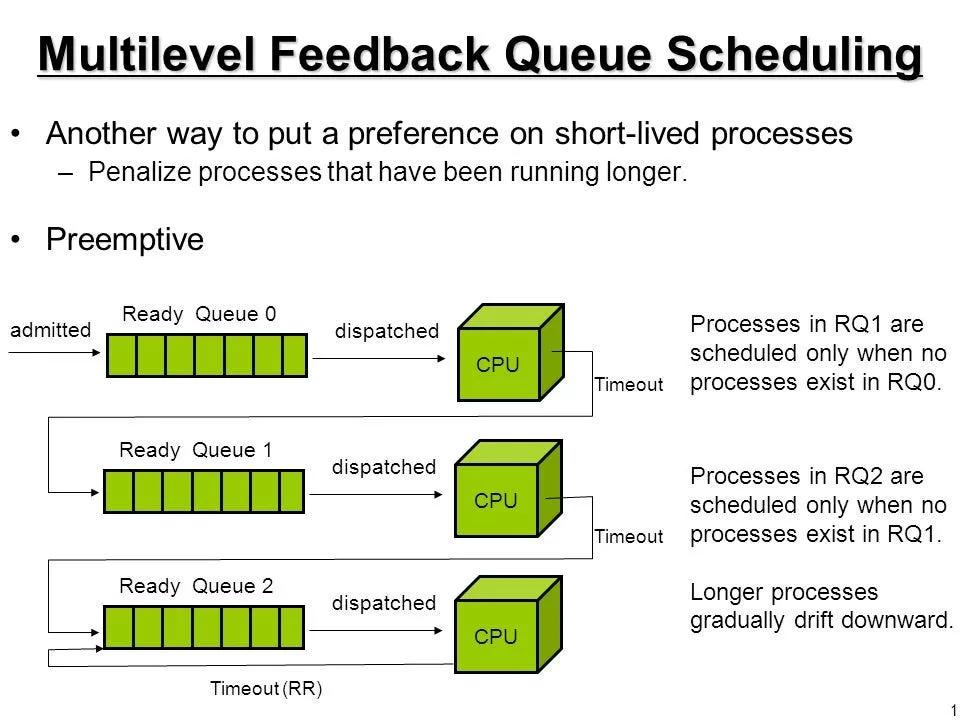
This one’s smarter — it moves processes between queues based on their behavior and needs.
Example: If a process behaves well (finishes quickly), it gets promoted; if it hogs time, it’s demoted. Kind of like a gaming leaderboard 🎮
Pros:
- Very adaptive
- Balances fairness and efficiency
Cons:
- Tough to configure (needs proper tuning of parameters)
Best used for: Modern OS kernels — like Linux and Windows use variants of MLFQ.
⏳ 7. Shortest Remaining Time First (SRTF) Scheduling Algorithm
It’s the preemptive version of SJF. If a new process arrives with a shorter remaining time, it interrupts the current one.
Example: Imagine you’re cooking dinner, but your microwave beeps — you stop cooking for a second to grab your food.
Pros:
- Minimizes waiting time
- Ideal for real-time environments
Cons:
- Frequent context switching
- Hard to estimate remaining time
Best used for: Real-time systems needing quick responses.
📊 Comparison Table: Scheduling Algorithms at a Glance
| Algorithm | Type | Preemptive | Best For | Drawback |
|---|---|---|---|---|
| FCFS | Non-preemptive | ❌ | Simple tasks | Convoy effect |
| SJF/SJN | Non-preemptive | ❌ | Batch jobs | Starvation |
| SRTF | Preemptive | ✅ | Real-time tasks | Frequent switching |
| RR | Preemptive | ✅ | Time-sharing | Depends on time quantum |
| Priority | Both | ✅/❌ | Urgent tasks | Starvation |
| Multilevel Queue | Both | ✅/❌ | OS-level processes | Complex |
| MLFQ | Preemptive | ✅ | Modern OS | Hard to configure |
Final Thoughts
Scheduling algorithms might sound technical, but they’re actually the hidden organizers of our digital chaos. They keep your apps responsive, your games smooth, and your systems alive.
Once you understand how CPU scheduling in operating systems works, you’ll never see your computer the same way again
Kaashiv Infotech Offers Networking Course, Cyber Security Course, Cloud Computing Course Visit Their Website www.kaashivinfotech.com.
Related Reads: