
Recoil in ReactJS – State management is one of the most important aspects of building scalable React applications. As applications grow, managing shared state between components becomes increasingly complex. While tools like Context API and Redux have been popular solutions, Recoil introduces a simpler and more flexible way to manage state in React.
In this complete guide, we’ll explore what Recoil is, why it’s useful, how it works, and how to implement it step-by-step in your ReactJS application.
What is Recoil in Reactjs?
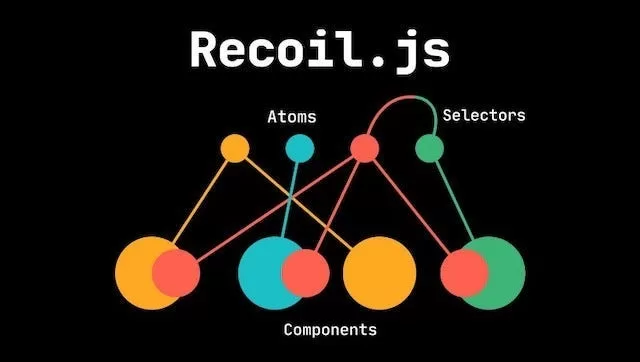
Recoil is a state management library for React developed by Meta (formerly Facebook). It provides a flexible way to share state across components without prop drilling or complex boilerplate.
Recoil introduces two main concepts:
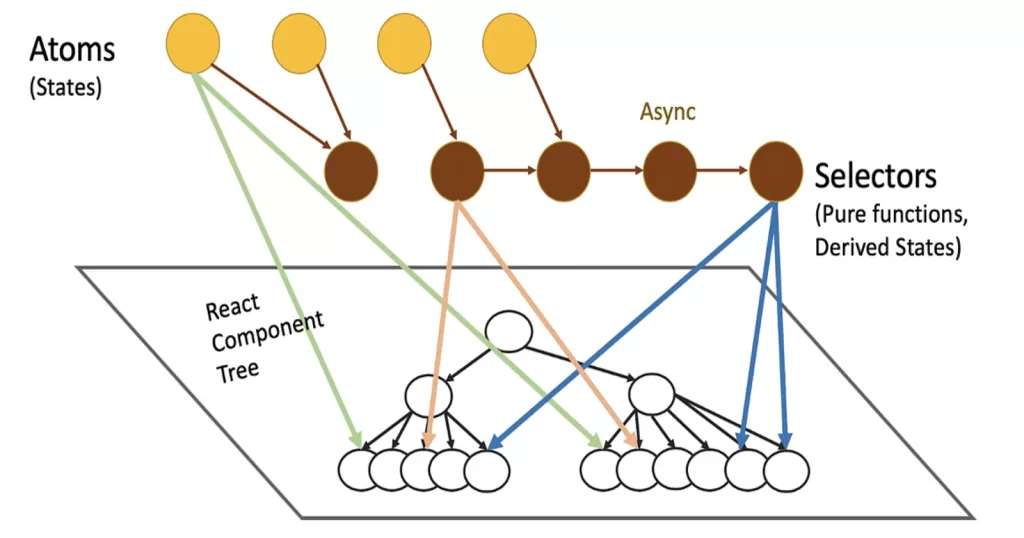
- Atoms – Units of state
- Selectors – Derived or computed state
It integrates seamlessly with React’s hooks and feels very natural for developers already familiar with useState and useEffect.
Why Do We Need Recoil in ReactJS?
As your React app grows, you may face issues like:
- Deep prop drilling
- Complex state synchronization
- Performance problems with global state updates
- Overhead from Redux boilerplate
Recoil solves these problems by:
- Allowing fine-grained subscriptions
- Avoiding unnecessary re-renders
- Providing minimal boilerplate
- Supporting async state easily
Core Concepts of Recoil In ReactJS
1. Atoms
Atoms are the basic building blocks of Recoil state. They represent independent pieces of state.
import { atom } from "recoil";

export const counterState = atom({
  key: "counterState",
  default: 0,
});
Each atom:
- Has a unique
key - Has a
defaultvalue - Can be shared across components
2. Selectors
Selectors derive or compute state from atoms.
import { selector } from "recoil";
import { counterState } from "./atoms";

export const doubleCounter = selector({
  key: "doubleCounter",
  get: ({ get }) => {
    const count = get(counterState);
    return count * 2;
  },
});
Selectors:
- Can compute derived state
- Can be asynchronous
- Automatically update when dependencies change
Installing Recoil in React

To start using Recoil in your React project:
npm install recoil
Wrap your root component with RecoilRoot:
import { RecoilRoot } from "recoil";

function App() {
  return (
    <RecoilRoot>
      <YourComponent />
    </RecoilRoot>
  );
}
Now your application is ready to use Recoil state.
Building a Simple Counter App with Recoil

Let’s create a small example to understand how Recoil works.
Step 1: Create Atom
// atoms.js
import { atom } from "recoil";

export const counterState = atom({
  key: "counterState",
  default: 0,
});
Step 2: Use Atom in Component
import { useRecoilState } from "recoil";
import { counterState } from "./atoms";

function Counter() {
  const [count, setCount] = useRecoilState(counterState);

  return (
    <div>
      <h2>{count}</h2>
      <button onClick={() => setCount(count + 1)}>Increment</button>
    </div>
  );
}
Step 3: Use Selector
import { useRecoilValue } from "recoil";
import { doubleCounter } from "./selectors";

function DoubleCounter() {
  const double = useRecoilValue(doubleCounter);

  return <h3>Double: {double}</h3>;
}
Now both components stay synchronized automatically.
Recoil Hooks Explained
Recoil provides several useful hooks:
| Hook | Purpose |
|---|---|
useRecoilState | Read and write state |
useRecoilValue | Read-only access |
useSetRecoilState | Write-only access |
useResetRecoilState | Reset to default |
useRecoilCallback | Advanced state operations |
These hooks work similarly to React’s built-in hooks, making adoption easy.
Asynchronous State with Recoil

One of Recoil’s powerful features is async selectors.
export const userData = selector({
  key: "userData",
  get: async () => {
    const response = await fetch("https://jsonplaceholder.typicode.com/users/1");
    return response.json();
  },
});
You can use React’s Suspense to handle loading states.
<Suspense fallback={<div>Loading...</div>}>
  <UserProfile />
</Suspense>
Recoil automatically manages async loading and caching.
Recoil vs Redux vs Context API
| Feature | Recoil | Redux | Context API |
|---|---|---|---|
| Boilerplate | Very Low | High | Low |
| Performance | High | High | Medium |
| Async Support | Built-in | Middleware | Manual |
| Learning Curve | Easy | Medium/Hard | Easy |
Recoil is often preferred for:
- Medium to large React apps
- Projects needing derived state
- Apps requiring async state management
Advantages of Recoil
- Minimal boilerplate
- Fine-grained reactivity
- Built-in async support
- Easy integration with React
- Scalable architecture
Limitations of Recoil
- Still evolving ecosystem
- Smaller community compared to Redux
- DevTools are less mature
Best Practices When Using Recoil
- Keep atoms small and focused
- Use selectors for derived logic
- Avoid overusing global state
- Organize atoms and selectors into separate files
- Use Suspense carefully for async flows
When Should You Use Recoil?
Recoil is ideal when:
- You want simpler global state than Redux
- You need derived state without complex reducers
- You want better performance than Context API
- You are building modern React apps with hooks
Conclusion
Recoil is a powerful and modern state management solution for ReactJS. It simplifies global state handling through atoms and selectors while maintaining excellent performance and minimal boilerplate.
If you are building scalable React applications and want a clean alternative to Redux, Recoil is definitely worth exploring. Its seamless integration with React hooks and support for asynchronous state make it a strong choice for modern development.
Want to learn more about React ?, Kaashiv Infotech Offers React course and more Visit Their website www.kaashivinfotech.com.