AJAX and jQuery for Dynamic Websites: Best Practices and Examples

AJAX and jQuery for Dynamic Websites – In the early 2000s, browsing the web was a fragmented experience. Every interaction—submitting a comment, clicking a “Next” button, or filtering a list—required the browser to tear down the entire page and rebuild it from scratch. This “white screen flicker” was the bottleneck of user experience.
Everything changed with the advent of AJAX (Asynchronous JavaScript and XML). Today, AJAX is the engine behind Google Maps’ smooth scrolling, Facebook’s instant notifications, and Gmail’s seamless transitions. When you combine AJAX and jQuery, you get a powerhouse toolkit that makes complex network requests simple, readable, and cross-browser compatible.
This guide provides an exhaustive look into AJAX and jQuery, from foundational concepts to advanced implementation strategies.
AJAX and jQuery for Dynamic Websites
1. What Exactly is AJAX?
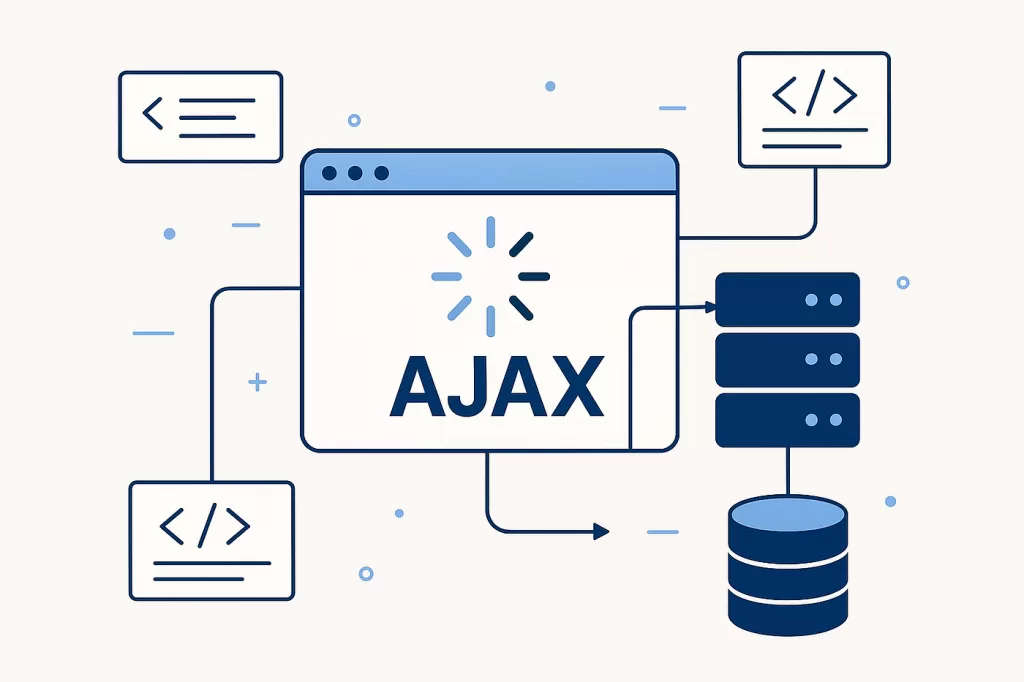
AJAX is not a programming language. Rather, it is a technique that uses a combination of:
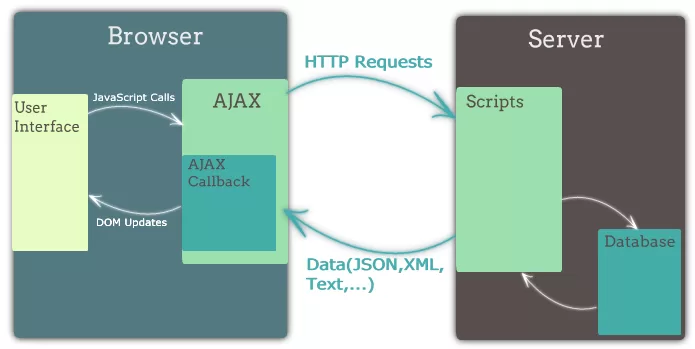
- A browser built-in
XMLHttpRequestobject (to request data from a web server). - JavaScript and HTML DOM (to display or use the data).
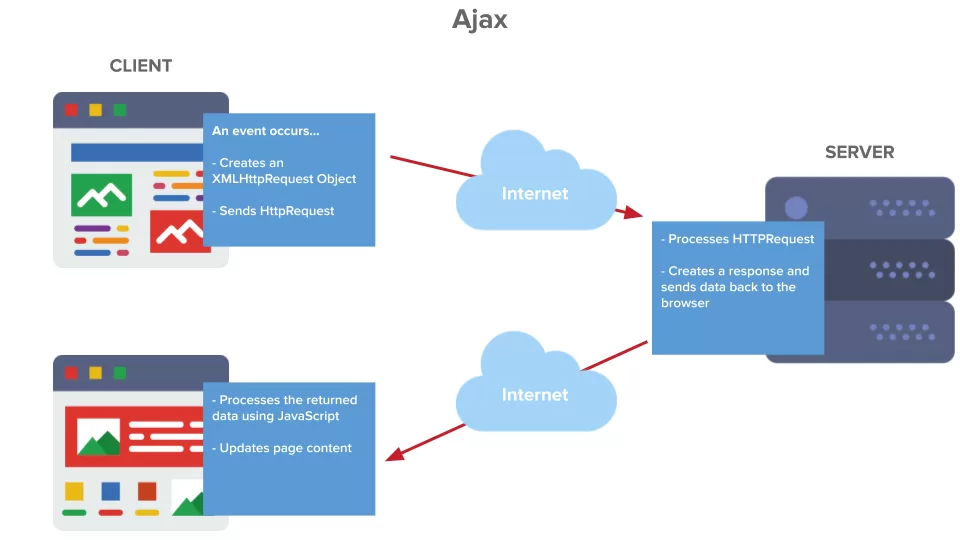
The “Asynchronous” part is key. It means that the JavaScript code tells the browser to go fetch some data in the background. While the browser is fetching that data, the user can still scroll, click other buttons, and interact with the page. Once the data arrives, a “callback” function is triggered to update the UI.
2. Why Use jQuery for AJAX?
While modern browsers have introduced the Fetch API, jQuery remains highly relevant for several reasons:
- Syntactic Sugar: Native
XMLHttpRequestis notoriously verbose and confusing. jQuery wraps this in clean, intuitive methods. - Cross-Browser Consistency: jQuery handles the edge cases of older browsers (like IE11) and inconsistent header implementations automatically.
- Unified Error Handling: It provides a centralized way to manage global AJAX events (like showing a spinner for every request).
- Simplified JSON Parsing: It automatically detects and parses JSON responses, saving you the step of
JSON.parse().

3. The Core Architecture: The $.ajax() Method
The $.ajax() method is the foundation of all AJAX requests in jQuery. It is highly configurable and can handle any HTTP request type.
The Anatomy of a Request
Key Parameters Explained:
url: A string containing the URL to which the request is sent.type: The HTTP method (GET, POST, PUT, DELETE).data: Data to be sent to the server. It can be an object or a query string.dataType: The type of data you expect back from the server (json, xml, html, or text).timeout: Set a local timeout (in milliseconds) for the request.
4. Shorthand Methods: Speeding Up Development

For 80% of your daily tasks, you don’t need the full $.ajax() configuration. jQuery provides “shorthand” methods that are faster to write.
A. $.get()
Used to fetch data from the server.
B. $.post()
Used to send data to the server, typically for creating records or submitting forms.
C. $(selector).load()
Perhaps the most “magical” jQuery method. It fetches HTML from a server and automatically injects it into a specific element.
5. Working with Different Data Formats
While AJAX was named when XML was king, JSON is now the industry standard.
JSON (JavaScript Object Notation)
JSON is lightweight and easy for humans to read and write. It’s also incredibly easy for machines to parse.
- Request: You send a JSON string.
- Response: jQuery automatically converts the JSON string into a JavaScript object.
6. Advanced Techniques: Handling Promises and Chaining
Modern jQuery (version 3.0+) uses Promises (Deferred objects). This allows you to chain your logic rather than nesting callbacks, which prevents “Callback Hell.”
7. Global AJAX Event Handlers
Sometimes you want to perform an action for every AJAX call on your site—for example, showing a global loading spinner or logging analytics. jQuery allows you to attach these handlers to the document.
.ajaxStart(): Triggered when the first AJAX request begins..ajaxStop(): Triggered when all AJAX requests have finished..ajaxError(): Triggered whenever any AJAX request fails.
8. Real-World Application: Building a Live Search
Imagine a search bar that shows results as the user types. Here is how you would implement it with jQuery AJAX:
HTML:
<input type="text" id="search" placeholder="Search products...">
<div id="results"></div>
JavaScript:
$('#search').on('keyup', function() {
    let query = $(this).val();

    if(query.length > 2) { // Only search after 3 characters
        $.ajax({
            url: '/api/search',
            method: 'GET',
            data: { q: query },
            success: function(data) {
                let html = '';
                data.forEach(item => {
                    html += `<div class="item">${item.name}</div>`;
                });
                $('#results').html(html);
            }
        });
    }
});
9. Common Challenges and Solutions
A. The Same-Origin Policy (CORS)
Browsers restrict AJAX requests to the same domain as the page. If your site is a.com, you can’t AJAX data from b.com unless b.com explicitly allows it via CORS (Cross-Origin Resource Sharing) headers.
- Solution: Ensure the server sends
Access-Control-Allow-Origin: *.
B. Caching Issues
Sometimes browsers “helpfully” cache GET requests, meaning you don’t get fresh data from the server.
- Solution: Use
cache: falsein your$.ajax()settings or append a timestamp to the URL.
C. Security: CSRF Attacks
When sending POST requests, attackers can trick users into submitting data.
- Solution: Always include a CSRF token in your AJAX headers that your server validates.
10. Best Practices for Professional AJAX

- Debounce User Input: In the Live Search example above, use a “debounce” function so you don’t hit the server on every single keystroke.
- Graceful Degradation: Ensure your site still works (even if less conveniently) if JavaScript is disabled.
- JSON over HTML: Return data (JSON) rather than pre-formatted HTML. This makes your API reusable for mobile apps later.
- Use
.fail(): Always handle the scenario where the user loses internet connection or the server goes down.
Conclusion: The Future of AJAX
Ajax and Jquery – While the rise of frameworks like React, Vue, and Angular has changed how we manage state, the underlying principle of AJAX remains the same. jQuery continues to be a robust, reliable bridge for developers who need to implement complex features quickly without the overhead of a massive framework.
By mastering $.ajax(), shorthand methods, and global handlers, you transform your websites from static documents into dynamic, living applications that respond instantly to user intent.
Want to learn more about, Ajax and Jquery ? Kaashiv Infotech Offers,Web Development Course, Full Stack Python Course, Data Science Course, & More, visit their website www.kaashivinfotech.com.
Related Reads: