💻 Why Is My Computer So Slow? Don’t Buy Antivirus for Windows Until You Read This! 🛑

Is your computer dragging like it’s stuck in 2009? Most people assume it’s a virus and rush to buy antivirus for Windows, hoping it’ll fix everything.
But here’s the truth: You already have solid antivirus for Windows — built-in, free, and often overlooked. Plus, In this article I will tell you about a powerful online tool that is same as scanning with 70+ antivirus engines you probably never knew existed.
Let’s break it all down 👇
🚨 Misconception: “My PC is slow = It has a virus”
Viruses can slow down your PC, sure. But most of the time, performance issues have nothing to do with malware.
Here are the usual culprits:
- Too many background apps
- Not enough RAM
- A nearly full hard drive
- Outdated drivers or software
- Too many startup programs
So before you throw money at paid antivirus for Windows, take a look at what’s already happening behind the scenes.
🔒 Windows Has Built-in Antivirus (Yes, Really)
If you’re on Windows 10 or Windows 11, you already have Windows Security (also called Microsoft Defender Antivirus) — and it’s way better than most people think.
How to check your current protection:
- Open the Start Menu
- Type “Windows Security”
- Click “Virus & Threat Protection”
From here, you’ll see:
- Real-time protection
- Ransomware protection
- Scan history and virus definitions
- Current security provider
💡 Unless you’ve installed another antivirus for Windows, Microsoft Defender is likely active by default.

🧠 Hidden Setting That Makes Virus Attacks Almost Impossible
Even if you installed something like Norton or McAfee, Microsoft Defender is still quietly installed in the background — just disabled.
But here’s a pro tip:
You can turn on a feature called Periodic Scanning to let Defender run background checks, even if you use another antivirus for Windows.
How to enable Periodic Scanning:
- Open Windows Security
- Click “Virus & Threat Protection”
- Scroll to “Microsoft Defender Antivirus”
- Click Turn on periodic scanning
- Approve any pop-ups
✅ Now Defender acts as a backup to your main antivirus — giving you two layers of defense with no slowdown.
🛡️ One Free Setting = Two Layers of Protection
Most people pay for antivirus thinking it adds extra security. But with this setup:
- You get real-time protection from your primary antivirus
- You also get backup scans from Defender
- And it won’t hog resources or slow your PC down
It’s a smarter way to use antivirus for Windows — especially if you’re unsure about uninstalling your paid option right away.
💸 Don’t Waste Money (Yet)
Paid antivirus for Windows often bundles in:
- VPNs
- Identity theft monitoring
- Performance tools
But unless you need those extras, you’re often better off with:
- Microsoft Defender
- Smart browsing habits
- one powerful tool below 👇
🧪 Use This Free Tool That Scans with 70+ Antivirus Engines!
If you ever download a sketchy file or get a suspicious link — don’t panic.
Instead of buying antivirus for Windows, go to:
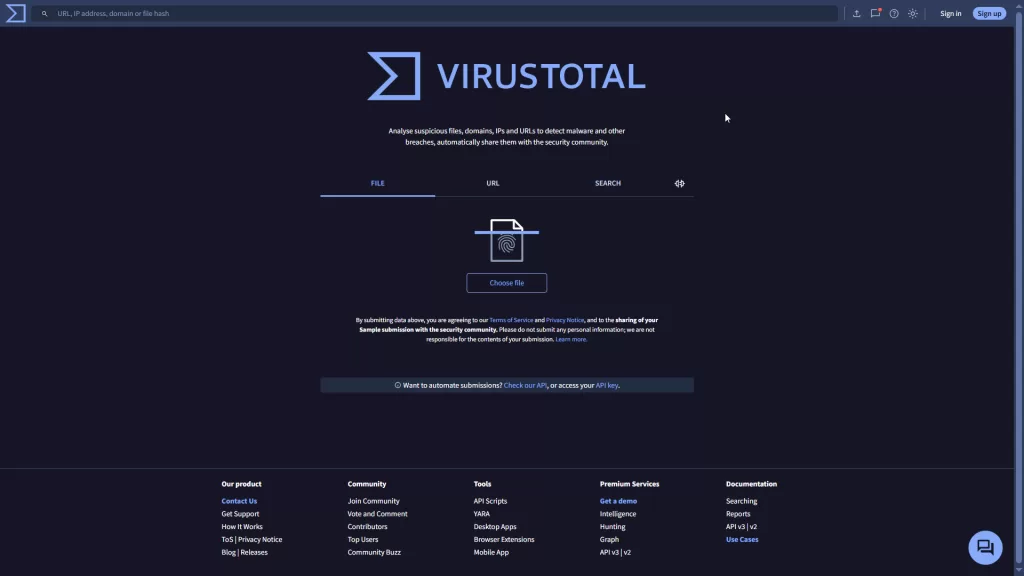
🔗 VirusTotal.com
It’s a free online scanner powered by 70+ antivirus engines like:
- Kaspersky
- Bitdefender
- Google Safe Browsing
- Malwarebytes
- Even the U.S. Cyber Command 🇺🇸
You can upload a file, paste a URL, or even check an IP address — and get results in seconds.
⚙️ This is called multiscanning. It checks your file against dozens of known malware signatures at once.
💡 Note: VirusTotal doesn’t provide real-time protection, but it’s perfect for on-demand scans.
🤯 Fun Fact (from my video):
“You can use over 70 antivirus engines for FREE. Save this article before you forget 😅”
✅ What You Should Do Instead
Here’s a checklist to clean up your slow PC without wasting money:
- Check if Microsoft Defender is active
- Uninstall unnecessary antivirus for Windows
- Use VirusTotal to scan sketchy files or links
- Disable startup programs in Task Manager
- Free up disk space using built-in cleanup tools
- Keep Windows + drivers up to date
- Restart your PC regularly (yep, it really helps)
- Want to go beyond antivirus? Check out these essential computer security tips to protect your system and personal data.
🔚 Final Thoughts
Your PC being slow doesn’t always mean it’s infected.
Before buying antivirus for Windows, explore what’s already protecting you for free.
Between Microsoft Defender, smart usage habits, and VirusTotal, you might already have the best free protection around.
If this helped you, share it with someone who’s about to waste money on antivirus!
And if you want more free tools like this, drop a comment — I’ve got plenty more. 🚀