Bridge in Networking (2025): Types, Working, Functions & Real-World Uses Explained
Why “Bridge in Networking” Still Matters in 2025
Every network you’ve ever used — from your office Wi-Fi to global data centers — relies on invisible traffic managers keeping data from crashing into chaos. One of those silent workhorses? The bridge in networking.
It may sound old-school, but here’s the reality: nearly 60% of enterprise LANs still use bridging concepts under the hood (yes, even your fancy cloud networks). Modern switches and VLANs are basically evolved bridges — just faster and smarter.
So, if you’re learning computer networks or planning a career in system administration, cloud computing, or network security, understanding how bridges work gives you a Layer 2 superpower. It helps you troubleshoot congestion, design scalable LANs, and truly “see” how data moves inside a network — skills every network engineer, DevOps pro, or cybersecurity analyst needs.
Let’s break it down simply: what exactly is a bridge, how does it work, and why should you care in 2025?
Key Highlights:
- 💡 Bridge in networking connects multiple LANs into a single, larger LAN at Layer 2 (Data Link Layer).
- ⚙️ Three main types of bridges: Transparent, Source Routing, and Translational.
- 🔁 Operates using MAC address filtering and forwarding tables.
- 🌍 Used in enterprise and industrial networks to improve performance and reduce collisions.
- 🔐 Employs Spanning Tree Protocol (STP) to prevent loops and broadcast storms.
- 🚀 Still relevant today as the foundation for modern switches and LAN architecture.
🧩 What Is a Bridge in Computer Network & Why Bridges Still Matter in Networking
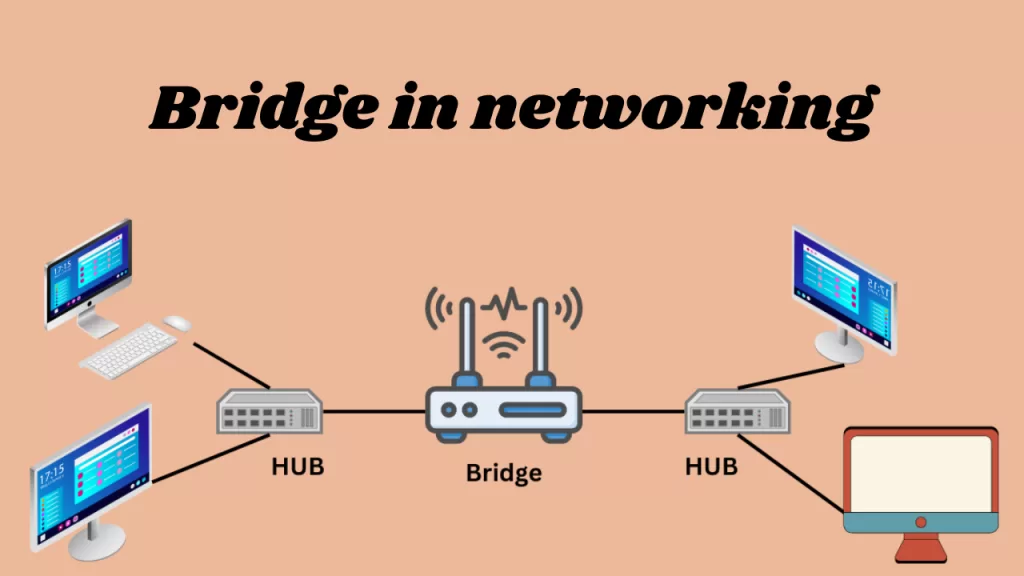
A bridge in networking is a device (or software) that connects two or more LAN segments, allowing them to act as one larger, unified network. Think of it as a traffic controller at the data link layer (Layer 2 of the OSI model), directing packets based on MAC addresses instead of IP addresses.
When data packets come in, the bridge checks their source and destination MAC addresses, learns which devices live on which side, and decides whether to forward or filter the data. This reduces unnecessary traffic, improves performance, and keeps collisions in check.
Bridges play a key role in creating efficient, scalable LANs — especially in environments where hundreds of devices share the same physical space (like offices, campuses, or factories).
Even in 2025, bridges haven’t vanished. They’ve evolved. Modern network switches — the backbone of almost every local network — are actually multiport bridges in disguise. Understanding bridges means you’re not just memorizing theory; you’re mastering the logic behind Ethernet switching, VLAN segmentation, and network performance tuning.
In short: if you can explain what a bridge does, you already understand half of how switches, routers, and even software-defined networks (SDN) operate.
🕰️ History and Evolution of Bridges
Bridges have been around since the early 1980s, when computer networks were growing fast but still chaotic. Back then, networks used hubs — simple devices that blasted every packet to every connected computer. It worked… until it didn’t. Congestion and collisions made networks painfully slow.
Enter the network bridge, introduced by Digital Equipment Corporation (DEC) around 1985. It was revolutionary: the bridge could “learn” which MAC addresses were connected to which port and forward traffic intelligently.
Here’s how bridges evolved over time:
| Era | Milestone | Description |
|---|---|---|
| 1980s | Birth of LAN bridges | Reduced collisions and segmented traffic efficiently. |
| 1990s | Switches replace bridges | Multiport bridges became Ethernet switches, adding higher speeds and better management. |
| 2000s | VLANs & STP enhancements | Bridges gained smarter loop prevention via Spanning Tree Protocol (STP) and VLAN tagging. |
| 2010s–Present | Virtual bridges & SDN | Virtual switches (vSwitches) inside cloud servers act as software bridges in virtualized networks. |
Even today, whether you’re working on AWS, Azure, or Cisco switches, bridging principles drive how Layer 2 traffic is handled.
The takeaway? Bridges may have started as simple devices, but their logic powers almost everything from your home Wi-Fi to the data center edge.
⚙️ Working of Bridge in Computer Networks
At its heart, a bridge in networking works like a disciplined gatekeeper — only allowing the right packets to pass through. Here’s a clear look at how it operates step by step:
🧭 Step-by-Step Working of a Bridge
- Receiving Frames
The bridge receives data frames from one of the connected LAN segments — say, Segment A. - Learning MAC Addresses
It checks the source MAC address in the frame and updates its internal table, learning which device is connected to which port. - Filtering / Forwarding Frames
- If the destination MAC address is on the same segment, the bridge filters (blocks) the frame.
- If it’s on another segment, the bridge forwards it to the correct one.
- Updating the MAC Table
Over time, the bridge continuously refines this table — removing inactive devices and learning new ones automatically.
🧮 According to Cisco, efficient MAC-based filtering can reduce LAN traffic by up to 40%, improving overall throughput and response time.
💡 Developer Insight:
“When optimizing a LAN, a well-configured bridge can significantly cut unnecessary broadcasts and keep your segments healthy,” says Priya S., Cisco Certified Network Engineer.
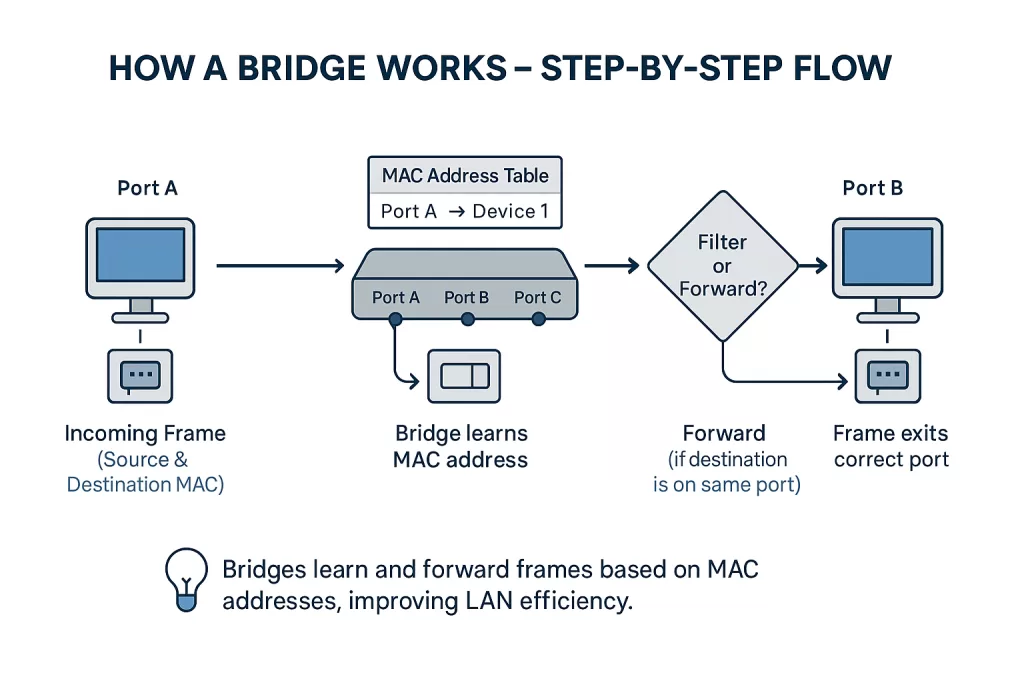
This process might look simple, but it forms the foundation of modern Layer 2 switching — the same logic used in high-speed enterprise switches today.
🧠 Bridge Architecture and Internal Components
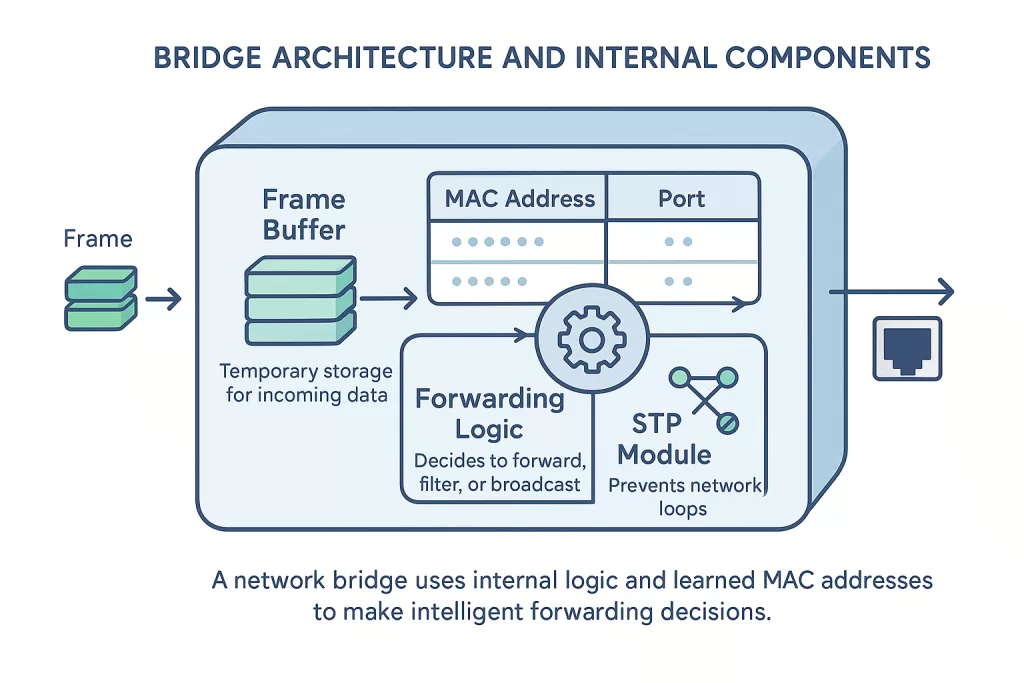
Under the hood, a network bridge has several key modules that make its intelligent decision-making possible:
| Component | Function |
|---|---|
| Frame Buffer | Temporarily stores incoming data frames before processing. |
| MAC Address Table (Forwarding Table) | Maps MAC addresses to specific ports. Used for filtering and forwarding. |
| Forwarding Logic | The brain that decides whether to block, forward, or broadcast a frame based on learned addresses. |
| STP Module (Spanning Tree Protocol) | Prevents loops in the network by dynamically disabling redundant paths. |
🔍 Firmware-Level Learning
Bridges use firmware-based algorithms to analyze Ethernet frames in real time. When a new MAC address appears, it’s added to the table along with its port and timestamp. After a certain timeout, unused entries are aged out to keep the table efficient.
🧩 Example Scenario
Imagine PC1 sends a frame through Port A. The bridge notes that PC1’s MAC address is linked to Port A and stores it.
Later, when another device wants to send data to PC1, the bridge doesn’t need to flood the network — it knows exactly where PC1 is, forwarding the frame directly to Port A.
This intelligent decision-making is what separates bridges from hubs, and why they remain vital even in today’s smart networks.
🔗 Types of Bridges in Computer Networks
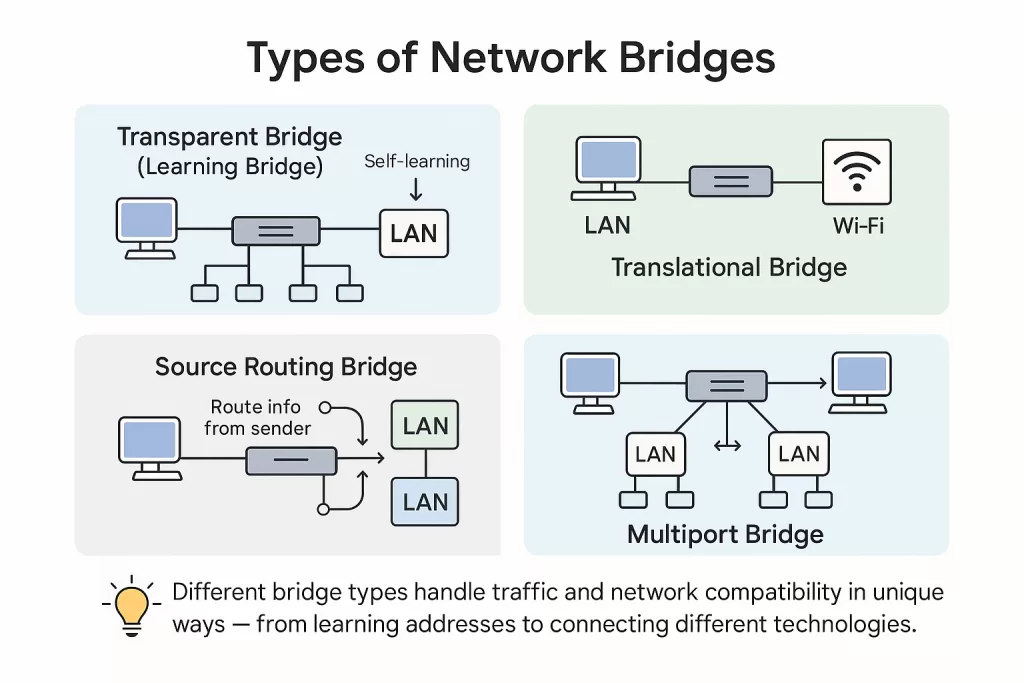
When talking about a bridge in networking, you’re really talking about how it learns, forwards, and adapts. Over the years, three primary types of bridges have evolved — each designed for specific environments and protocols.
➤ Transparent Bridge
A transparent bridge is the most common type used in Ethernet networks. It’s called “transparent” because devices on the network don’t even know it exists — it operates quietly in the background.
It dynamically learns MAC addresses by monitoring incoming frames, updating its internal table automatically.
If the destination address is known, it forwards the packet to the correct port; if not, it floods the frame to all ports (except the incoming one) to discover the right destination.
💡 Fun fact: Almost every Ethernet switch you use today is technically a multiport transparent bridge running at gigabit or higher speeds.
➤ Source Routing Bridge
Source routing bridges were developed by IBM for Token Ring networks, which dominated enterprise systems before Ethernet took over.
In this setup, the source device determines the entire route the frame should take through the network. Each frame carries routing information in its header — so when it’s transmitted, every bridge along the path already knows what to do.
This reduces the bridge’s processing load but shifts routing responsibility to the sender.
🔧 Where it’s still seen: Certain industrial control systems and legacy IBM networks continue to rely on source routing because of its predictable, low-latency data delivery.
➤ Translational Bridge
A translational bridge acts as a translator between different network architectures, such as connecting a Token Ring to an Ethernet network.
It converts frame formats, bit rates, and protocols so data can move smoothly across otherwise incompatible systems.
💡 Example:
Even today, translational bridges play a crucial role in connecting old manufacturing networks to modern Ethernet-based monitoring systems. Many factories still use decades-old equipment that communicates via Token Ring — and a bridge is the silent hero making that integration possible.
🌐 Models of Bridging
Bridging isn’t just about how devices talk — it’s also about where and how far they are from each other. Broadly, there are two models of bridging in computer networks:
🔸 Local Bridging
Used when LANs within the same physical area (like a building or floor) need to connect directly. Local bridges rely on Ethernet cables or fiber links to maintain high-speed communication at the data link layer.
💼 Example: An IT team might use local bridging to connect the HR and Finance departments’ LANs within the same office to share resources securely and efficiently.
🔸 Remote Bridging
Used when LANs are geographically distant — connected through a WAN (Wide Area Network). Remote bridging transmits data frames across long distances using encapsulation and tunneling protocols.
🎓 Example: Many universities use remote bridging to connect separate departmental LANs (like the Engineering, Medical, and Arts campuses) into a single, unified campus-wide network, while keeping local traffic isolated within each segment.
🛡️ Spanning Tree Protocol (STP) – Loop Prevention
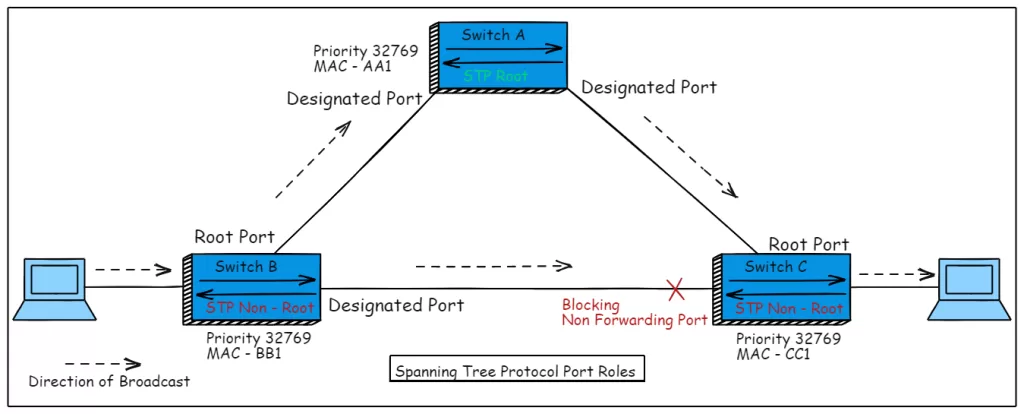
If two bridges are connected in multiple ways, the network can accidentally form a loop — a condition where the same data packet keeps circulating indefinitely. The result? Broadcast storms, network congestion, and sometimes total LAN failure.
That’s where the Spanning Tree Protocol (STP) comes in.
STP dynamically detects redundant paths between bridges and disables the extra ones, leaving only one active path at any given time. If the active path fails, STP automatically reactivates a backup link — ensuring reliability without chaos.
⚙️ How It Works (Simplified):
- All bridges elect a Root Bridge (the central control point).
- Each bridge calculates the shortest path to the root.
- Redundant links are placed in blocking mode to prevent loops.
- If a link goes down, STP recalculates the topology and reactivates the safest alternate path.
📘 Quick Fact:
The IEEE 802.1D standard introduced STP — and even today, it underpins all Layer 2 switching operations across Cisco, Juniper, and other enterprise-grade systems.
🔄 Bridge vs Switch vs Router — Key Differences
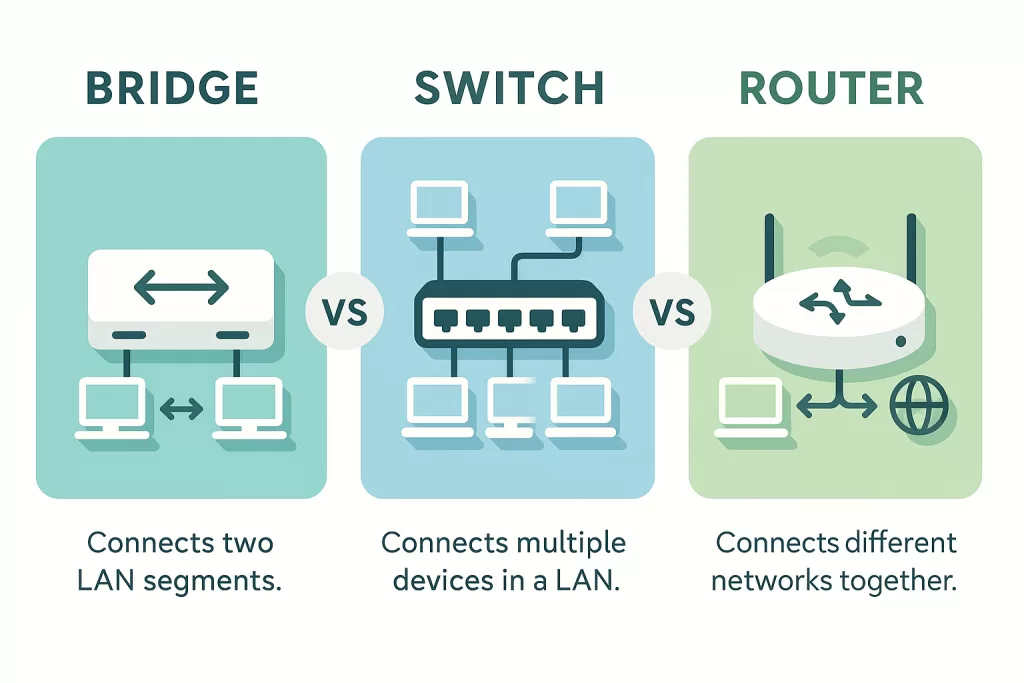
Although bridges, switches, and routers may look similar on a rack, they serve very different roles in how data moves across a network.
Here’s a quick comparison table to make it clear:
| Feature | Bridge | Switch | Router |
|---|---|---|---|
| OSI Layer | Layer 2 (Data Link) | Layer 2 / Layer 3 (Managed Switches) | Layer 3 (Network) |
| Primary Function | Connects multiple LAN segments | Connects multiple devices within the same LAN | Connects multiple networks (LAN ↔ WAN, Internet) |
| Data Based On | MAC Address | MAC Address | IP Address |
| Traffic Management | Filters and forwards frames | Filters, forwards, and manages VLANs | Routes packets across networks |
| Collision Domain | Divides collision domains | Each port has its own collision domain | Separate broadcast domains |
| Broadcast Domain | Single | Single (unless VLANs used) | Multiple |
| Speed | Moderate | High | Variable (depends on routing) |
| STP Support | Yes | Yes | No (uses routing protocols instead) |
| Ideal Use | Small LAN segmentation | Large LANs, VLAN-based networks | WAN connectivity, internet routing |
| Example Device | Classic LAN bridge, wireless bridge | Ethernet Switch | Cisco Router, Home Wi-Fi Router |
💡 Quick takeaway:
A bridge is the foundation — the logic that switches inherited.
A switch is the modern, faster version.
A router is the bridge between networks, not just LAN segments.
⚙️ Uses & Functions of Bridges in Networking
Bridges serve a simple purpose — connect and optimize LANs — but that simplicity hides serious power. Here’s what they actually do (and why it matters):
- 🧩 Segment Networks to Improve Performance
Bridges divide a network into smaller sections, reducing collisions and ensuring smooth data flow between busy devices.
➜ Why it matters: Each segment gets its own bandwidth, preventing bottlenecks. - 🚦 Reduce Traffic Congestion
By forwarding only relevant packets, bridges stop unnecessary traffic from flooding the entire LAN.
➜ Real-world use: IT departments use bridges to isolate IoT device traffic from office systems. - 📡 Connect Heterogeneous Networks
Translational bridges allow communication between different architectures like Ethernet and Token Ring.
➜ Why it matters: Keeps legacy machines running while enabling modernization. - 🧠 Improve Network Intelligence
Bridges “learn” MAC addresses automatically, creating self-updating forwarding tables.
➜ Developer insight: This concept forms the base logic behind all modern switches.
🌟 Advantages of Bridge in Networking
When configured right, a bridge in networking brings major performance and management benefits — especially in medium-scale networks.
- 🚀 Boosts Network Performance — By dividing LANs into segments, each group gets cleaner bandwidth and fewer collisions.
- 🔄 Reduces Traffic — Forwards only the data needed, avoiding unnecessary load.
- 🧩 Extends LANs Easily — Bridges let you connect separate network topologies seamlessly.
- 🔐 Improves Reliability — Even if one segment faces issues, others keep running independently.
- ⚙️ Simple Setup — No complex configuration or external software required.
💬 Pro Insight:
“A well-placed bridge can make an overloaded LAN behave like a new one — clean, efficient, and fast.”
— Arun Dev, Senior Network Administrator at Infosys
⚠️ Disadvantages of Bridge in Networking
Like any technology, bridges come with trade-offs — especially when used beyond their intended scope.
- 🐢 Slower Than Switches — Because bridges process each frame in software, latency is higher.
- 💰 Costlier Than Hubs — Offers intelligence but at a higher hardware price.
- 🌪️ Broadcast Storms — Without STP (Spanning Tree Protocol), bridges can loop endlessly, flooding the network.
- 📉 Limited Scalability — Best suited for small to medium LANs, not high-speed data centers.
💡 Expert Tip:
“Bridges are great for small to medium LANs. But if you’re dealing with enterprise-grade traffic, invest in managed switches — they’re faster, scalable, and more resilient.”
— Ritika K., Cisco CCNP Professional
🌍 Real-World Use Cases of Bridges
Despite their age, bridges in networking still find strong use in real-world environments — especially where cost, compatibility, or legacy systems are factors.
- 🏢 Corporate Offices
Connects different departmental LANs — for example, HR and Finance — while keeping traffic separate for security and performance. - 🏭 Manufacturing Systems
Bridges integrate legacy Ethernet or Token Ring networks with modern industrial controllers.
→ Example: A car factory uses a bridge to connect 1980s-era robotic arms with new IoT monitoring dashboards. - 🎓 Educational Campuses
Universities bridge networks between buildings — like labs, admin offices, and dorms — to create a unified campus network without replacing old infrastructure. - 🏘️ Home / SOHO Networks
Wireless bridges link separate buildings or floors using Wi-Fi, creating a seamless network extension without extra cabling.
🧰 Best Practices for Using Bridges in Networking
Bridges work best when used thoughtfully. Here’s how to configure and maintain them effectively:
- ⚙️ Always Configure STP (Spanning Tree Protocol)
➜ Prevents network loops and broadcast storms — a must for stability. - 🧾 Regularly Update MAC Tables
➜ Ensures accurate forwarding and avoids stale or outdated entries. - 🚫 Avoid Using Bridges in High-Speed Backbones
➜ Switches handle gigabit+ traffic far better; bridges can become a bottleneck. - 🧩 Use VLANs for Segmentation
➜ Provides logical traffic isolation and better security without additional hardware. - 🧠 Monitor Bridge Logs and Load
➜ Helps detect loop issues early and optimize performance dynamically.
💡 Why it matters: These best practices keep your LAN stable, efficient, and scalable — letting bridges work silently in the background without slowing anything down.
❓ FAQs on Bridge in Networking
1. What layer does a bridge operate on?
A bridge operates at Layer 2 (Data Link Layer) of the OSI model. It uses MAC addresses to filter and forward frames between different LAN segments, improving performance and reducing collisions.
2. What is the difference between a bridge and a switch?
A bridge connects and filters traffic between two or a few LAN segments, while a switch does the same across many ports simultaneously.
In fact, a switch is essentially a multiport bridge with faster hardware and advanced management features like VLANs and QoS (Quality of Service).
3. Why use a bridge in a LAN?
Bridges are used in LANs to segment traffic, reduce congestion, and extend network reach. They create separate collision domains, allowing smoother communication between busy departments or devices without overloading the network.
4. How does the Spanning Tree Protocol (STP) work in bridges?
STP (Spanning Tree Protocol) prevents loops in bridged networks by identifying redundant paths and disabling them temporarily.
If an active link fails, STP reactivates a backup route, ensuring continuous and stable connectivity without causing broadcast storms.
5. Is the bridge still used today?
Yes — even though standalone bridges are rare, their core logic still powers modern Ethernet switches and virtual bridges (vSwitches) in cloud data centers.
Learning about bridges helps you understand how Layer 2 switching, VLANs, and network segmentation work in real-world systems.
🏁 Conclusion
A bridge in computer networks may seem like an old-school device from the early LAN days — but its principles still drive how modern switches, virtual LANs, and data centers function.
Whether you’re setting up a home lab, preparing for certifications like CCNA or CompTIA Network+, or managing a corporate network, mastering the concept of bridging is non-negotiable.
It’s not just about connecting cables — it’s about understanding how data truly flows at the heart of every network.
In short: bridges connect more than just networks; they connect the past and present of networking technology.
🚀 Call to Action
If you’re serious about building a career in networking, start by mastering Layer 2 fundamentals — like bridges, switches, and STP.
Related Reads:
📘 NCP Full Form: What is Network Control Protocol? History, PPP, and Examples (2025 Guide)
🌐 What is FTP? How to Use FTP to Transfer Files in 2025
🛰️ RIP Protocol Explained (2025)
🔒 What is HTTPS? HTTPS Protocol in 2025 — Working, Importance & Security Best Practices
📶 What Is Ping? (2025 Guide) Ping Meaning in Networking, Command, Test & More Explained
Or, if you want a practical angle:
💻 Try building a mini network lab using virtual machines or Packet Tracer — and watch bridging in action.