C Language Loop – The Complete Beginner’s Guide to Loops in C Language
When I first started to learn C programming, I wrote the same block of code over and over. It was boring, took a long time, and had lots of chances for mistakes. Then I learned about loops in C language — which are a way to perform a set of instructions again without writing them again and again.
In this article, I am going to explain loops, a few types of C Language Loop, the syntax of loops, give examples of loops, and review best practices. Whatever your purpose for learning C, whether that is a programming exam or interview, you are in the right place!
1. What is a Loop in C Language?
To put it another way, C language loop is a control structure that allows you to execute a block of code multiple times depending on a condition.
Why use loops?
- Avoid repetition in your code
- Make your programs cleaner and shorter
- Complete repetitive tasks quickly
- Make it easier to maintain code
In C language loop programming, the concept is simple:
- Condition
- Run a block of code
- Repeat until the condition isn’t true.
2. Types of Loops in C Language

C provides three main types of loops, plus the concept of nested loops and infinite loops.
2.1 For Loop in C Language
The for loop is best when you know exactly how many times you want to repeat an action.
Syntax:
for (initialization; condition; increment/decrement) {
    // code to be executed
}
Example:
#include <stdio.h>
int main() {
    for (int i = 1; i <= 5; i++) {
        printf("Number: %d\n", i);
    }
    return 0;
}
Output:
Number: 1
Number: 2
Number: 3
Number: 4
Number: 5
2.2 While Loop in C Language
The while loop is used when the number of iterations isn’t known beforehand.
Syntax:
while (condition) {
    // code to be executed
}
Example:
#include <stdio.h>
int main() {
    int count = 1;
    while (count <= 5) {
        printf("Count: %d\n", count);
        count++;
    }
    return 0;
}
2.3 Do While Loop in C Language
The do while loop executes the block of code at least once, even if the condition is false.
Syntax:
do {
    // code to be executed
} while (condition);
Example:
#include <stdio.h>
int main() {
    int num = 1;
    do {
        printf("Number: %d\n", num);
        num++;
    } while (num <= 5);
    return 0;
}
3. Nested Loops in C Language
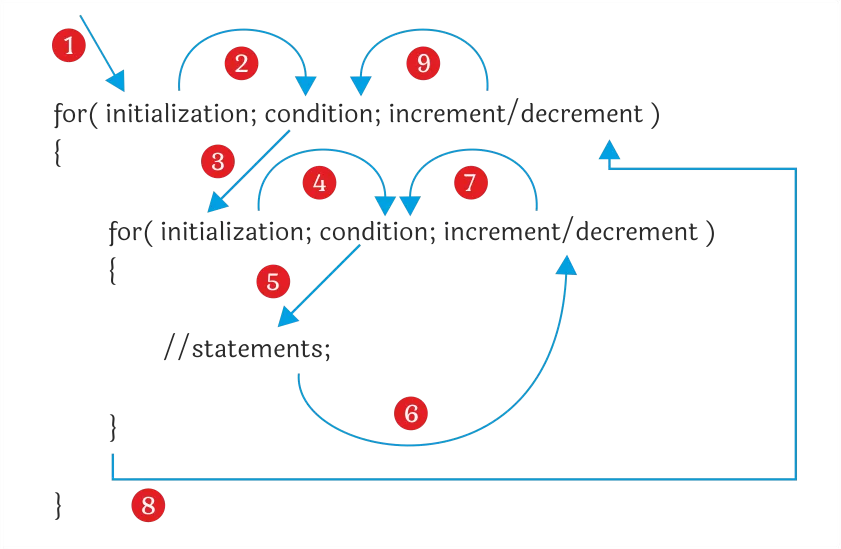
You can place one loop inside another. This is useful for working with multi-dimensional data like matrices.
Example:
#include <stdio.h>
int main() {
    for (int i = 1; i <= 3; i++) {
        for (int j = 1; j <= 3; j++) {
            printf("%d,%d  ", i, j);
        }
        printf("\n");
    }
    return 0;
}
4. Infinite Loops in C Language
An infinite loop runs endlessly until manually stopped, usually by pressing Ctrl + C.
Example:
#include <stdio.h>
int main() {
    while (1) {
        printf("This will run forever!\n");
    }
    return 0;
}
5. Loop Control Statements in C Language
- break – exits the loop immediately.
- continue – skips the current iteration and moves to the next.
Example with break:
#include <stdio.h>
int main() {
    for (int i = 1; i <= 10; i++) {
        if (i == 5) break;
        printf("%d ", i);
    }
    return 0;
}
6. Real-Life Analogy for Loops in C Language
Imagine you’re arranging chairs for an event. Instead of saying:
- Place chair 1
- Place chair 2
- Place chair 3
You can say:
- Repeat placing chairs until all 100 chairs are done.
That’s what a loop does — it repeats a task until a condition is met.
7. Best Practices for Using C Language Loops
- Avoid infinite loops unless necessary.
- Use meaningful variable names for clarity.
- Keep the loop body short for readability.
- Optimize conditions to improve performance.
8. Common Mistakes Beginners Make
- Forgetting to update the loop variable (causes infinite loops).
- Misplacing semicolons after for or while.
- Using the wrong loop type for the problem.
Final Thoughts
Loops in C language are an important part of learning to be an efficient C programmer. All loops – including for loops and while loops – should be mastered. When programmers understand the syntax, the grammar, how they work, and, just as importantly, how to not make the common mistakes, they can write shorter code, cleaner code, more efficient code, and easier to maintain code.
Now that you have read about the theory and examples along with associated syntax, try writing your own programs. Experiment with C language loops and real-world examples to increase your understanding and familiarity.
Related Links




![Merge Sort Algorithm [2025]](https://www.wikitechy.com/wp-content/uploads/2025/08/Merge-Sort-Algorithm-2025-380x220.webp)

