Computer Networks: The Complete Guide for 2025

In today’s hyper-connected world, computer networks are at the centre of everything we do. From social media browsing, to streaming videos, to global business and cloud computing, it is safe to say that we rely on computer networks in every aspect of our lives. For students studying for exams, professionals advancing their careers by sharpening their IT skills, and anyone interested in learning about how a network functions, these essential elements of hardware and software will assist you in understanding computer networks.
What Are Computer Networks?
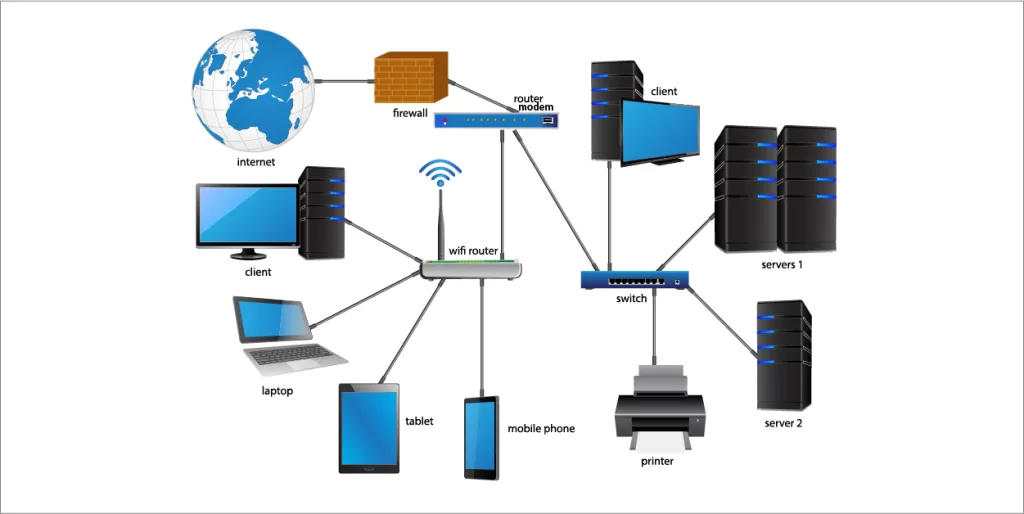
A computer network is defined as many devices (computers, servers, routers, switches, etc.) that connect and communicate to share resources, data, and applications. Comparatively the size of networks is very broad and can refer to a home Wi-Fi, or the global Internet.
Key Functions of Computer Networks:
- Resource Sharing: Allows printers, storage, platforms and applications, to be used by multiple users.
- Communication: Allows devices to share and communicate to email chat, and video conference, or instant message.
- Data Transfer: Allows files and information to be exchanged between devices.
- Scalability: Supports thousands and millions of devices, only limited to resources available.
Types of Computer Networks

- Local Area Network (LAN): Very small networks, such as in a house, school, or office, respectively.
- Wide Area Network (WAN): Very large networks, including the entire physical internet and all networks in a specific area.
- Metropolitan Area Network (MAN): Covers a city, or large campus area, and businesses operate across a number of smaller cities.
- Personal Area Network (PAN): Bluetooth, or hotspot, typically operated by smart phone technology.
Flow Control in Computer Networks
Flow control in computer networks is an important process that helps the sender relieve some stress. For example, suppose I am talking to someone (the receiver) who is taking notes and I am talking at a speed that’s faster than they can process (write). They may lose out on a few of the details that I just said or I completely lost them. Flow control works in a similar manner.
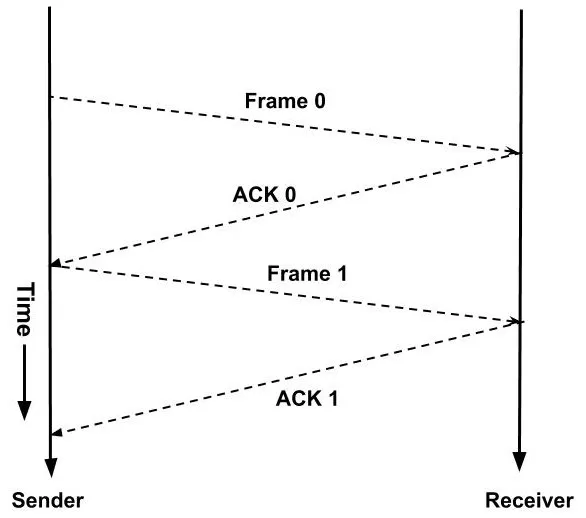
Techniques for Flow Control:
- Stop-and-Wait Protocol: The sender sends a frame and waits for the acknowledgment before sending another one so they don’t overrun the receiver.
- Sliding Window Protocol in Computer Networks: Instead of just one frame, the sender is able to send multiple frames (up to a defined ‘window size’) before expecting an acknowledgment, and also improves performance over a stop-and-wait approach.
Flow control prevents packet loss, allows packets to transfer continuously without stopping, and enables a maximum use of the bandwidth.
Sliding Window Protocol in Computer Networks
The sliding window protocol in computer networks is a flow control protocol but also is a protocol that provides error control. This protocol allows the sender to send multiple packets of data instead of sending one packet and waiting for an acknowledgment to get another packet.

Benefits:
- Improves throughput by maximizing the useful bandwidth which reduces the time waiting an acknowledgment.
- The sliding window protocol manages network latency better than a stop-and-depth protocol.
- The sliding window protocol provides error correction through acknowledgments and retransmission.
Real-World Example:
Take a simple analogy of a factory situation. When putting items on the moving conveyor belt you can place an item for the worker (receiver) to pick up. When the worker sends back a signal that they are ready for more items, the sender (factory worker) can place another batch of items on the conveyor belt.
UDP in Computer Networks
UDP (User Datagram Protocol) is an example of one of the main protocols of the Internet Protocol Suite that is used in computer networks. UDP is connectionless, meaning it does not establish a handshake before transmitting data, unlike TCP.

Features of UDP:
- Fast and lightweight: UDP is faster than TCP since it does not require a handshake or error correction.
- Unreliable but efficient: Packets may go missing when transmitted using UDP, but for the end user the loss of packets is worth the speed of UDP.
- Popular in real-time applications: The majority of video streams online, online gaming, and VoIP calls are transmitted using UDP.
Example:
Imagine you are watching a live cricket match streamed online. Because live UDP streams have the lowest latency possible, if there was a packet loss during UDP transmission (which is likely to happen), you may never know, if receiving the intended stream of data is more important than the loss of few packets.
SNMP in Computer Networks
SNMP (Simple Network Management Protocol) is a method of monitoring network devices (e.g. routers, switches, servers, printers) within networks.
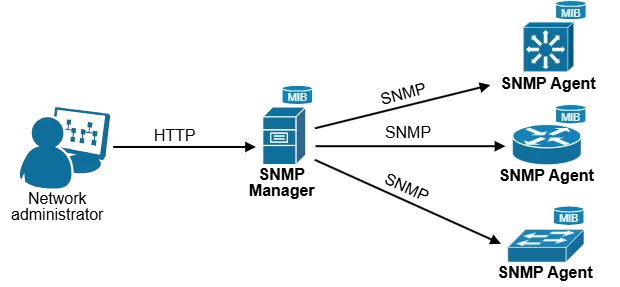
How SNMP Works:
- Manager – the system (usually a server) that the devices communicate to.
- Agent – software installed on devices that will report on the health/performance of the device.
- MIB (Management Information Base) – a database of information of a device.
Applications:
- Monitor CPU usage, memory usage, and bandwidth.
- Alert when a failure occurs (real-time).
- Ensure businesses have security and uptime.
SNMP is the soft-spoken, behind the scenes worker of networks which ensures everything is running smoothly.
The OSI Model and TCP/IP Stack
To understand computer networks, you must know the OSI model and TCP/IP protocol suite.
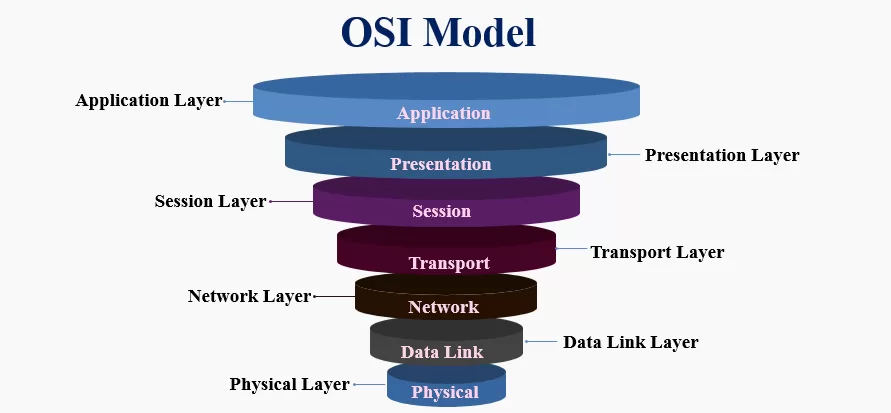
OSI Layers:
- Physical – cables, Wi-Fi signals.
- Data Link – MAC addresses, switches.
- Network – IP addressing, routing.
- Transport – TCP, UDP, flow control.
- Session – managing sessions.
- Presentation – encryption, compression.
- Application – HTTP, FTP, email.
The TCP/IP model takes a standardized approach to communication over the Internet and simplifies networking into four layers (Network Access, Internet, Transport, and Applications.
Importance of Computer Networks in 2025
- Cloud Computing: Companies depend on AWS, Azure and Google Cloud.
- Remote Work: VPNs and secure networks are enabling teams around the globe.
- IOT (Internet of Things): Smart devices are reliant on seamlessly working networks.
- Cybersecurity: Putting controls in place to protect networks from hacking and data theft is essential.
Without computer networks, the modern world would literally grind to a halt.
Future of Computer Networks
By 2030, we’ll see:
- 6G Networks: Faster than anything we have today.
- AI-enabled Network Management: Automated monitoring that rely’s on ML.
- Quantum Networking: Ultra-secure communication using quantum cryptography.
- Edge Computing: Putting data close to the user to allow real-time applications.
Final Thoughts
From flow control in computer networks to more advanced topics like SNMP, UDP and sliding window protocol in computer networks, there’s too many concepts to master to build a career in networking, cybersecurity, cloud computing, and AI.
If you are serious about computer networks, now is the time to immerse yourself into it because it is only getting more connected.
Related Links