📌 Where Are My Contacts in Gmail? Find and Access Them Fast!

Let’s Be Honest: Where Did My Gmail Contacts Go?
I still remember the first time Google changed Gmail’s interface. I opened my inbox like I always do, tried to find a contact of Gmail, and… nothing. My saved numbers? Email IDs? Gone. For a second, I thought I had lost them all. Panic mode ON.
But here’s the truth: your contacts of Gmail are safe. They’re just not sitting in the same place they used to be. Google simply moved them into a dedicated space called Google Contacts.
So, if you’ve ever sat there wondering: “Where are my Gmail contacts? Did Google hide them?” — you’re not alone. I’ve been there, my friends have been there, and now I’m here to guide you step by step.
Step 1: Open Gmail
Go to your Gmail account and look at the home page. In the upper right corner you’ll see a square made up of nine dots (those are your apps):

Step 2: Open your apps
Click on that square, and you’ll see a dropdown menu containing all your available apps. The contacts app might not be at the top, but you can drag the apps around into any arrangement you like.
If you don’t see a contacts app, click “more” at the bottom and add it.

Step 3: Click that contact icon and manage your contacts
Once you’ve clicked the blue “contacts” icon, you’ll be brought to this screen (you may or may not have more than one contact – or you may not have any yet):
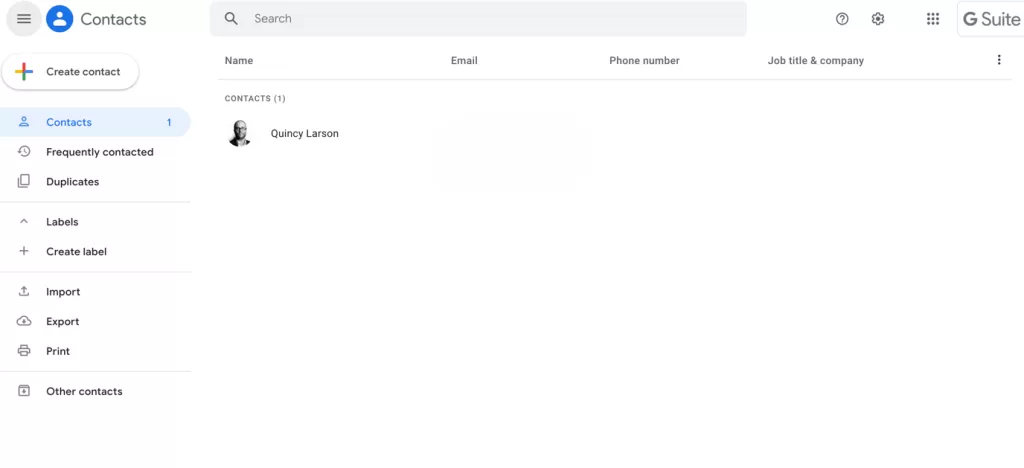
If you already have a bunch of contacts, this is where they’ll be. More on what you can do with them below (in Step 5).
Step 4: How to create new contacts
If you don’t yet have any contacts, or want to add new contacts, this is also the place for you.
You can create a new contact in a couple ways. The first way to create a contact, which you’ll use if you haven’t yet emailed the person you want to add, is by clicking the “create contact” button:

One way to create new contacts in Gmail – click the “create contact” button
When you create a new contact with that button, it’ll ask you for some info to complete the contact entry. You can fill out as much or as little as you like – a name and email are usually quite helpful.
Step 5: Explore what else you can do with your contacts
There’s a lot more you can do on the contacts page. Let’s have a closer look.
Frequently contacted and duplicates
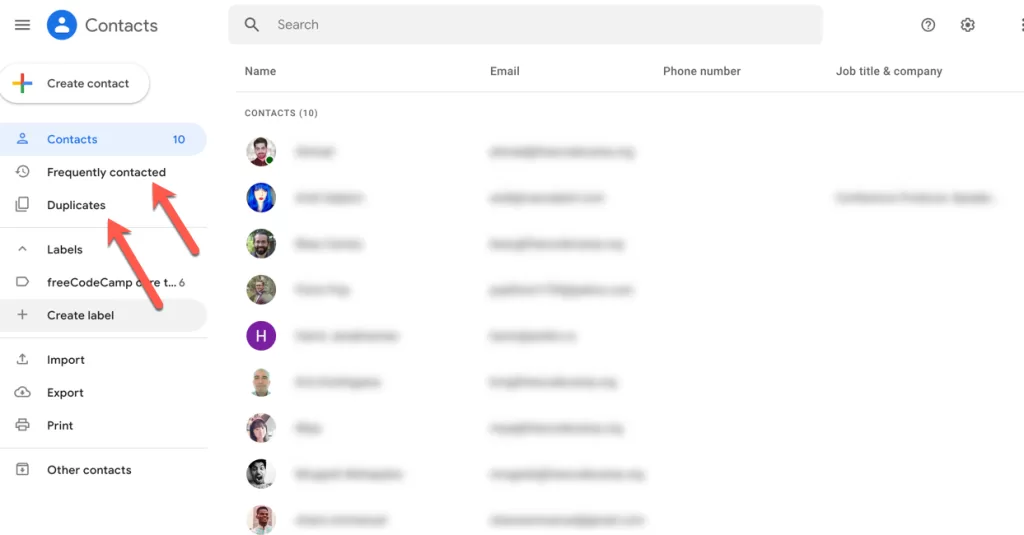
First, you can see the people you email the most frequently, under the “frequently contacted” tab on the left sidebar menu.
My Personal Pro Tips for Managing Gmail Contacts
I’ve been using Gmail since my college days (over a decade now 😅), and here are some tricks I’ve picked up:
- ⭐ Use Labels: I’ve created labels like Work, Family, Clients to keep things neat.
- 📅 Add birthdays: Google Contacts lets you add birthdays — it’ll even remind you in Google Calendar.
- 🔄 Sync with phone: Nothing worse than losing contacts. Make sure sync is ON so your contact of Gmail is always backed up.
- 📂 Export contacts: Before I switched phones last year, I exported my contacts from Google Contacts as a backup. Saved me big time.

❓ FAQs About Contact of Gmail
1. Can I still access Gmail contacts the old way?
Not really. Google retired the old “Contacts” button in Gmail. The new way is through the Google Contacts app.
2. Are Gmail contacts and Google Contacts the same?
Yes ✅. Your contacts of Gmail are just stored in the Google Contacts app now.
3. Do Gmail contacts sync with Android/iPhone automatically?
Yes, if sync is turned on. On Android, it’s automatic. On iPhone, you need to enable it.
Final Thaughts:
Finding a contact of Gmail isn’t rocket science — but it sure felt like it when Google first changed things. Now you know:
- Inside Gmail → Apps grid → Contacts.
- Or directly visit Google Contacts.
- On mobile → Use Google Contacts app (Android) or sync with iPhone Contacts.
Honestly, once I got the hang of it, I realized Google made my life easier. I don’t waste time digging through old emails anymore. My contacts are just one click away.
So next time you’re wondering “Where are my Gmail contacts?”, smile, because you already know the answer.
Want to Learn Programming Languages, like Python Course, Java Course and non coding courses and more visit www.kaashivinfotech.com
Related Reads: