Digital Display 7 Segment Explained: Structure, Working & Applications
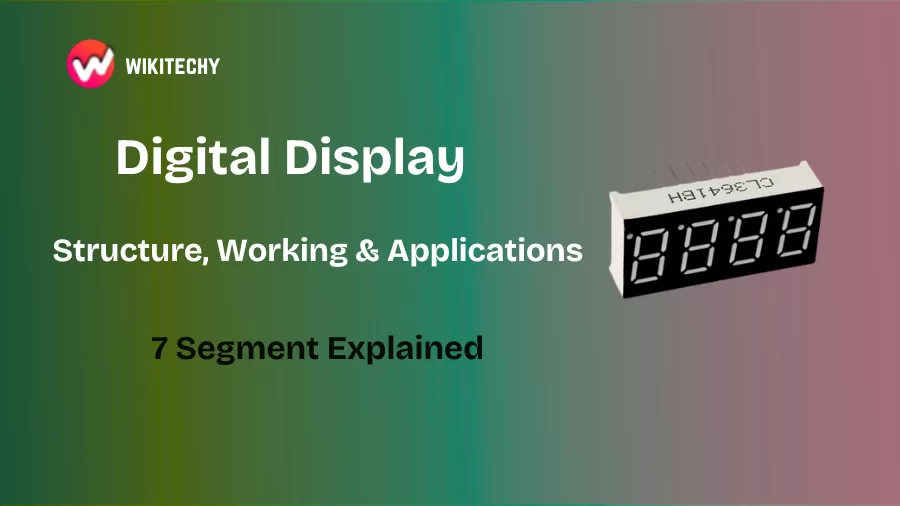
Digital display 7 segment — what exactly is it?
Digital display 7 segment technology is probably one of the first electronic display systems I ever learned about — and honestly, it still feels iconic. Whenever I see one glowing red on an old calculator or on a microwave timer, I get that familiar tech nostalgia.
Digital display 7 segment modules are one of the simplest and most widely used numeric display systems. You’ve seen them everywhere — clocks, elevators, digital meters, weighing scales, petrol pumps, and even in basic engineering lab projects.
I still remember the first time I wired a digital display 7 segment module on a breadboard. One wrong connection and all the segments flickered like a disco light. But when it finally displayed the number “5”, it felt like magic — simple magic, but still magic.
1. Understanding the Structure of a Seven Segment Display
When I say “digital display 7 segment,” I literally mean it:
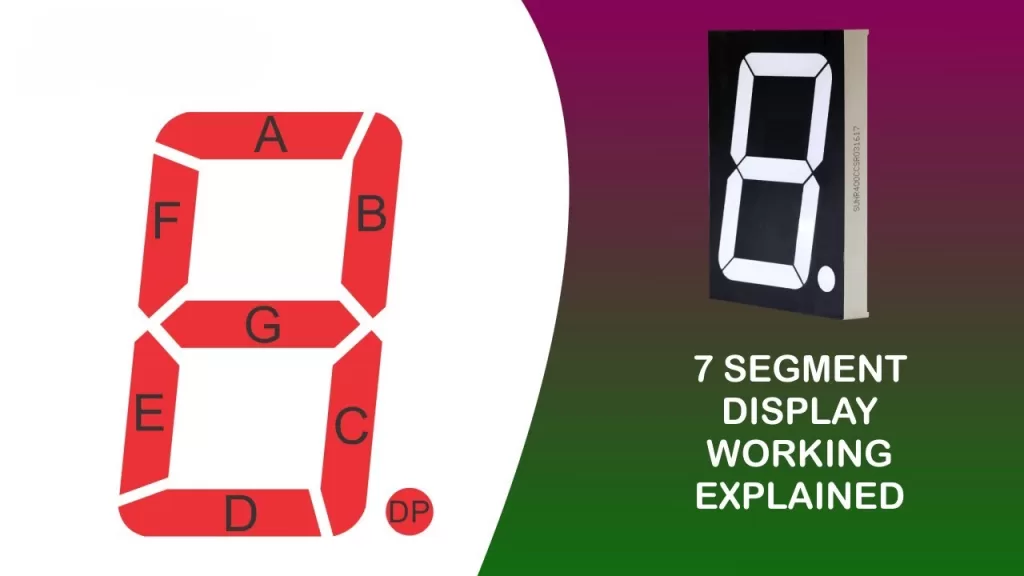
There are seven LED segments arranged in a figure-8 pattern.
These segments are labeled:
a, b, c, d, e, f, g
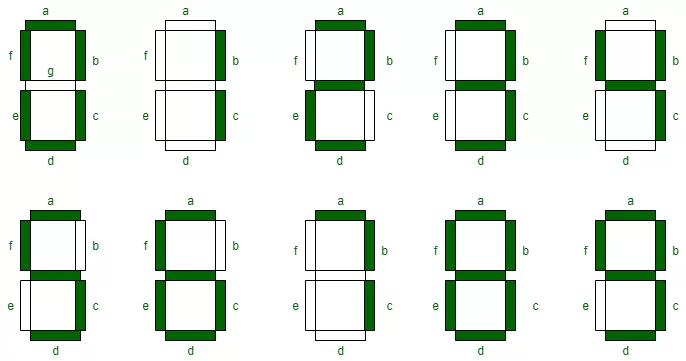
Each segment lights up independently to form numbers from 0 to 9.
If you light up all segments except one, the display changes.
It’s like playing with light-based Lego bricks.
🔹 Two Common Types
There are two popular versions, and I’ve worked with both:
1. Common Anode (CA)
All LED anodes are tied together.
You apply LOW to light a segment.
2. Common Cathode (CC)
All LED cathodes are tied together.
You apply HIGH to light a segment.
Most beginners prefer Common Cathode because turning ON a segment feels intuitive.
2. How a Digital Display 7 Segment Actually Works
The way a digital display 7 segment works reminds me of toggling small switches.
Each segment is basically an LED.
When electricity flows through a particular segment, it glows.
When it doesn’t, the segment stays dark.
Let me give you a quick example:
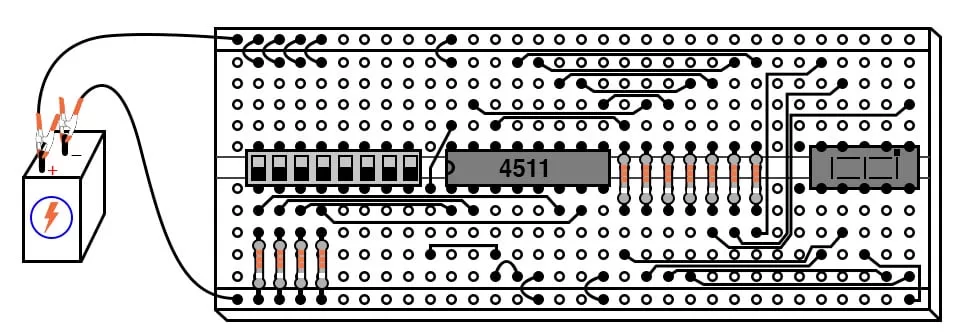
To display the number 2, segments a, b, g, e, d turn ON.
For 8, all seven segments glow.
You control these segments using:
- Switches
- Microcontrollers like Arduino or PIC
- Decoders like 7447 or 4511
If you’re working with a microcontroller, you simply send HIGH/LOW signals to each pin.
I still remember writing my first Arduino program to display a sequence.
Watching 0→1→2→3 in glowing red LEDs felt like building my own tiny time machine.
3. Pin Configuration — The Part Most Beginners Fear
A digital display 7 segment module usually comes with 10 pins, and trust me, remembering them the first time feels like memorizing a new phone number.
A typical pin layout has:
- 7 segment pins (a to g)
- 1 or 2 common pins (CA/CC)
The tricky part is that pin numbers differ between brands.
I’ve often ended up checking the datasheet twice after wiring something wrong.
🔸 Single Digit Display
One unit showing numbers 0–9.
Perfect for counters and basic lab circuits.
🔸 Multi-Digit Display
Two, three, or four-digit units used in clocks or timers.
However, they use multiplexing — lighting each digit really fast so your eyes see them all at once.
🔸 Hexadecimal Display
Displays A–F in addition to 0–9
Super useful in digital electronics courses.
5. Real-Life Applications (Where You’ve Already Seen Them)
Here’s where digital display 7 segment systems quietly do their job every day:
✔ Digital clocks
Every time you check the time on a digital wall clock, that’s a 7-segment display glowing.
✔ Calculators
The old-school ones still rely on seven glowing segments to give answers.
✔ Ovens & microwaves
Temperature, timer, countdown — all seven segment magic.
✔ Elevators
The floor number display? Yep — seven segment again.
✔ Fuel pumps
Lit-up digits showing litres and price.
✔ Weighing scales
Most simple electronic scales use the same display style.
Once you notice them, you can’t “un-see” them.
6. Advantages I Personally Love
- Super simple to understand — a great starting point for learners.
- Very reliable — these displays work for years.
- Low power consumption — LED-based designs are efficient.
- Cheap — costs less than a sandwich.
- Visible even in bright light — dependable in outdoor conditions.
If you’re teaching someone basic electronics, digital display 7 segment modules are perfect.
7. Limitations — Yes, Even Simple Things Have Flaws
Even though I love their simplicity, digital display 7 segment systems aren’t perfect.
- They only display numbers, not letters (except a few like A, b, C, d, E, F).
- Not suitable for showing long text or animations.
- Multi-digit displays need multiplexing — a bit tricky for beginners.
- Doesn’t look as modern as LCD or OLED panels.
Think of them like the classic Nokia phone — robust and reliable, but not fancy.
8. My Personal Experience: Why I Still Use Them
Even with fancy RGB displays around, I still use digital display 7 segment units in my projects. They remind me of the basics — the foundation of digital electronics.
Whenever someone new joins my lab or workshop, the first thing I make them build is a counter using a seven segment display.
Why?
Because once you understand how one LED lights up, you understand the logic behind all displays.
It’s a great confidence booster too.
If you can make a “7” glow on your first attempt?
You’re officially an electronics student now.
9. Final Thoughts
If you’re starting your electronics journey, the digital display 7 segment module is honestly one of the best places to begin. It’s simple enough for a beginner, powerful enough for real-world devices, and nostalgic enough to make you appreciate how far technology has come.
These displays may look old-school, but they taught many of us — including me — the fundamentals of digital circuits, LED driving, logic patterns, and microcontroller programming.
want to learn more?, kaashiv infotech offers, cloud computing course, networking course and more visit their website www.kaashivinfotech.com
Related Reads