✍️ Evernote vs OneNote: Which Is the Best Note-Taking App in 2025?

Choosing the right digital note-taking tool is essential for boosting productivity in 2025. With so many apps available, two names stand out — Evernote and OneNote. If you’re wondering Evernote vs OneNote: Which Is the Best Note-Taking App in 2025?, you’re not alone. In this guide, we’ll dive deep into both apps and compare their features, pricing, usability, and more.
✅ Whether you’re a student, professional, or creative, this in-depth comparison of Evernote vs OneNote will help you choose the right tool in 2025.
🔍 Key Highlights
- In-depth comparison: Evernote vs OneNote
- Performance, features, and pricing reviewed
- Best pick based on your personal or business needs
- Tips to boost note-taking productivity in 2025
🚀 Evernote vs OneNote: Which Is the Best Note-Taking App in 2025?
The debate between Evernote vs OneNote continues to evolve as both platforms introduce updates and new features. In 2025, choosing the best app comes down to what you value more: simplicity, collaboration, cloud integration, or design flexibility.
📘 What is Evernote?
Evernote is a powerful note-taking app that helps users capture ideas, create to-do lists, store web clippings, and organize documents in a seamless way. With smart tagging, notebook stacks, and powerful search, it’s built for users who value organization and simplicity.
🔗 Learn more on Evernote

📒 What is OneNote?
Microsoft OneNote is a free note-taking app that mimics a digital notebook. It lets users create sections, pages, and sub-pages, making it ideal for brainstorming, class notes, and project planning. It integrates seamlessly with the Microsoft Office Suite, making it a natural choice for Windows users.
🔗 Visit OneNote

🆚 Evernote vs OneNote – Feature-by-Feature Comparison
1. ✅ User Interface (UI) and Ease of Use
- Evernote: Sleek, modern interface that’s easy to navigate. Great for beginners.
- OneNote: More like a physical notebook with sections. Better suited for detailed note structuring.
Winner: Tie – depends on your preference.
2. 💾 Storage and Syncing
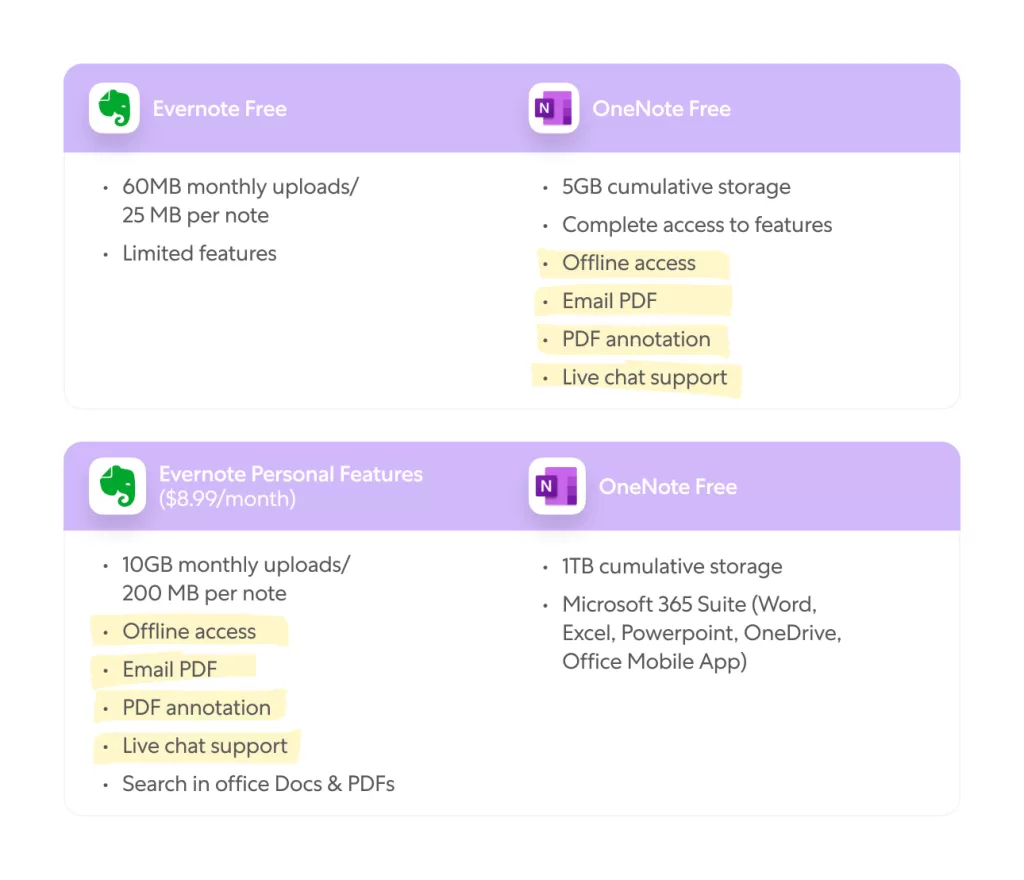
- Evernote: Free plan offers 60MB/month; syncs across 2 devices. Paid plans offer more.
- OneNote: Completely free with sync across unlimited devices via OneDrive.
Winner: OneNote
3. ✨ Features and Functionality
- Evernote: Web clipper, templates, tasks, calendar integrations, OCR (image-to-text).
- OneNote: Draw and sketch tools, audio recording, rich formatting, math equations.
Winner: Tie – Evernote is better for organization; OneNote is better for creativity.

4. 🔗 Integrations
- Evernote: Integrates with Google Calendar, Slack, Microsoft Teams, and more.
- OneNote: Native integration with Office apps like Outlook, Word, Excel, Teams.
Winner: OneNote for Office users, Evernote for wider third-party apps.
5. 💰 Pricing
- Evernote: Free tier is limited; paid plans start at $14.99/month.
- OneNote: Completely free with a Microsoft account.
Winner: OneNote (more value for free)
6. 🧠 AI and Search Capabilities
- Evernote: Offers advanced search, smart suggestions, and OCR features.
- OneNote: Good search but not as advanced in OCR and AI suggestions.
Winner: Evernote
7. 👥 Collaboration & Sharing
- Evernote: Easy to share notes, notebooks, and assign tasks.
- OneNote: Real-time collaboration within Office 365 and Teams.
Winner: OneNote for teams
⭐ Verdict: Evernote vs OneNote – Which Should You Choose in 2025?
Still asking Evernote vs OneNote: Which Is the Best Note-Taking App in 2025? Here’s a breakdown:
| Criteria | Best Choice |
|---|---|
| Budget Friendly | OneNote |
| Best for Professionals | Evernote |
| Best for Teams | OneNote |
| Best Design & Layout | Evernote |
| Best for Students | OneNote |
| Best AI & Search | Evernote |
👉 Use OneNote if you want a free, feature-rich note-taking tool with seamless Microsoft integrations.
👉 Choose Evernote if you need powerful organization features, superior search, and integrations outside the Microsoft ecosystem.
Want to explore more helpful tools? Check out:
❓ FAQ: Evernote vs OneNote
1. Is OneNote still free in 2025?
Yes! OneNote remains completely free and syncs across unlimited devices.
2. Can Evernote sync with Google Calendar?
Yes. Evernote’s paid plans allow integrations with Google Calendar and other tools.
3. Which app is better for collaboration?
OneNote is better for real-time collaboration, especially with Microsoft Teams.
4. Is OneNote or Evernote better for students?
OneNote is ideal for students due to its structure, drawing tools, and free access.
🎯 Final Thoughts: Evernote vs OneNote – Choose Based on Your Needs
The question “Evernote vs OneNote: Which Is the Best Note-Taking App in 2025?” doesn’t have a one-size-fits-all answer. If you’re part of the Microsoft ecosystem and want value at no cost, OneNote is a clear winner. If you prioritize clean design, detailed organization, and advanced search tools, Evernote might be worth the subscription.
💡 Evaluate your workflow, budget, and platform preferences to make the best decision for your note-taking success in 2025!