How to Upload Resume on LinkedIn in 2025 – Add, Update, Download & Link It the Right Way!
✨ Why Everyone’s Googling “How to Upload Resume on LinkedIn” in 2025
If you’re still job hunting without uploading your resume on LinkedIn, you’re invisible to recruiters. 😶 Seriously. Whether you’re a final-year student or someone shifting from marketing to tech, LinkedIn acts like your first impression before any HR even opens your file. 💼
And with over 950 million users globally (Statista, Jan 2025), you’re competing with smart, qualified, and resume-ready folks. So yes, learning how to upload resume on LinkedIn properly isn’t just a bonus — it’s a necessity. 🚀
🔹 Key Highlights
- 📥 Learn how to upload resume on LinkedIn step-by-step
- 🌐 Understand where and how to add resume in LinkedIn for visibility
- 🛠️ Update, change, or delete your resume easily (with screenshots)
- 🔗 Discover how to add LinkedIn link in your resume professionally
- 💼 Real tips for job seekers, career changers, and students entering the IT world
📁 How to Upload Resume on LinkedIn (The Quickest Way)
There are actually two ways to do this, depending on what you want:
✅ Option 1: Upload Resume While Applying to Jobs
- 🔍 Visit the Jobs tab
- 📄 Click on a job listing
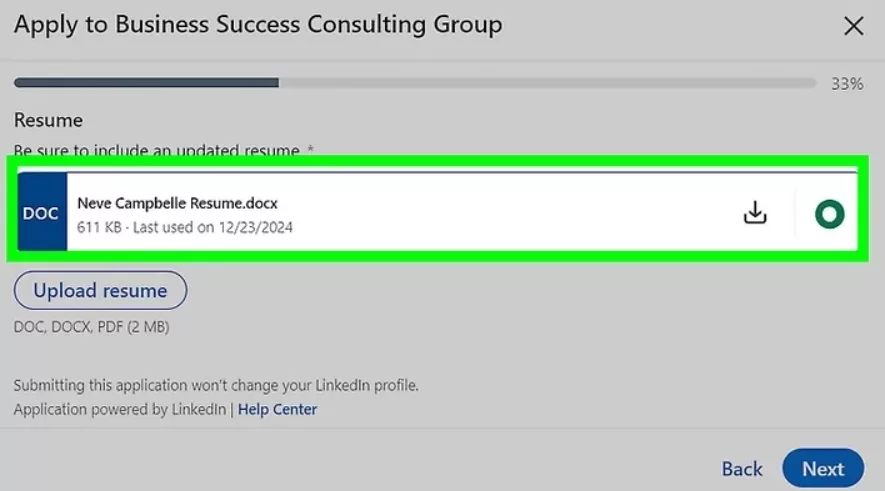
- 🟦 Hit “Easy Apply”
- 📎 Upload your resume (PDF, DOCX format under 5MB)
Your resume will now be visible to only that recruiter. You can also save it to reuse. 🔁


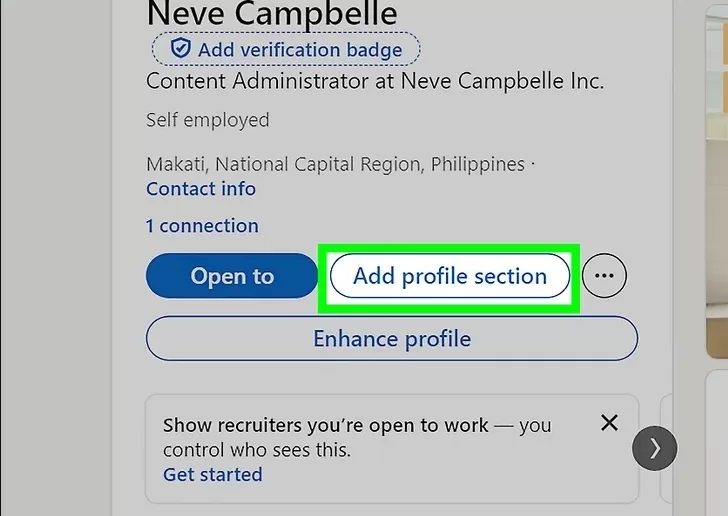
🌟 Option 2: Upload Resume to Your Profile (Publicly Visible)
- 👤 Go to your Profile Page
- ➕ Click “Add Profile Section”
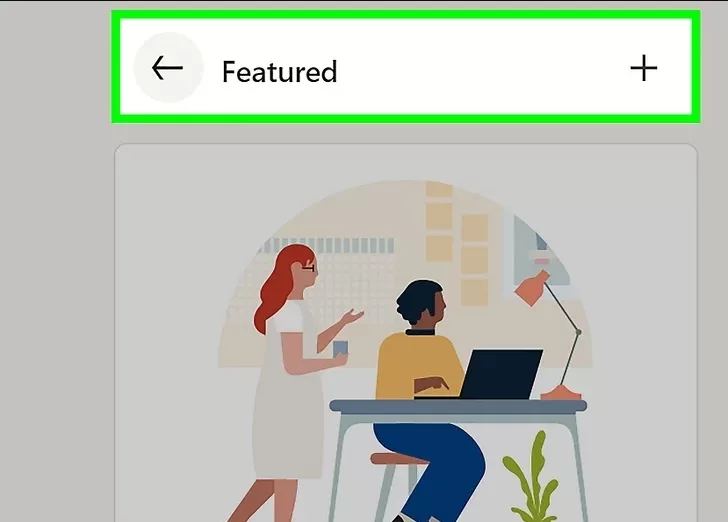
- 🖼️ Select “Featured > Media”
- 📂 Upload your file with a short title and summary
✅ This is where you want to shine. Use your best and latest resume. ✨
Pro Tip 💬: If you’ve done any job-relevant programs — say a Full Stack python Course, or even a short SQL Internship — highlight it within your resume before uploading. Recruiters often filter by those keywords. 🧠



🔍 Where to Upload Resume in LinkedIn for Best Visibility
Here’s the truth: recruiters scan profiles in less than 6 seconds (according to Eye-Tracking studies from Ladders). 😳⏱️
So make it count. 🎯
Best sections to upload resume on LinkedIn:
- ✨ Featured section
- ✉️ During job applications
- 📝 Add it as a link inside your About summary
- 🔐 “Build a Resume” in Job Settings (private use)
📲 How to Add Resume in LinkedIn Mobile App
Using the app? Here’s how to upload resume in LinkedIn mobile app:
- 📱 Open your LinkedIn app
- 👤 Tap your profile picture > View Profile
- ➕ Tap Add Section > Featured > Add Media
- 📤 Upload the resume from your device
🚫 Note: You can’t use LinkedIn’s resume builder on the mobile app. Upload only.
✏️ How to Update Resume in LinkedIn (Without Looking Messy)
So, your skills changed. Or you finally finished that Cyber security Course or did a summer Networking Internship. Here’s how to update resume on LinkedIn:
- 🧹 Delete the old file from your Featured section
- 🔄 Re-upload a new version
- 📝 Edit the title to reflect the update (e.g., “Updated July 2025”)
Pro Tip: Always keep resume titles consistent with your role, like: “Full Stack .Net Resume – Fresher (2025)”. 📌
📁 How to Download Resume from LinkedIn
This one’s for folks using LinkedIn’s built-in resume builder:
- 👤 Go to Me > Job Preferences > Job Application Settings
- 📜 Scroll to “Manage Resumes”
- ⬇️ Click Download beside the version you want
🌟 Works great if you don’t have your resume handy. 🧳
🔄 How to Change Resume in LinkedIn Without Confusion
Changing your resume isn’t the same as updating a few lines. Here’s the proper way:
- ❌ Remove the old file from Featured or Settings
- 📥 Upload a clean, new copy
- 🧠 Update relevant keywords if your role changed
⚠️ Keep only ONE resume visible to avoid duplicate info or confusion.
🗑️ How to Delete Resume from LinkedIn
Want to remove an old or irrelevant resume?
- 🔎 Go to your Profile
- 📜 Scroll to Featured section
- ⋯ Click the three dots > Remove Media
🧽 Done. Clean slate. ✅
🔗 How to Add LinkedIn Link in Resume (The Right Way)
A lot of people do this wrong. Don’t just paste a long URL. 🙅♂️
Here’s how to do it like a pro:
- 🌐 Go to Profile > Edit Public Profile & URL
- ✂️ Customize it to something short:
linkedin.com/in/yourname - 🧾 Add it to your resume in the header or contact section
Bonus Tip: 💡 Use hyperlinking in PDFs so they can click directly.
💬 Final Words: Don’t Just Upload. Make It Worth Clicking.
Now that you know How to Upload Resume on LinkedIn this just the step one. But what’s inside that resume? That’s what seals the deal. 💯
Start now. Your future recruiter is scrolling through someone else’s profile. Why not make it yours? 🌟
📚 Related Reads You Might Like:
- 💼 How to Build a Portfolio That Gets You Hired (2025)
- 🧰 Top Full Stack Developer Tools You Need in 2025
- 📄 LinkedIn Resume Guide 2025: Create a Job-Ready Profile That Gets You Hired
- ⚙️ LinkedIn Profile Optimization Tool: 6 ChatGPT Prompts You Need