HTML DOCTYPE Declaration Explained: 5 Things Beginners Must Know
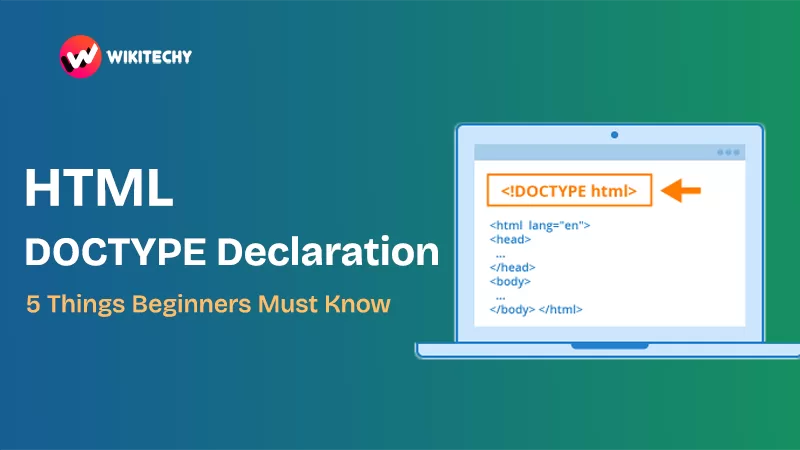
What is the HTML DOCTYPE Declaration?
The html doctype declaration might look like a boring technical line at the top of your HTML file, but trust me—it’s the silent hero of your webpage.
When I first saw this thing, it looked like alien language:
I remember thinking, “Okay… what is this? Do I delete it? Do I need it? Why is it yelling at me in caps?”
Turns out, this small line is like the foundation of your house. Without it, the structure stands—but shaky. The html doctype declaration tells browsers which version of HTML you’re using. That way, Chrome, Firefox, or even old-school Internet Explorer (RIP) know how to interpret your code.

Why the HTML DOCTYPE Declaration Matters
Let me be blunt: if you skip it, you’ll run into quirks mode. Sounds fancy, right? But it’s not.
Here’s what happens without the html doctype declaration:
- Browsers guess the HTML version.
- Sometimes your CSS doesn’t behave.
- Layouts look different on different browsers.
- You’ll pull your hair out debugging.
I learned this the hard way when my first project header looked perfect in Chrome but broke in Firefox. Why? Yep, missing DOCTYPE.

So, think of it like giving your webpage a passport. Without it, border control (browsers) just don’t know where you’re from.
The HTML5 DOCTYPE: Short and Sweet
Earlier versions of HTML had long, scary doctype declarations like this:
When I saw that, I almost closed my laptop. Thankfully, HTML5 made life easier:
That’s it. Just one line. Lowercase or uppercase? Doesn’t matter. It works the same.
Real-Life Example: DOCTYPE in Action 👨💻
Here’s how your HTML skeleton should start:
That html doctype declaration right at the top? That’s your shield. Without it, the browser might not render the <h1> the way you intended.
A Quick Story 📝
When I was teaching my cousin HTML basics, she skipped the DOCTYPE because “it looked unnecessary.” We built a simple portfolio site. Everything was fine until we tested it on Safari—it looked like a Picasso painting gone wrong. The culprit? Missing html doctype declaration.
Moral of the story: never skip it. It’s like wearing a seatbelt. You don’t always notice it’s there, but you’ll regret it if it’s missing.
Types of DOCTYPE Declarations (Before HTML5) 🕰️
Let me give you a quick history lesson (don’t worry, I’ll keep it short). Before HTML5, there were different doctype declarations:
- HTML 4.01 Strict – the “rules are rules” version.
- HTML 4.01 Transitional – a little flexible.
- XHTML 1.0 – stricter XML-style syntax.
Each one had its own long, messy declaration. But with HTML5, we simplified it. Now we just use <!DOCTYPE html> for everything modern.
If you’re still maintaining legacy projects (say, government sites or old corporate intranets), you might run into these. Otherwise, stick with HTML5.
Common Mistakes Beginners Make ❌
I’ve been there, and maybe you’ve done this too:
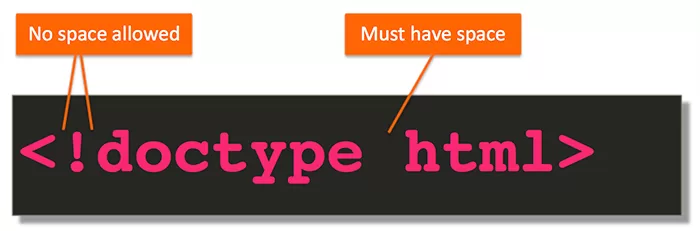
- Forgetting DOCTYPE – the #1 mistake.
- Writing it wrong – like
<DOCTYPE html>(oops, missing!). - Mixing old DOCTYPEs with modern HTML – don’t do it.
- Thinking it’s optional – it’s not.
Pro tip: always copy-paste it when starting a new HTML file. That way, you don’t miss it.
How the HTML DOCTYPE Declaration Affects SEO 📈
You might wonder: “Does Google care about the html doctype declaration?”
Directly, no. It won’t boost your rankings. But indirectly, yes—it helps browsers render your site properly. If your site breaks on some devices because you forgot the DOCTYPE, guess what? Poor user experience → higher bounce rates → SEO pain.
So yes, it matters.

For more about how HTML impacts SEO, check out Google’s SEO Starter Guide.
Final Thoughts
The html doctype declaration may look boring, but it’s a must-have. Think of it like brushing your teeth—skip it once, and nothing major happens. Skip it regularly, and things go bad fast.
So next time you open a blank HTML file, remember:
- Add
<!DOCTYPE html>first. - Avoid quirks mode.
- Make browsers happy.
Want to Learn About HTML?, Kaashiv Infotech Offeres Front End Development Course, Full Stack Development Course, and more Visit www.kaashivinfotech.com.
That’s it. Simple, but game-changing.
Related Reads: