Scratch Programming: The Complete Guide for Beginners
If you’ve ever been curious about coding and wanted to learn in a fun, visual way, Scratch programming is a great place to start. Developed by MIT, Scratch computer language was created for absolute beginners – especially kids – but it also includes enough power to create interactive stories, games, and animations. In this guide, you’ll learn everything you need to know about Scratch, including what it is, all the way to building your first project.
What is Scratch Programming?
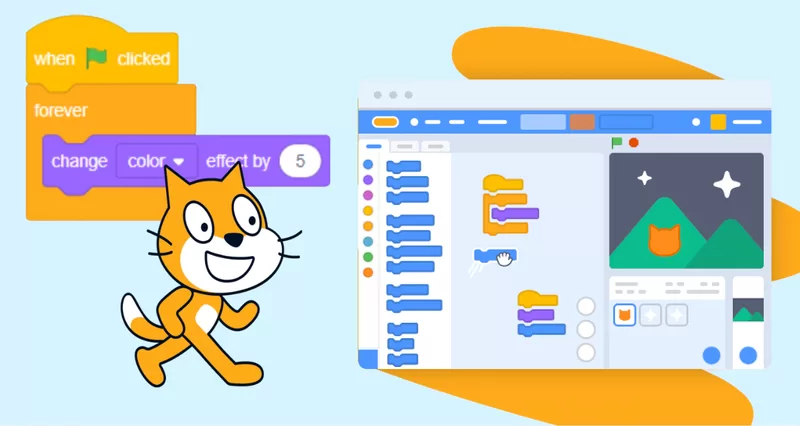
Scratch programming is a block-based visual coding language developed by the MIT Media Lab. Unlike traditional coding where you written lines of code, mostly in Scratch programming you drag and drop colorful coding blocks to make your program function! I love Scratching and offer the following:
- No syntax errors — ideal for beginners.
- Visual interface makes learning enjoyable.
- Perfect for ages 8 – 80!
Why Learn Scratch Computer Language?
Here’s the reason this language is revolutionary for learners:
- Easy to Learn – Blocks creating drag-and-drop instead of having to learn code.
- Creativity at Every Level – Design games, animations and interactive art.
- Logical Thinking – Experience coding logic without the anguish.
- Free – Nothing expensive to download.
- World Community – Ability to share your projects and follow millions of other creators for inspiration.
Getting Started with Scratch Programming
If you want to begin your Scratch programming smartly, do the following:
- Go to the Scratch website.
- Make a free account.
- Click “Create” to begin your first project.
- Start looking at the stage (where your game appears), sprites (characters/objects), and code blocks.
The Building Blocks of Scratch Computer Language

The blocks are divided into categories:
- Motion – Control the motion of sprites.
- Looks – Change colors, costumes, and/or text.
- Sound – Music or sound effects.
- Events – Trigger code with a click or key press.
- Control – Loops and conditions.
- Sensing – Clicks, collision, etc.
- Operators – Math and logic.
- Variables – Store data such as a score.
Scratch Programming Example: Your First Game
Let’s create a basic Scratch game where a cat catches falling apples.
- Pick sprites for the player (a cat sprite) and the object (an apple sprite).
- Add motion so the cat can move left and right with the arrow keys.
- Use events so the apples fall when the game starts.
- Detect collisions to increase the score if the cat catches the apple.
- Add sound so there is an indication of a score.
Scratch Projects for Beginners
If you are a first-time Scratch programmer, here are some fun projects you could do to get started:
- Pong Game – A simple ball-and-paddle game.
- Dance Animation – Characters dance to the music.
- Maze Game – Move a sprite to the goal, but do not touch the walls.
- Storybook Animation – A simple interactive story.
Scratch Programming for Kids
Parents and teachers love this because kids can learn code without frustration. There are many excellent benefits for learning to program with Scratch which include:
Problem-Solving Skills
- Collaboration (kids can share and remix projects)
- Exposure to STEM (Science Technology Engineering Mathematics)
- Increased Confidence
Scratch Computer Language vs. Traditional Programming
| Feature | Scratch Computer Language | Python / Java |
| Syntax | Block-based | Text-based |
| Learning Curve | Very easy | Moderate to hard |
| Creativity | Very high | Depends on skills |
| Target Audience | Kids, beginners | Intermediate to advanced |
Tips to Master Scratch Programming

- Explore the Community – Observe how others use code and use their projects to remix and expand your creativity.
- Try the Blocks – If you are going to use a tutorial to learn to use Scratch, remember you don’t have to follow step by step. Just have fun and see what you can create.
- Break it Down – You do not have to solve the entire problem at once. Solve one part.
- Join Scratch Challenges – Online scratch challenges are very popular. Play along and have fun.
Advanced Scratch Programming Ideas
After getting to grips with the essence of the Scratch language, try your hand at:
- Making multi-level games,
- Using variables to keep score, track time and health,
- Add timers and leaderboards,
- Creating educational quizzes
FAQs
Q1: Is Scratch programming free?
Yes! Scratch is completely free and works on any modern browser.
Q2: Can adults learn Scratch computer language?
Of course! While it has been designed for kids, it can also be a great beginner coding tool for adults.
Q3: Do I need to download Scratch?
No, you can use Scratch online. There is also an offline editor, if you wish.
Final Thoughts
Whether you’re a parent amazed about introducing your child to coding, a teacher designing motivational lessons, or just someone who is interested in programming and wants an easy introduction, Scratch programming is an excellent option. So, go for it – open Scratch, drag some colourful blocks and start creating something cool now!
Related Links