Top 10 Java Programs for Freshers (Complete 2026 Guide)
Java is one of the most beginner-friendly yet powerful programming languages widely used in software development, mobile apps, enterprise systems, and backend technologies. For freshers, mastering basic Java programs is the first step toward building a strong programming foundation.
In this guide, we’ll not only look at the top 10 Java programs but also deeply understand the logic behind each one.
1. Hello World Program
public class HelloWorld {
    public static void main(String[] args) {
        System.out.println("Hello, World!");
    }
}
Detailed Explanation:
The “Hello World” program is the simplest and most fundamental Java program that every beginner starts with. It helps you understand the basic structure of a Java application. In this program, public class HelloWorld defines a class, which is the core building block of Java. The main method is the entry point of the program, meaning execution begins from here.
The statement System.out.println() is used to print output to the console. Here, System is a class, out is an object, and println() is a method used to display text. Even though it looks simple, this program introduces you to important concepts like classes, methods, and output handling in Java.
2. Sum of Two Numbers
import java.util.Scanner;public class Sum {
    public static void main(String[] args) {
        Scanner sc = new Scanner(System.in);
        int a = sc.nextInt();
        int b = sc.nextInt();
        System.out.println("Sum: " + (a + b));
    }
}
Detailed Explanation:
This program demonstrates how to take user input and perform arithmetic operations. The Scanner class is used to read input from the user via the keyboard. After creating a Scanner object, we use nextInt() to read integer values.
The program stores two numbers in variables a and b, then calculates their sum using the + operator. Finally, it prints the result. This example is important because it introduces input handling, variables, and basic operations—concepts that are used in almost every real-world program.
3. Even or Odd Number
public class EvenOdd {
    public static void main(String[] args) {
        int num = 10;
        if(num % 2 == 0)
            System.out.println("Even");
        else
            System.out.println("Odd");
    }
}
Detailed Explanation:
This program checks whether a number is even or odd using a simple mathematical rule. If a number is divisible by 2 (i.e., the remainder is zero), it is considered even; otherwise, it is odd.
The % operator (modulus) is used to find the remainder. The if-else condition helps in decision-making by executing different blocks of code based on the result. This program is a great introduction to conditional statements and logical reasoning in programming.
4. Factorial of a Number
public class Factorial {
    public static void main(String[] args) {
        int num = 5, fact = 1;
        for(int i = 1; i <= num; i++) {
            fact *= i;
        }
        System.out.println("Factorial: " + fact);
    }
}
Detailed Explanation:
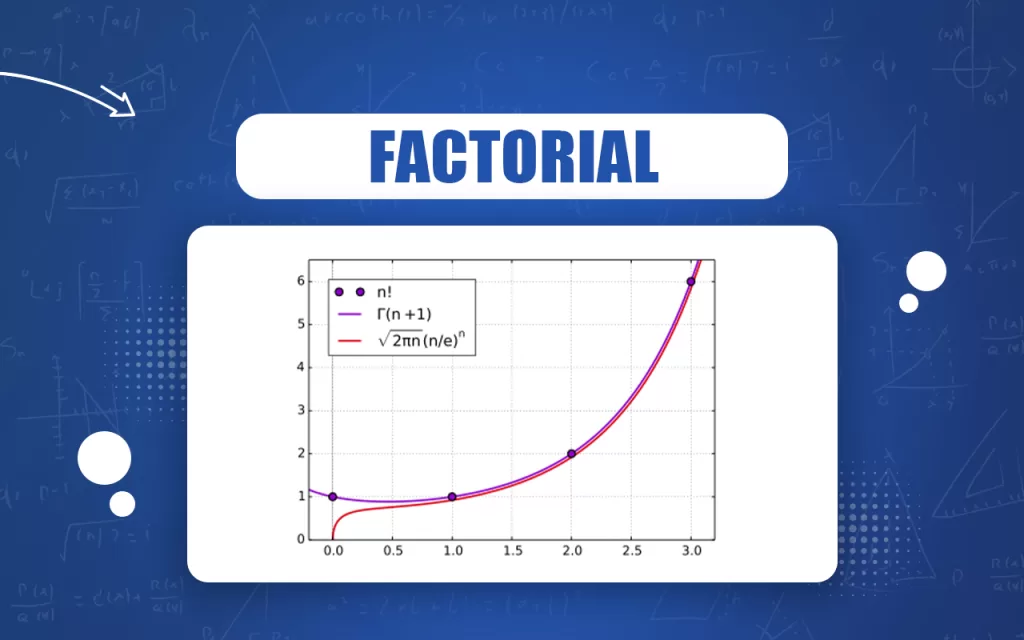
The factorial of a number is the product of all positive integers up to that number. For example, the factorial of 5 is 5 × 4 × 3 × 2 × 1 = 120.
In this program, we use a for loop to iterate from 1 to the given number. The variable fact stores the result and is updated in each iteration by multiplying it with the loop variable. This program helps you understand loops, iterative calculations, and mathematical problem-solving in Java.
5. Fibonacci Series
public class Fibonacci {
    public static void main(String[] args) {
        int n = 10, a = 0, b = 1;
        System.out.print(a + " " + b);        for(int i = 2; i < n; i++) {
            int c = a + b;
            System.out.print(" " + c);
            a = b;
            b = c;
        }
    }
}
Detailed Explanation:
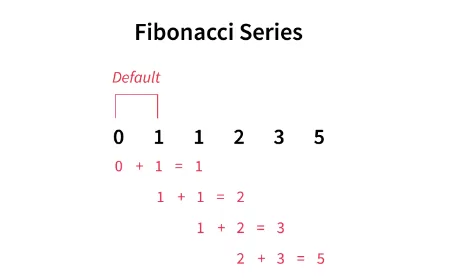
The Fibonacci series is a sequence where each number is the sum of the previous two numbers. It starts with 0 and 1, and continues as 0, 1, 1, 2, 3, 5, and so on.
In this program, we initialize the first two numbers and use a loop to calculate the remaining terms. Inside the loop, the next number is computed by adding the previous two numbers. Then we update the values for the next iteration. This program improves your understanding of sequences, loops, and variable updates.
6. Prime Number Check
public class Prime {
    public static void main(String[] args) {
        int num = 7;
        boolean isPrime = true;        for(int i = 2; i <= num / 2; i++) {
            if(num % i == 0) {
                isPrime = false;
                break;
            }
        }        if(isPrime)
            System.out.println("Prime");
        else
            System.out.println("Not Prime");
    }
}
Detailed Explanation:
A prime number is a number that is divisible only by 1 and itself. In this program, we check if the number has any divisors other than 1 and itself.
We use a loop starting from 2 up to half of the number. If any number divides it evenly, we mark it as not prime and exit the loop using break. A boolean variable isPrime is used to track the result. This program teaches logical optimization and efficient condition checking.
7. Reverse a Number
public class ReverseNumber {
    public static void main(String[] args) {
        int num = 1234, reverse = 0;        while(num != 0) {
            int digit = num % 10;
            reverse = reverse * 10 + digit;
            num /= 10;
        }        System.out.println("Reversed: " + reverse);
    }
}
Detailed Explanation:
This program reverses the digits of a number. For example, 1234 becomes 4321.
We use a while loop to extract digits one by one using the modulus operator %. Each digit is added to the reversed number after shifting its position by multiplying the current result by 10. The original number is reduced by dividing it by 10. This program helps you understand digit manipulation and loop control.
8. Palindrome Number
public class Palindrome {
    public static void main(String[] args) {
        int num = 121, original = num, reverse = 0;        while(num != 0) {
            int digit = num % 10;
            reverse = reverse * 10 + digit;
            num /= 10;
        }        if(original == reverse)
            System.out.println("Palindrome");
        else
            System.out.println("Not Palindrome");
    }
}
Detailed Explanation:
A palindrome number is a number that reads the same forwards and backwards, like 121 or 1331.
This program uses the same logic as reversing a number. After reversing the number, we compare it with the original value. If both are equal, the number is a palindrome. This example reinforces code reuse and comparison logic.
9. Largest of Three Numbers
public class Largest {
    public static void main(String[] args) {
        int a = 10, b = 25, c = 15;        if(a >= b && a >= c)
            System.out.println("Largest: " + a);
        else if(b >= c)
            System.out.println("Largest: " + b);
        else
            System.out.println("Largest: " + c);
    }
}
Detailed Explanation:
This program finds the largest among three numbers using conditional statements. We compare each number using logical operators (&&) to determine which one is greater.
The if-else if-else structure ensures that only one condition is executed. This program is useful for understanding decision-making logic and multiple condition checks in Java.
10. Simple Calculator
import java.util.Scanner;public class Calculator {
    public static void main(String[] args) {
        Scanner sc = new Scanner(System.in);
        int a = sc.nextInt();
        int b = sc.nextInt();
        char op = sc.next().charAt(0);        switch(op) {
            case '+': System.out.println(a + b); break;
            case '-': System.out.println(a - b); break;
            case '*': System.out.println(a * b); break;
            case '/': System.out.println(a / b); break;
            default: System.out.println("Invalid Operator");
        }
    }
}
Detailed Explanation:
This program simulates a basic calculator that performs operations like addition, subtraction, multiplication, and division.
It uses the Scanner class to take input and a switch statement to handle different operations based on the operator entered by the user. Each case corresponds to a specific arithmetic operation. This program is very important as it combines input handling, control flow, and arithmetic logic into one practical application.
Final Thoughts
Mastering these Java programs will give freshers a strong foundation in programming. These are not just academic examples—they are stepping stones to solving real-world problems and cracking technical interviews.
Want to Learn More About Java ?, Kaashiv Infotech Offers, Full Stack Java Course, Java Course, Data Science Course, Internships & More, Visit Their Website www.kaashivinfotech.com.
Related Reads: