🖱️ What Are Input Devices? 9 Types, Real Examples & Simple Uses (Explained Like a Friend!)
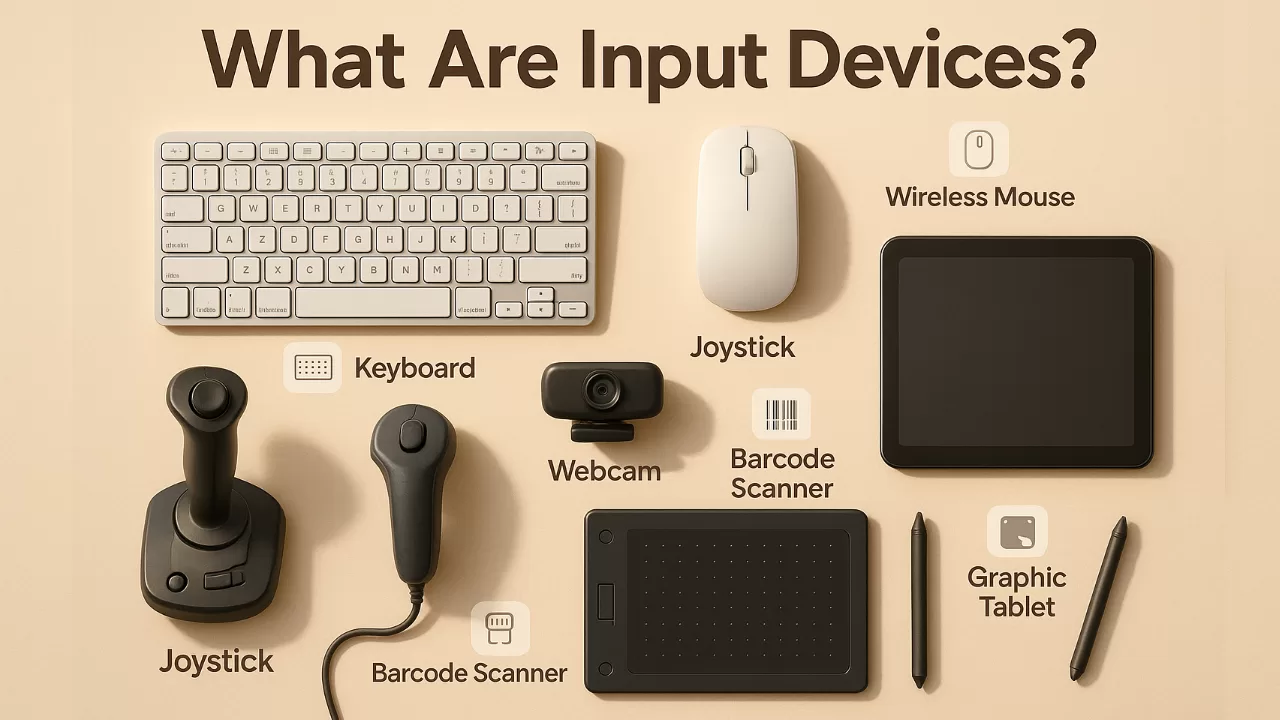
Ever typed a message, clicked a button, or scanned a QR code? Boom — you’ve used an input device.
If you’re diving into IT, preparing for a computer fundamentals exam, or just curious about how computers respond to your actions, this guide is for you.
Let’s start with the basics and work our way into the cool stuff. We’ll cover what input devices are, why they matter, and the different types you encounter (even if you don’t realize it).
Key Highlights:
- Learn what an input device is and how it actually works in real life
- Discover 9 types of input devices used in everyday tech
- Get real-world examples of input devices you’ve probably used today
- Understand the function of input devices in computers without tech jargon
- Bonus: Simple stories, analogies, and insights from the IT world
🤔 What Is an Input Device in a Computer?
An input device is any hardware you use to send data or commands to a computer. You press keys, move a mouse, tap a screen, or speak into a mic — and the computer takes that input and processes it.
In simple terms? Input devices are how you talk to your computer.
Let’s look at some quick examples:
- Keyboard ➝ You type an email
- Mouse ➝ You open a folder
- Microphone ➝ You record a voice note
- Scanner ➝ You digitize a paper document
Without input devices, you’d have no way to communicate with your PC or phone. They’re essential. Period.
⚙️ How Do Input Devices Work?
Let’s break it down:
- You act (press a key, move a mouse, swipe the screen)
- The input device detects that action
- It converts it into signals the computer understands (usually electrical)
- The computer processes the input
- You see a result (cursor moves, letter appears, song plays)
A friend of mine, Neha, once said, “A keyboard is like the front desk at a hotel — you tell it what you want, and it passes the request inside.” That’s exactly how input devices work!
📚 9 Common Types of Input Devices (with Real-Life Examples)
Let’s explore the major types of input devices in computers. These aren’t just boring definitions — you’ve probably used most of them today.
1. 🧠 Keyboard
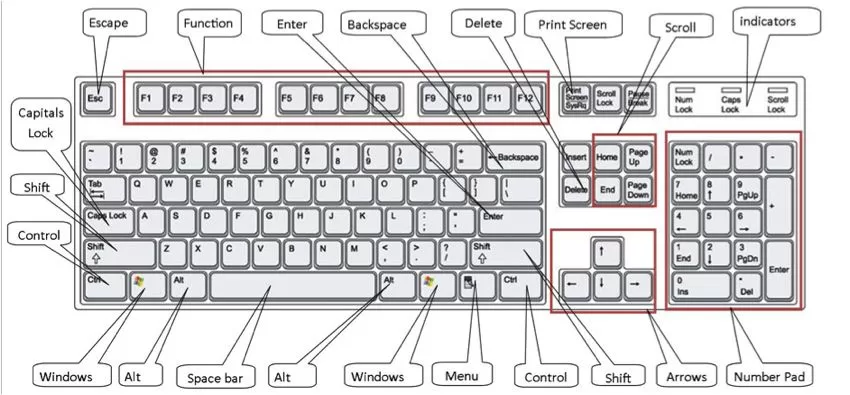
The keyboard is the most common input device. It lets you input letters, numbers, and commands.
Types of keys:
- Alphabet keys (A–Z) and numeric keys (0–9)
- Function keys (F1–F12)
- Control keys like Ctrl, Alt, Esc
- Special keys like Shift, Tab, Enter
Real use? Writing this article, replying to chats, Googling stuff.
2. 🖱️ Mouse
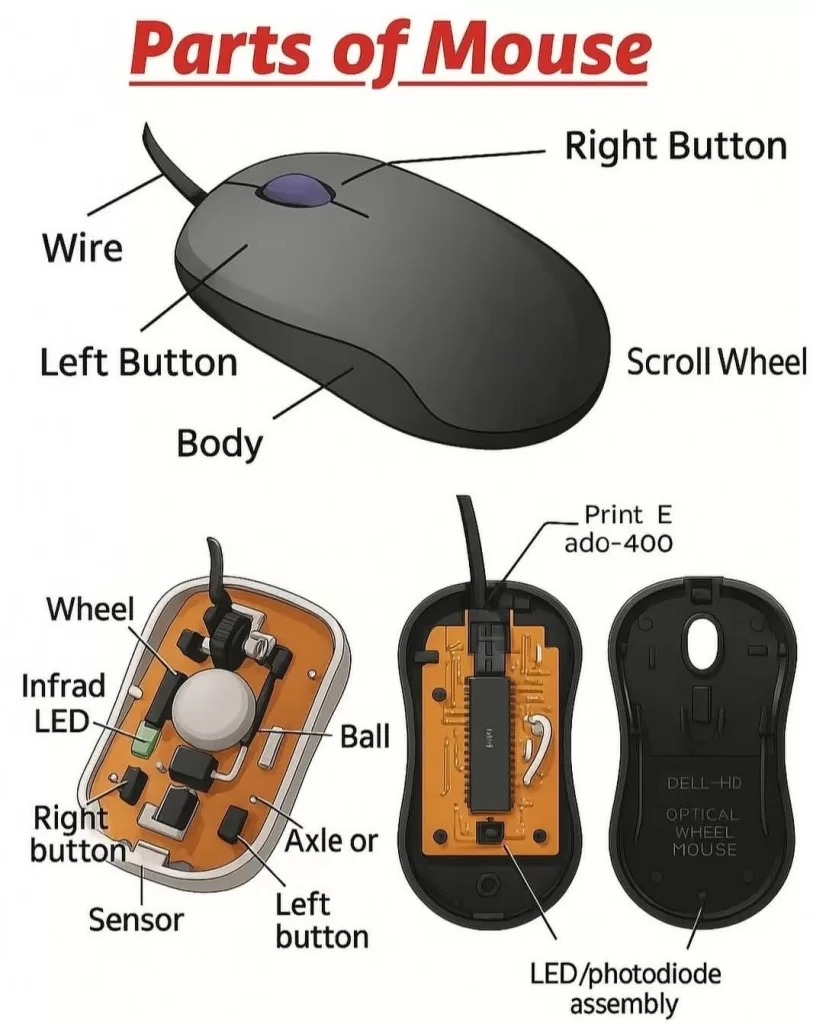
Another superstar. The mouse is a pointing device. You move it to control a pointer on screen.
Types:
- Mechanical (old school with a rubber ball)
- Optical (uses light — smoother)
- Wireless (hello, clean desk!)
Fun fact: Douglas Engelbart invented the mouse in 1963. Big win for lazy scrolling!
3. 🕹️ Joystick
Mostly seen in gaming or simulation setups. You move the stick in different directions for input.
Types:
- Analog, Digital, Flight, and even Industrial joysticks
Use case? Gaming, flight simulators, crane control.

4. ✍️ Light Pen
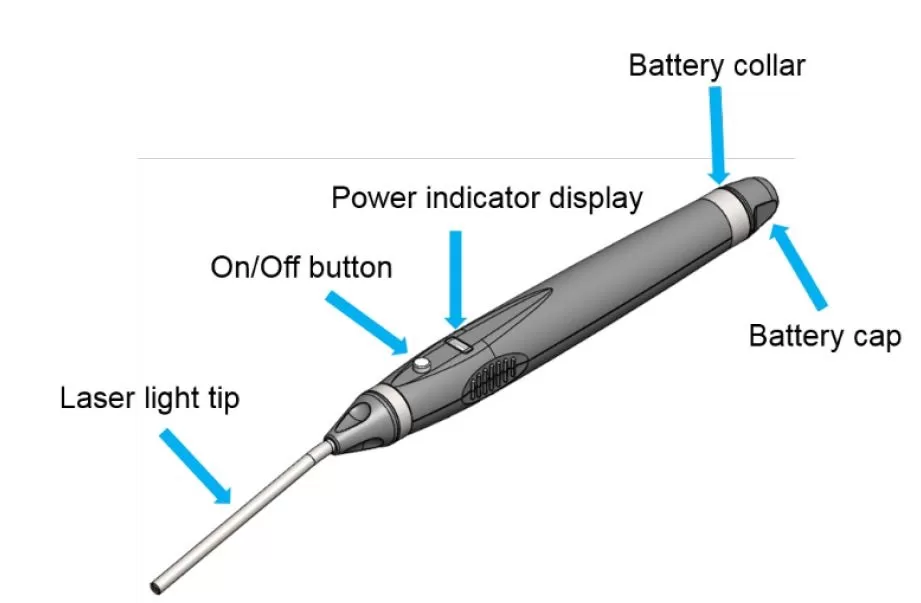
A pen-like device that lets you draw directly on CRT screens. It’s old tech, but still cool.
Modern version? Think styluses used on drawing tablets.
5. 📷 Scanner
Need to turn physical docs into digital ones? Use a scanner.
Types: Flatbed, Handheld, Sheet-fed, Drum
Real use? Digitizing certificates, book pages, artwork.

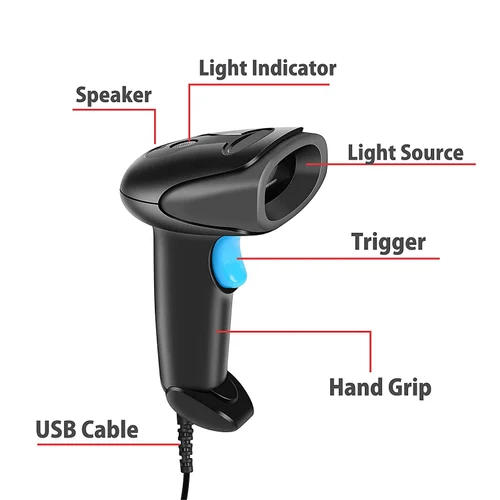
6. 📦 Barcode Reader
Used in shops, warehouses, even libraries. It reads barcodes and sends the data to the computer.
Types:
- Pen-type
- Laser
- CCD
- 2D camera-based
- Omnidirectional
Example: Your cashier scanning your chocolate bar? Yup — barcode reader at work.
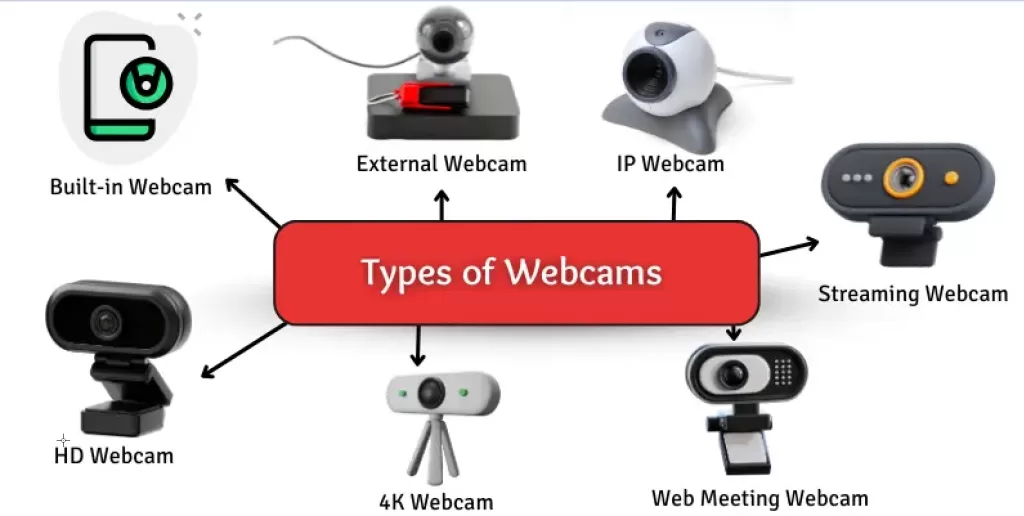
7. 🎥 Web Camera
A webcam captures video and acts as an input device for apps like Zoom, Skype, etc.
Types: USB webcams, Built-in webcams, 4K webcams, PTZ cams
Real use? Online meetings, video calls, YouTube lives.
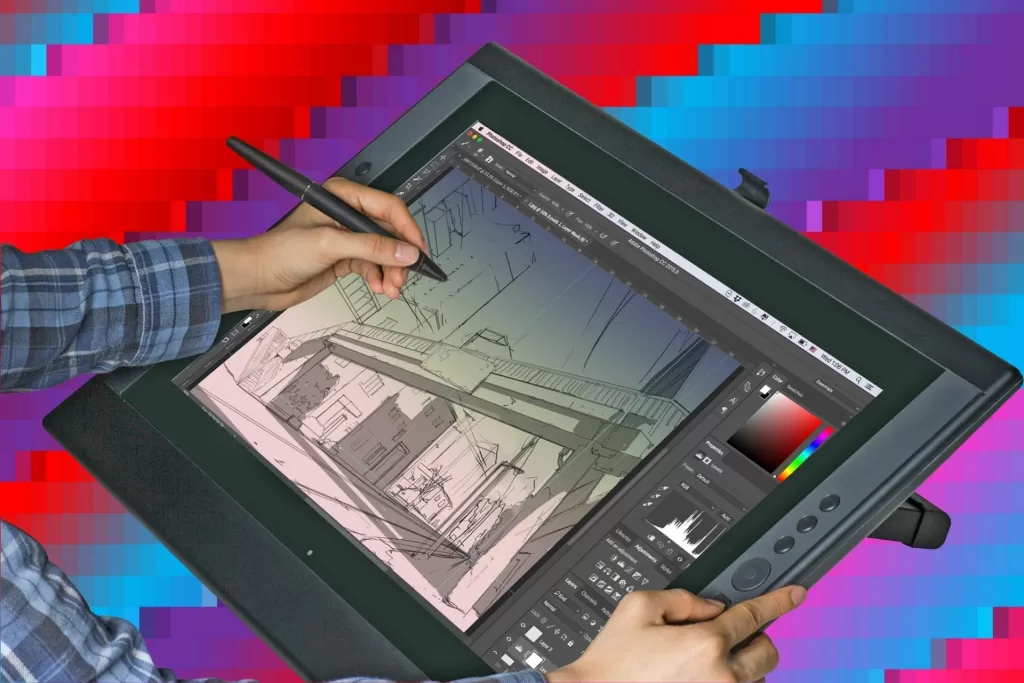
8. 🧑🎨 Graphic Tablet
Used mostly by designers and artists. You draw with a stylus on the pad, and it appears on screen.
Types: Pen tablets, display tablets, smart tablets
Cool example: Your favorite digital comic artist probably uses one.
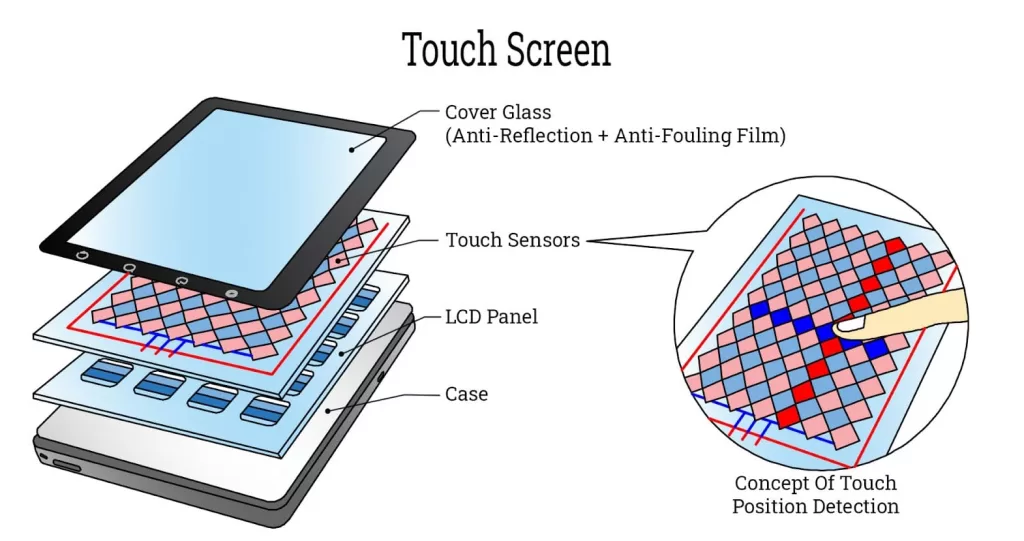
9. 📱 Touchscreen
It’s a combo — input and output. You touch it, it reacts. Found in smartphones, ATMs, and POS machines.
Types:
- Resistive (older, pressure-based)
- Capacitive (modern smartphones)
- Infrared, SAW, and Optical
✅ What Is the Function of Input Devices?
The main function of input devices is to enable communication between you and your computer.
Think of them as translators:
- You give instructions in your way (touch, type, move)
- The device converts it into data
- The computer receives and understands it
Without input devices, your computer is like a locked box — no way in.
🔁 Input Devices vs Output Devices
Quick side-note: Many confuse input devices with output devices.
Input = You ➝ Computer Output = Computer ➝ You
Example:
- Keyboard = Input (you type)
- Monitor = Output (you see the result)
Want to dive deeper into this? Read our full guide on Output Devices Explained Simply 🔗
🧠 Real Talk: Why You Should Know This (Career Tip 💡)
If you’re aiming for a job in IT, tech support, or even digital design — knowing your input devices isn’t just theory. It’s practical knowledge.
When I first interviewed for an IT helpdesk role, the hiring manager asked: “What would you do if a user’s mouse suddenly stopped working?” — That moment, I was glad I understood types of input devices and how they function.
Also, if you’re prepping for certifications like CompTIA A+, this topic is a must.
🧩 Final Thoughts
Understanding input devices is your first step into the world of computers. Whether you’re a student, tech beginner, or future IT pro — this is your foundation.
From the keyboard you type on to the touchscreen on your phone — input devices are everywhere.
Next time you tap, click, or swipe — you’ll know exactly what’s going on behind the scenes.
🔍 FAQs on Input Devices
Q1. What are input devices in a computer? A: Hardware devices used to send data to the computer — like keyboards, mouse, or scanners.
Q2. What are 5 input device examples? A: Keyboard, mouse, scanner, microphone, joystick.
Q3. What is the function of an input device? A: To translate your actions into data the computer can understand.
Q4. Are all touchscreens input devices? A: Most are both input and output — you touch (input), and it displays (output).
Q5. Why should I care about this? A: Whether you’re studying, gaming, designing, or troubleshooting — understanding input devices makes your tech life easier.
🔗 Related Reads You Might Like
If you’re curious to explore more about how computers work beyond just input devices, here are some helpful guides:
- 📤 What Are Different Output Devices? — Learn how computers send information back to you!
- 🔁 Input and Output Devices Explained — A complete guide covering both input and output devices with examples.
- 🧠 What Are the Main Components of a Computer? — Understand the building blocks inside every machine.
- 🖥️ Difference Between Hardware and Software — Break down the physical and digital parts of a computer.
- ⚙️ Features of Operating System — Get to know what makes an OS smart, efficient, and essential.