What is https:// ? HTTPS Protocol in 2025 — Working, Importance & Security Best Practices
HTTPS Protocol in 2025: Why It’s More Important Than Ever
When you visit most website you visit, you will notice a little padlock 🔒 next to https:// in the browser bar. That little padlock isn’t just for decoration. It indicates that the HTTPS Protocol is in use, encrypting the data between your browser and the site in order to protect privacy and validity.
The HTTPS Protocol has become the backbone of trust on the internet. In 2014, less than 30% of websites used HTTPS. By 2025, more than 95% of global page loads are secured (Google Transparency Report). Browsers such as Chrome and Safari now warn, or block, plain HTTP entirely: it is plain and simple; the web has moved from insecure by default, to secure by default.
Now, here’s the kicker: the padlock does not necessarily mean that the site is ‘safe.’ Phishing sites use HTTPS as well. This is why, in 2025, understanding how the HTTPS Protocol works, its importance, and what best practices to be adopted for security is important.
And if your site still uses plain HTTP, people won’t just skip it — they’ll assume it’s unsafe.
So let’s break it down — what is HTTPS, how does it work, and why should you care?

🔑 Key Highlights
- HTTPS Protocol is now the default standard for safe browsing, trusted by 95% of websites in 2025.
- What is HTTPS? It’s just HTTP wrapped with encryption (SSL/TLS).
- The full form of HTTPS is HyperText Transfer Protocol Secure.
- HTTPS ensures data security, integrity, and trust.
- Port number 443 is the standard port for HTTPS connections.
- Without HTTPS, browsers label websites “Not Secure.”
- Best practices include enabling TLS 1.3, using HSTS, and installing a valid SSL certificate.
What is HTTPS? (Definition + Full Form)
The full form of HTTPS is HyperText Transfer Protocol Secure.
In simple terms, it’s the secure version of HTTP — the language your browser and a web server use to talk to each other. The difference? HTTPS adds an extra layer of encryption through SSL (Secure Socket Layer) or TLS (Transport Layer Security).
That encryption means when you log in, shop, or enter personal details, nobody else can read what’s happening in the background.
Think of it this way:
- HTTP = sending a postcard through the mail 📮. Anyone handling it can read the message.
- HTTPS = sending a locked package 📦. Even if it’s intercepted, nobody can see what’s inside.

How Does HTTPS Ensure Secure Communication?
Here’s how the HTTPS protocol secures your data step by step:
- Handshake begins 🤝 – Your browser connects to the website and asks for proof it’s legit.
- SSL certificate shared – The server shows its SSL certificate, which proves ownership.
- Verification – Your browser checks if the certificate is valid and issued by a trusted authority.
- Key exchange 🔑 – Public and private keys are exchanged to set up encryption.
- Encrypted communication – Now, all data between you and the site flows in a scrambled, unreadable format.
💡 Fun fact: HTTPS typically runs on port 443, while HTTP uses port 80. This tiny detail often matters to developers setting up servers.
HTTP vs HTTPS: What’s the Difference?
Most beginners ask: What is the difference between HTTP and HTTPS? Here’s a quick comparison you can’t ignore:
| Feature | HTTP ❌ | HTTPS ✅ |
|---|---|---|
| Encryption | No | Yes (SSL/TLS) |
| Security | Low | High |
| SEO Boost | No | Yes |
| Port Number | 80 | 443 |
| User Trust | Weak | Strong |
👉 Developers often share stories of clients losing conversions because their checkout pages didn’t use HTTPS. Adding HTTPS not only fixed the issue but also boosted sales, because customers trusted the site again.
Real-World Use Cases of HTTPS
- Banking apps: Your account balance and PIN need protection. Without HTTPS, anyone on public Wi-Fi could see it.
- E-commerce websites: Payment details (credit cards, UPI IDs) stay hidden from attackers.
- Healthcare portals: Patient records stay encrypted, meeting compliance laws like HIPAA.
- Career websites & job portals: Prevents identity theft during job applications.
A small switch — adding HTTPS — makes a big difference in keeping these systems safe.

Encryption in HTTPS (How the Magic Happens)
The HTTPS protocol uses asymmetric encryption:
- Public Key → Anyone can use it to encrypt data.
- Private Key → Only the server has it to decrypt messages.
Example:
- Plain text:
Login=User123, Password=hello123 - Encrypted text:
9Uj@KdnS&u7#!aR3hP...
Even if a hacker grabs the packet, it looks like gibberish.
Advantages of HTTPS Protocol
- 🔐 Security – Protects login details, payments, and user data.
- 📊 Data Integrity – Prevents tampering during transmission.
- 🛡️ Privacy – Stops snooping on public Wi-Fi.
- 🚀 SEO Ranking – Google ranks HTTPS sites higher.
- ⚡ Faster Speed – With HTTP/2, HTTPS pages often load quicker.
Did you know? A Cloudflare study (2024) showed HTTPS sites load 40% faster on average compared to HTTP, thanks to better compression and multiplexing.
Potential Risks of HTTPS
Yes, HTTPS is secure — but it’s not flawless:
- Phishing attacks – Fake sites can buy cheap SSL certificates, so don’t trust a padlock alone.
- Expired certificates – Cause scary browser warnings.
- Improper setups – Mixed content (HTTP + HTTPS elements) breaks trust and confuses users.
Lesson: HTTPS helps, but developers must configure it correctly.
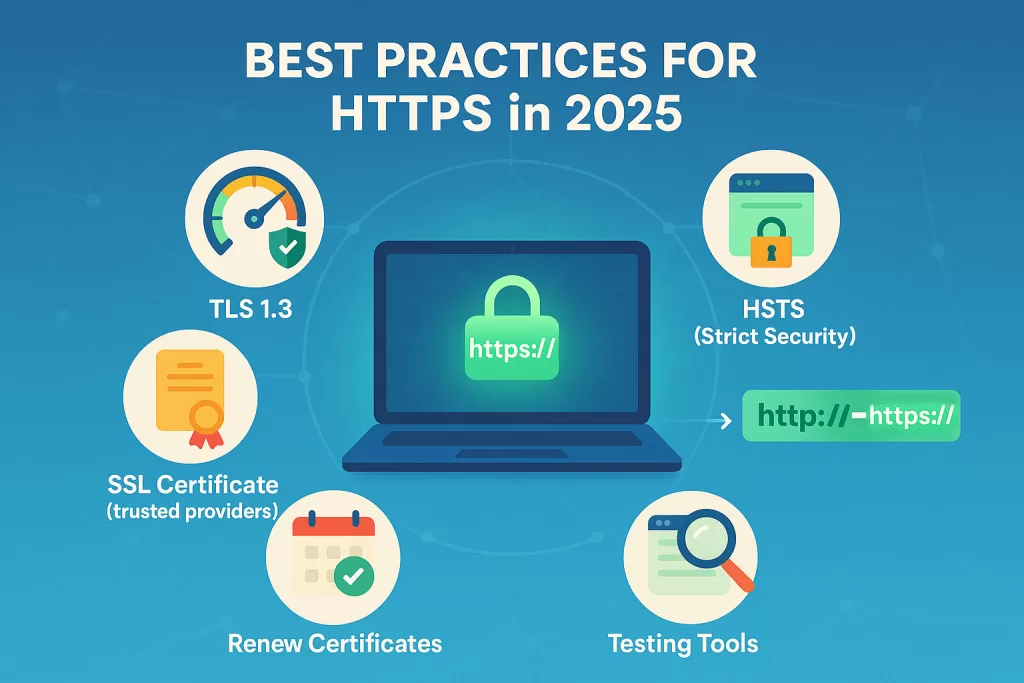
Best Practices for HTTPS in 2025
If you’re building or managing websites, follow these best practices:
- Use TLS 1.3 → It’s faster and more secure than older versions.
- Install SSL from trusted providers → Let’s Encrypt, DigiCert, or GlobalSign.
- Enable HSTS (HTTP Strict Transport Security) → Forces browsers to always use HTTPS.
- Redirect HTTP → HTTPS → Never leave old pages accessible via HTTP.
- Renew certificates on time → Avoid browser warnings.
- Test using tools → Like Qualys SSL Labs Test to find misconfigurations.
Following these steps shows users and search engines you care about security.
FAQs on HTTPS
Q1: What is the full form of HTTPS?
👉 HyperText Transfer Protocol Secure.
Q2: In what layer does the HTTPS protocol live?
👉 Application Layer in the OSI model.
Q3: What port does HTTPS use?
👉 Port 443.
Q4: Which protocol does HTTPS use for secure communication?
👉 SSL/TLS.
Q5: Which internet protocol transmits encrypted data?
👉 HTTPS is the answer.
Conclusion
Back in the early 2010s, HTTPS felt like an option. In 2025, it’s a non-negotiable standard. From banks to blogs, every site needs to run on the HTTPS Protocol.
The internet in 2025 runs on trust — and the HTTPS Protocol is the foundation of that trust. Whether you manage a small blog or a global e-commerce platform, enabling https:// is about more than encryption — it’s about showing users their data, privacy, and confidence matter.
The web has moved on from HTTP. The real question is, have you?
🔗 Related Reads
Difference Between RAM and ROM (2025) – RAM vs ROM
What is CPU? Complete Guide 2025