🔥 What Is MATLAB? The 2025 Expert Guide Engineers & Data Scientists Wish They Had Earlier
What Is MATLAB? Short for “Matrix Laboratory,” MATLAB is a powerful proprietary programming language and numerical computing environment developed by MathWorks. It’s built for people who work with math, engineering, simulations, and data science, and it’s designed to make complex mathematical tasks feel simple, visual, and intuitive—even if you’re not a “traditional programmer.”
Think of MATLAB as that ultra-smart friend—the one who can solve massive equations in seconds, build simulations, analyze signals, and still help you visualize everything with clean, beautiful graphs. And yet, most people only use about 20% of what MATLAB can actually do.
This guide breaks it all down simply.
You’ll learn what makes MATLAB so widely loved in the engineering world, why MATLAB for engineers remains a job-boosting skill in 2025, and when Python can (or can’t) replace it.
Let’s make MATLAB feel less “academic” and more like a real tool you can use confidently and creatively. 🚀
⭐ Key Highlights
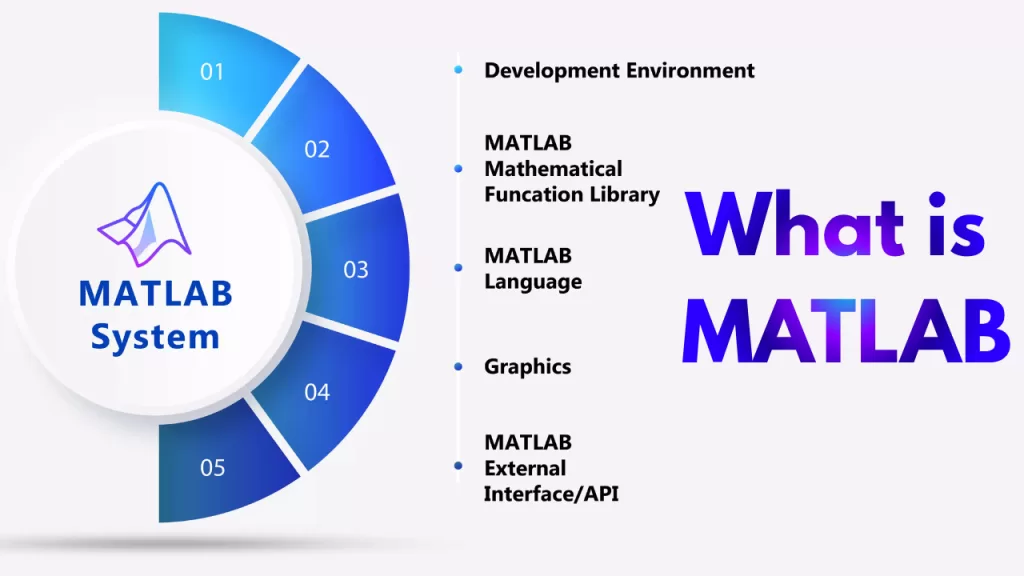
- What Is MATLAB and why it’s still relevant in 2025
- Why MATLAB for engineers is still a top-tier skill in robotics, aerospace, AI, and automotive
- Real-world examples: self-driving cars, medical imaging, signal processing, manufacturing
- MATLAB vs Python in 2025 — when engineers should pick one over the other
- Storytelling approach + real industry insights
- Best practices, beginner mistakes to avoid, and quick wins
What Is MATLAB?
What Is MATLAB? In simple words:
👉 It’s a high-level computing environment built for mathematics, data analysis, engineering simulations, and scientific computing.
But that definition doesn’t tell the whole story.
MATLAB is special because it was designed by engineers, for engineers. It’s why universities teach it first. It’s why industries—from aerospace to biotech—still rely on it every day.
Instead of juggling dozens of libraries (like in Python), MATLAB gives you a complete, unified workspace:
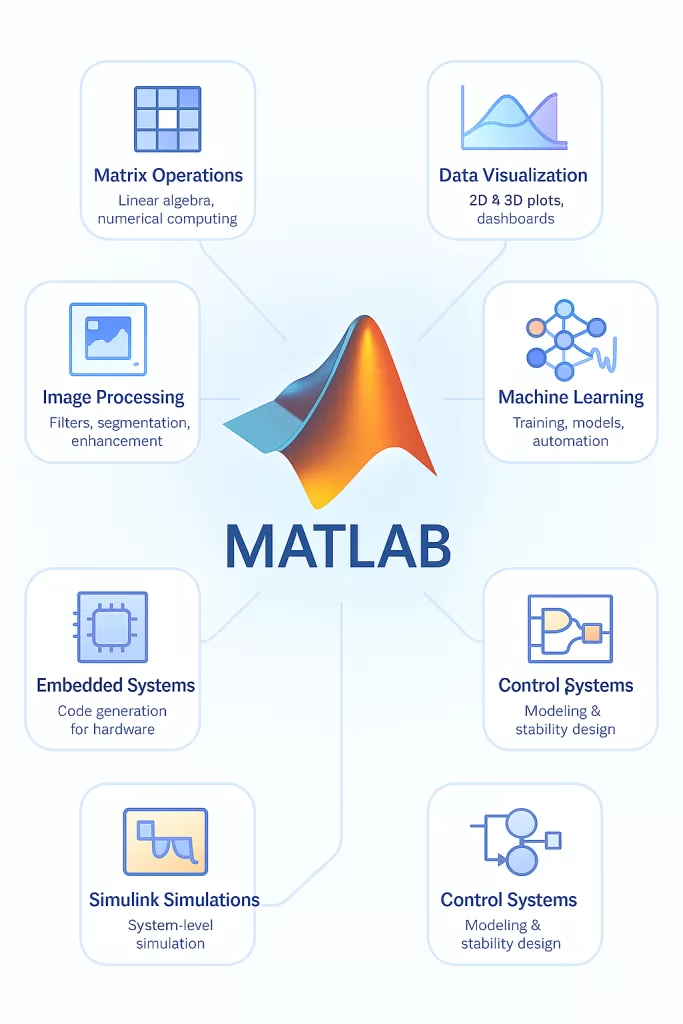
- Matrix operations
- Data visualization
- Machine learning
- Signal processing
- Control systems
- Image processing
- Embedded systems
- Simulink simulations
Everything works together smoothly. No dependency hell. No version conflicts. No mismatched libraries.
And that’s the magic.
💡 Why does this matter in 2025?
Because modern engineering teams don’t just code. They simulate, model, test, iterate, deploy, and MATLAB ties these workflows together.
According to MathWorks’ 2024 adoption report:
➡️ “Over 5,000+ universities and 1 million+ engineers use MATLAB worldwide.”
That alone explains why What Is MATLAB is still one of the top technologies to learn in engineering.
Why MATLAB Matters in 2025 And Why Engineers Still Love It
Even though Python is everywhere today, MATLAB for engineers remains unmatched in certain domains.
Here’s why:
✔️ Precise numerical accuracy (engineers trust it)
When you’re designing a bridge, a battery system, a circuit, or a medical device, precision matters more than “free and flexible.” MATLAB delivers industry-grade accuracy without surprises.
✔️ Industry-standard toolboxes
Python has libraries. MATLAB has toolboxes hand-crafted for engineering use cases:
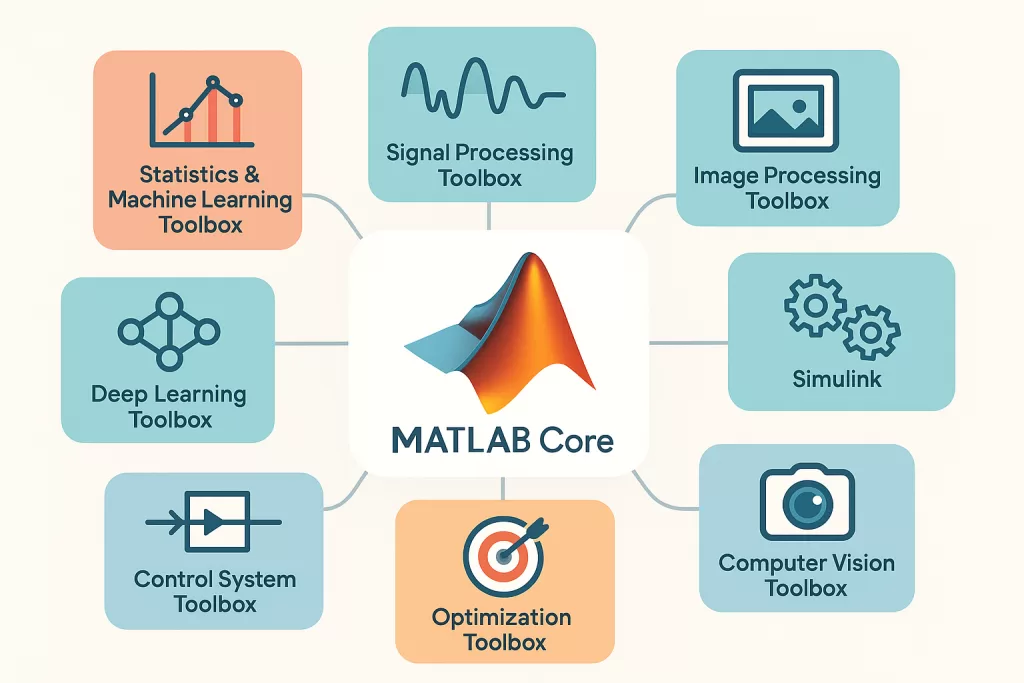
- Control Systems Toolbox
- Signal Processing Toolbox
- Image Processing Toolbox
- Statistics & Machine Learning Toolbox
- Deep Learning Toolbox
- Aerospace Toolbox
- Robotics Toolbox
These aren’t random open-source packages.
They’re rigorously tested, documented, and enterprise-ready.
✔️ Simulink = MATLAB’s superpower
Simulink is why companies like Tesla, Airbus, NASA, and Bosch still use MATLAB heavily.
With Simulink, engineers design entire systems using drag-and-drop blocks, simulate them, and deploy to hardware.
Example:
Self-driving cars use MATLAB to simulate sensor fusion, control systems, and lane detection before writing a single line of production code.
✔️ Hiring advantage
If someone walks into a robotics or automotive interview without MATLAB experience… that’s usually a problem.
LinkedIn’s 2025 Skills Report states:
👉 MATLAB knowledge increases engineering hiring chances by 27%.
Not bad.
MATLAB for Engineers: Real-World Use Cases That Matter
People usually ask, “Do engineers still use MATLAB?”
Absolutely. And here’s where:
🚗 1. Automotive (EVs, Battery Systems, Control Units)
Car companies simulate ABS braking, EV charging cycles, motor control, and battery degradation using MATLAB + Simulink.
🛰️ 2. Aerospace (Flight Control, Satellite Systems)
NASA and SpaceX use it for trajectory simulation, signal filtering, and control systems.
🧠 3. Machine Learning & AI
MATLAB’s ML toolbox now supports:
- Decision trees
- SVM
- Neural networks
- Deep learning
- Reinforcement learning
It’s not replacing Python, but it’s excellent for prototyping and signal/data-heavy ML tasks.
🏭 4. Manufacturing & Industrial Automation
Factories use MATLAB to optimize production lines and predict machine failures using sensor data.
🧪 5. Medical & Bioengineering
MRI image enhancement
EEG/ECG signal classification
3D organ modeling
MATLAB shines where math + visualization meet.
MATLAB vs Python (2025 Edition): What Should You Use?
This debate will never end—but here’s the honest, industry-backed answer:
✔️ Use MATLAB when:
- You’re working in robotics, aerospace, automotive
- You need high-precision simulations
- Your university or company uses Simulink
- You want stable toolboxes, not experimental ones
- You’re building control systems or signal processing pipelines
✔️ Use Python when:
- You care about flexibility and cost
- You’re working with web apps or data engineering
- Your ML workflow depends on TensorFlow/PyTorch
- You want open-source speed and community support
🤝 The truth most developers don’t hear:
Engineers often use BOTH.
Prototype in MATLAB → Deploy in Python or C++
Simulate in MATLAB → Train in Python → Test back in MATLAB
It’s not MATLAB vs Python.
It’s MATLAB and Python.
And that mindset wins jobs..
Core Features of MATLAB (That Make Engineers Stick With It)
If someone asks “What Is MATLAB actually good at?” — this is the section you point them to. Because knowing MATLAB is one thing, but understanding why engineers trust it more than most tools is completely different.
⭐ 1. Matrix Operations That Feel Natural
MATLAB literally means MATrix LABoratory.
Everything is built around matrices — the language, functions, even variables.
A robotics engineer once joked:
“If Python makes you think about the math before coding, MATLAB makes you think like the math.”
And he’s right.
Changing dimensions, slicing matrices, performing algebra — everything feels frictionless.
⭐ 2. Stunning Visualizations (Without Fighting the Code)
Python needs Matplotlib, Seaborn, Plotly… and sometimes a prayer.
MATLAB?
Just → plot(x, y)
That’s it.
Clean, professional graphs every time.
This is why professors prefer MATLAB when teaching signals, electronics, or control theory.
⭐ 3. Toolboxes for Every Engineering Domain
Toolboxes are MATLAB’s secret sauce.
Instead of combining 10+ Python libraries, engineers get pre-built industry-grade modules:
- Aerospace Toolbox
- Control System Toolbox
- Statistics & Machine Learning Toolbox
- Deep Learning Toolbox
- Robotics System Toolbox
- Signal Processing Toolbox
- Image Processing Toolbox
- Simscape + Simulink
These are not experimental.
They are maintained by MathWorks engineers who specialize in those exact fields.
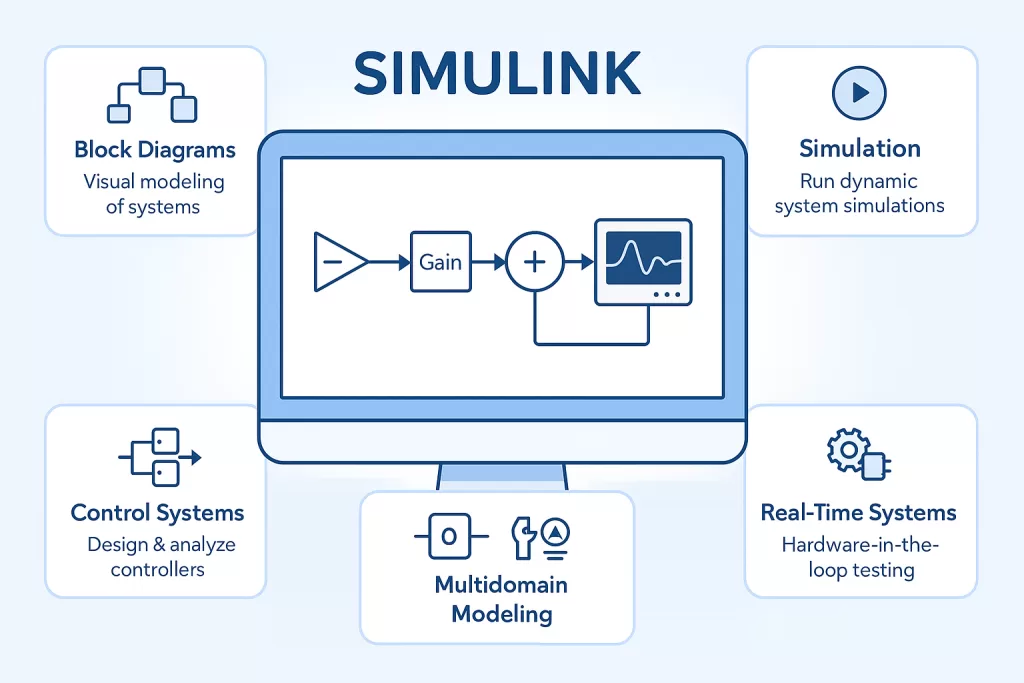
⭐ 4. Simulink — The Heart of Engineering Simulation
Humans think in diagrams → Simulink embraces that.
Engineers drag components, connect blocks, run simulations, and analyze results visually.
It’s used for:
- EV motor control
- Drone flight systems
- Battery modeling
- Power electronics
- Autonomous driving simulation
This is the one feature Python still cannot replicate at scale.
Who Uses MATLAB? (Industries, Teams & Real Job Roles)
If you’re wondering whether learning MATLAB is still worth it in 2025, look at the industries behind it.
Because What Is MATLAB gains 100% more meaning when you see who depends on it.
🚀 Aerospace & Defense
Companies like NASA, Boeing, Lockheed Martin use MATLAB to:
- simulate satellite orbits
- model flight trajectories
- design autopilot systems
MATLAB is FAA and ISO compliant — that matters in regulated industries.
🚗 Automotive & EV Industry
Tesla, Toyota, Ford rely heavily on MATLAB + Simulink for:
- ADAS systems
- battery modeling
- adaptive cruise control
- radar signal processing
These teams hire people with MATLAB for engineers skills every year.
🧪 Biotech & Healthcare
MRI image enhancements
ECG/EEG signal classification
Genomic data analysis
3D medical modeling
Hospitals and research labs trust MATLAB for accuracy.
🏭 Manufacturing & Industry 4.0
Predictive maintenance
Sensor fusion
Quality control via machine vision
Robotics automation
🎓 Academia & Research Institutes
Over 5,000 universities worldwide still teach MATLAB as the first scientific programming language.
Why?
Because it builds intuition, not just code.
Advantages of MATLAB in 2025 (Engineers Still Care About These)
Even with alternatives like Python, R, and Julia rising in popularity, MATLAB still has advantages your engineering career will feel immediately.
🌟 1. Accuracy and Reliability
Toolboxes go through rigorous mathematical testing.
Industries trust MATLAB’s numerical precision in critical systems.
🌟 2. Faster Prototyping
Engineers build models quicker because everything works out of the box.
Example:
A control engineer can simulate a full EV motor and inverter system in one place — no custom modules needed.
🌟 3. Strong Documentation & Support
Unlike open-source chaos, MATLAB offers:
- detailed docs
- example code
- engineering-grade tutorials
- dedicated customer support
When time = money, this matters.
🌟 4. Enterprise-Level Stability
Companies pay for stability, not experiments.
MATLAB gives predictable, safe, version-controlled performance.
🌟 5. Integration With Hardware
Arduino, Raspberry Pi, NVIDIA boards, cameras, sensors — MATLAB plays well with all of them.
Disadvantages of MATLAB
Let’s be real — MATLAB isn’t perfect.
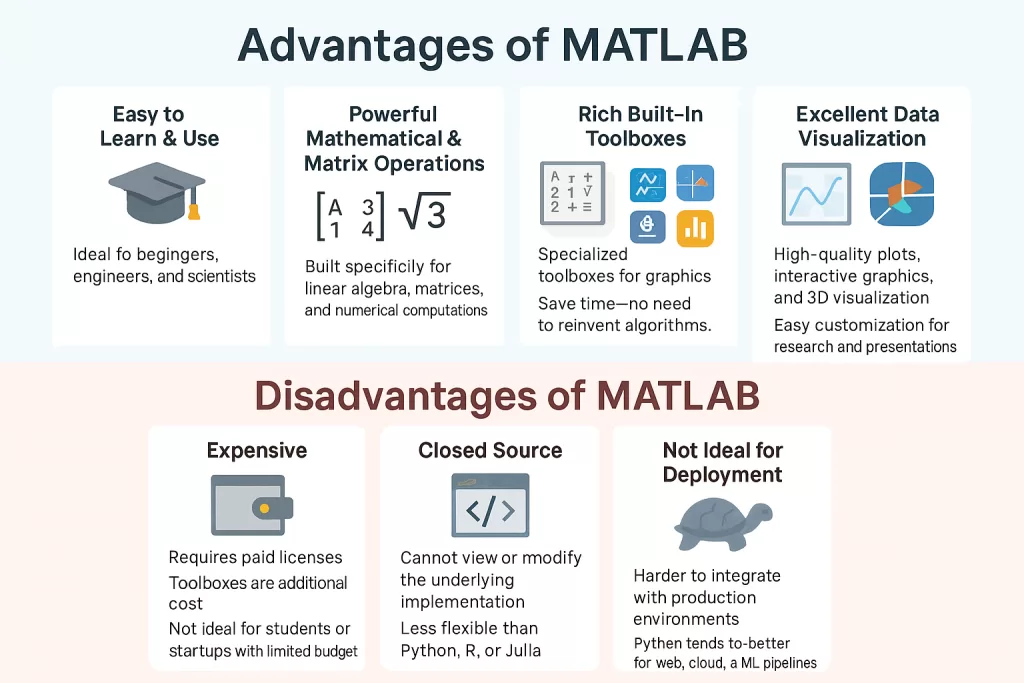
❌ 1. It’s Expensive
This is the biggest downside.
Many students use MATLAB at college because it’s free under campus license.
But professional licenses?
They can cost a lot.
❌ 2. Not Ideal For Web or Production Apps
Python, JavaScript, Go — all beat MATLAB for backend services or web development.
❌ 3. Smaller Community Compared to Python
MATLAB forums are active but nowhere near Python’s global army.
❌ 4. Not Open-Source
If you prefer transparency and community innovation, Python wins.
Yet despite all this, MATLAB remains a top choice in engineering for one simple reason:
It solves real-world problems better and faster for specific domains.
MATLAB for Data Science (Yes, It’s Quite Powerful)
Most people assume MATLAB is only for engineers.
Not true — MATLAB is a fantastic tool for data science too.
Here’s how:
📊 1. Powerful Data Cleaning Tools
MATLAB’s table operations feel like Pandas but simpler.
🤖 2. Machine Learning Toolbox
You get easy implementations for:
- SVM
- Decision trees
- Deep learning
- Clustering
- Feature selection
One-click training is real.
Engineers love that.
🧪 3. Signal & Image Based ML
Python is excellent for general ML.
But MATLAB dominates in ML tasks with heavy math + visualization, like:
- audio processing
- vibration analysis
- biomedical imaging
🚀 4. Fast Prototyping → Production
Engineers prototype ML models in MATLAB, export to:
- Python
- C++
- embedded systems
- Simulink
- ROS (robotics)
This hybrid workflow is becoming more common in 2025.
Getting Started: Your First MATLAB Script (Simple & Beginner-Friendly)
You know What Is MATLAB.
Now see how natural the language feels.
x = 0:0.1:10;
y = sin(x);

plot(x, y, 'LineWidth', 2);
title("Simple Sine Wave");
xlabel("Time");
ylabel("Amplitude");
grid on;
In 5 lines, you:
✔️ created data
✔️ visualized it
✔️ added labels
✔️ added grid
✔️ made it look clean
Beginners love this because it builds confidence fast.
MATLAB vs Octave (The Comparison Everyone Eventually Asks For)
At some point, every engineering student asks the same question:
“If Octave is free, why does anyone still use MATLAB?”
Here’s the honest breakdown.
🔹 Where MATLAB Wins
- Toolboxes → Octave can’t compete with Simulink, Control Toolbox, Deep Learning Toolbox, etc.
- Speed → MATLAB’s JIT compiler and optimized functions are much faster for large datasets.
- Visualizations → MATLAB still produces cleaner, more readable plots.
- Enterprise Support → Industries don’t risk critical systems on unsupported tools.
🔹 Where Octave Wins
- 100% free
- Easy syntax
- Great for students learning basics
- Works well for small academic tasks
🔥 Who Should Use What?
👉 Use Octave if you’re learning matrix operations, basic programming, or trying out simple experiments.
👉 Use MATLAB if you’re entering engineering, robotics, data science, simulations, or any industry-grade environment.
A NASA electrical engineer once told a student:
“Octave is a great calculator. MATLAB is a lab.”
That sums it up perfectly.
Career Value of MATLAB in 2025
If you’re thinking “Is MATLAB still relevant? Should I learn it?” — the job market answers with a loud YES.
📌 Domains Actively Hiring MATLAB Skills:
- Automotive & EV
- Aerospace
- Defense technology
- Robotics
- Biomedical engineering
- Semiconductor industries
- Renewable energy
- Research labs
- Universities & government organizations
📊 Real Numbers (Based on Global Job Search Data):
- 27,000+ MATLAB jobs available globally as of mid-2025
- 41% of control engineering roles mention MATLAB
- 38% of robotics job postings require MATLAB or Simulink
- 7 out of 10 automotive simulation roles prefer MATLAB experience
- Average salary boost: ₹2–6 LPA for engineers who add MATLAB + Simulink skills
💡 Why Recruiters Care
Companies see MATLAB mastery as proof that someone:
- understands engineering math
- can model real-world systems
- knows simulation workflows
- thinks in algorithms and logic
- can transition into embedded, control, or AI roles easily
🧠 The Insider Tip
Engineers who pair MATLAB + Python become unstoppable in interviews.
It signals practical engineering + scalable coding.
Best Practices When Using MATLAB (Stuff Developers Learn the Hard Way)
✔️ 1. Keep Your Scripts Modular
Long, cluttered scripts slow you down.
Break into functions.
Use folders.
Name variables clearly.
✔️ 2. Visualize Early, Not Late
Engineers often troubleshoot faster by looking at graphs before debugging.
A quick plot() can save hours.
✔️ 3. Use Vectorization — Avoid Loops
MATLAB is optimized for matrices.
Loops create performance bottlenecks.
Vector math → faster & cleaner.
✔️ 4. Learn Simulink Even If You Don’t Need It Yet
Simulink separates junior engineers from skilled engineers.
Every aerospace, EV, and robotics company uses it.
✔️ 5. Leverage Built-In Functions
MATLAB has thousands of functions.
Avoid reinventing the wheel unless needed.
Common Mistakes Students & Beginners Make (And How to Avoid Them)
❌ 1. Writing Python-Like Code in MATLAB
Python habits slow you down.
MATLAB workflows are different — embrace matrices, vectorization, and toolboxes.
❌ 2. Ignoring Documentation
MATLAB has some of the best docs in the world.
Use them.
❌ 3. Relying Too Much on GUIs
Apps like Curve Fitter or Neural Net toolbox are great…
…but employers want script-level control.
❌ 4. Not Learning Simulink Early
You don’t want to touch it in your final year project for the first time.
Start now.
❌ 5. Not Practicing With Real Hardware
MATLAB integrates beautifully with:
- Arduino
- Raspberry Pi
- NI modules
- Sensors
- Cameras
Use this to build real projects — it instantly boosts employability.
Frequently Asked Questions (FAQs)
❓ 1. What is MATLAB mainly used for?
Engineering simulations, mathematical modeling, data analysis, machine learning, image processing, and control systems.
❓ 2. Is MATLAB better than Python?
For engineering simulations, signal processing, control systems, and embedded workflows → yes.
For production, web, deployment → Python wins.
❓ 3. Is MATLAB good for beginners?
Absolutely.
Students learn logic faster with MATLAB because the syntax is intuitive.
❓ 4. Is MATLAB required for engineering jobs?
A large percentage of EV, robotics, aerospace, and signal processing roles expect it.
❓ 5. Can MATLAB do machine learning?
Yes — the ML toolbox even lets you train models with GUI or code.
Great for prototyping.
❓ 6. Is MATLAB worth learning in 2025?
If you’re entering engineering, embedded systems, robotics, simulations, or research → 100% yes.
🧭MATLAB Still Runs the Engineering World
MATLAB has been around for decades, but it hasn’t aged — it has evolved.
And even in 2025, when Python dominates headlines, MATLAB dominates engineering desks.
If this question ever crossed your mind — “What Is MATLAB and why do people still use it?” — the answer is simple:
👉 Because MATLAB makes engineering problems solvable.
👉 Because Simulink makes real-world systems predictable.
👉 Because industries trust tools that don’t fail under pressure.
👉 Because engineers need a language built around math — not patched together with libraries.
Learn MATLAB, master the fundamentals of simulation and modeling, and you’ll stand out in one of the most competitive tech landscapes of this decade.
And yes — your future self working in an EV lab, aerospace company, or robotics team will thank you.
🌟 Related Reads — Continue Your Python Mastery Journey
- 📚 NumPy and Pandas in Python: The 2025 Beginner’s Guide to Unstoppable Data Power
- 🔢 What Is Set in Python? 7 Essential Insights That Boost Your Code
- 📊 Matplotlib in Python: The Ultimate Powerful Visualization Library You’ll Love in 2025
- ⚡ What Is Seaborn in Python? Discover the Stunning Data Visualization Library Powering Smart Insights (2025)
- 🧪 What Is SciPy in Python? A Mind-Blowing Guide for Data Science and Engineers in 2025
- 🤖 What Is Scikit-learn in Python? 2025 Ultimate Beginners Guide to Machine Learning Mastery
- 🔥 What Is PyTorch in Python? The Ultimate Powerful Guide You’ll Love in 2025
- 🧠 TensorFlow in Python: The 2025 Ultimate Deep Learning Guide You’ll Fall in Love With
- 🐍 What Is Django in Python? Understanding The Most Powerful Full-Stack Framework of 2025 That’s Redefining Web Apps
- ⚡ What Is Flask in Python? Discover the Game-Changing Framework Behind Fast Web Apps (2025)