4 Storage Classes in C That Changed the Way I Code Forever!

When I first started learning C, I honestly had no idea what a storage class was. I just thought — variables are variables, right? I could declare them, use them, and move on. But the moment I stumbled into debugging messy code and unpredictable variable behavior, that’s when I discovered the real magic behind C storage classes.
And let me tell you — it completely changed how I write C programs.
If you’ve ever wondered why a variable sometimes “remembers” its value even after a function ends, or why global variables behave differently, then this post is for you.
What Are Storage Classes in C?

In simple terms — a C storage class defines how a variable is stored in memory, how long it stays alive, and where it can be accessed.
Sounds simple? It’s not, until you’ve seen it in action.
There are 4 main C storage classes you need to know about:
- auto
- register
- static
- extern
Each of these has its own personality. Think of them like roommates in a coder’s dorm — each behaves differently, but they share the same house (your memory space).
1. Auto Storage Class in C – The Default One You Never Noticed

I used to declare variables like this:
Guess what? That’s actually an auto storage class variable!
If you don’t specify a storage class, C automatically assigns “auto” to it.
📍Key points:
- Scope: Local to the function or block
- Lifetime: Exists only while the function runs
- Default value: Garbage (yep, random memory content)
- Storage: Memory (RAM)
Here’s how it looks explicitly:
But since auto is the default, nobody really writes it. I call it the “silent worker” of the C world.
🧠 Pro tip: Use it when you want simple local variables that don’t need to remember values after function execution.
2. Register Storage Class in C – The Speed Freak
Now this one’s interesting.
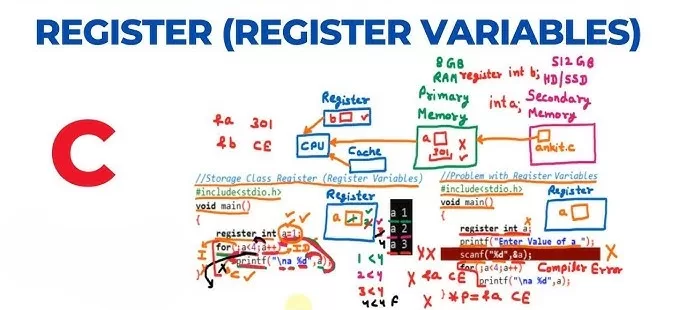
When I first saw register int i;, I thought it was some ancient keyword nobody used. But here’s the deal — register variables are stored in the CPU register instead of RAM.
That means… faster access! ⚡
📍Key points:
- Scope: Local to the block
- Lifetime: Exists during the function
- Storage: CPU registers (if available)
- Default value: Garbage
Example:
I once used it inside a loop that ran millions of times — and yes, it improved performance noticeably on embedded systems.
⚠️ Caution: You can’t use the & operator (address-of) with register variables because they don’t have a memory address!
3. Static Storage Class in C – The Memory Keeper

Here’s where I learned one of the coolest C tricks.
I had a counter inside a function that needed to remember how many times it was called.
Normally, a local variable forgets its value once the function ends, right?
Not with static!
Every time I call demoStatic(), it remembers the previous value.
That’s because static variables in C are stored permanently in memory, not recreated each time.
📍Key points:
- Scope: Local to the function
- Lifetime: Throughout the program
- Default value: Zero
- Storage: Data segment
This was a game-changer for me.
I use static storage class variables when I need persistent data across function calls without making it global.
🧠 Real-life example:
Think of static like your notebook on your desk. You close it (function ends), but the notes inside remain for the next time you open it.
4. Extern Storage Class in C – The Global Connector
Okay, confession: I used to mess this up all the time when working with multiple C files.
I’d define a variable in one file and then try to use it in another — only to face the dreaded “undefined reference” error.
That’s where extern storage class comes to the rescue.
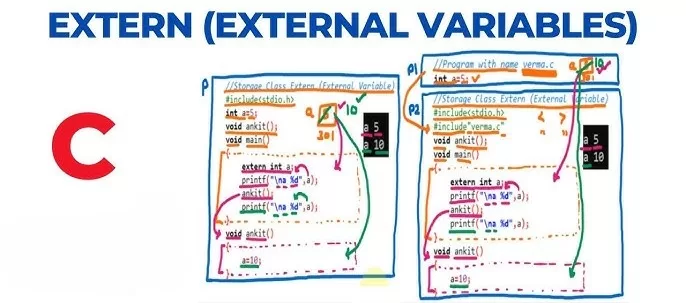
You use it when you want to access a global variable from another file.
Let’s say you have two files:
file1.c
file2.c
Here, extern tells the compiler that total exists somewhere else — no need to create new memory for it.
📍Key points:
- Scope: Global (accessible across files)
- Lifetime: Entire program
- Default value: Zero
- Storage: Data segment
💡 Pro tip: Use extern to share variables between modules without redefining them. Perfect for large-scale C projects.
🧮 Quick Comparison Table
| Storage Class | Scope | Lifetime | Default Value | Storage Location | Keyword |
|---|---|---|---|---|---|
| auto | Local | Function | Garbage | RAM | auto |
| register | Local | Function | Garbage | CPU Register | register |
| static | Local | Program | Zero | Data Segment | static |
| extern | Global | Program | Zero | Data Segment | extern |
Importance Of C Storage Classes
Understanding C storage classes doesn’t just make you sound smart — it makes your code faster, cleaner, and safer.
When I started optimizing embedded C code for IoT devices, memory management became everything. Using the right C storage class at the right place reduced memory leaks, improved performance, and even helped me debug easier.
Let me break it down simply:
- Use auto for temporary, function-level variables.
- Use register when performance is key (like in loops).
- Use static when a variable needs to remember its state.
- Use extern to share data across files.
Final Thoughts:
At first, storage classes in C felt like overkill. But over time, I realized they’re the invisible hands managing variable behavior.
Learning them gave me control — not just over memory, but over how I think as a programmer. Every time I use a static variable or declare an extern, I know exactly what my program’s doing behind the scenes.
If you’re serious about mastering C, don’t skip this part. Understand your C storage classes deeply. They might not make flashy headlines, but they’ll make your code bulletproof.
Kaashiv Infotech Offers, C Programming Course, Full stack development course, Python Course & More, Visit Their Website www.kaashivinfotech.com.
Related Reads: