7 Key Differences Between DOS and DDOS Attacks That Every Internet User Should Know!

When I first learned about DDOS and DOS attacks, I thought they were just fancy hacker terms that sounded cool in movies. But once I started studying cybersecurity, I realized how real, dangerous, and surprisingly simple these attacks can be. Let’s be honest—if you use the internet (which obviously, we all do), understanding the difference between DOS and DDOS attacks could save you from some serious trouble.
What Is a DOS Attack?
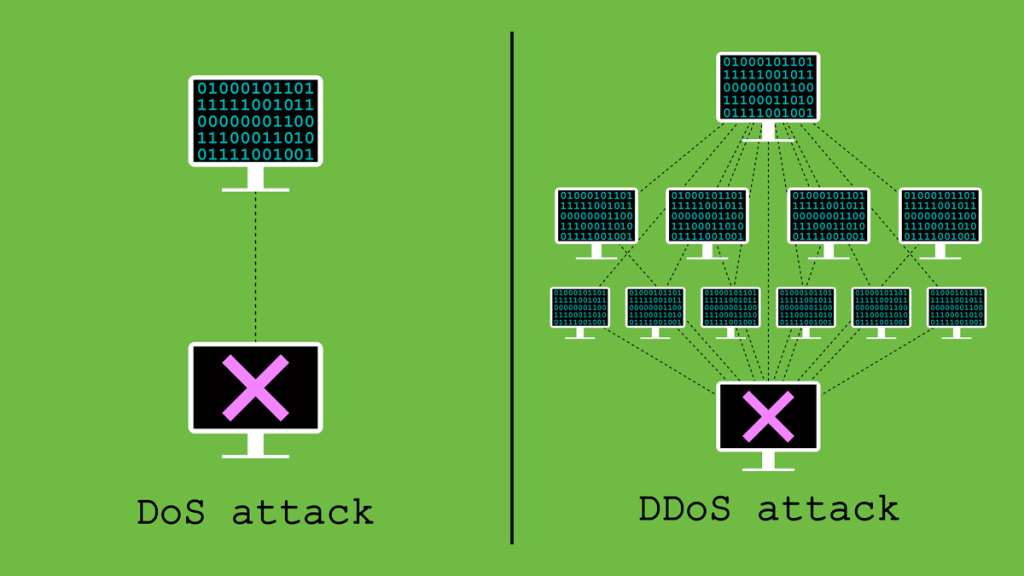
Let’s start with the basics. A DOS attack stands for Denial of Service attack. Imagine this — you’re hosting a small website for your college project. Everything’s going smoothly until one day, your website slows down and eventually crashes. You check your hosting dashboard and realize — the server’s being overloaded with requests. But here’s the twist — it’s not real users visiting. It’s one attacker, bombarding your system with fake requests to exhaust your server’s resources.

That’s a DOS attack — one machine flooding a target with too much traffic until it collapses.
💡 Real-Life Example: Back in the early 2000s, websites like Yahoo and eBay were hit by DOS attacks that temporarily took them offline. One attacker used a single computer to flood the servers — just like a one-person traffic jam on a one-lane road.
What Is a DDOS Attack?
Now, a DDOS attack — or Distributed Denial of Service attack — is like a DOS attack on steroids. Instead of one attacker, there are hundreds or even thousands of computers working together to crash a single system.
These machines are often infected with malware and form what we call a botnet. The scary part? The owners of these infected computers usually have no idea their system is being used for an attack!

💣 Real Example: In 2016, the Dyn DNS DDOS attack shook the internet. Major platforms like Twitter, Netflix, and Reddit went down. The attack used thousands of IoT devices (like smart cameras and routers) that were infected with the Mirai malware.
So yes, that cute Wi-Fi-enabled fridge might just be helping hackers take down Netflix!
DOS vs DDOS Attack: The Key Differences
When I first tried to differentiate between DOS and DDOS attacks, I got confused because both cause the same result — the system crashes. But when you look closer, the method, scale, and impact are worlds apart. Let me break it down simply:
| Feature | DOS Attack | DDOS Attack |
|---|---|---|
| Full Form | Denial of Service | Distributed Denial of Service |
| Attack Source | Single computer or network | Multiple computers (botnet) |
| Complexity | Simple and easy to execute | Complex and large-scale |
| Speed of Attack | Slower | Extremely fast |
| Traceability | Easier to trace the attacker | Harder to trace due to multiple sources |
| Damage Level | Moderate | Severe and widespread |
| Defense Mechanism | Easier to block | Difficult to defend without advanced security tools |
Why Hackers Use DDOS and DOS Attacks
It’s not always about fun or chaos. Many hackers use DDOS and DOS attacks for reasons like:
- Revenge or protest: Hacktivist groups like Anonymous use DDOS attacks to protest against organizations.
- Extortion: Attackers threaten to launch an attack unless paid a ransom.
- Testing security: Sometimes ethical hackers (like me during lab simulations ) test how a system responds under pressure.
- Diversion: Attackers use DDOS attacks to distract IT teams while launching a more serious data breach in the background.
Real-Life Analogy
Here’s how I explain it to my non-tech friends:
Imagine you’re running a small coffee shop. A DOS attack is when one person keeps ordering coffee repeatedly and refuses to leave. A DDOS attack, on the other hand, is when a whole crowd storms in, ordering endlessly until your shop can’t handle the load — even your regular customers can’t get their coffee.
That’s what websites feel like during DDOS and DOS attacks — overwhelmed and helpless.
How to Protect Against DOS and DDOS Attacks

Over the years, while monitoring networks, I’ve learned that prevention beats recovery. Here are a few effective measures:
- Use a Content Delivery Network (CDN): Services like Cloudflare or Akamai absorb and filter malicious traffic before it hits your server.
- Rate Limiting: Restrict the number of requests a user can make in a given time.
- Firewalls and Intrusion Detection Systems: Tools like WAF (Web Application Firewall) can detect and block suspicious patterns.
- Use Anti-DDOS Services: Many web hosts offer DDOS protection add-ons — trust me, it’s worth every rupee.
- Keep Systems Updated: Outdated software is a hacker’s paradise.
- Monitor Traffic Regularly: As I do for my network monitoring project, I use tools like Wireshark and Nagios to watch unusual traffic spikes.
Final Thoughts
At the end of the day, whether it’s a DOS or DDOS attack, both aim for one thing — denial of service. But the scale, complexity, and impact of a DDOS attack make it far more dangerous.
If you’re a student, a cybersecurity learner, or just an internet user, understanding DDOS and DOS attacks isn’t optional anymore — it’s essential.
So, the next time your website lags mysteriously or your server shows a sudden spike in requests — don’t panic. Stay calm, monitor your logs, and remember — knowledge is your first line of defense.
Want to learn about Cyber Security?, Kaashiv Infotech Offers, Cyber Security Course, or Networking Course & More, Visit www.kaashivinfotech.com.
Related Reads: