When I first heard people throwing around the terms UI and UX, I thought, “Aren’t they the same thing?”
If you’re reading this, you probably feel the same confusion I once did. So, let’s break this down in plain English, no fluff. Just real talk about UI and UX full form, their meaning, and how both shape our digital world.
What’s the UI and UX Full Form?

Before anything else, let’s get the basics right.
- UI stands for User Interface
- UX stands for User Experience
Simple, right? But here’s where people get lost — the interface (UI) is what you see, while the experience (UX) is how you feel when using it.
Think of it like this 👇
When you walk into a café:
- The décor, the menu design, the seating — that’s UI (User Interface).
- How comfortable you feel, how easy it is to order, how fast you get your coffee — that’s UX (User Experience).
Both matter.ui and ux full form You can’t have a great café with stunning interiors but horrible service. The same goes for UI and UX design.
What is UI (User Interface) Design?

Let me take you back to my early days as a design enthusiast. I remember redesigning my first app interface — I obsessed over buttons, icons, colors, and typography. I wanted everything to look perfect. That’s UI design for you.
UI design focuses on visuals and interactivity. It’s about making digital products aesthetic and easy to navigate.
UI designers decide:
- Which colors make the brand pop
- How buttons look when you hover or click
- The layout, spacing, and typography
It’s the art side of digital design — where creativity meets technology.
👉 Example:
Think of Instagram’s clean layout, the heart icon, or the swipe-up story feature — all designed by UI designers.
What is UX (User Experience) Design?

Now let’s talk about UX design — the invisible hero of every great app or website.
UX is about how users feel when interacting with a product. It’s not just about looks, it’s about functionality, flow, and satisfaction.
When I started learning UX, I realized it’s a lot like being a detective. You have to understand what users want, what frustrates them, and how to make their journey smoother.
UX designers work on:
- Researching what users need
- Mapping out user journeys
- Testing how people interact with designs
- Making improvements for better usability
👉 Example:
Ever used Amazon’s “1-Click Buy” feature? That’s brilliant UX — it removes unnecessary steps and saves your time.
UI vs UX – What’s the Real Difference?
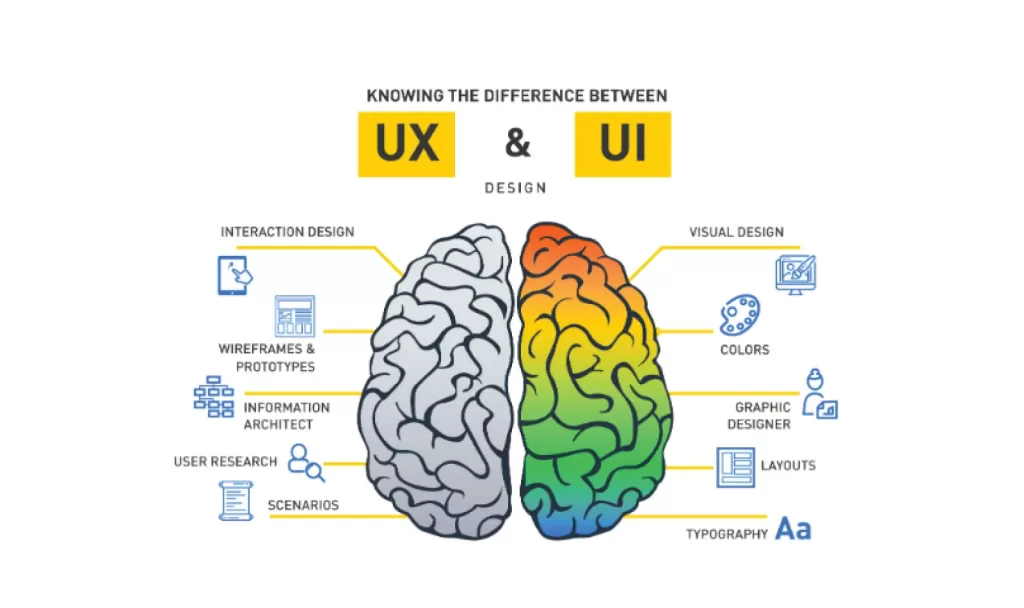
Here’s the simplest way I can put it:
| Aspect | UI (User Interface) | UX (User Experience) |
|---|---|---|
| Focus | Visual design and interaction | User journey and satisfaction |
| Goal | Make the product look good | Make the product work well |
| Involves | Colors, typography, buttons, layout | Research, usability testing, flow |
| Tools | Figma, Sketch, Adobe XD | Miro, UserTesting, Hotjar |
| Outcome | A beautiful interface | A seamless experience |
To sum it up — UI attracts users, UX keeps them.
A stunning app with poor UX is frustrating. But a functional app with bad UI feels dull.
That’s why UI and UX design must work hand in hand.
Real-Life Example: Apple’s Perfect UI & UX Balance 🍏

Let’s talk about Apple — the brand that nails UI and UX design every single time.
- The UI? Sleek, minimalist, consistent across all devices.
- The UX? Intuitive, fast, and effortless.
When you unbox an iPhone, every tiny detail — from the packaging to the swipe gestures — is part of Apple’s UX philosophy. It’s emotional, simple, and delightful.
That’s why Apple’s not just selling phones. It’s selling experiences.
UI and UX Tools You Should Try
If you’re planning to explore this field, here are a few tools I personally use and love:
- Figma – for UI and prototyping (collaboration heaven ✨)
- Adobe XD – another great UI tool
- Miro – for mapping user flows and brainstorming UX ideas
- Notion – for documenting research
- Hotjar / Google Analytics – to track UX behavior

Why Learning UI and UX Full Form Isn’t Enough
Knowing the UI and UX full form is just the beginning. The real magic happens when you apply it.
When I worked on my first real project, I made a mistake — I focused too much on UI and forgot UX. The app looked great but users dropped off because the checkout process was confusing. That’s when I realized — design without empathy is just decoration.
Final Thoughts:
In the end, it’s not UI vs UX, it’s UI + UX.
You need both to create digital products people love.
To me, UI and UX are like coffee and milk — great alone, but magical together.
So next time someone asks, “What’s the difference between UI and UX?”, smile and say:
“UI is what you see. UX is what you feel.”
And that’s the beauty of good design.
Want to learn more, Kaashiv Infotech Offers, UI UX Course, Front End Development Course, Full Stack Development Course & More, Visit Their Website www.kaashivinfotech.com.