Whenever someone asks me why their internet suddenly drops to 3 Mbps when it should be 100 Mbps, my first instinct is to check something most people ignore—the RJ45 color code. Yes, that simple sequence of colored wires inside your Ethernet cable often decides whether your connection is stable… or a complete nightmare.
When I first learned networking years ago, I messed this up more times than I’d like to admit. I’d crimp a cable, plug it in confidently, and boom—no connection. Why? Because I swapped just one wire. That’s how crucial the RJ45 color code is.
So today, I want to break it down for you like I would for a friend sitting next to me fixing their first ethernet cable. No jargon. No robotic explanations. Just real, simple, useful stuff.

⭐ What Is an RJ45 Connector?
An RJ45 connector is that small transparent plug you see at the end of an Ethernet cable—used in LAN networks, routers, switches, and home broadband setups.
Inside that connector, you’ll find eight small wires, and they must follow a specific RJ45 color code.
Why?
Because networks speak in patterns, and if the pattern is wrong, nothing works.
If you’ve ever used:
- Cat5 / Cat5e
- Cat6
- Cat7
🧵 Primary & Secondary Focus Keyword Subheading: RJ45 Color Code – Why These Color Patterns Even Matter?
I still remember the first time I heard someone say, “Color coding is only for neatness.” Nope. Wrong. The RJ45 color code ensures:
- Proper pairing
- Minimal interference
- Maximum speed (especially for CAT6/CAT7 cables)
- Compatibility across devices
If even one pair is mismatched, the cable may still “click” into the port, but the connection becomes unstable or dead.
So yes, this tiny detail matters—a lot.
🔍 T568A vs T568B: The Two Official RJ45 Color Code Standards
There are two globally-recognized wiring standards:
- T568A
- T568B
Both follow the same pairing logic, but the colors shift slightly.
And here’s the emotional part:
I learned the hard way that mixing T568A on one end and T568B on the other creates what’s called a crossover cable. Useful for specific situations, sure—but disastrous if you’re unknowingly trying to make a straight-through cable.
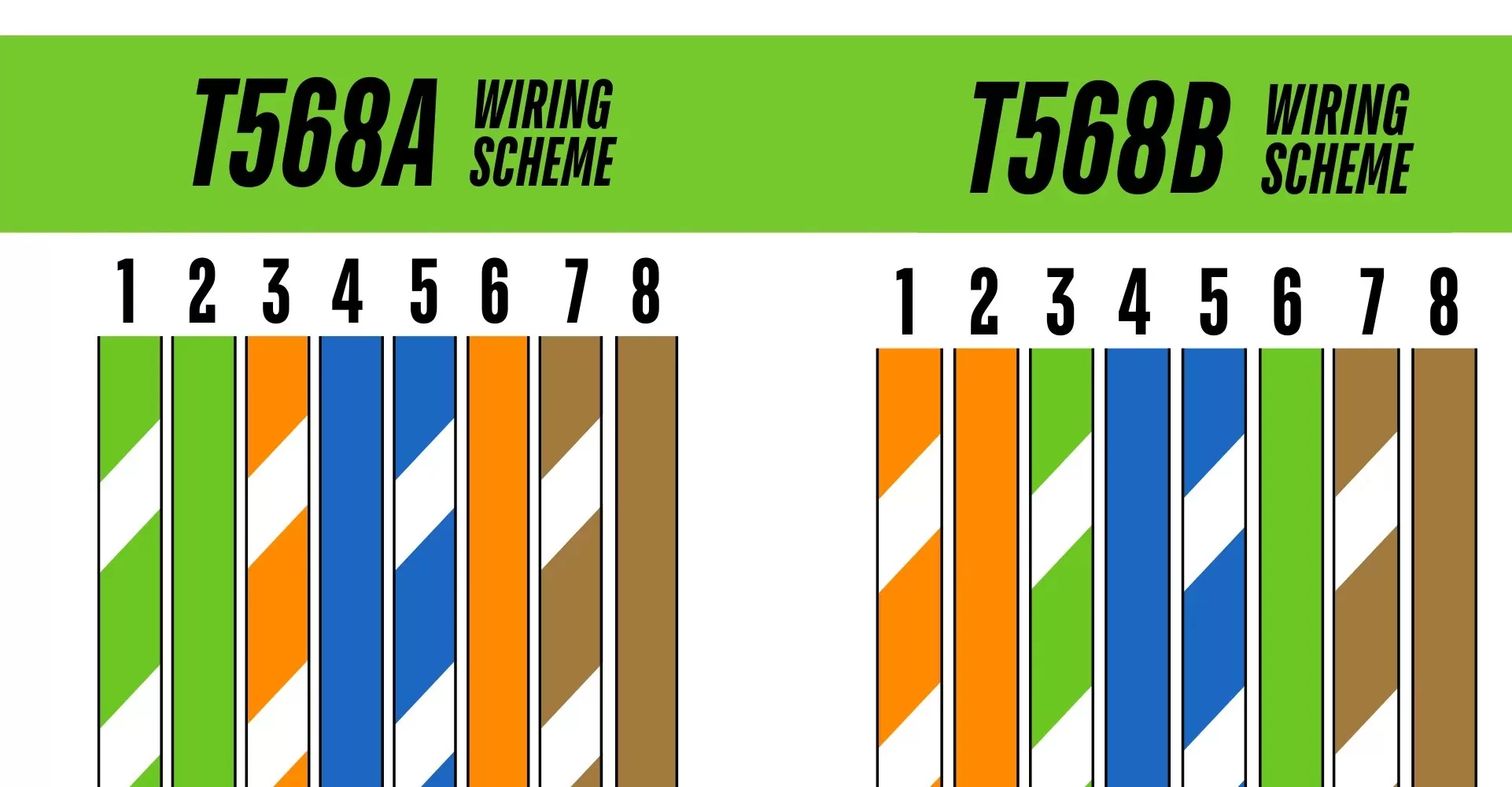
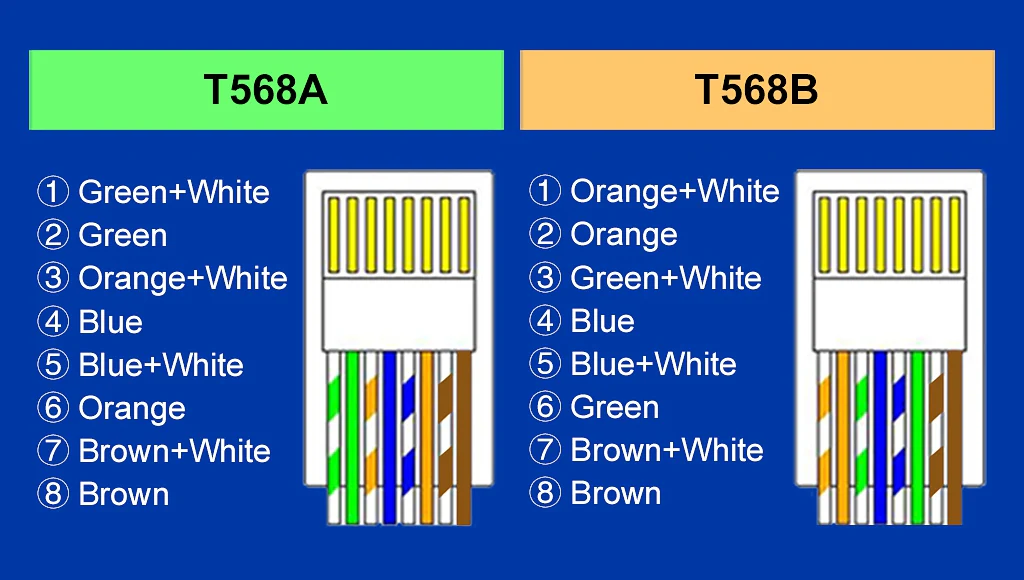
🎨 1. T568A RJ45 Color Code -Most Common in Government/Older Installations
Order from left to right:
1️⃣ White/Green
2️⃣ Green
3️⃣ White/Orange
4️⃣ Blue
5️⃣ White/Blue
6️⃣ Orange
7️⃣ White/Brown
8️⃣ Brown
I once worked in an office where half the building used T568A and the other half T568B. That day taught me patience and the value of double-checking.

🎨 2. T568B RJ45 Color Code -Most Common Worldwide & in India
Order from left to right:
1️⃣ White/Orange
2️⃣ Orange
3️⃣ White/Green
4️⃣ Blue
5️⃣ White/Blue
6️⃣ Green
7️⃣ White/Brown
8️⃣ Brown
Most technicians—including myself—prefer T568B because it’s widely adopted in commercial setups.
🆚 T568A vs T568B: Which RJ45 Color Code Should You Use?
Let me keep it brutally simple:
✔ Use the same standard on both ends → Straight-through cable (router → PC, switch → PC).
✔ Use A on one end and B on the other → Crossover cable (PC → PC, switch → switch).
Personally, T568B is my go-to because almost every modern device supports and expects it.
How I Crimp an Ethernet Cable
When I started doing this, my wires always ended up too short—or too long. Here’s the method I perfected over time:
- Strip just 1 inch of the outer jacket
- Untwist wires gently (don’t over-separate them)
- Arrange them in perfect RJ45 color code sequence
- Pull them straight using your fingers
- Trim the ends evenly
- Insert into RJ45 connector (check color order again!)
- Crimp firmly
- Test using a LAN tester
Every time I skip checking the order, I regret it. So trust me—double-check.
Straight-Through Cable Using RJ45 Color Code
- Both ends must be T568A ↔ T568A OR T568B ↔ T568B.
- Used for:
- Router to PC
- Switch to PC
- Modem to Router
🔁 Crossover Cable Using RJ45 Color Code
- One end T568A
- Other end T568B
- Used for:
- PC to PC
- Networking lab experiments
- Older switches without auto MDI-X
(If you’re a networking student, this will show up in your practical exams—I promise.)
⚠️ Common RJ45 Wiring Mistakes I Keep Seeing
I love teaching networking beginners, and I notice these mistakes repeatedly:
❌ Mixing color codes accidentally
❌ Leaving wire lengths uneven
❌ Not pushing the wires fully inside the connector
❌ Using cheap or fake RJ45 connectors
❌ Over-crimping and damaging the copper
Fixing these can instantly improve your cable quality.
💡 Real-Life Example: When Color Code Saved the Day
A few months back, a friend complained his office internet kept fluctuating. The ISP blamed the router, the IT guy blamed the switch. After five minutes with a LAN tester, I discovered two wires were swapped—just two.
Fixed the RJ45 color code, recrimped the cable, and the network magically healed.
This stuff matters
🔧 Tools You Should Have :
- Crimping tool
- RJ45 connectors
- LAN tester
- Cable stripper
- CAT6 cable
💬 Final Thoughts
Understanding the RJ45 color code isn’t just for networking technicians—it’s for anyone who wants stable, reliable internet. Once you learn the T568A and T568B patterns, you’ll never look at an Ethernet cable the same way again.
And trust me, the satisfaction of crimping a cable that works on the first try? Absolutely priceless.
Related Reads:
- What is TCP vs UDP?
- What is DNS? (Beginner-friendly)
- What is Framework?