In today’s digital world, billions of devices communicate simultaneously — sending emails, streaming videos, making voice calls, browsing websites, and transferring data. Imagine if every single communication required a separate physical cable or transmission medium. The cost and infrastructure would be enormous.
This is where multiplexing becomes one of the most important concepts in computer networks.
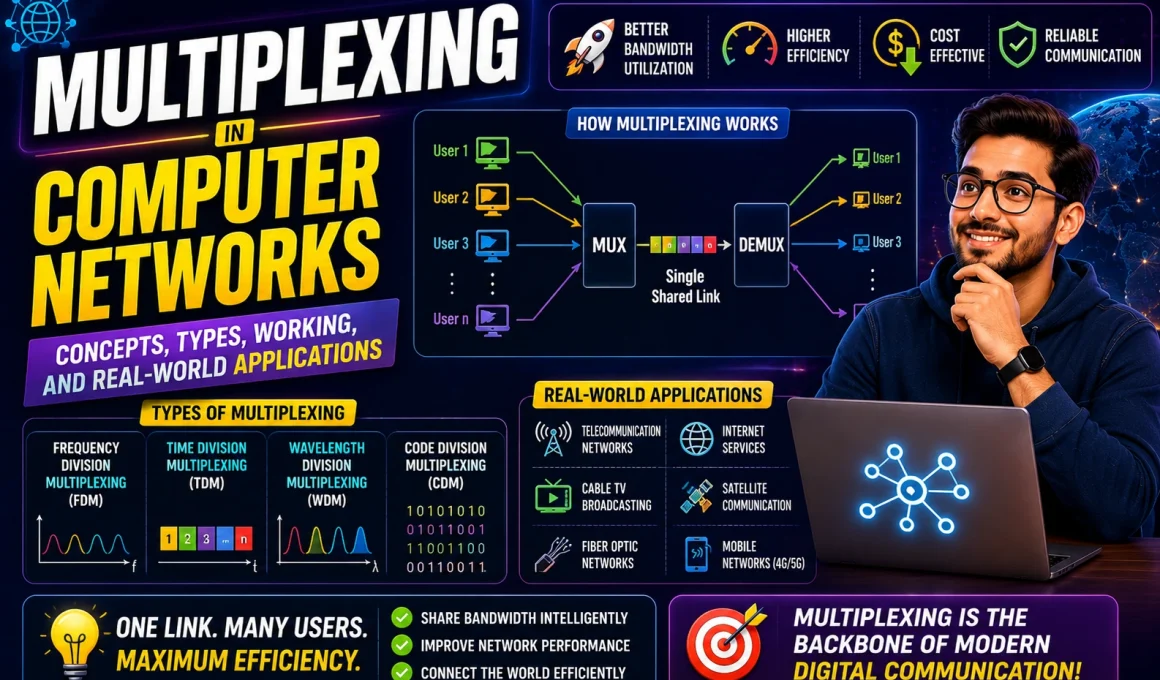
Multiplexing is the technique that allows multiple signals or data streams to share a single communication channel efficiently. It ensures maximum utilization of bandwidth while reducing costs and improving network scalability. From telephone systems to fiber-optic backbones and modern 5G networks, multiplexing is everywhere.
Let’s explore everything you need to know about multiplexing in computer networks.
What is Multiplexing?
Multiplexing is a method used in communication systems to combine multiple signals into a single composite signal for transmission over a shared medium. At the receiving end, the composite signal is separated back into individual signals.
In simple words:
Multiplexing = Many signals → One channel → Separated again at destination.
It helps overcome the limitation of bandwidth and optimizes network resources.
Why Do We Need Multiplexing?
Without multiplexing:
- Every communication would need a separate physical path.
- Infrastructure costs would increase drastically.
- Bandwidth would be wasted.
- Network scalability would be limited.
With multiplexing:
- Multiple users share one link.
- Bandwidth is efficiently utilized.
- Communication cost reduces.
- Networks can handle massive traffic volumes.
This is especially important in:
- Internet backbone networks
- Mobile communication systems
- Cable television
- Satellite communication
- Fiber optic networks
Basic Components of Multiplexing
Multiplexing works using two key devices:
1. Multiplexer (MUX)
The multiplexer is placed at the sending side. It combines multiple input signals into one output signal.
2. Demultiplexer (DEMUX)
The demultiplexer is placed at the receiving side. It separates the combined signal back into original signals.
Basic Flow:
- Multiple sources generate data.
- MUX combines the signals.
- Data travels through a single communication channel.
- DEMUX separates the signals at the receiver.
How Multiplexing Works
The working principle depends on how the channel is divided. The channel can be divided based on:
- Frequency
- Time
- Wavelength
- Code
- Space
Instead of giving the entire channel to one signal, multiplexing divides the channel intelligently so multiple signals can share it without interference.
Major Types of Multiplexing in Computer Networks
Different applications require different multiplexing techniques. Let’s explore them in detail.
1. Frequency Division Multiplexing (FDM)
What is FDM?
In Frequency Division Multiplexing, the total available bandwidth is divided into smaller frequency bands. Each signal is assigned a unique frequency range.
All signals are transmitted simultaneously but on different frequencies.
How It Works
- The total bandwidth is split into multiple non-overlapping frequency bands.
- Guard bands are added between signals to prevent interference.
- Each signal modulates a carrier frequency.
- At the receiver, filters separate each frequency band.
Where FDM is Used
- Radio broadcasting
- Television broadcasting
- Traditional telephone systems
- Cable TV networks
- DSL broadband
Advantages of FDM
- Continuous transmission
- No time synchronization required
- Suitable for analog signals
Disadvantages of FDM
- Requires guard bands (wastes bandwidth)
- Interference can occur if not properly filtered
- Not ideal for digital systems
2. Time Division Multiplexing (TDM)
What is TDM?
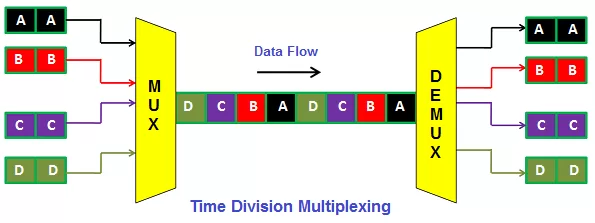
In Time Division Multiplexing, multiple signals share the same frequency channel but transmit in different time slots.
Each signal gets a small portion of time in a repeating cycle.
Types of TDM
a) Synchronous TDM
- Fixed time slots assigned to each device.
- Even if a device has no data, its slot remains reserved.
b) Statistical (Asynchronous) TDM
- Time slots assigned only to active devices.
- More efficient than synchronous TDM.
Where TDM is Used
- Digital telephony
- ISDN
- Circuit-switched networks
- Data communication systems
Advantages
- Efficient for digital signals
- Better bandwidth utilization (especially statistical TDM)
Disadvantages
- Requires synchronization
- Delay may occur if many devices compete
3. Wavelength Division Multiplexing (WDM)
What is WDM?
Wavelength Division Multiplexing is used in fiber optic communication. Instead of frequency, it uses different wavelengths (colors) of light to carry multiple signals through the same fiber.
Each signal uses a unique wavelength.
Types of WDM
- CWDM (Coarse WDM)
- DWDM (Dense WDM)
Where WDM is Used
- Long-distance fiber optic networks
- Submarine cables
- Data center communication
- ISP backbone networks
Advantages
- Extremely high data capacity
- Efficient for long-distance transmission
- Scalable
Disadvantages
- Expensive equipment
- Complex design
4. Code Division Multiplexing (CDM)
What is CDM?
In Code Division Multiplexing, each signal is assigned a unique code. All signals share the same frequency and time but are distinguished by their unique codes.
The receiver extracts the signal using the correct code.
Where CDM is Used
- CDMA mobile networks
- Satellite communication
- Secure military communication
Advantages
- High security
- Resistant to interference
- Efficient spectrum usage
Disadvantages
- Complex decoding
- Requires strong synchronization
5. Orthogonal Frequency Division Multiplexing (OFDM)
OFDM is an advanced form of FDM used in modern wireless communication.
It splits the signal into multiple smaller sub-signals and transmits them over closely spaced orthogonal frequencies.
Used In
- Wi-Fi
- 4G LTE
- 5G networks
- Digital broadcasting
Why OFDM is Important
- Handles multipath interference
- Provides high data rates
- Efficient for wireless environments
6. Space Division Multiplexing (SDM)
SDM uses multiple physical paths to transmit signals simultaneously.
Examples:
- Multiple antennas (MIMO)
- Multi-core fiber cables
Used In
- Advanced wireless networks
- Data centers
- High-speed fiber systems
Multiplexing vs Demultiplexing
| Multiplexing | Demultiplexing |
|---|---|
| Combines signals | Separates signals |
| Done at sender | Done at receiver |
| Uses MUX | Uses DEMUX |
| Reduces bandwidth usage | Restores original streams |
Real-World Applications of Multiplexing
Multiplexing plays a vital role in modern communication systems:
1. Internet Service Providers (ISPs)
ISPs combine traffic from millions of users onto shared backbone links.
2. Mobile Networks
Voice, data, SMS, and control signals share the same spectrum.
3. Cable Television
Multiple TV channels transmitted via FDM.
4. Fiber Optic Backbone
WDM carries terabits of data across continents.
5. Satellite Communication
Multiple users share the same satellite channel.
Advantages of Multiplexing
- Maximizes bandwidth utilization
- Reduces infrastructure cost
- Supports scalability
- Enables high-speed communication
- Allows multiple services on a single medium
Limitations of Multiplexing
- Increased system complexity
- Expensive initial setup
- Synchronization challenges
- Single point of failure
- Possible signal interference
Future of Multiplexing
With growing demand for:
- Cloud computing
- IoT devices
- 5G and upcoming 6G
- High-definition streaming
- Artificial intelligence workloads
Multiplexing technologies will continue evolving. Advanced optical multiplexing and massive MIMO systems are shaping the next generation of networks.
Conclusion
Multiplexing is a foundational concept in computer networking that enables efficient communication across shared media. Whether dividing channels by frequency, time, wavelength, code, or space, multiplexing ensures multiple signals coexist without interference.
Without multiplexing, modern communication systems — from the Internet to mobile networks — simply would not be possible.
It remains one of the most critical techniques powering the digital world.
Want to learn Networking Course, Cyber Security Course, Cloud Computing Course, IOT Course Visit course.kaashivinfotech.com.