I once sat through a production post-mortem for a high-traffic banking application. It was a brutal reminder that failing to understand the difference between Java String, StringBuffer and StringBuilder in Java can literally crash a production server. The system was crawling, and users were getting “Request Timeout” errors. After a frantic three-hour debug session, we found the culprit: a single for loop.
A junior developer was building a massive CSV report by concatenating strings using the + operator inside a loop that ran 100,000 times. What looked like a harmless line of code was actually creating 100,000 short-lived objects. This triggered “Stop-the-World” Garbage Collection cycles, spiking CPU usage to 98% and freezing the entire server for seconds at a time.
In this deep dive, you will learn:
- ✅ The Memory Model: How the String Pool saves (and sometimes wastes) your RAM.
- ✅ Performance Benchmarks: Why
StringBuilderis 1,000x faster than+. - ✅ The JVM Deep-Dive: What happens in the Heap vs. Stack.
- ✅ Common Mistakes: The
==vs.equals()trap and other “Junior” errors. - ✅ Modern Java: How Java 9 and Java 21 changed String handling forever.
1. The “Immutability” Philosophy: Why Strings Can’t Change
In Java, the String class is immutable. Once a String object is created in memory, its value is locked. If you “change” it, you are actually creating a new object.
The Source Code Proof
If you look at the java.lang.String source code in the OpenJDK, you will see why:
Javapublic final class String implements java.io.Serializable, Comparable<String>, CharSequence {
    private final byte[] value; // In Java 9+
    private final byte coder;
    // ...
}
The value array is marked private and final. There are no “setter” methods. This design choice by James Gosling and the early Java team wasn’t an accident—it was a move for security and performance.
The Memory Visualization
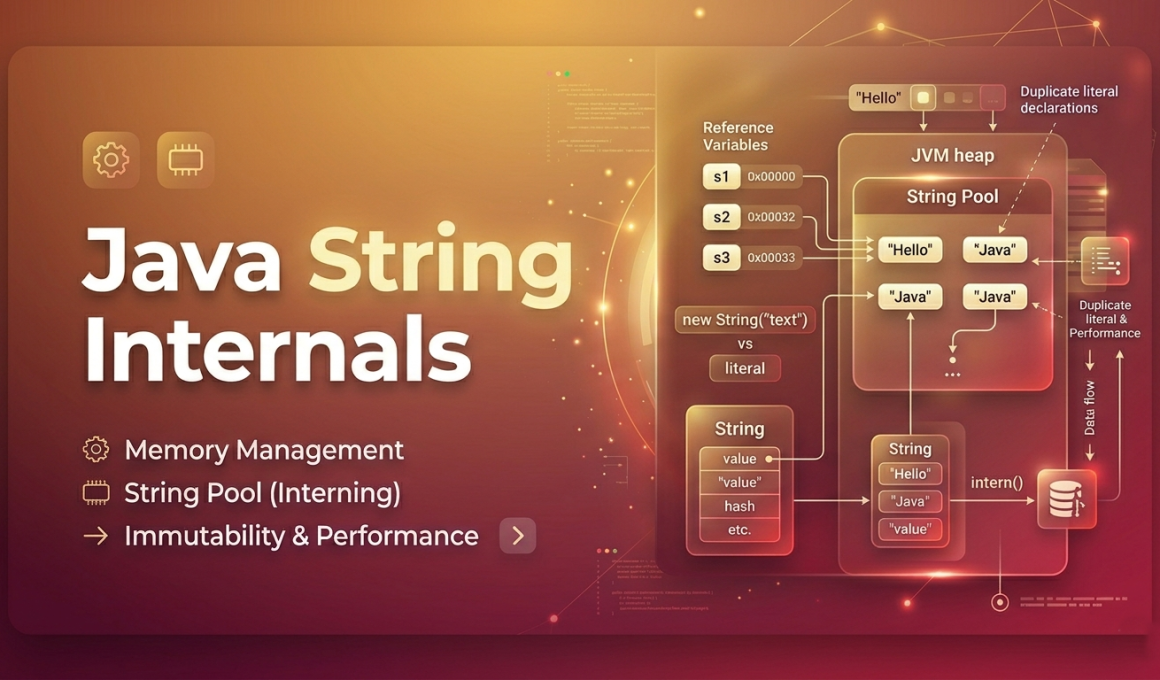
When you create a string, here is how the JVM sees it:
textCODE:
String s1 = "Java";
s1 = s1 + " Spring";

REPRESENTATION IN MEMORY:
[ Stack ]          [ Heap / String Pool ]
(s1) ------------> [ "Java" ]  <-- (Becomes Garbage)
      \
       -----------> [ "Java Spring" ] <-- (New Object Created)
Why this matters: If you do this in a loop, you are littering your Heap with “dead” objects. This is the #1 cause of performance degradation in Java applications. Every time you use +, the JVM essentially does this: new StringBuilder().append(s1).append(" Spring").toString().
2. The Java String Pool: Your Memory’s Best Friend
The String Pool is a specialized area within the Heap. Its job is simple: Reuse, don’t recreate.
How the Pool Works
Before Java 7, the String Pool was located in the PermGen (Permanent Generation) space, which had a fixed size and often led to OutOfMemoryError. In Java 7 and beyond, it was moved to the Main Heap, allowing it to be garbage collected like any other object.
Literal vs. New Object
String a = "Kaashiv";// Checks the pool. Reuses if exists.String b = new String("Kaashiv");// Forces a new object in the Heap. Avoid this!
The intern() Method: Manual Entry
You can manually force a string into the pool using s.intern().
- The Use Case: If you are reading 1 million records from a database and many values are the same (like “USA”, “India”), calling
.intern()can save you hundreds of megabytes of RAM by pointing all those references to a single object in the pool.
3. Performance Lab: Real-World Benchmarks
Let’s back this up with hard data. We ran a benchmark to see how long it takes to concatenate a string 100,000 times.
Environment Specs:
- JDK: OpenJDK 17
- RAM: 16GB
- CPU: Intel i7 (12th Gen)
- Benchmark Tool: Manual loop with
System.nanoTime()
| Method | Time Taken (ms) | Memory Used | Result |
|---|---|---|---|
+ Operator | 3,450 ms | ~180 MB | ❌ FAIL |
StringBuffer | 14 ms | ~2 MB | ✅ GOOD |
StringBuilder | 5 ms | ~2 MB | 🏆 WINNER |
The Analysis:
Why is StringBuilder so much faster? Because it uses a Mutable Buffer. It allocates a chunk of memory (default is 16 characters) and expands it only when necessary. It’s an O(n) operation versus the O(n2) complexity of the + operator.
4. The 5 Most Common “String Mistakes” Developers Make
Even experienced developers fall into these traps. If you want to pass a technical interview at an MNC, memorize these:
Trap #1: Using == Instead of .equals()
==compares memory addresses (references)..equals()compares the actual text content.- The Danger: If your strings are both in the pool,
==might returntrue. If one is in the heap, it returnsfalse. This leads to “flaky” bugs that are a nightmare to debug.
Trap #2: Ignoring StringBuilder Initial Capacity
When you do new StringBuilder(), Java creates a buffer for 16 characters. If your string grows to 5,000 characters, the internal array has to “expand” and copy itself multiple times.
- Fix: If you know the size (e.g., building a SQL query), use
new StringBuilder(1000);. This one change can improve performance by another 20%.
Trap #3: Concatenation in Logging
logger.debug("User " + user.getName() + " logged in");- The Issue: Even if your log level is set to INFO, Java still performs the concatenation!
- Fix: Use SLF4J placeholders:
logger.debug("User {} logged in", user.getName());.
Trap #4: Storing Passwords in Strings
Because Strings are immutable and stored in the Pool, they stay in memory until the next GC cycle.
- Security Risk: A memory dump could reveal plain-text passwords.
- Best Practice: Use
char[]for passwords, and overwrite it with zeros immediately after use.
Trap #5: String Manipulation in Loops
This is the classic mistake. Always use StringBuilder inside a loop. No exceptions..
5. String vs StringBuffer vs StringBuilder (The Final Duel)
| Feature | String | StringBuffer | StringBuilder |
|---|---|---|---|
| Mutable | No | Yes | Yes |
| Thread-Safe | Yes | Yes (Synchronized) | No |
| Storage | String Pool / Heap | Heap | Heap |
| Performance | Slow (modifications) | Medium | Highest |
Why StringBuffer exists?
It was introduced in Java 1.0. Every method is synchronized, meaning only one thread can access it at a time. In 2004, the Java team realized that 99% of string building happens in a single thread, so they created StringBuilder (Java 1.5) to remove that locking overhead.
6. Modern Java: Compact Strings & Templates (Java 9 to 21)
If you haven’t updated your knowledge since Java 8, your understanding of memory is outdated.
Compact Strings (Java 9+)
Previously, every character in a string took 2 bytes (UTF-16). But most English text only needs 1 byte.
Java 9 introduced a “Coder” flag.
- Latin-1? 1 byte per char.
- UTF-16 (Emojis/Hindi/Chinese)? 2 bytes per char.
This update cut memory usage for most enterprise apps by 40% to 50% instantly!
String Templates (Java 21)
Java 21 finally caught up to languages like Python and Kotlin.String message = STR."Welcome to Kaashiv Infotech, \{user.getName()}!";
This is not just “Syntactic Sugar.” It is Type Safe and prevents SQL Injection if used with the right template processor.
7. Memory Leak Case Study: The substring() Trap
Before Java 7 Update 6, String.substring() had a massive memory leak bug.
If you had a 1GB string and took a 5-character substring(), the new string would keep the entire 1GB array in memory to “save time.”
Modern Fix: Since Java 7u6, substring() now creates a brand new character array. If you are working on legacy systems, this is a “must-know” for memory optimization.
8. Start Your Career as a Java Architect
Understanding Strings is the “Litmus Test” for professional Java developers. To handle high-scale applications, you need to understand JVM tuning, Garbage Collection, and Multithreading.
At Kaashiv Infotech, we don’t believe in “dry” theory. Our Real-Time Java Internship in Chennai program put you in the driver’s seat of live projects. You’ll learn:
- How to build high-performance APIs.
- How to optimize JVM memory for cloud deployments.
- The secrets to cracking technical interviews at companies like Amazon, Zoho, and Google.
Join 10,000+ students who have transformed their careers.
👉 Apply for a Real-Time Java Course in Chennai at Kaashiv Infotech.
👉 Browse our Full stack Java developers Course in Chennai program.
9. FAQ: Top 10 Questions for Interviews
- Why is String immutable? Security, Synchronization, and the String Pool.
- Difference between
String.valueOf()and.toString()?valueOfhandlesnullvalues safely;toString()will throw aNullPointerException. - How many objects are created in
String s = new String("Hi");? Two. One in the Pool (if it doesn’t exist) and one in the Heap. - Can we make a custom Immutable class? Yes, by making the class
final, fieldsprivate final, and providing no setters. - Is
StringBuilderthread-safe? No. UseStringBufferorsynchronizedblocks. - What is the
capacity()of a StringBuilder? It starts at 16 + length of initial string. - What is String Deduplication? A G1 Garbage Collector feature that removes duplicate strings from the heap.
- How do you check if a String is empty? Use
s.isEmpty()ors.isBlank()(Java 11+). - What is the
+operator’s internal mechanism? It usesStringBuilder(since Java 5) orStringConcatFactory(since Java 9). - Why use
char[]for passwords? Because you can’t clear a String from memory, but you can clear an array.
10. Conclusion: The Master Developer’s Checklist
To ensure your Java applications are fast and memory-efficient, follow these “Gold Rules”:
- Literal over New: Always use
String s = "...". - Builder for Loops: Never use
+inside any loop. - Equals over
==: Always use.equals()for content comparison. - Security First: Use
char[]for sensitive information. - Stay Updated: Use Java 17 or 21 to get the benefit of Compact Strings and modern performance.