

An operating system (OS) is one of the most important components of a computer. It acts as an interface between users and computer hardware, allowing people to perform different tasks easily. Whether we use a desktop computer, laptop, smartphone, or tablet, every device requires an operating system to manage its resources and applications.
Popular operating systems include Windows, Linux, macOS, Android, and iOS. Each operating system offers different features, benefits, and limitations depending on its purpose and usage.
Understanding the advantages and disadvantages of operating systems helps students, beginners, and IT professionals learn how computers work and choose the right platform for their requirements.
What Is an Operating System?
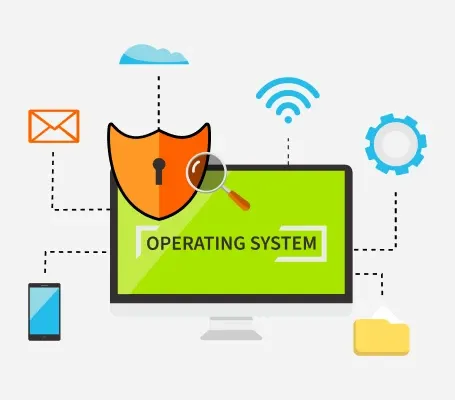
An operating system is system software that manages computer hardware and software resources. It controls essential activities such as memory management, file management, process management, security, and input/output operations.
When a user opens an application, saves a file, or connects a printer, the operating system manages the communication between the application and the hardware.
Some common functions of an operating system include:
- Memory Management: Allocates and manages memory for running applications.
- Process Management: Controls the execution of multiple processes.
- File Management: Organizes, stores, and retrieves files.
- Device Management: Manages hardware devices such as printers, keyboards, and monitors.
- Security Management: Protects system resources and user information.
- User Interface: Provides graphical or command-line interfaces for interacting with computers.
Advantages of Operating Systems
Operating systems provide several benefits that make computers easier to use, manage, and maintain. Here are some important advantages.
1. Easy User Interface
One of the biggest advantages of an operating system is its user-friendly interface. Modern operating systems provide graphical user interfaces (GUI) with icons, menus, windows, and buttons.
Users can perform tasks without learning complicated programming commands. For example, Windows and macOS allow users to open applications, manage files, and access settings easily.
2. Efficient Resource Management
An operating system manages important computer resources such as CPU, memory, storage, and hardware devices.
It distributes resources among different applications based on their requirements. This helps improve system performance and prevents applications from unnecessarily consuming available resources.
3. Multitasking Capabilities
Most modern operating systems support multitasking, allowing users to run multiple applications simultaneously.
For example, users can browse the internet, listen to music, download files, and edit documents at the same time. The operating system manages these processes and allocates CPU resources efficiently.
4. File Management
Operating systems provide tools to create, save, organize, rename, copy, move, and delete files.
They also support folders and directory structures, helping users manage large amounts of information. Windows File Explorer and macOS Finder are common examples of file management tools.
5. Improved Security
Operating systems include security features to protect computers from unauthorized access and potential threats.
Features such as passwords, user permissions, encryption, firewalls, and security updates help protect sensitive information. Some operating systems also provide built-in antivirus and application security features.
6. Hardware and Software Compatibility
An operating system helps applications communicate with computer hardware through device drivers and system services.
It supports different devices, including keyboards, printers, scanners, webcams, and storage devices. This makes it easier to install and use hardware and software.
7. Networking Support
Modern operating systems provide networking features that allow computers to connect to the internet and communicate with other devices.
Users can share files, access network printers, connect to Wi-Fi, and use cloud services. These features are important for businesses, educational institutions, and home users.
8. Regular Updates and Improvements
Many operating systems receive regular updates to improve performance, fix bugs, and strengthen security.
These updates also introduce new features and improve compatibility with modern applications and hardware.
Disadvantages of Operating Systems
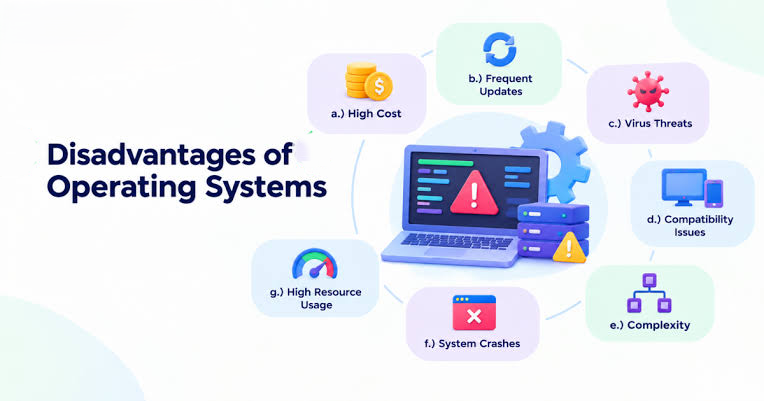
Although operating systems provide many benefits, they also have certain limitations. These disadvantages may affect performance, security, cost, and usability.
1. High Cost
Some operating systems require users to purchase a license or pay subscription fees. For example, certain editions of Windows and commercial operating systems may involve additional costs.
Businesses may also need to spend money on software licenses, maintenance, and technical support.
2. Security Vulnerabilities
Operating systems can contain security vulnerabilities that attackers may exploit.
Malware, ransomware, spyware, and viruses can affect systems through malicious downloads, outdated software, or unsafe websites. Regular updates and security practices help reduce these risks, but they cannot eliminate every threat.
3. System Complexity
Operating systems perform many complicated tasks in the background. Managing processes, memory, storage, and hardware requires complex software components.
Some advanced settings and troubleshooting procedures may be difficult for beginners. Users without technical knowledge may require professional support to resolve certain issues.
4. High Resource Consumption
Modern operating systems require sufficient hardware resources to operate smoothly.
Some operating systems consume significant amounts of RAM, CPU power, and storage space. Older computers may experience slow performance when running newer operating system versions.
5. Compatibility Issues
Not every application or hardware device works with every operating system.
For example, certain Windows applications may not run directly on Linux or macOS. Users may need alternative software, compatibility layers, or virtual machines to access specific applications.
6. System Failures and Crashes
Operating systems may occasionally experience errors, freezes, or unexpected shutdowns.
These problems can occur because of corrupted system files, hardware failures, incompatible drivers, or software conflicts. In some situations, users may lose unsaved data.
7. Frequent Updates and Maintenance
Operating system updates are important for security and performance, but they may sometimes interrupt regular activities.
Some updates require system restarts, consume internet data, or introduce compatibility problems with existing applications and drivers.
8. Dependence on the Operating System
Most computer applications depend on an operating system to function correctly.
If the operating system becomes corrupted or stops working, users may lose access to their applications and files until the issue is resolved. This makes operating system maintenance essential.
Examples of Popular Operating Systems
Different operating systems are designed for different devices and user requirements.
| Operating System | Common Usage |
|---|---|
| Windows | Personal computers, offices, and gaming |
| Linux | Servers, programming, and cybersecurity |
| macOS | Apple Mac computers and professional work |
| Android | Smartphones, tablets, and smart devices |
| iOS | Apple iPhones |
How to Choose the Right Operating System
Choosing the right operating system depends on your needs, budget, technical knowledge, and hardware requirements.
Consider the following factors before selecting an operating system:
- Purpose: Identify whether you need it for personal use, programming, gaming, business, or cybersecurity.
- Budget: Consider licensing costs and additional software expenses.
- Hardware Requirements: Check whether your computer supports the operating system.
- Security: Evaluate available security features and update support.
- Software Compatibility: Make sure your required applications are supported.
- Ease of Use: Select an operating system that matches your technical experience.
For example, Windows is suitable for general computer usage and gaming, Linux is popular for programming and server administration, and macOS is commonly used in creative and professional environments.
Conclusion
Operating systems play an essential role in modern computing by managing hardware, software, memory, files, and security. They provide several advantages, including multitasking, resource management, networking support, and user-friendly interfaces.
However, they also have disadvantages such as licensing costs, security vulnerabilities, hardware requirements, compatibility issues, and occasional system failures.
Understanding these advantages and disadvantages helps users select the right operating system based on their needs. Learning about operating systems is also an important foundation for students interested in computer science, software development, networking, and cybersecurity.
Want to learn about ethical hacker skills, Cyber Security?, Kaashiv Infotech Offers, Cyber Security Course, or Networking Course & More, Visit www.kaashivinfotech.com.