

Python is one of the most popular programming languages because of its simple syntax and beginner-friendly features. When learning Python, understanding its basic building blocks is important. One such fundamental concept is tokens in Python.
Tokens are the smallest individual units of a Python program that have meaning to the interpreter. Every Python statement is made up of different tokens, such as keywords, identifiers, literals, operators, and delimiters. These tokens help Python understand and execute the instructions written by developers.
Whether you are learning Python for software development, data science, automation, or web development, understanding tokens will help you write better programs and understand how Python code works internally.
What Are Tokens in Python?
Tokens in Python are the smallest meaningful elements of source code. When a Python program is executed, the interpreter breaks the code into individual tokens during the lexical analysis process.
For example, consider the following Python statement:
total = price + 100Python identifies different tokens in this statement:
total– Identifier=– Assignment operatorprice– Identifier+– Arithmetic operator100– Numeric literal
Each token has a specific purpose. Together, they form a complete Python statement.
Types of Tokens in Python
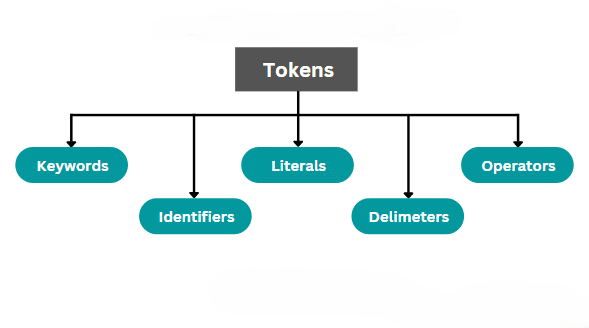
Python tokens are generally classified into five main categories:
- Keywords
- Identifiers
- Literals
- Operators
- Delimiters (Punctuators)
Let’s understand each type with simple examples.
1. Keywords in Python
Keywords are reserved words in Python that have predefined meanings. They are used to define the structure and functionality of a program.
Python keywords cannot be used as variable names, function names, or identifiers because they are reserved for specific purposes.
Some commonly used Python keywords include:
| Keyword | Purpose |
|---|---|
if | Checks a condition |
else | Executes an alternative condition |
for | Creates a loop |
while | Repeats statements |
def | Defines a function |
class | Defines a class |
return | Returns a value |
import | Imports a module |
break | Stops a loop |
continue | Skips the current iteration |
True | Represents a Boolean true value |
False | Represents a Boolean false value |
Example:
age = 22if age >= 18: print("Eligible to vote")else: print("Not eligible to vote")In this example, if and else are keywords. They help Python make decisions based on the given condition.
2. Identifiers in Python
Identifiers are names used to identify variables, functions, classes, and other objects in Python programs.
Developers create identifiers to store data and organize program components.
Example:
student_name = "Arun"student_age = 21def display_details(): print(student_name) print(student_age)display_details()Here, student_name, student_age, and display_details are identifiers.
Rules for Creating Identifiers
- Identifiers can contain letters, numbers, and underscores.
- They cannot start with a number.
- Spaces are not allowed.
- Python keywords cannot be used as identifiers.
- Identifiers are case-sensitive.
- Special characters such as
@,$, and%are not allowed.
For example, student_name is valid, but 2student and student-name are invalid identifiers.
3. Literals in Python
Literals are fixed values directly written in a Python program. They represent data such as numbers, text, Boolean values, and collections.
Python supports different types of literals.
Numeric Literals
Numeric literals represent numerical values.
age = 25price = 199.50number = 5 + 3jThese examples represent integer, floating-point, and complex number literals.
String Literals
String literals represent text enclosed within single quotes, double quotes, or triple quotes.
name = "Python"message = 'Welcome to programming'Boolean Literals
Boolean literals represent two values: True and False.
is_student = Trueis_completed = FalseCollection Literals
Python also supports collection literals such as lists, tuples, dictionaries, and sets.
numbers = [10, 20, 30]colors = ("Red", "Blue")student = {"name": "Arun", "age": 21}unique_numbers = {1, 2, 3}Literals allow developers to directly provide values while writing Python programs.
4. Operators in Python
Operators are special symbols or keywords used to perform operations on variables and values.
Python provides different categories of operators.
Arithmetic Operators
These operators perform mathematical calculations.
a = 20b = 10print(a + b)print(a - b)print(a * b)print(a / b)Common arithmetic operators include +, -, *, /, %, //, and **.
Comparison Operators
Comparison operators compare two values and return either True or False.
a = 20b = 10print(a > b)print(a == b)print(a != b)Logical Operators
Logical operators combine multiple conditions.
age = 25print(age > 18 and age < 60)print(age < 18 or age > 60)Python also supports assignment, bitwise, identity, and membership operators.
5. Delimiters in Python
Delimiters, also called punctuators, are symbols used to separate or organize different elements of Python code.
They help define function arguments, lists, dictionaries, expressions, and code blocks.
Common delimiters include:
| Delimiter | Purpose |
|---|---|
() | Groups expressions and function arguments |
[] | Defines lists and accesses elements |
{} | Defines dictionaries and sets |
: | Introduces a code block or separates dictionary keys and values |
, | Separates multiple values |
. | Accesses object attributes |
; | Separates simple statements |
= | Assignment symbol |
Example:
students = ["Arun", "Priya", "Kumar"]def display_students(name): print("Student:", name)display_students(students[0])In this example, square brackets define a list, parentheses are used for function calls, commas separate values, and the colon introduces the function body.
How Tokens Work in Python
Python uses a process called lexical analysis to identify tokens in source code.
When a developer writes a Python program, the interpreter breaks the source code into smaller meaningful elements. These elements are then processed by the parser to understand the program’s structure.
For example:
x = 10 + 20print(x)Python identifies the tokens as follows:
x– Identifier=– Assignment operator10– Numeric literal+– Arithmetic operator20– Numeric literalprint– Built-in function name(and)– Delimiters
Python processes these elements to understand the instructions and execute the program.
How to Identify Tokens Using Python
Python provides a built-in tokenize module that helps developers identify tokens in Python source code.
Example:
import tokenizefrom io import BytesIOcode = b"x = 10 + 20"tokens = tokenize.tokenize(BytesIO(code).readline)for token in tokens: print(token.type, token.string)This program reads Python source code and displays the token types and their corresponding values.
The tokenize module is useful for developers who want to understand how Python analyzes source code.
Why Are Tokens Important in Python?
Understanding tokens is useful for beginners and experienced developers because they form the foundation of Python programming.
Some important benefits include:
- Better understanding of syntax: Tokens help developers understand how Python statements are structured.
- Easy debugging: Identifying incorrect tokens can help locate syntax errors.
- Improved coding skills: Understanding keywords, operators, and identifiers makes writing programs easier.
- Compiler understanding: Tokens explain how programming languages process source code.
- Useful for advanced concepts: Tokenization is helpful when learning interpreters, compilers, and programming language design.
Conclusion
Tokens are the basic building blocks of every Python program. They represent the smallest meaningful elements of source code and help the Python interpreter understand programming instructions.
The five main categories of Python tokens are keywords, identifiers, literals, operators, and delimiters. Each category plays an important role in defining program structure and functionality.
For beginners, learning these token types with simple coding examples is a great way to build a strong foundation in Python. Once you understand how tokens work, learning advanced Python concepts such as functions, loops, object-oriented programming, and modules becomes easier.
Want to Learn More About Python & Artificial Intelligence ???, Kaashiv Infotech Offers Full Stack Python Course, Artificial Intelligence Course, Data Science Course & More Visit Their Website course.kaashivinfotech.com.