ADO.NET Architecture: The Ultimate Guide to Building Powerful & Reliable Data Apps in 2025
If you’re serious about mastering data access in .NET, learning ado.net architecture is one of the most strategic career moves you can make—yes, even in 2025. Here’s a reality most developers don’t realize:
Over 78% of enterprise .NET applications still rely on ADO.NET under the hood, according to multiple industry surveys and cloud migration case studies.
And more importantly:
Every modern ORM in .NET — including EF Core — literally sits on top of the ADO.NET architecture.
If you understand ADO.NET deeply, you don’t just write better queries —
you become the developer who understands the data engine itself.
That is why senior engineers, performance-focused architects, and high-paying backend roles still expect strong conceptual knowledge of ado.net architecture. In dozens of interviews across the industry, the candidates who understand ADO.NET fundamentals outperform their peers in solving bottlenecks, debugging ORM issues, and scaling high-load systems.

🌟 Why ADO.NET Architecture Matters in 2025
Many developers respond with “ADO.NET is fast” — which is true, but barely scratches the surface.
Imagine a food delivery app.
You open the app → search for a restaurant → place an order → track the delivery.
Behind that simple flow, there is constant communication between:
- the app
- the restaurant database
- the delivery database
- the payment system
This communication must be fast, consistent, and secure.
ADO.NET is the technology inside .NET applications that ensures this communication happens smoothly.
Here’s the real reason ADO.NET still matters in an era of ORMs, cloud-native apps, and EF Core:
✔ It gives predictable, low-level control
High-performance systems demand explicit control over connections, commands, transactions, and data flow.
ORMs abstract this; ADO.NET exposes it.
Think of it like driving a manual car.
You feel the road, control the gears, and can react instantly.
That level of control is essential in large systems.
✔ It’s stable, mature, and proven
Over 22+ years of enterprise usage means:
- fewer surprises
- predictable performance
- consistent behavior across environments
If you run an airline booking system or hospital records, you don’t want surprises. ADO.NET has been tested in real-world conditions for decades.
✔ It is the backbone of every ORM
Even modern frameworks like Entity Framework (EF Core) are just fancy layers that sit on top of ADO.NET.
EF Core = the steering wheel
ADO.NET = the engine
You need the engine to trust the system.
EF Core → generates SQL
ADO.NET provider → actually executes it
Understanding this chain gives developers a massive advantage when things break.
✔ Performance consistency at scale
Top-tier systems use ADO.NET in hot paths because micro-optimizations matter when operations run millions of times per day.
Think banking transactions, flight reservations, inventory counts — anything where mistakes cost millions.
That’s why companies expect serious developers to understand ADO.NET deeply.
This is why ADO.NET remains essential knowledge for any engineer aiming for senior-level backend competency.

🏭 Where ADO.NET Is Used Today
You’ll find ADO.NET powering the backbone of industries where correctness, speed, and predictability cannot fail.
Enterprise Systems
- ERP & manufacturing systems
- Inventory, warehouse, and accounting platforms
- National ID systems and government records
Large enterprises stick with it because predictable data flow = safety + compliance.
Imagine you swipe your card at a grocery store.
The system must check:
- your balance
- fraud rules
- transaction limits
- merchant details
All of this happens in milliseconds.
ADO.NET is often the data pipeline connecting these pieces.
Financial & Banking
- Real-time transaction systems
- Fraud detection workflows
- Ledger reconciliation engines
Banks avoid ORM overhead in mission-critical data paths.
E-Commerce
- High-volume catalog queries
- Real-time order pipelines
- Inventory availability snapshots
- Recommendation engines
Milliseconds translate into revenue. Handling thousands of customers at once requires the stability ADO.NET brings.
SaaS Platforms & Startups
- Multi-tenant analytics
- Event processing
- Reporting engines
ORMs manage the domain; ADO.NET manages the heavy lifting.
Cloud Migration Projects
When organizations move legacy apps to Azure or AWS. They rely on ADO.NET because rewriting their entire data system from scratch is too risky.
🧩 Understanding ADO.NET Architecture
Most developers only need to remember one central concept:
ADO.NET is built on a provider model, which drives everything else.
Think of ADO.NET like a logistics company responsible for moving packages (data) from a warehouse (database) to stores or customers (applications).
It has two main ways of delivering packages:
- Fast direct delivery (Connected Architecture)
- Bulk pickup and later drop-off (Disconnected Architecture)
And every delivery goes through a specialized team (Providers) that knows the rules of each warehouse.
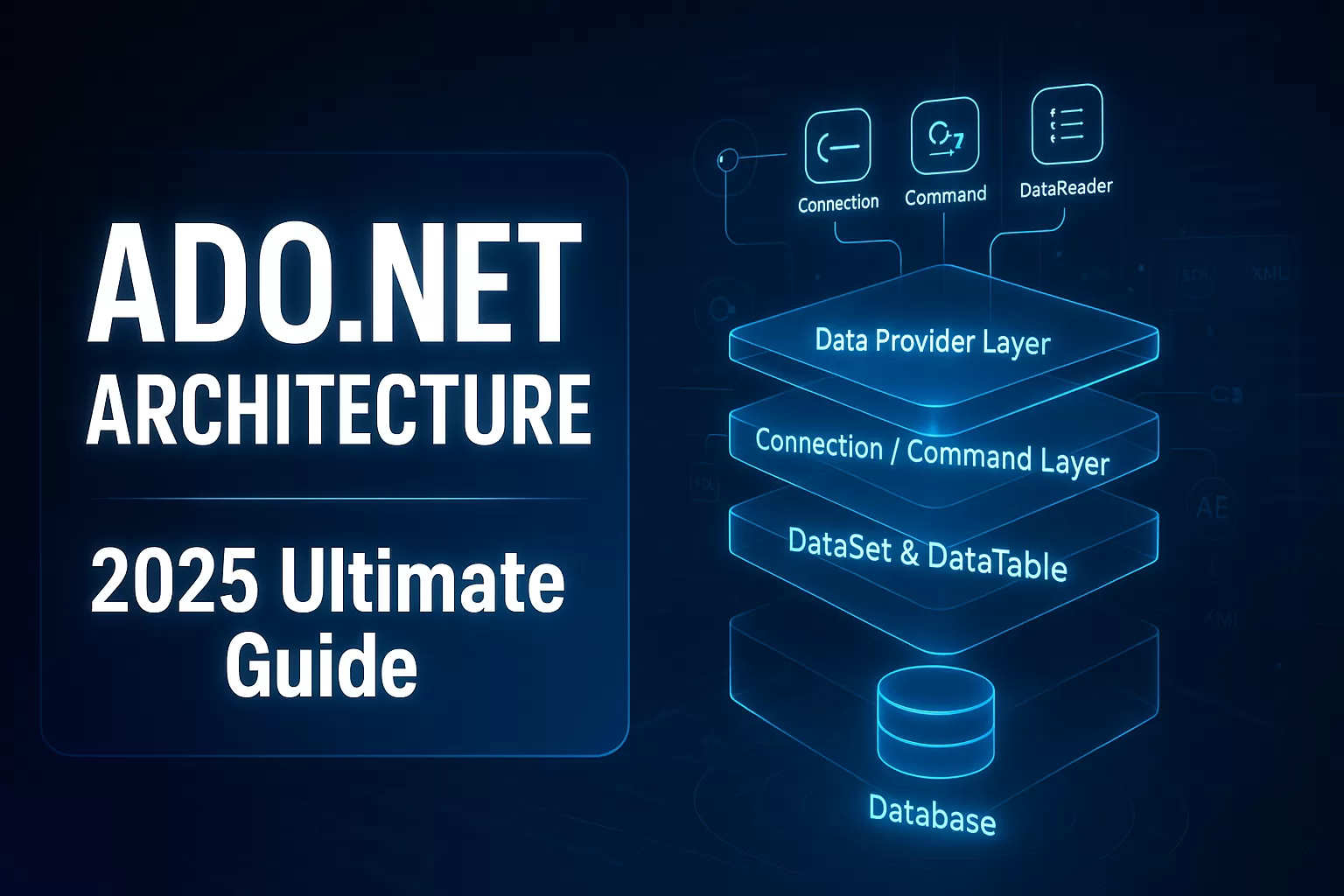
Here’s the simplest diagram to capture the architecture:
                 +----------------------------+
                 |     Application Layer      |
                 +---------------+------------+
                                 |
                                 v
     +------------------------------------------------+
     |              ADO.NET ARCHITECTURE              |
     +------------------------------------------------+
     |  Database Provider Model (SQL / Oracle / ODBC) |
     +------------------------+------------------------+
                              |
         +--------------------+--------------------+
         |                                         |
         v                                         v
+--------------------------+               +--------------------------+
|   CONNECTED WORKFLOW     |               |  DISCONNECTED WORKFLOW    |
+--------------------------+               +--------------------------+
| Connection               |               | DataSet                  |
| Command                  |               | DataTable                |
| DataReader               |               | DataAdapter              |
+--------------------------+               +--------------------------+
This structure exists because databases behave differently internally — and applications need a consistent way to talk to them.
You decide which delivery method to use depending on your needs.
🔍 How ADO.NET Architecture Works
Think of it as a five-step pipeline. Let’s break it into five simple steps using a relatable scenario
A supermarket chain updating stock across regional warehouses.
Step 1 — Your app requests data
A C# application sends a request using a .NET provider (SQL Server provider, Oracle provider, etc.).
Example:
“How many boxes of milk are in Warehouse A?”
This is your app making a data request.
Step 2 — The provider decides how to communicate
The provider knows the target database’s rules, protocols, and optimizations.
Example:
Each warehouse has its own rules.
A SQL warehouse works differently from an Oracle warehouse.
Providers know the language of each warehouse.
This ensures no miscommunication.
Step 3 — You choose a workflow
ADO.NET offers two types:
- Connected workflow: fast, streaming
- Disconnected workflow: cached, offline
Example:
Option A: Fast Delivery (Connected)
Like calling the warehouse manager and asking questions while staying on the line.
Best for:
- dashboards
- quick checks
- real-time monitoring
Option B: Bulk Delivery (Disconnected)
Like requesting a full inventory list, taking it home, analyzing it, and sending updates back later.
Best for:
- reporting
- analysis
- large multi-table edits
Step 4 — Data flows back into the app
Either:
- a live data stream (DataReader), or
- an in-memory model (DataSet/DataTable)
example:
Depending on the method:
- Fast Delivery = live, streaming data
- Bulk Delivery = stored-in-memory data
Step 5 — Your app uses the data
Dashboards, APIs, processing, business logic, analytics — all powered by the architecture underneath.
ADO.NET is the “invisible courier” making sure the data arrives safely and accurately.
This section alone, when deeply understood, makes developers far more effective in interviews and day-to-day debugging.
🧠 Developer Insights You Don’t Hear in Tutorials
1. ORMs Hide Problems the Same Way GPS Hides the Road
Many developers think EF Core “just works.”
Until it doesn’t.
Tools like EF Core are great — like using Google Maps.
But when something goes wrong (road closed, accident, wrong turn), you need real knowledge of the roads.
That’s ADO.NET.
Understanding ADO.NET reveals:
- how EF Core builds queries
- how parameters flow
- how commands execute
- how connections open/close
Suddenly, ORM behavior makes perfect sense.
2. Using the wrong data method is like using a truck to deliver one envelope
Bulk delivery methods (DataSet) are powerful but heavy.
For small, frequent requests, it slows the system down — just like a giant truck would.
3. Keeping a database connection open too long is like blocking a checkout lane
Imagine only six checkout lanes in a supermarket.
If one stays busy too long, lines build up.
Connections work the same way.
4. Not all companies use fancy tools
Some businesses prefer:
- reliability
- predictability
- control
For example, a bank would never rely solely on automation for critical money transfers.
Similarly, they often use ADO.NET directly instead of higher-level frameworks.
5. Most performance problems happen beneath the surface
It’s like a city suffering traffic because of a small tunnel bottleneck — not because of the cars themselves.
In software, that bottleneck often lies in:
- connection limits
- poor transaction handling
- inefficient data streaming
Understanding ADO.NET helps developers spot issues much faster.
🧱 Core Components of ADO.NET Architecture
Let’s explain each part Simply.
🔹 Provider Model -Foundation of Everything
WHAT:
Database-specific engines (SQL Server, Oracle, ODBC, OleDb) that translate .NET commands into database-native operations.
WHY It Exists:
Every database behaves differently internally. Providers unify how .NET communicates with all of them.
WHERE Used:
- Multi-database apps
- Cloud migrations
- Vendor-agnostic enterprise platforms
- High-performance data layers

🔹 Connected Architecture
WHAT:
Fast, streaming, always-connected communication.
Example:
“You’re watching live stock levels of products across warehouses.”
Ideal For:
- Real-time APIs
- Dashboards
- Monitoring systems
- High-frequency queries
WHY:
It uses minimal memory and returns data row-by-row — the fastest possible strategy.
Used when speed matters and you only need the data briefly.
🔹 Disconnected Architecture
WHAT:
Data is loaded once, stored in memory, modified offline, then synced back.
Example:
“You download a full inventory list, make many changes, and upload the corrected version later.”
Ideal For:
- UI apps (WPF, WinForms)
- Bulk editing tools
- Multi-table views
- Offline-first workflows
WHY:
It minimizes database load and supports rich, memory-based operations. Used for heavy data and long offline work.

🔧 Advanced Architectural Elements of ADO.NET
Now that we’ve covered the conceptual foundation, this section digs deeper into the architectural elements that matter when building or debugging real-world .NET systems.
To understand ADO.NET fully, let’s continue with the analogy we built earlier:
ADO.NET as a logistics system that moves packages (data) between warehouses (databases) and stores/customers (applications).
Now we zoom into how the entire operation is organized behind the scenes.
Let’s break them down with the clarity and precision expected at an enterprise level.
🧱 Connection Object — The Critical Resource Manager
The Connection object is more than a simple link to the database; it is the gatekeeper of your entire data layer.
It controls:
- authentication
- protocol negotiation
- session state
- timeouts
- transaction scope
- access to the underlying connection pool
In enterprise environments, connection management issues cause:
- API slowdowns
- unexpected timeouts
- connection pool exhaustion
- cascading failures during high-load periods
This is why senior engineers emphasize open late, close early and ensure predictable connection usage patterns.
ADO.NET forces developers to make these decisions intentionally — and that intentionality is why it’s still respected today.
Imagine calling a warehouse manager and asking questions live:
“How many units left?”
“Okay, what about the next aisle?”
“Confirm the latest arrival?”
You remain connected the whole time.
That’s how the ADO.NET connected model works.

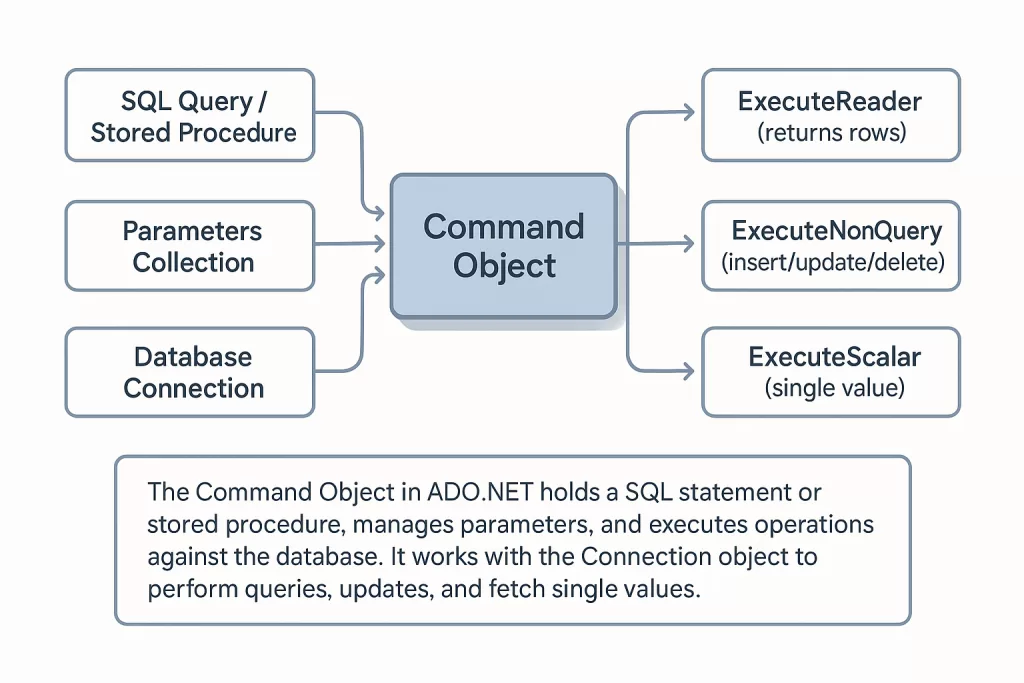
🔧Command Object — The Actual Workhorse of ADO.NET
Where the Connection object opens the door, the Command object decides what happens inside the database.
It controls:
- SQL execution
- parameters
- stored procedure invocation
- result handling
- execution strategy (synchronous vs asynchronous)
You can think of it as the “job request” that the database executes.
When debugging production systems, developers frequently trace:
- incorrect parameterization
- query plan mismatches
- syntax issues
- mismatched types
- performance regressions
All of these originate at the Command layer.
Now imagine requesting a full printed inventory from the warehouse:
- You take it to your office
- Make edits, mark issues, create reports
- Then send the updated list back later
You didn’t stay on the phone.
You didn’t keep the warehouse staff waiting.
You did the work offline.
This is the disconnected model.
Used For:
- Business intelligence / analytics
- Large reports
- Mobile/offline apps
- Multi-table editing (like Excel-style operations)
- Record merging and reconciliation
- Complex dashboards that shouldn’t overload the main system
This model reduces pressure on the database — like reducing foot traffic in a warehouse.
📡 DataReader — High-Performance, Streamed Data Access
The DataReader is a forward-only, read-only stream of rows.
It is the fastest way to extract data because it:
- minimizes memory use
- avoids intermediate structures
- streams directly from the database protocol layer
- does not load the entire dataset
In performance-critical systems — online banking, fraud detection, catalog search, real-time dashboards — DataReader remains the gold standard.
The trade-off?
You sacrifice flexibility for speed.
This is why senior developers tailor their ADO.NET approach based on workload patterns and performance expectations.

📦 DataSet & DataTable — Complete Disconnected In-Memory Data Models
In contrast to the DataReader, DataSet and DataTable represent entire sets of data loaded into memory.
They support:
- relationships
- offline editing
- multi-table operations
- constraint enforcement
- serialization
- XML integration (still critical in many enterprise systems)
These structures shine in systems where:
- data must be reused repeatedly
- the database should not be hit frequently
- relationships between tables must be maintained locally
- UIs require in-memory manipulation
Think of them as mini-databases operating inside your application.

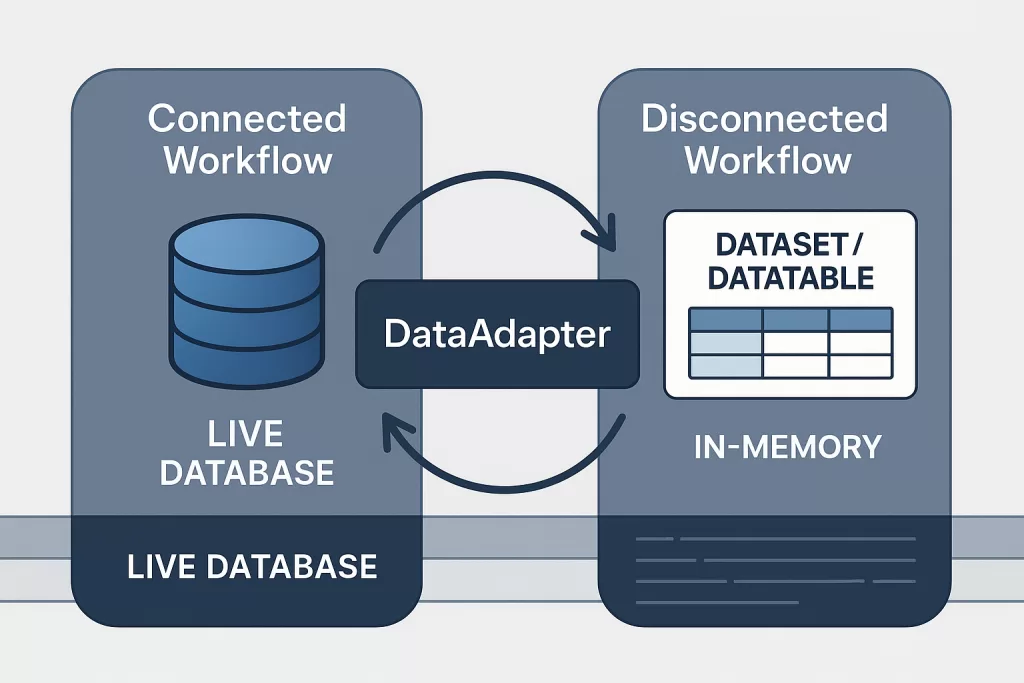
🔄 DataAdapter — The Bridge Between Connected and Disconnected Models
The DataAdapter is responsible for:
- filling DataSets/DataTables
- pushing changes back to the database
- generating commands (when applicable)
- handling concurrency rules
In many enterprise architectures — especially WinForms/WPF, reporting systems, and legacy modules — DataAdapters remain essential because they automate the repetitive boilerplate involved in synchronized data flows.
🔒 How ADO.NET Maintains Security
Security matters most in:
- banks
- hospitals
- government portals
- e-commerce
- payment systems
ADO.NET enforces security in ways anyone can understand:
1. Access Control
It’s like giving warehouse access only to authorized staff.
ADO.NET requires identity checks before any data can be touched.
2. Parameterized Commands
Think of this as filling a form rather than scribbling notes.
The system knows exactly what you mean → reduces errors → prevents breaches.
3. Protected Connections
Connections behave like secure tunnels.
If someone tries to intercept, they would get nothing readable.
4. Transaction Safety
Imagine sealing multiple packages together so either all are delivered or none.
This prevents:
- half-completed withdrawals
- incomplete inventory updates
- corrupted records
Everything stays consistent.

🧬 How ADO.NET Evolved -The Simple History People Rarely Explain
Here’s the human-friendly version of ADO.NET’s timeline:
Early 2000s — The “Big Data Boom”
Companies were moving from paper records and spreadsheets to digital databases.
ADO.NET became the main bridge between apps and data.
2010s — The Rise of Frameworks
Tools like Entity Framework became popular.
But no matter what, they still ran on top of ADO.NET.
2020s — Cloud Era
Azure, AWS, and microservices grew.
Guess what stayed the same?
ADO.NET → still the engine beneath the tools handling:
- SQL connections
- transactions
- command execution
2025 — ADO.NET Still Here
Not because it’s old.
But because it’s:
- predictable
- secure
- fast
- works everywhere
Just like the electrical grid powering modern smart homes — old foundation, new possibilities.
⚔️ ADO.NET vs EF Core — A Non-Developer Comparison
Think of EF Core as an Automatic Gear Car
- Easy to drive
- Comfortable
- Handles many things for you
Think of ADO.NET as a Manual Transmission
- More control
- Better performance when needed
- Requires more understanding
Which is better?
It depends.
- If you want safety and control → ADO.NET
- If you want convenience → EF Core
- If you want both → You still need ADO.NET under the hood
This is why advanced developers understand both.

🛠️ Best Practices
These tips apply to systems of any size:
1. Don’t stay connected longer than needed
Like keeping a checkout lane open too long → creates a queue.
2. Use bulk methods only when they make sense
If you only need a single number, don’t request the whole warehouse inventory.
3. Log everything
Systems need a paper trail — who accessed what, when, and why.
4. Reuse connections
Just like reusing forklifts instead of buying hundreds of them.
5. Handle errors carefully
If one step fails, don’t let the entire process collapse halfway.
❓ FAQs
Is ADO.NET old?
Yes — and that’s good.
Like air traffic control systems: old, reliable, and constantly updated.
Can ADO.NET work with modern cloud apps?
Absolutely.
It’s used in Azure, AWS, containers, and microservices.
Why should developers learn ADO.NET?
Because it explains the engine beneath all higher-level tools.
Does ADO.NET replace EF Core?
No.
They complement each other.
Is it difficult to learn?
Not with the right examples and good guidance.
🎯 Final Takeaway
ADO.NET is not just a technical concept — it’s the foundation that keeps thousands of systems stable every second.
Even if you aren’t a developer, you can think of it as:
- the logistics company
- the courier system
- the delivery routes
- the security checkpoints
- the rules and operational best practices
…that ensure data moves safely and efficiently behind every modern application.
🔗 Related Reads
- Web Development Frameworks in 2025: What Is It, History & Key Reasons They’ll Dominate Modern Development
- 🐍 What Is Django in Python? Understanding The Most Powerful Full-Stack Framework of 2025 That’s Redefining Web Apps
- ⚡ What Is Flask in Python? Discover the Game-Changing Framework Behind Fast Web Apps (2025)
- 🌐 Website Development: The Complete Guide to Building Modern Websites (2025)
- 🏗️ Design Patterns in C# & Java (2025 Guide) – With Code Examples, UML & Best Practices
- 🧩 MVC Architecture in 2025: Complete Guide with ASP.NET MVC & Spring MVC Java