Asana vs Jira: Which Project Tool is Best in 2025? 🛠️
Choosing the right project management software can make or break your productivity. In this guide, we’ll help you decide between two industry leaders: Asana vs Jira: Which Project Tool is Best in 2025? If you’re managing complex workflows, team collaboration, or product development, this article is tailored for you.
Let’s dive right in to answer the question: Asana vs Jira: Which Project Tool is Best in 2025?
🔑 Key Highlights
- ✅ Direct comparison of Asana vs Jira across features, pricing, integrations, and ease of use
- ✅ Pros and cons of each platform
- ✅ Best tool for agile development vs general task management
- ✅ Real-world use cases in 2025
- ✅ Final verdict to help you choose the right tool
🚀 Asana vs Jira: Which Project Tool is Best in 2025? [Quick Answer]
If you’re short on time, here’s the quick takeaway:
- 👉 Asana is best for non-technical teams that need visual task management, flexible views, and a user-friendly interface.
- 👉 Jira is ideal for technical teams like developers using Agile/Scrum methodologies and needing deep customization.
- 🏆 Choose Asana for marketing, HR, operations.
- 🏆 Choose Jira for software development and bug tracking.
Now, let’s break it down in detail 👇
📋 Overview: What Are Asana and Jira?
🧩 What is Asana?
Asana is a collaborative project management tool used to plan, organize, and track work. It’s known for its simple design and flexibility in managing tasks visually.
- Founded: 2008
- Best for: Marketing teams, HR departments, operations, small businesses
- Interface: Kanban, List, Calendar, Timeline

🧠 What is Jira?
Jira, developed by Atlassian, is a powerful issue-tracking and Agile project management tool. It supports Scrum, Kanban, and custom workflows tailored for software teams.
- Founded: 2002
- Best for: Software developers, product teams, Agile environments
- Interface: Scrum boards, Kanban, Backlog, Sprint planning

⚖️ Feature Comparison: Asana vs Jira
🛠️ Task Management
- Asana offers intuitive task views (List, Board, Calendar).
- Jira supports deep task breakdowns, epics, and story points — ideal for developers.
Winner: Asana for ease, Jira for complexity
🔄 Workflow Automation
- Asana has “Rules” to automate simple actions (e.g., move task when status changes).
- Jira has robust automation for complex dev workflows.
Winner: Jira
📊 Reporting & Analytics
- Asana gives basic dashboards and project overviews.
- Jira provides deep insights with burndown charts, sprint reports, velocity, and more.
🧩 Integrations
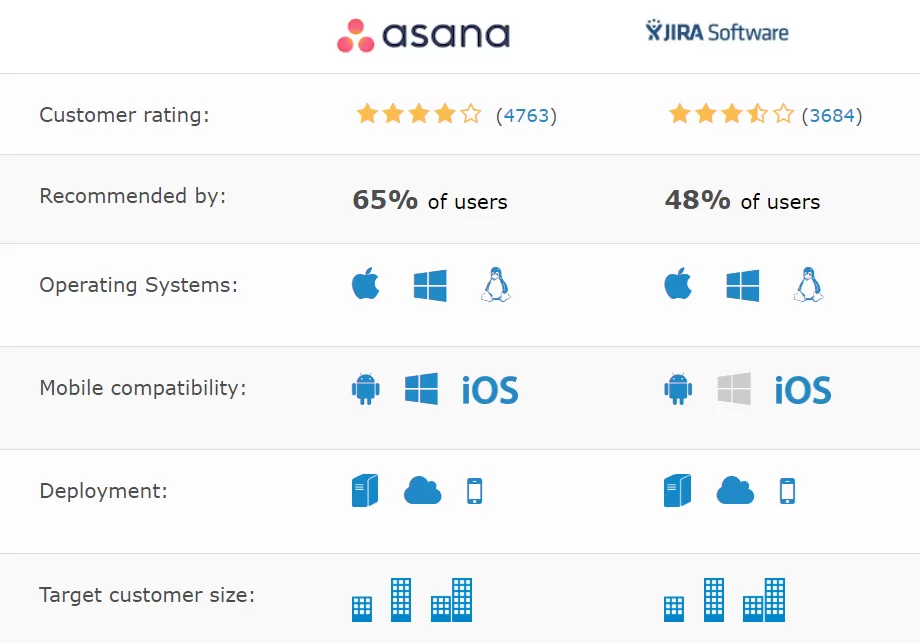
- Asana connects with 200+ tools (Slack, Google Workspace, Zoom).
- Jira integrates tightly with dev tools like Bitbucket, Confluence, GitHub.
Winner: Tie — Depends on your use case
🤹 Ease of Use
- Asana is beginner-friendly with drag-and-drop simplicity.
- Jira has a steeper learning curve.
💸 Pricing Comparison: Asana vs Jira
| Plan | Asana (per user/mo) | Jira (per user/mo) |
|---|---|---|
| Free | ✅ Yes | ✅ Yes |
| Starter | $10.99 | $8.15 |
| Business | $24.99 | $16 |
| Enterprise | Custom pricing | Custom pricing |
🔗 See Asana pricing
🔗 See Jira pricing
Verdict: Jira is more affordable for small teams, but Asana offers a smoother experience.
🧪 Real-World Use Cases (2025)
✔️ When to Use Asana
- Marketing teams managing campaigns
- HR departments onboarding employees
- Startups managing cross-functional work
- Remote teams needing simple, visual tools
✔️ When to Use Jira
- Developers tracking issues and bugs
- Product teams managing sprints
- Agile teams needing Scrum and Kanban boards
- DevOps teams integrating Git workflows

🏁 Final Verdict: Asana vs Jira — Which Project Tool is Best in 2025?
Asana vs Jira: Which Project Tool is Best in 2025? It depends on your team’s needs:
- 💼 Choose Asana if your focus is simplicity, user experience, and team-wide collaboration.
- 🧑💻 Choose Jira if you manage complex projects, sprints, and require deep customization.
🎯 Still unsure? Try both — Asana and Jira offer free plans for you to explore.
🔗 Related Reading
- ✅ Top 8 Marketing Automation Tools
- ✅ 7 Best Mobile Scanning and OCR Software in 2025
- ✅ Best Project Management Software
🧠 FAQs: Asana vs Jira in 2025
Q1: Is Asana good for developers?
Asana works for basic development tasks but Jira is better suited for developers due to its agile features.
Q2: Can I switch from Jira to Asana?
Yes, both tools allow data export/import, but expect some manual adjustments.
Q3: What’s better for startups in 2025?
Startups benefit from Asana’s quick setup and simple UI. Jira is better if you’re tech-focused.
✍️ Conclusion
There’s no universal answer to “Asana vs Jira: Which Project Tool is Best in 2025?” — your choice should reflect your team’s goals, technical needs, and workflow complexity.
💡 Pro tip: Start with the free version of both and run a 14-day test with your team before deciding.