JavaScript 2D Array – Two Dimensional Arrays in JS

When I first started learning JavaScript, I could handle single arrays easily. But when my mentor introduced something called an array of arrays in JS, I froze. “Wait, what do you mean an array inside another array?” It sounded like Inception, but with square brackets.
If you’ve ever felt that way — trust me, I’ve been there. So in this post, I’m going to simplify how a JavaScript 2D array (or an array of arrays in JS) works — using real-life examples, personal experience, and code snippets you can play with right away.
What Is an Array of Arrays in JS?
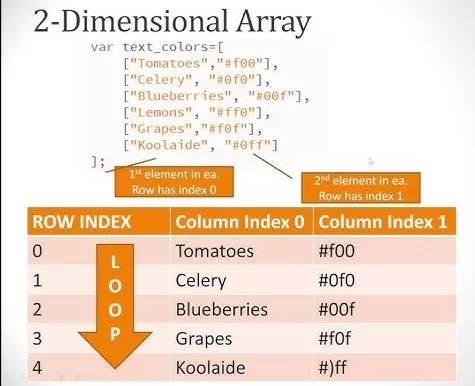
In simple words, an array of arrays in JS is just a collection of arrays nested inside one big array. Think of it like a table made of rows and columns — that’s your JavaScript 2D array.
Here’s a quick example:
See that? Each [ ] inside the main array is a row. So we basically have a 3×3 matrix here — a perfect example of a two-dimensional array in JS.
I still remember the first time I visualized it as a spreadsheet. Rows and columns suddenly made sense! From that point, working with an array of arrays in JS became 10x easier.
Real-Life Example:
Let’s make it relatable. Imagine you’re managing a classroom with 3 rows and 3 seats each:
Now you can access any student using row and column indices.
For example:
👉 Here, [0][1] means “first row, second column.”
This example helped me see how powerful arrays of arrays in JS really are — they organize data beautifully!
How to Create a JavaScript 2D Array

There are a few different ways to create an array of arrays in JS — let’s explore them quickly.
1️⃣ Literal Notation (Most Common)
Simple, clean, and works perfectly for small data sets.
2️⃣ Using Loops
If you want to create larger 2D arrays dynamically:
When I first wrote this code, it felt like magic. Seeing that nested for loop fill up the JavaScript 2D array — that’s when I truly understood how arrays work internally.
Accessing Elements in an Array of Arrays in JS
Accessing elements is straightforward once you get the hang of it:
This means — go to the second row ([1]) and then grab the third element ([2]).
That’s all an array of arrays in JS is doing — mapping rows and columns!
🔁 Looping Through a JavaScript 2D Array

Here’s something I used to mess up a lot — nested loops. But once you practice it, it’s a breeze.
Each loop handles one dimension:
- The outer loop goes through the rows.
- The inner loop goes through the columns.
Where Are Arrays of Arrays Used in JS?
Honestly? Everywhere!
Here are a few real-world examples where I’ve personally used JavaScript 2D arrays:
- 🎮 Game Boards: Like Tic Tac Toe or Sudoku grids.
- 📊 Data Visualization: Representing tables or matrix-style data.
- 📅 Calendars: Storing days and weeks.
- 💡 Image Processing: Pixels can be represented as a grid of color values.
If you’re building anything that feels “grid-like,” you’ll probably need an array of arrays in JS.

Manipulating 2D Arrays – Add, Remove, Update
When I first started experimenting, I often wondered: “Can I push and pop elements in a 2D array?” The answer is yes!
Here’s how:
Adding a New Row
Adding a New Column
Updating a Value
Removing a Row
Removing an Element
Once I realized that every row is just another array in JS, everything clicked. You can treat each row independently — just like you’d handle a regular array.
Common Mistakes Beginners Make
Let’s be real — we all trip up sometimes. Here are the ones that caught me off guard:
- ❌ Forgetting that indices start from 0.
- ❌ Mixing up rows and columns.
- ❌ Trying to access an undefined element (like
matrix[3][3]when it doesn’t exist). - ❌ Using shallow copies instead of deep copies (especially when cloning arrays).
If you’re ever stuck, MDN Web Docs is your best friend for reliable examples.
Final Thoughts:
Working with an array of arrays in JS is one of those skills that unlocks a deeper understanding of how data can be structured in JavaScript.
Once you start playing with JavaScript 2D arrays, you’ll see patterns everywhere — from games to data tables to UI layouts.
So don’t overthink it. Start small. Play around. Make mistakes. And before you know it, you’ll be nesting arrays like a pro.
Want to learn more about javascript??, kaashiv Infotech Offers Front End Development Course, Full Stack Development Course, & More www.kaashivinfotech.com.
Related Reads: