🔥 Pointers in C Explained (2025 Guide with Real Examples & Best Practices)
Learning pointers in C, can feels like stepping into a dark alley of programming. The concept has been made to sounds intimidating, and honestly, many developers give up too early. But pointers are the backbone of C programming, powering operating systems, embedded systems, and even game engines in 2025.
Think about this: every program you write, whether it’s a small calculator app or a massive database system, uses memory. Pointers in C give you direct control over that memory. That’s why system-level developers, kernel programmers, and embedded engineers call them with love as the “necessary evil.”
So if you’ve ever asked yourself “what is pointer in C and why should I care?”, this article will answer that and more. By the end, you’ll see pointers not as a monster, but as a tool that makes you a sharper programmer and more job-ready.
🔑 Key Highlights (Pointers in C at a Glance)
- Definition made simple → A pointer is just a variable that stores the memory address of another variable.
- Relevance in 2025 → Used heavily in operating systems, compilers, databases, and embedded devices.
- Pointer types you must know →
null pointer,void pointer,dangling pointer,wild pointer,constant pointer, andfunction pointer. - Pointer arithmetic → Unique power in C: add, subtract, compare, and move across memory blocks.
- Arrays + Pointers → Why arrays are basically syntactic sugar for pointers.
- Real-world use cases → From swapping numbers efficiently to implementing linked lists, memory allocators, and callback functions.
- Best practices → Always initialize pointers, free memory properly, and never trust a wild pointer.
👉 If you’re preparing for coding interviews or a career in system-level programming, mastering pointers in C is non-negotiable.
🧩 What is Pointer in C?
A pointer in C is simply a variable that holds the address of another variable. Not the value, but the location in memory where that value lives.
📖 Think of it like this:
- A normal variable is like holding the actual book in your hand. You can open it and read the content directly.
- A pointer is like a library catalog card. It doesn’t contain the book itself, but it tells you the shelf location where the book lives.
- If you want to read the book, you first check the catalog card (the address), then go to the shelf and grab the book (dereferencing).
💻 Quick Example in C:
#include <stdio.h>

int main() {
    int age = 25;         // normal variable → the book (actual value)
    int *ptr = &age;      // pointer → the catalog card (stores shelf location of the book)

    printf("Address of age (shelf location): %p\n", ptr);
    printf("Value of age (book content): %d\n", *ptr);

    return 0;
}
🖥 Output (example):
Address of age (shelf location): 0x7fffa0757dd4
Value of age (book content): 25
👉 Here’s the key:
*ptr means go to that shelf, pull the book out, and read what’s inside.
ptr doesn’t hold 25. It holds the shelf location where the book (with 25 written inside) is kept.

💡 Real-world analogy:
Imagine you’re asking a friend some project file. Instead, they send you a Google Drive link (the address). That’s what a pointer is—a link to the actual resource. You don’t have the data itself, but you know exactly where it is.
⚡ Developer Insight:
Companies like Oracle, Intel, and NASA still rely on C with pointers for building efficient low-level systems. In fact, a 2024 Stack Overflow survey revealed that 35% of embedded systems developers still actively code in C because of the fine-grained control that pointers provide.
✍️ Declaring and Initializing Pointers in C
Declaring a pointer is almost the same as declaring a normal variable, except you add an asterisk (*). That little star tells the compiler: “Hey, this isn’t a normal variable. It’s going to store an address.”
Syntax:
data_type *pointer_name;
Example:
int *p;    // pointer to integer
char *c;   // pointer to character
float *f;  // pointer to float
But remember — declaring isn’t the same as initializing. A pointer must be given an address before it’s safe to use. Otherwise, you create a wild pointer (more on that later).
Here’s how you initialize:
int age = 30;
int *p = &age;   // & gives the memory address
👉 Best practice: Always initialize pointers at the time of declaration. If you don’t have a valid address yet, assign NULL. This prevents accidental memory corruption.
🎯 Dereferencing a Pointer in C
Declaring and initializing a pointer is step one. Step two? Actually using it. That’s where dereferencing comes in.
Dereferencing means accessing the value stored at the memory address a pointer holds. You use the same * operator, but this time not for declaration—this time to “open the door” at that memory address.
Example:
#include <stdio.h>
int main() {
int num = 100;
int *p = &num;
printf("Value using variable: %d\n", num);
printf("Value using pointer: %d\n", *p); // dereferencing
return 0;
}
Output:
Value using variable: 100
Value using pointer: 100
Notice how both methods give the same result? That’s because *p fetches the value directly from the memory where num lives.
💡 Real-world use case: Imagine writing a function that swaps two numbers. Without pointers, you’d have to return both values somehow. With pointers, you just pass their addresses, and the function updates them directly:
void swap(int *a, int *b) {
    int temp = *a;
    *a = *b;
    *b = temp;
}
That’s why every interviewer loves asking “swap two numbers using pointers” — it shows you understand dereferencing.
📏 Size of Pointers in C (Why It Matters in 2025)
Here’s a common misconception: “An int* takes 4 bytes, while a char* takes 1 byte.”
Wrong ❌.
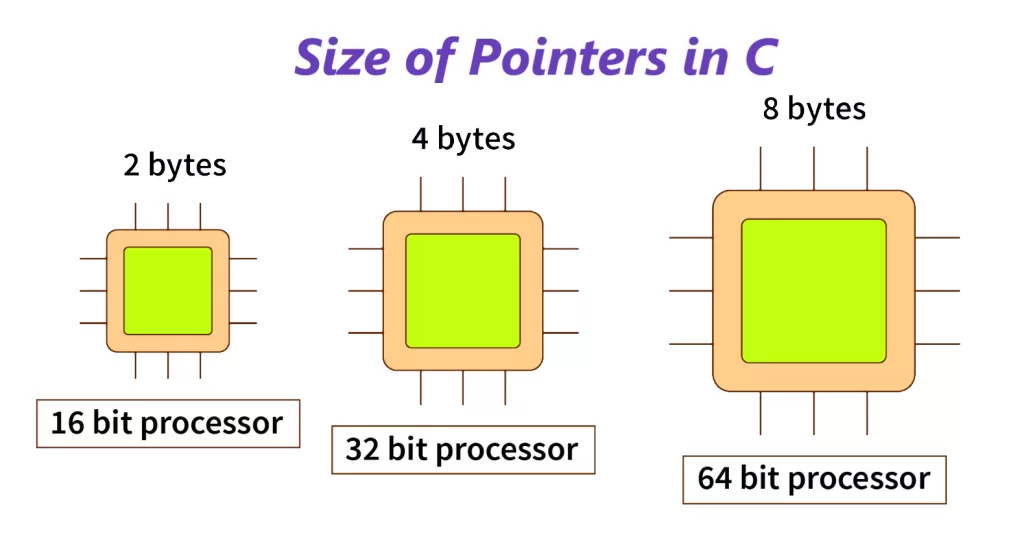
The size of pointers in C doesn’t depend on the type of data they point to—it depends on the system architecture:
- On a 32-bit machine → every pointer is 4 bytes.
- On a 64-bit machine → every pointer is 8 bytes.
Example:
#include <stdio.h>

int main() {
    int *p1;
    char *p2;
    double *p3;

    printf("Size of int pointer: %zu bytes\n", sizeof(p1));
    printf("Size of char pointer: %zu bytes\n", sizeof(p2));
    printf("Size of double pointer: %zu bytes\n", sizeof(p3));

    return 0;
}
Output on a 64-bit system:
Size of int pointer: 8 bytes
Size of char pointer: 8 bytes
Size of double pointer: 8 bytes
👉 Why does this matter in 2025? Because with growing IoT devices, mobile processors, and cloud infrastructure, you’ll often deal with cross-platform code. A pointer’s size can change depending on whether you’re compiling for a microcontroller (32-bit) or a server (64-bit).
⚡ Pro tip: If you’re working on portable code (say, an embedded system that talks to a cloud API), use intptr_t or uintptr_t from <stdint.h>. They ensure pointer sizes remain consistent across architectures.
🔍 Types of Pointers in C
In C programming, pointers in C aren’t just about int* or char*. Depending on how you use them, they can take on different personalities. Here are the main ones you’ll actually encounter:
- Null Pointer
- Void Pointer
- Wild Pointer
- Dangling Pointer
- Constant Pointer
- Function Pointer (bonus — heavily used in real projects)
Now let’s break these down with examples and developer-friendly insights.

🛑 1. Null Pointer in C
A null pointer doesn’t point anywhere. It’s like saying: “Hey, I don’t have a valid address for now, so let’s just keep this empty.”
Example:
int *p = NULL;
👉 Best practice: Always initialize unused pointers to NULL. This prevents random memory access (a nightmare in debugging).
Real-world use case: In OS kernels, null pointers are used as sentinel values to mark the end of linked lists. Similarly, APIs often return NULL when something fails (like file not found). Checking for NULL is your first safety net.
📦 2. Void Pointer in C
A void pointer is a generic pointer. It can point to any data type, but you can’t directly dereference it without typecasting.
Example:
void *ptr;
int x = 10;
ptr = &x;   // valid

// Dereferencing requires casting
printf("%d", *(int*)ptr);
👉 Why it matters in 2025: In real-world C libraries, void pointers are everywhere. For example, in malloc() (dynamic memory allocation), the function returns a void*. It’s up to you to cast it to int*, char*, or whatever type you need.
Pro tip: If you’re building reusable functions (say, a generic sorting function), use void pointers. That way, your function works with arrays of any type.
🚨 3. Wild Pointer in C
A wild pointer is uninitialized and points to some garbage address. Accessing it is like walking into an abandoned building — dangerous and unpredictable.
Example:
int *p;   // uninitialized
*p = 50;  // dangerous: wild pointer
👉 Real-world problem: Wild pointers cause segmentation faults (the dreaded “core dumped” error). This is one of the biggest causes of app crashes in C programs.
Best practice: Always initialize pointers with either NULL or a valid address. Don’t leave them “wild.”
🕳️ 4. Dangling Pointer in C
A dangling pointer happens when the memory a pointer refers to is freed, but the pointer still “thinks” it’s valid.
Example:
int *p = (int*)malloc(sizeof(int));
*p = 42;
free(p);    // memory freed
printf("%d", *p);   // dangling pointer access ❌
👉 Real-world issue: In production systems, dangling pointers can lead to use-after-free vulnerabilities. Hackers exploit this to inject malicious code. That’s why secure coding standards (like MISRA-C for automotive software) emphasize avoiding them.
Fix: After freeing memory, immediately set the pointer to NULL.
free(p);
p = NULL;
🔒 5. Constant Pointer in C
A constant pointer means either:
- The pointer itself cannot change (fixed address), OR
- The data pointed to cannot change (read-only).
Examples:
- Pointer can’t change:
int x = 10, y = 20;
int * const p = &x;
p = &y;   // ❌ not allowed
- Data can’t change:
const int *p = &x;
*p = 50;   // ❌ not allowed
👉 Real-world use case: This is widely used in APIs. For example, if you pass a string to a function that shouldn’t modify it, you declare it as const char*. This prevents accidental changes to your data.
🎯 Bonus: Function Pointer in C
While not in the “special” list above, function pointers deserve a quick mention. They let you store the address of a function inside a pointer — powerful for callbacks and event-driven programming.
Example:
#include <stdio.h>

void greet() {
    printf("Hello, Developer!\n");
}

int main() {
    void (*funcPtr)() = &greet;
    funcPtr();   // calls greet
    return 0;
}
👉 Real-world example: Function pointers are the backbone of C event systems, plugin architectures, and even modern operating systems. In Linux, system calls are implemented using tables of function pointers.
➗ Pointer Arithmetic in C
Here’s the thing about pointers: you can do math with them. But not the way you’d add two numbers in Excel — it’s more about moving across memory.
👉 How it works
When you add 1 to a pointer, it doesn’t just move forward by 1 byte. It moves by the size of the data type it points to.
Example:
int arr[3] = {10, 20, 30};
int *p = arr;

printf("%d\n", *p);     // 10
printf("%d\n", *(p+1)); // 20
printf("%d\n", *(p+2)); // 30
Here p+1 jumps 4 bytes forward on a 32-bit system (size of an int).

✅ Best practices
- Use pointer arithmetic for array traversal when performance matters.
- Don’t overstep — pointer arithmetic is the #1 cause of buffer overflows. In fact, MITRE CWE-119 ranks buffer overflows among the top security vulnerabilities.
Real-world use case: C compilers, operating systems, and embedded systems use pointer arithmetic for fast data access. Think of a video game engine scanning large arrays of pixels — pointer math makes it faster than using regular indexing.
🔗 Pointer to Pointer in C (Double Pointers)
A pointer that stores the address of another pointer? Sounds confusing, but it’s extremely useful. This is called a double pointer or pointer to pointer.
👉 Example
int x = 42;
int *p = &x;     // pointer to int
int **pp = &p;   // pointer to pointer

printf("%d\n", **pp); // 42
Here,
ppoints tox.pppoints top.**ppgets you back to the value42.
✅ Real-world use cases
- Dynamic memory allocation:
malloc()with multidimensional arrays needs double pointers. - Command-line arguments: In C,
main(int argc, char **argv)uses double pointers to handle arguments. - Linked data structures: Complex structures like linked lists, trees, and graphs often use double pointers for insertion and deletion operations.
Pro tip: If you’re debugging and see ** somewhere, don’t panic — it usually means you’re just looking at one more layer of indirection.
📚 Pointers with Arrays and Strings in C
This is where pointers shine in day-to-day C programming.
1. Pointers with Arrays
Arrays and pointers are closely related — in fact, an array name behaves like a pointer to its first element.
Example:
int arr[] = {1, 2, 3, 4};
int *p = arr;

printf("%d\n", *(p+2)); // prints 3
👉 Instead of arr[2], you can use *(p+2). Both are the same under the hood.
Real-world use case: High-performance libraries (like BLAS for linear algebra) often rely on pointer-based array traversal instead of indexing for efficiency.

2. Pointers with Strings
A string in C is just a character array ending with \0. A pointer to char makes string handling flexible.
Example:
char str[] = "Hello";
char *p = str;

while (*p != '\0') {
    printf("%c", *p);
    p++;
}
👉 This iterates through the string using pointer arithmetic.
Real-world use case: Functions in <string.h> (strlen, strcpy, etc.) all use pointers internally to handle strings efficiently.
⚡ Pointers and Functions in C
If you’ve ever heard someone say “C gives you low-level power,” pointers with functions are what they’re talking about. Functions + pointers = flexibility, efficiency, and callbacks.
🔄 Call by Reference using Pointers
By default, C uses call by value — it makes a copy of variables when you pass them into functions. But with pointers, you can modify the original variable inside a function.
#include <stdio.h>

void update(int *x) {
    *x = *x + 10;
}

int main() {
    int num = 5;
    update(&num);
    printf("Updated Value: %d", num);  // 15
    return 0;
}
👉 Without pointers, num would stay 5. With pointers, it becomes 15.
Real-world use case: When writing APIs, call by reference is used to return multiple outputs. For example, scanf() in C updates variables by using pointers.
🎯 Function Pointers
A function pointer stores the address of a function, so you can call it indirectly.
#include <stdio.h>

void greet() { printf("Hello, Developer!\n"); }
void bye()   { printf("Goodbye!\n"); }

int main() {
    void (*func)();
    func = greet;  // assign function
    func();        // call function
    func = bye;
    func();
    return 0;
}
👉 This is like saying: “I’ll decide later which function to call.”
Real-world use case:
- Linux kernel system calls are implemented using function pointer tables.
- Game engines use them to map user input (keyboard/mouse events) to different actions.

🔔 Callbacks in C
A callback is simply a function passed as a pointer to another function.
Example:
#include <stdio.h>

void process(void (*callback)()) {
    callback();  // call the passed function
}

void hello() { printf("Hello World\n"); }
void thanks() { printf("Thanks for visiting!\n"); }

int main() {
    process(hello);
    process(thanks);
    return 0;
}
👉 This makes your code flexible and modular.
Real-world use case:
- Event-driven systems (like GUI apps, device drivers).
- Sorting functions (
qsort()in<stdlib.h>) — you pass a function pointer to define custom sorting logic.
💾 Dynamic Memory Allocation with Pointers in C
Here’s where C separates itself from higher-level languages like Python or Java. You don’t just get memory for free — you manage it yourself.
👉 malloc, calloc, realloc, and free
malloc()– allocate memory (uninitialized).calloc()– allocate memory (initialized to zero).realloc()– resize previously allocated memory.free()– release memory.
Example:
#include <stdio.h>
#include <stdlib.h>

int main() {
    int *arr = (int*) malloc(3 * sizeof(int));
    arr[0] = 10; arr[1] = 20; arr[2] = 30;

    arr = (int*) realloc(arr, 5 * sizeof(int));
    arr[3] = 40; arr[4] = 50;

    for(int i=0; i<5; i++) printf("%d ", arr[i]);

    free(arr);  // prevent memory leak
    return 0;
}
Output:
10 20 30 40 50
👉 Best practice in 2025:
- Always check if memory allocation succeeded (
if(arr == NULL)…). - Always
free()after use — memory leaks are still one of the biggest causes of crashes in C projects, even in 2025. - Use tools like Valgrind to catch leaks.
Real-world use case: In embedded systems (IoT devices, routers, drones), memory is limited. Dynamic allocation ensures you only use what you need.
🏁 Conclusion: Why Pointers Still Matter in 2025
Pointers in C are not just some academic concept. They’re the backbone of system programming, operating systems, networking stacks, embedded devices, and even cybersecurity tools.
- They let you work directly with memory addresses.
- They power dynamic memory allocation.
- They enable efficient array, string, and function handling.
- They give flexibility through callbacks and function pointers.
👉 If you’re learning C for a career in systems, IoT, or embedded engineering, mastering pointers is a must. They may look scary at first, but once you get the hang of them, you’ll see why every great C programmer says:
“Understanding pointers is like holding the keys to the engine room of programming.” 🚀
📚 Related Reads
Looking to explore more programming concepts? Check out these in-depth guides:
- 🧮 Sum of Absolute Differences in Arrays 2025 Guide with Examples & Code
- 🔢 Float and Double in Programming: Meaning, Size, Range, and Key Differences in 2025
- 🏗️ Design Patterns in C# & Java (2025 Guide) – With Code Examples, UML & Best Practices
- 🖥️ MVC Architecture in 2025: Complete Guide with ASP.NET MVC & Spring MVC Java
- 🚀 Insertion Sort Algorithm in 2025 – Must-Know Facts, Examples in C, Java, Python & More