✅ What Is an SRS? 7 Must-Know Things About Software Requirement Specification 💡

🔑 Key Highlights
- ✅ What an SRS (Software Requirement Specification) really is—and why it matters
- 📋 Breakdown of functional vs. non-functional requirements
- 🔍 How to write an SRS, with examples and pro tips
- 🧰 A look at top requirements management tools
- 📥 Free downloadable SRS template
- 💬 Real-life use cases and mistakes to avoid
🧠 Let’s Get Real: What Is a Software Requirement Specification (SRS)?
Let me be brutally honest—when I first heard “software requirement specification,” I had zero clue what it meant. It sounded like something only senior developers or project managers cared about. But once I started working on real-world projects, I realized this little document is actually everything. 💥
A Software Requirement Specification (SRS) is a document that defines exactly what a software product is supposed to do—before a single line of code is written. Think of it like the blueprint for building a house. Without it? Chaos. With it? Clarity, accountability, and success.
I can’t stress this enough: if you’re building software without an SRS, you’re just asking for bugs, confusion, and frustrated clients.

🎯 Why You Should Care About Software Requirement Specification (SRS)
Here’s the thing—software isn’t cheap. And building something the wrong way because you didn’t document it properly? Even more expensive.
Let me walk you through a real example.
A few years ago, I was part of a small dev team working on a custom CRM. We skipped writing an SRS (rookie mistake), and six weeks in, the client asked, “Hey, where’s the lead scoring feature we discussed?”
Guess what? That conversation had happened in a meeting—never documented. We had to rebuild a good chunk of the system. Time lost, money wasted.
👉 Lesson? Always write a software requirement specification—before you code.
📦 What’s Inside an SRS Document? [Includes Functional and Non-Functional Requirements]
A solid SRS covers the what, how, and why of your software. Here’s a breakdown:
1. Introduction
- Purpose of the software
- Scope
- Definitions and acronyms
- Intended audience
2. Overall Description
- Product perspective
- System features
- User classes and characteristics
- Constraints and assumptions
3. Functional Requirements 🛠️
These define what the software should do. For example:
- The user shall be able to reset their password via email.
- The system shall generate invoices every 30 days.
These are the core capabilities of your application.
4. Non-Functional Requirements 🧱
These describe how the system performs:
- Speed
- Security
- Scalability
- Usability
- Reliability
For example:
- The system shall load the dashboard within 2 seconds under normal load.
👉 Tip: Functional = what it does. Non-functional = how well it does it.
5. Interfaces
- User Interface (UI)
- Application Programming Interface (API)
- Hardware/Software interfaces
6. Assumptions & Constraints
- Assumes user has internet
- Must run on iOS and Android
7. Requirements Traceability Matrix
- Map each requirement to its corresponding design, implementation, and test.
✍️ How to Write a Software Requirement Specification (SRS)
Here’s a no-BS, step-by-step approach I use when creating an SRS:
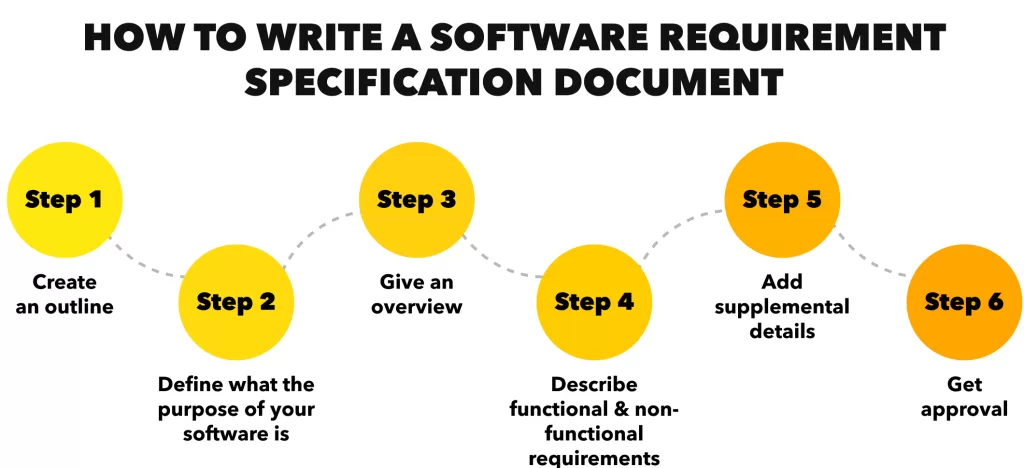
Step 1: Talk to the people who matter
Stakeholders, product owners, customers—whoever’s involved. Ask the hard questions. What do they actually want the software to do?
Step 2: Use a template
Don’t reinvent the wheel. Use a proven SRS template to stay organized.
Step 3: Document functional and non-functional requirements
List them out clearly. Use bullet points. Be specific, not vague.
Bad: “System should be fast”
Good: “System shall respond to user input within 1 second 95% of the time”
Step 4: Include use cases
Describe real scenarios. “When a user logs in, this should happen…”
Step 5: Add traceability
Every requirement should link to design + testing. This helps with validation later on.
Step 6: Review & iterate
Get feedback. Rewrite. Polish. It’s a living document.
🧰 Top 3 Requirements Management Tools I’ve Used (and Recommend)
- Jama Connect – great for enterprise-level projects
- ReqView – perfect for traceability and audits
- ClickUp – not traditionally built for SRS, but super flexible
These requirements management tools help you manage changes, track versions, and maintain clarity across the team.
🔁 SRS in Action: A Real-World Mini Example
Project: E-commerce app
Functional Requirement: The system shall allow users to filter products by price range.
Non-Functional Requirement: Filter results shall load in less than 1.5 seconds.
Use Case:
- User logs in
- Clicks “Shoes”
- Applies filter: ₹1,000 – ₹2,000
- Sees updated list instantly
🧠 Common Mistakes People Make with SRS (I’ve Been There…)
- Writing vague requirements (“user-friendly” means different things to different people)
- Not updating the document after changes
- Skipping the non-functional requirements
- Forgetting to involve QA early (they’ll thank you later)
Avoid these, and you’ll be ahead of 80% of teams I’ve seen.
📌 Final Thoughts: Don’t Ship Without an SRS 🛑
If you’re serious about building quality software, you need a solid software requirement specification (SRS). Whether you’re freelancing, working at a startup, or managing an enterprise project, an SRS is your roadmap.
It’s not just paperwork—it’s your software’s foundation. And trust me, without it, things can (and will) fall apart.
🔗 Useful Links