Picture this: It’s 1999. You’ve got a chunky Nokia 7110, a monochrome screen, and a “browser” that looks nothing like Chrome or Safari. Yet, somehow… you’re checking cricket scores and sending emails — wirelessly.
That magic? Wireless Application Protocol (WAP).
Before smartphones and 4G towers, WAP was the quiet revolution that let early mobile devices connect to the internet. It was slow, simple, and often frustrating — but it laid the groundwork for everything mobile that came after.
If you’ve ever used WhatsApp, Gmail, or YouTube on your phone, you’re standing on the shoulders of WAP.
In this guide, you’ll explore what Wireless Application Protocol actually is, how the WAP protocol stack works, why it mattered, and how knowing this “old-school” tech can actually boost your networking or IT career today.
🎯 Key Highlights
- Wireless Application Protocol (WAP) brought internet access to mobile phones long before smartphones existed.
- It uses WML (Wireless Markup Language), a lighter version of HTML, designed for tiny screens and slow networks.
- WAP’s layered architecture resembles TCP/IP but is optimized for wireless communication.
- Though outdated, it’s the foundation of modern mobile communication, IoT, and 5G systems.
- Learning WAP concepts helps IT and networking professionals understand how wireless communication evolved.
🔹 What is Wireless Application Protocol (WAP)?
In plain terms, Wireless Application Protocol (WAP) is a communication standard that allowed early mobile devices to access the internet — even with tiny screens and painfully slow connections.
It replaced full-fledged HTML with something lighter: WML (Wireless Markup Language), which is based on XML. WML made it possible for feature phones to display text-based web pages and simple menus when 9.6 kbps felt like lightning speed.
WAP wasn’t a random tech experiment — it was the brainchild of some of the biggest telecom players of the time. In 1998, Ericsson, Motorola, Nokia, and Unwired Planet came together to form the WAP Forum, aiming to standardize wireless internet technologies.
By 2002, this effort merged with others to form the Open Mobile Alliance (OMA) — a key player in defining modern mobile standards.
💬 Fun fact: Before “apps” were even a thing, WAP sites (like early Yahoo Mobile and BBC Mobile) were your only way to browse on phones.

🌐 How the Wireless Application Protocol Model Works
Alright, let’s simplify this.
When you opened the “mini browser” on your old mobile and typed a website URL, here’s what happened step-by-step:
- The mobile device sent a WAP request through the network.
- That request reached a WAP Gateway, which acted like a translator.
- The gateway converted the WAP request into a normal HTTP request (like the ones your PC sends).
- The web server processed that request and sent back a WML file.
- The gateway then converted that file into a WAP-compatible response, which your mobile could display.
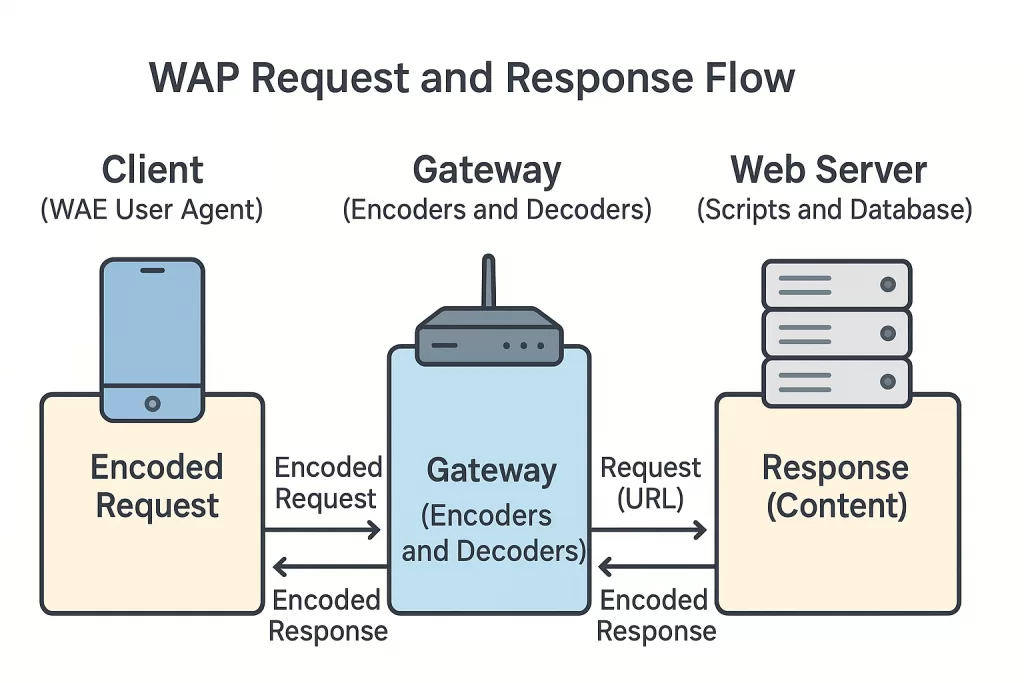
So, your phone wasn’t connecting directly to the web — it was using the WAP gateway as a bridge.
🧠 Developer Insight: Think of it like this — if the internet spoke English, and your 2000s mobile phone only spoke Morse code, the WAP Gateway was the interpreter making the conversation possible.
⚙️ Understanding the Wireless Application Protocol Stack
Now, here’s where things get a little geeky — but also where Wireless Application Protocol really shines.
Just like how the internet runs on TCP/IP, WAP had its own protocol stack, specially tuned for wireless communication.
| Layer | Protocol | Purpose |
|---|---|---|
| Application Layer | WAE (Wireless Application Environment) | Defines mobile content formats like WML and scripting environments. |
| Session Layer | WSP (Wireless Session Protocol) | Handles session management — fast connection, suspension, and reconnection. |
| Transaction Layer | WTP (Wireless Transaction Protocol) | Offers transaction reliability (like TCP but lighter) over UDP. |
| Security Layer | WTLS (Wireless Transport Layer Security) | Ensures data integrity, privacy, and authentication. |
| Transport Layer | WDP (Wireless Datagram Protocol) | Provides a uniform interface for upper layers — the “data carrier” of WAP. |
Each layer had one goal — to make the internet mobile-friendly when mobile data barely existed.

⚡ Pro Tip for Networking Students:
WAP’s design is a great case study for understanding layered architecture. If you can explain the WAP stack in an interview, you’re already proving you know how protocols talk to each other efficiently.
The Evolution, Impact, and Career Relevance of Wireless Application Protocol (WAP)
📊 Evolution Timeline of Wireless Application Protocol (WAP)
| Year / Era | Technology / Event | Key Highlights & Impact |
|---|---|---|
| 1998 | WAP Forum Founded (by Nokia, Ericsson, Motorola & Unwired Planet) | Unified efforts to standardize mobile internet communication across devices. |
| 1999 (Late 1990s) | WAP 1.0 (2G Era) | First version of the Wireless Application Protocol. Enabled lightweight web browsing via WML (Wireless Markup Language) on basic mobile phones. |
| 2000 | WAP 1.1 Released | Introduced Wireless Transport Layer Security (WTLS) for improved data protection and encryption. |
| 2002 (Early 2000s) | WAP Forum merges into Open Mobile Alliance (OMA) | The OMA took over to create unified standards for global mobile content and device communication. |
| Mid-2000s | WAP 2.0 / XHTML-MP | Added support for multimedia, color displays, and better markup (XHTML Mobile Profile), bridging WAP and the modern web. |
| 2010s | Rise of Mobile Web (3G/4G Era) | Smartphones introduced full HTML support, app stores, and media streaming — marking WAP’s gradual decline. |
| 2007+ to 2010s | WAP Decline Begins | With the launch of the iPhone and HTML5-based apps, the WAP ecosystem faded from mainstream use. |
| 2020s (Present) | 5G + IoT + Edge Computing Era | WAP’s legacy lives on — its principles of low-bandwidth efficiency and layered protocols power IoT communication, AR/VR systems, and edge devices today. |
🔍 Did you know?
In 2001, about 18 million users worldwide were accessing the web via WAP — that’s pre-smartphone internet in action!
⚖️ Advantages of Wireless Application Protocol (WAP)
When WAP hit the scene, it solved real problems — not just tech challenges, but human ones. Imagine the late ’90s: slow 2G connections, phones with 8 MB storage, and zero app stores. WAP gave people a way to connect, even within those limits.
Here’s what made it revolutionary:
✅ Cross-platform compatibility – WAP wasn’t tied to a specific phone or OS. If your device supported it, you could browse.
✅ Lightweight & efficient – WML pages loaded lightning-fast compared to HTML, perfect for narrowband networks.
✅ Open and free – It was an open standard, not locked behind any company’s patent wall.
✅ Structured design – Its layered protocol stack mimicked TCP/IP, which made it reliable and scalable.
✅ Foundation for modern mobile web – Many principles of responsive web design and adaptive content come from WAP’s efficiency-first mindset.
💬 Pro Insight: Even the way your smartphone compresses data for “lite” versions of apps (like YouTube Lite or Facebook Lite) can be traced back to ideas first explored in the WAP era.
⚠️ Disadvantages of Wireless Application Protocol
Of course, not everything aged well.
For every brilliant design idea, WAP carried a few anchors that sank it:
❌ Slow speed – Mobile networks were too underpowered for smooth browsing.
❌ Clunky user experience – WML lacked the polish and flexibility of HTML.
❌ Security concerns – WTLS (its security layer) wasn’t as robust as HTTPS, making it vulnerable.
❌ Tiny screens & limited input – Imagine trying to read a webpage through a keypress maze — not fun.
❌ Poor developer adoption – Creating WML content was tedious; developers flocked to HTML once smartphones evolved.
So, WAP walked so mobile broadband could run. Its decline was inevitable — but its lessons were timeless.
🔄 From WAP to 5G: The Tech Evolution
Wireless Application Protocol was like the Wright brothers’ first flight. Short, shaky, but world-changing.
Here’s how it evolved into what we use today:
| Era | Technology | Key Progress |
|---|---|---|
| Late 1990s | WAP (2G) | Lightweight web via WML, text-only sites |
| Mid-2000s | WAP 2.0 / XHTML-MP | Introduction of multimedia, color, and better markup |
| 2010s | Mobile Web (3G/4G) | Full HTML support, app stores, streaming |
| 2020s | 5G + IoT + Edge Computing | Real-time connectivity, AR/VR, autonomous systems |
Each generation built on WAP’s core design philosophy — communication over constrained networks.
Even today’s IoT protocols (like MQTT and CoAP) echo WAP’s logic: low-bandwidth, high-efficiency data transfer.
So, if you understand Wireless Application Protocol, you’re basically learning the ancestors of IoT communication — which powers smart homes, wearables, and industrial sensors.
💼 Career Relevance: Why Networking & IT Students Should Still Learn About Wireless Application Protocol
You might think — “No one uses Wireless Application Protocol anymore, why should I care?”
But that’s like a pilot ignoring the Wright brothers because modern jets exist.
Here’s why learning WAP fundamentals still pays off in 2025:
1️⃣ Strong foundation in network layering:
The WAP stack mirrors TCP/IP — if you grasp WAP, you understand how modern web traffic flows across wireless networks.
2️⃣ Helps in network optimization roles:
Telecom and ISP engineers still design systems that optimize data over unstable links — the exact problem WAP was created to solve.
3️⃣ Prepares you for IoT & embedded systems:
IoT devices rely on tiny data packets, similar to WAP’s design. Understanding its efficiency model gives you a leg up in IoT architecture roles.
4️⃣ Enhances cybersecurity awareness:
WTLS’s limitations help you understand how encryption evolved into HTTPS and modern TLS — a must-know for cybersecurity interviews.
5️⃣ Impresses interviewers:
Recruiters love candidates who can connect old concepts to new tech. Dropping a line like “WAP was the early foundation of mobile web protocols that influenced modern IoT design” instantly shows depth.
📘 Real-World Example: When Legacy Knowledge Pays Off
A network engineer at a major telecom company once noticed an intermittent data sync issue with IoT sensors in rural areas.
Turns out — the issue wasn’t bandwidth, but packet fragmentation and session timeout under poor signal conditions.
He fixed it using — you guessed it — a WAP-style retry and session suspension logic.
That’s why engineers who understand legacy protocols often outperform newer grads — they know why things evolved, not just how they work now.
🔧 Best Practices & Insights (For Modern Developers)
If you’re a developer or student, here’s how to apply WAP’s lessons in your own work:
- Optimize for low resources. Always test your apps or APIs under poor network conditions.
- Design modularly. Layered designs like WAP protocol stack make systems easier to debug and scale.
- Secure everything. Learn from WTLS’s flaws — use modern TLS certificates and end-to-end encryption.
- Think user-first. WAP’s downfall came from ignoring usability. Don’t repeat that mistake.
📈 Career Paths Where WAP Knowledge Adds Value
- Telecom Network Engineer – Understanding mobile data communication standards helps in optimizing carrier networks.
- IoT Solutions Architect – Low-data protocols trace back to WAP concepts.
- Mobile App Backend Developer – Knowledge of gateway architecture aids in designing lightweight APIs.
- Cybersecurity Analyst – Knowing legacy weaknesses helps secure modern networks.
- Technical Writer / Trainer – Teaching protocol evolution builds authority in tech education.
🌍 Wireless Application Protocol Legacy: More Relevant Than Ever
Today, you scroll through full HD videos and AR filters — but under all that flash, the same principle remains:
deliver data efficiently over a wireless medium.
WAP’s story isn’t about failure — it’s about evolution.
It’s a reminder that even obsolete tech can leave blueprints for future innovation.
And for your career?
Understanding Wireless Application Protocol means understanding how digital communication began — and where it’s headed next.
✨ Conclusion: From WAP to the Future of Wireless
If you’ve made it this far, you’ve done more than just learn about WAP — you’ve connected dots most people miss.
That’s what makes a great tech professional.
Tomorrow’s protocols — for 6G, IoT, and edge networks — will be faster, smarter, and more complex.
But they’ll always carry traces of the WAP mindset:
“Make the web work for everyone, everywhere — no matter the device.”
So next time you browse on blazing-fast 5G, give a silent nod to the humble WAP protocol.
It may be gone, but its DNA runs through every wireless byte we send today.
🔗 Related Reads You’ll Love
Want to explore more about how network protocols shape our connected world?
Here are some must-read guides that go hand-in-hand with Wireless Application Protocol (WAP):
- 🌐 Random Access Protocol: The Backbone of Efficient Network Communication
Discover how Random Access Protocol allows multiple users to share network resources efficiently — the silent powerhouse of smooth data transfer. - ⚙️ NCP Full Form: What is Network Control Protocol? History, PPP, and Examples (2025 Guide)
Learn how Network Control Protocol (NCP) laid the groundwork for the modern Internet and why it still matters in PPP-based systems. - 🔒 What is HTTPS? HTTPS Protocol in 2025 — Working, Importance & Security Best Practices
The go-to guide on how HTTPS protects online communication — the evolved, more secure successor to WAP’s WTLS layer. - ⚡ Network Switch Explained: 7 Powerful Insights for Smarter, Faster Networking in 2025
Unpack the critical role of network switches in managing traffic, reducing collisions, and enabling high-speed connectivity. - 🧩 Bridge in Networking (2025): Types, Working, Functions & Real-World Uses Explained
Understand how bridges connect and filter networks — essential for mastering data flow and OSI layer concepts. - 💻 Computer Networks: The Complete Guide for 2025
Your complete roadmap to networking — covering topologies, devices, and the evolution of communication protocols like WAP. - 📡 What Is Ping? (2025 Guide) Ping Meaning in Networking, Command, Test & More Explained
Understand what “Ping” really does, how to use it for network testing, and why it remains one of the simplest yet most powerful diagnostic tools in networking.