If you have started your journey with C programming, you’ve likely heard that variables store data. But what happens when you need to store hundreds of values? Do you really create variables named value1, value2, all the way to value100? Fortunately, there is a smarter solution. That solution is the array.
Understanding the Array in C Definition, Types, Syntax & Examples is crucial for any developer looking to write efficient code. Whether you are building a sorting algorithm, managing a list of scores, or working with matrices, arrays are the backbone of data management in C. In this article, we will break down everything you need to know about arrays in a simple, human-friendly way.
What Is an Array in C? (Definition + Simple Explanation)
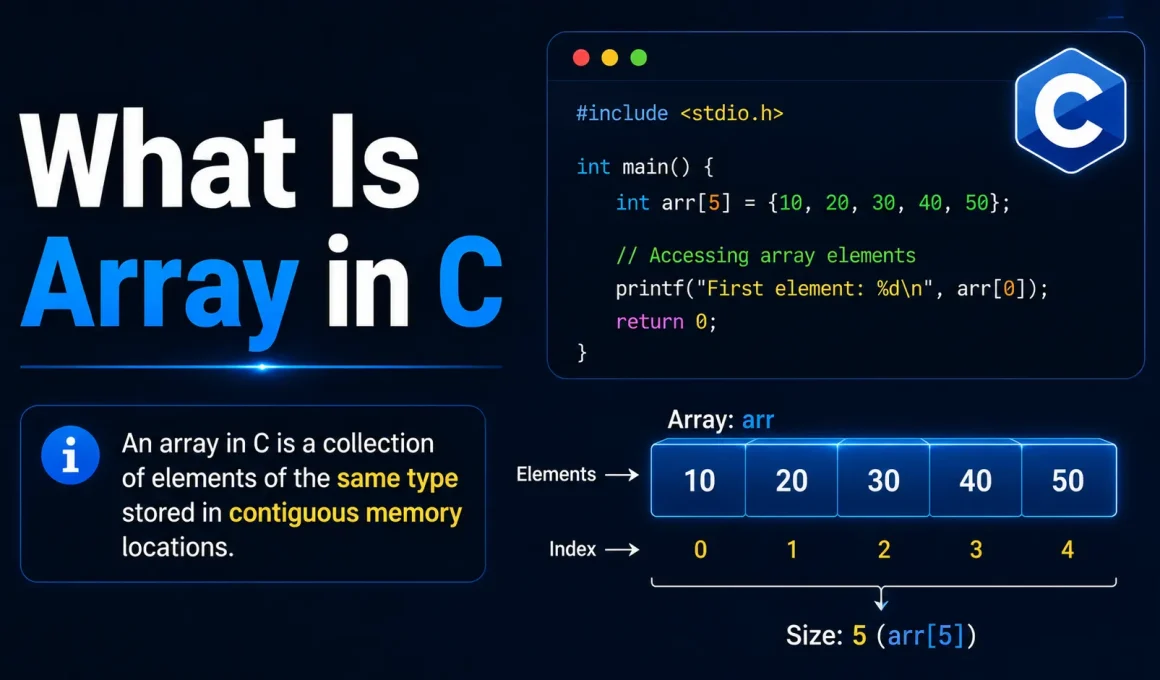
At its core, an array in C is a data structure designed to store multiple values of the same type. Unlike a single variable that holds one piece of data, an array acts like a container capable of holding a collection of items.
Imagine a row of lockers in a school hallway. Each locker has a unique number, and they are all lined up next to each other. An array works similarly. All elements are stored in a continuous block of memory. This contiguity is key because it allows the computer to access any item quickly if it knows the index number.
According to the technical Array in C Definition, the size of the array is fixed once declared. You cannot change the size of an array dynamically after creation. However, within that limit, you can store integers, floats, characters, or even complex structures like pointers.
Key Characteristics of C Arrays
- Homogeneous: All elements must be of the same data type.
- Contiguous Memory: Elements are stored side-by-side in memory.
- Zero-Based Indexing: The first element starts at index 0, not 1.
- Fixed Size: The capacity is determined at the time of declaration.
Why Do We Need Arrays in C?
Before arrays existed, programmers had to declare individual variables for every piece of data. Imagine calculating the average marks of 50 students. Without arrays, you would need 50 separate variable names like student1, student2, …, student50. This is tedious, prone to errors, and makes your code messy.
Arrays solve this problem by allowing you to group related data under a single name. You can use loops to process these elements automatically instead of writing repetitive lines of code. When working with large datasets, tables, or mathematical matrices, the Array in C becomes an essential tool for scalability and efficiency.
Array in C — Initialization and Declaration
To use an array, you must first declare it and then initialize it. Let’s look at the syntax and different ways to get started.
Basic Syntax
The general formula for declaring an array is straightforward:
CData_type array_name[array_size];
For example, to create an integer array named numbers with a size of 5, you would write:
Cint numbers[5];
Initializing Arrays
Declaring an array leaves it filled with garbage values. To avoid unexpected errors, you should initialize the array with specific values. Here are the three most common methods:
1. Initializing Array During Declaration
You can define the size and assign values simultaneously using curly braces {}.
Cint arr[5] = { 10, 20, 30, 40, 50 };
2. Initializing Array Without Size
If you provide the values but skip the size inside the brackets, the compiler calculates the size automatically based on the number of elements provided.
Cint arr[] = { 10, 20, 30, 40, 50 };
// Compiler sets size to 5 automatically
3. Declaring Array Using Loops
For larger datasets, typing out every value is impractical. You can use a loop to populate the array after declaration.
Cint arr[10];
for(int i = 0; i < 10; i++) {
    arr[i] = i * 2; // Assigns even numbers 0 to 18
}
Accessing and Updating Elements in an Array
Once your array is ready, how do you talk to the data inside? You use the square bracket notation [] combined with the index number. Remember, C uses zero-based indexing. This means if you have an array of size 5, the indices range from 0 to 4.
Reading Data
To access the third element of our previous array, we do not use index 3. We use index 2.
C#include <stdio.h>
int main() {
    int arr[] = { 1, 4, 8, 25, 2 };
    printf("Third element: %d", arr[2]); // Output: 8
    return 0;
}
Updating Data
Updating is just as easy. You simply assign a new value to a specific index.
Carr[0] = 99; // Changes the first element from 1 to 99
This ability to randomly access any position is one of the biggest advantages of the Array in C.
Types of Arrays in C
While the concept is simple, arrays can take different shapes depending on your needs.
1. One-Dimensional Array
This is the standard array we discussed above. It looks like a straight line or a single row of elements. It is perfect for lists, queues, or simple sets of data.
Cint marks[5] = {80, 90, 75, 60, 85};
2. Multi-Dimensional Array
Sometimes you need to represent data in rows and columns, like a spreadsheet or a matrix. C supports multi-dimensional arrays. The most common type is the 2D array.
Cint matrix[2][3] = {
    {1, 2, 3},
    {4, 5, 6}
};
In this example, matrix[0][1] would access the value 2. You can theoretically go deeper with 3D or N-D arrays, but 2D is the most frequent use case in C programming.
Example of Array in C (with Explanation)
Let’s put theory into practice with a full program. This example sorts an array of numbers in descending order using a basic nested loop technique.
C#include <stdio.h>

int main() {
    int i, j, temp;
    int a[6] = {1, 4, 8, 25, 2, 17 };

    // Sorting Logic
    for(i = 0; i<6; i++) {
        for(j = i+1; j<6; j++) {
            if(a[j] > a[i]) {
                temp = a[i];
                a[i] = a[j];
                a[j] = temp;
            }
        }
    }

    printf("Sorted Element List ...\n");
    for(i = 0; i<6; i++) {
        printf("%d\n", a[i]);
    }
    return 0;
}
This code demonstrates how arrays allow you to manipulate a list of data collectively. By iterating through the indices, we compared values and swapped them until the list was ordered.
Advantages and Disadvantages of Using Array in C
Like any tool, arrays have their strengths and weaknesses. Understanding these helps you decide when to use them.
Advantages
- Random Access: You can jump to any element instantly using its index.
- Memory Efficiency: Since data is stored continuously, there is less overhead compared to linked lists.
- Ease of Traversal: Iterating through elements is simple using
forloops. - Organization: Keeps similar data organized under one variable name.
Disadvantages
- Fixed Size: You cannot resize the array after creation. If you guess wrong, you waste memory or run out of space.
- Insertion/Deletion Issues: Adding or removing an item in the middle requires shifting all subsequent elements, which is slow.
- Overflow Risk: If you try to access an index outside the declared size (e.g.,
arr[10]when size is 5), you may cause a buffer overflow or undefined behavior.
Recommended Technical Course
Mastering arrays is a stepping stone to becoming a proficient programmer. If you want to deepen your skills, consider exploring courses like:
- Full Stack Development Course
- DSA C++ Course
- Python DSA Course
- Generative AI Course
- Data Analytics Course
Become A C Programming Expert With Kaashiv Infotech
Looking to master the fundamentals of software development and carve your path to success in the tech industry? Kaashiv Infotech is here for you! Our specialized C Programming Inplant Training (IPT) is specifically designed by industry veterans to equip you with the low-level programming mastery and real-world logic required to set your foot in the highly competitive software engineering industry.
Let’s break down our training offerings to see what makes Kaashiv Infotech stand out:
- 2 Real-time Live Industry Projects: Move beyond theoretical syntax by working on two comprehensive, real-time industry projects that simulate actual developer workflows and build a professional portfolio.
- Expert-Led Training: Benefit from interactive sessions led by Microsoft MVPs and Google-recognized experts who bring deep technical insights and global industry standards directly to your learning.
- Inplant Training (IPT) Model: Our specialized IPT approach ensures you gain practical, hands-on experience that bridges the gap between academic learning and professional execution.
- Industry-Oriented Curriculum: Learn high-demand coding techniques and memory management skills that are directly applicable to real-world software and system development.
- Triple Certification Advantage: Stand out to recruiters with our unique credentialing system. Upon completion, you earn three powerful credentials: an Internship Certificate, an IPT Certificate, and an Industrial Exposure Certificate.
- Practical Logic Building: Master key concepts through intensive practical exercises designed to sharpen your problem-solving skills and algorithmic thinking.
- Mentorship & Guidance: Receive direct support from seasoned professionals to ensure all your technical doubts are cleared and your concepts are crystal clear.
- 100% Job Assistance & Career Toolkit: We don’t just train you; we launch you. Gain access to 100% job assistance, professional ATS-friendly resume tools, and curated interview question banks to ensure you are industry-ready.
So what are you waiting for? Launch your career with confidence! Join the Kaashiv Infotech C Programming Training and unlock your potential today.
Conclusion
Learning the Array in C Definition, Types, Syntax & Examples gives you a superpower in programming. It transforms how you handle data, moving from scattered variables to organized structures. While they come with limitations like fixed sizing, the benefits of speed and organization make them indispensable.
Whether you are preparing for an interview or building your first software project, mastering arrays in C is non-negotiable. Start experimenting with 1D and 2D arrays today, and soon you’ll find yourself thinking in terms of collections rather than single variables. Happy coding!
FREQUENTLY ASKED QUESTIONS (FAQs)
1. What is the use of a C array in programming?
A C array is used to store multiple values of the same data type in a single, continuous memory block. It helps you manage lists, perform repetitive operations, process large datasets efficiently, and access elements quickly using indexes.
2. How can we access elements inside an array?
You can access elements inside an array by using their index number within square brackets. For example, to access the second element, you would use arrayName[1] because C arrays are zero-indexed.
3. Is an array good for insertion and deletion?
Generally, no. Inserting or deleting elements in the middle of a C array is inefficient because it requires shifting all subsequent elements to maintain order. Linked lists are often preferred for frequent insertions and deletions.
4. What is an array in C with a simple definition?
Simply put, an array in C is a collection of items of the same data type stored at contiguous memory locations. It behaves like a list where each item has a unique address known as an index.
5. What is the difference between 1D and 2D arrays?
A one-dimensional (1D) array represents a linear list of elements (a row). A two-dimensional (2D) array represents a grid of elements (rows and columns), similar to a table or matrix.