

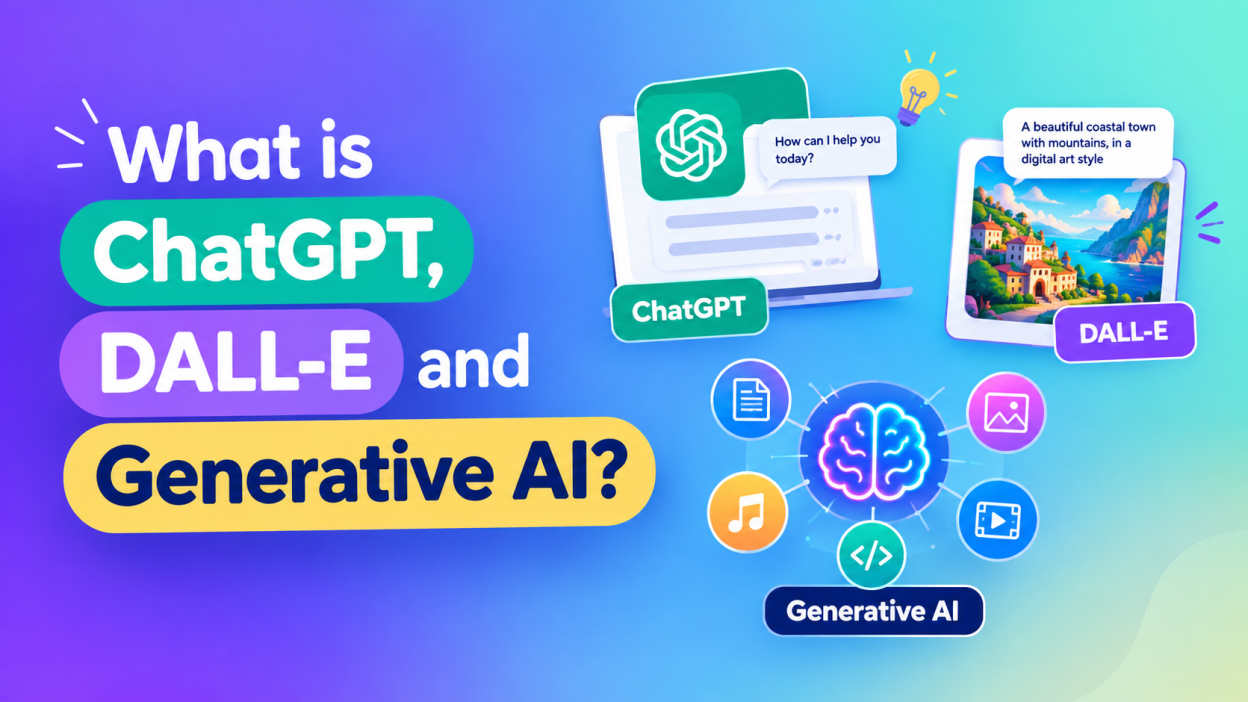
ChatGPT, DALL-E, Generative AI — these three terms have become almost impossible to avoid when we talk about artificial intelligence today. But what do they actually mean? Are they the same thing? Can ChatGPT create images? Is DALL-E still used? And, most importantly, what exactly is Generative AI?
I had the same questions when I first started exploring AI. At first, everything sounded like one big technology: type something, press a button, and AI magically gives you an answer or creates something.
It is actually more interesting than that.
In simple words, Generative AI is the larger technology category, while ChatGPT is an AI assistant designed to work with people through conversation, and DALL-E is a family of OpenAI image-generation models designed to create images from text descriptions.
One important update for 2026: the original DALL-E experience has evolved. OpenAI has retired the official DALL-E GPT from ChatGPT and now provides ChatGPT Images for creating and editing images.
So, if you are a beginner, don’t worry about remembering every model name. Let’s break everything down from the beginning.
🔑 Key Highlights
- Generative AI creates new content instead of simply retrieving existing information.
- ChatGPT is an AI assistant that can help with writing, studying, coding, brainstorming, planning, and many other tasks.
- DALL-E was developed by OpenAI to generate images from natural-language descriptions.
- You can think of Generative AI as the big category, with tools such as ChatGPT and image-generation systems fitting inside the larger AI ecosystem.
- ChatGPT can work with text, images, files, coding, and other forms of information, depending on the current capabilities available.
- DALL-E helped popularize the idea of simply describing an image in words and getting an AI-generated picture.
- AI-generated content should still be checked because AI can produce incorrect information, misleading details, or unexpected results.
- You don’t need to be an AI expert to start using Generative AI. A simple prompt is often enough to begin. 🚀
What is Generative AI?
Let’s start with the biggest term: Generative AI.
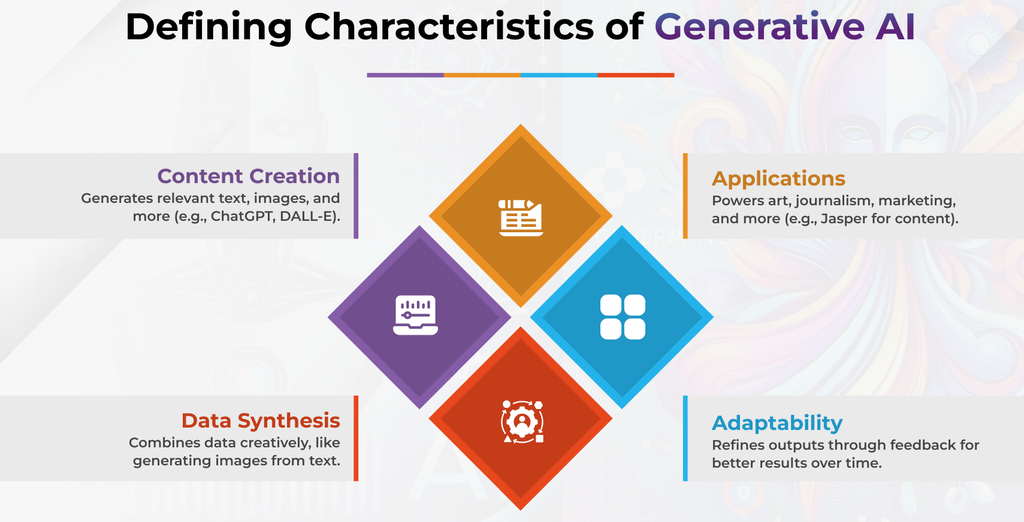
Generative AI is a type of artificial intelligence that can create new content based on the instructions or prompts we provide.
That content could be:
- 📝 Text
- 🖼️ Images
- 🎵 Music
- 🎤 Audio
- 🎬 Video
- 💻 Computer code
- 📊 Other forms of digital content
This is what makes Generative AI different from many traditional software systems.
Imagine that you open a normal calculator and type:
25 + 50
It gives you the result:
75
The calculator isn’t creating a story, designing a picture, or writing an email.
Now imagine telling an AI: “Write a friendly email asking my manager for one day of leave.”
The AI can generate a complete email based on your instruction.
That’s the basic idea behind Generative AI.
The word “generative” is important here because the system generates content.
How Does Generative AI Work?
This part can sound complicated very quickly, so I’ll keep it simple.
Generative AI models are trained using large amounts of data. During training, models learn patterns and relationships in the data.
For example, a language model learns how words and sentences relate to one another.
When I give an AI a prompt, the model uses what it learned during training to generate a response that matches the instructions as closely as it can.
Think about autocomplete on your phone.
You type: “I am going to…”
Your phone may suggest: “the office.”
Generative AI works on a vastly more sophisticated scale. It can use the context of a much larger instruction to generate paragraphs, code, explanations, stories, summaries, and more.
Of course, modern AI systems are far more complicated than simple autocomplete. But this comparison gives beginners a useful starting point.
What is ChatGPT?
ChatGPT is an AI assistant developed by OpenAI.
According to OpenAI, ChatGPT can help with everyday activities such as writing, brainstorming, studying, planning, mathematics, coding, and analyzing images and files.
The easiest way to understand ChatGPT is this:
You communicate with it using natural language instead of learning a complicated command system.
For example, you could type: “Explain JavaScript to me like I’m a beginner.”
ChatGPT can explain the concept in simple terms.
Then you can continue: “Give me an example.”
Then: “Now explain that example line by line.”
This conversational style is one of the things that makes ChatGPT different from traditional software.
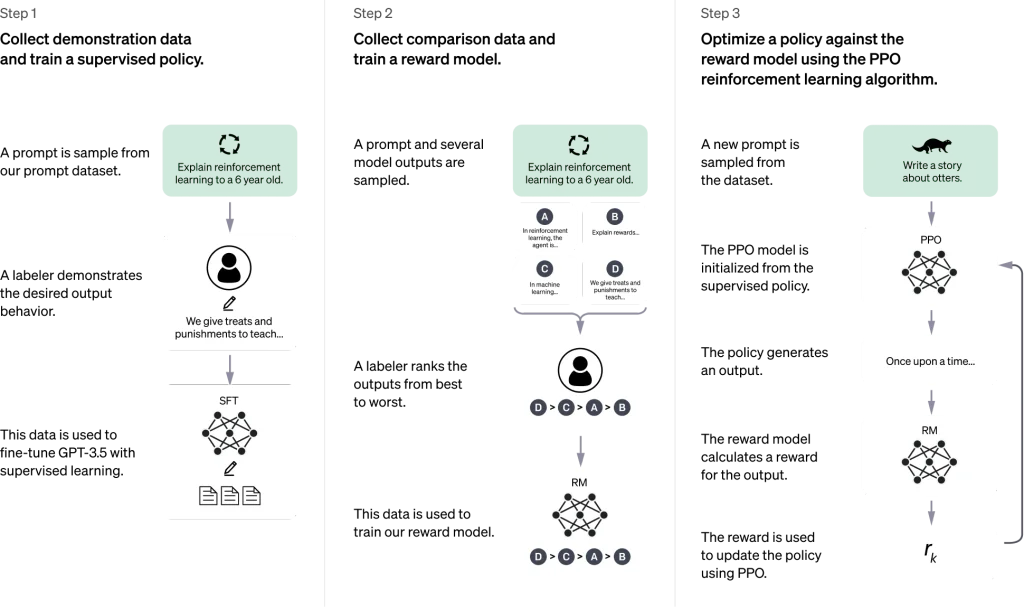
OpenAI introduced ChatGPT publicly in November 2022 as a conversational model.
Today, the ChatGPT experience has expanded considerably beyond simply answering text questions.
What Can ChatGPT Do?
This is where things become interesting.
I personally find ChatGPT most useful when I treat it like a thinking and productivity assistant, rather than simply a question-answering machine.
Here are some common uses:
1. Learning
You can ask ChatGPT to explain difficult topics in simple words.
For example: “Explain APIs to me with a real-life example.”
You can then ask follow-up questions until the topic becomes clear.
2. Writing
ChatGPT can help draft:
- Emails
- Blog articles
- Social media posts
- Reports
- Resumes
- Product descriptions
3. Coding
You can ask for:
- Code examples
- Debugging help
- Programming explanations
- SQL queries
- Algorithm explanations
4. Brainstorming
Suppose you’re creating a technology blog but can’t think of topics.
You could ask: “Give me 20 beginner-friendly AI article ideas.”
That’s a simple use of Generative AI.
5. Working with files and images
Depending on the available ChatGPT features, users can also work with files and images for tasks such as analysis, summarization, or transformation.
What is DALL-E?
Now let’s talk about DALL-E.
DALL-E is an OpenAI system designed to generate images from text descriptions.
OpenAI introduced the original DALL-E in January 2021. The system could create images based on natural-language descriptions and combine concepts in unusual ways.
For example, imagine typing: “A golden retriever wearing sunglasses, sitting in a futuristic office, digital art.”
The basic idea behind DALL-E is that the text description can be used to produce a corresponding image.
This was a big step in making text-to-image generation accessible to ordinary users.
You didn’t need to know Photoshop.
You didn’t need to know 3D modeling.
You could simply describe what you wanted.
DALL-E and Text-to-Image AI
The phrase text-to-image AI is worth remembering.
It basically means:
Text prompt → AI model → Generated image
For example:
Prompt: “A small robot drinking coffee in a Chennai café, cinematic photography.”
Output:
An AI-generated image based on that description.
DALL-E demonstrated how natural language could be used to control visual generation. OpenAI’s early DALL-E research also explored combining unrelated concepts and generating different visual styles and compositions.
This is one reason DALL-E became such a well-known name in Generative AI.
Is DALL-E Still Used in ChatGPT?
This is an important question because many older articles still say: “ChatGPT uses DALL-E to generate images.”
That information can be outdated.
OpenAI’s current ChatGPT documentation says that the official DALL-E GPT has been retired from ChatGPT. Users can now create and edit images using the newer ChatGPT Images experience.
OpenAI also introduced newer image-generation technology that is more deeply integrated into its GPT models.
So I would explain the relationship like this:
DALL-E → Important OpenAI image-generation technology
ChatGPT Images → Current image-generation experience in ChatGPT
This distinction matters if you’re writing an updated AI article in 2026.
ChatGPT vs DALL-E vs Generative AI
The easiest way to remember the difference is to imagine a large umbrella.
☂️ Generative AI
Under that larger concept, we have different AI systems designed for different types of content.
| Technology | Simple Meaning | Main Use |
|---|---|---|
| Generative AI | AI that creates new content | Text, images, audio, video, code, etc. |
| ChatGPT | Conversational AI assistant | Questions, writing, coding, learning, planning |
| DALL-E | OpenAI image-generation model family | Creating images from text |
| ChatGPT Images | Current ChatGPT image-generation experience | Creating and editing images |
So, ChatGPT, DALL-E, Generative AI are related, but they are not three names for exactly the same thing.
That’s probably the easiest way to remember it.
Real-Life Example of Generative AI
Let’s say I’m preparing a blog article about cybersecurity.
Normally, I might have to:
- Research the topic.
- Create an outline.
- Write the introduction.
- Find examples.
- Create an image.
- Edit the content.
- Create social media copy.
Generative AI can help with several of these steps.
I could ask ChatGPT: “Create a beginner-friendly outline for a cybersecurity article.”
Then: “Explain phishing using a real-life example.”
Then: “Create five social media captions for this article.”
For the visual side, I could use an AI image-generation tool to create an illustration based on a description.
That’s where Generative AI becomes practical.
It isn’t just something we discuss in technology conferences. People are already using these tools for everyday creative and productivity tasks.
Why is Generative AI So Popular?
I think one major reason is simplicity.
Earlier, if you wanted to create certain types of digital content, you often needed specialized software or technical knowledge.
Now the interaction can be as simple as:
Think → Type → Generate → Edit
That feels completely different.
A student can use AI to understand a difficult concept.
A developer can use it to explore code.
A designer can experiment with ideas.
A content creator can brainstorm topics.
A business owner can draft marketing content.
The important thing is not simply knowing how to generate something. The real skill is learning how to give good instructions and how to review the result.
What is a Prompt?
A prompt is the instruction you give to an AI system.
For example: “Explain Python.”
That’s a prompt.
But you can make it more specific: “Explain Python variables to a complete beginner using three simple real-life examples.”
The second prompt gives the AI more context.
This is why prompting has become an important skill when working with Generative AI.
A better prompt doesn’t guarantee a perfect answer, but clear instructions usually make it easier for an AI system to understand what you’re asking for.
Advantages of Generative AI
Generative AI can be useful for many reasons.
⚡ Saves time
It can help create a first draft quickly.
💡 Helps with ideas
When you have absolutely no idea where to start, AI can provide starting points.
📚 Supports learning
You can ask the AI to explain a topic at different difficulty levels.
💻 Helps developers
It can assist with code examples, debugging, documentation, and explanations.
🎨 Supports creativity
Image-generation tools can help people visualize ideas that are difficult to create manually.
🌍 Makes technology easier to access
You don’t always need to learn complicated commands before getting started.
Limitations of Generative AI
Now comes the part I think every beginner should understand.
Don’t blindly trust AI.
Generative AI can produce incorrect information. Sometimes an answer sounds extremely confident even when something in it is wrong.
That’s why I always recommend:
Generate → Check → Edit → Use
Don’t simply:
Generate → Copy → Publish
This becomes especially important for:
- Medical information
- Financial decisions
- Legal information
- News
- Technical documentation
- Academic work
- Important business decisions
AI can be incredibly useful, but human judgment still matters.
Is ChatGPT the Same as Generative AI?
No.
This is one of the most common beginner misunderstandings.
Generative AI is the broader concept.
ChatGPT is a specific AI assistant/product experience.
A simple analogy is: Vehicle = broad category, Car = one type of vehicle
Similarly: Generative AI = broad technology category, ChatGPT = one AI product that can generate content
DALL-E fits into the image-generation side of this ecosystem.
ChatGPT, DALL-E and Generative AI in Everyday Life
Let’s make the whole thing extremely simple.
Imagine you’re starting a YouTube channel.
You could use ChatGPT to brainstorm video ideas.
You could use Generative AI to help create a script.
You could use an AI image-generation system to create visual concepts.
You could use AI tools for captions, descriptions, and other content.
Suddenly, one person can experiment with tasks that previously required several different skills.
That doesn’t mean AI replaces every human skill.
Instead, I see it as a new kind of tool.
And like any tool, the result depends heavily on how you use it.
What Should Beginners Learn First?
If you’re completely new to AI, I wouldn’t recommend starting with complicated machine-learning mathematics.
Start here:
Step 1: Understand AI
Learn what Artificial Intelligence actually means.
Step 2: Understand Generative AI
Learn how AI systems can generate new content.
Step 3: Try ChatGPT
Ask simple questions. Then ask follow-up questions.
Step 4: Learn Prompting
Experiment with specific instructions.
Step 5: Explore AI Images
Try describing an image and see how AI interprets your idea.
Step 6: Learn AI Limitations
Understand hallucinations, inaccurate information, privacy considerations, and bias.
This gives you a much stronger foundation than simply memorizing AI terminology.
Final Thoughts
When I first came across terms like ChatGPT, DALL-E, Generative AI, they sounded like completely separate and complicated technologies.
Now I think about them much more simply.
Generative AI is the bigger idea: AI systems that can generate new content.
ChatGPT is a conversational AI assistant that can help with tasks such as writing, learning, coding, brainstorming, and planning.
DALL-E represents an important part of OpenAI’s history in text-to-image generation, where users could describe an image using natural language and have an AI system create it.
And today, the ChatGPT image experience has moved beyond the original DALL-E integration, with newer image-generation technology built into ChatGPT.
The exciting part is that you don’t have to be a programmer to start exploring Generative AI.
Start with one simple prompt.
Ask a question.
Try something.
Make a mistake.
Ask another question.
That’s how I think most people should begin learning AI — not by trying to understand everything at once, but by actually using it. 🚀
Frequently Asked Questions
1. What is ChatGPT in simple words?
ChatGPT is an AI assistant that lets you communicate with AI using natural language. It can help with writing, learning, coding, brainstorming, planning, and many other tasks.
2. What is DALL-E?
DALL-E is an OpenAI image-generation model family that was designed to create images from natural-language descriptions.
3. What is Generative AI?
Generative AI refers to AI systems that can generate new content such as text, images, audio, video, and code.
4. Is ChatGPT Generative AI?
Yes. ChatGPT is an example of a Generative AI-powered product experience because it can generate content in response to user instructions.
5. Can ChatGPT create images?
Yes. ChatGPT currently has an integrated image-generation experience for creating and editing images. The official DALL-E GPT has been retired from ChatGPT.
6. Is DALL-E the same as ChatGPT?
No. They are related OpenAI technologies, but they were designed around different capabilities. ChatGPT focuses on conversational interaction and a broad range of tasks, while DALL-E was specifically associated with image generation.
7. Can Generative AI make mistakes?
Yes. Generative AI can produce inaccurate or misleading information, so important information should always be verified.
8. Do I need programming knowledge to use Generative AI?
No. Many Generative AI tools can be used with ordinary natural-language instructions. Programming becomes useful when you want to build applications that use AI through APIs.
Want to Learn More About Python & Artificial Intelligence ?, Kaashiv Infotech Offers Full Stack Python Course, Artificial Intelligence Course, Data Science Course & More Visit Their Website course.kaashivinfotech.com.
Related Reads:
Artificial Intelligence vs Human Intelligence: A Deep Dive into Minds Made and Minds Born
Top 10 AI Tools for Content Creation in 2026 You Shouldn’t Miss.

