Git vs GitHub: 7 Key Differences You Must Know (And Why It Matters in 2025 💥)
Git vs GitHub – What’s the Difference and Why Should You Care?
Let’s get right into it — if you’ve Googled “git vs github” more than once, you’re not alone. I’ve been there too. When I started learning to code, these two terms confused the heck out of me. I thought Git was GitHub and GitHub was… just some fancy website?
Wrong. 🤯
They’re related, but they are not the same. And if you’re a student, a beginner developer, or even a tech-curious non-coder, understanding the difference between Git and GitHub will save you so much time and frustration later on.
Let’s simplify it — from one confused beginner (then) to another (you?) right now.
🧠 So… What is Git?
Let’s start with Git.
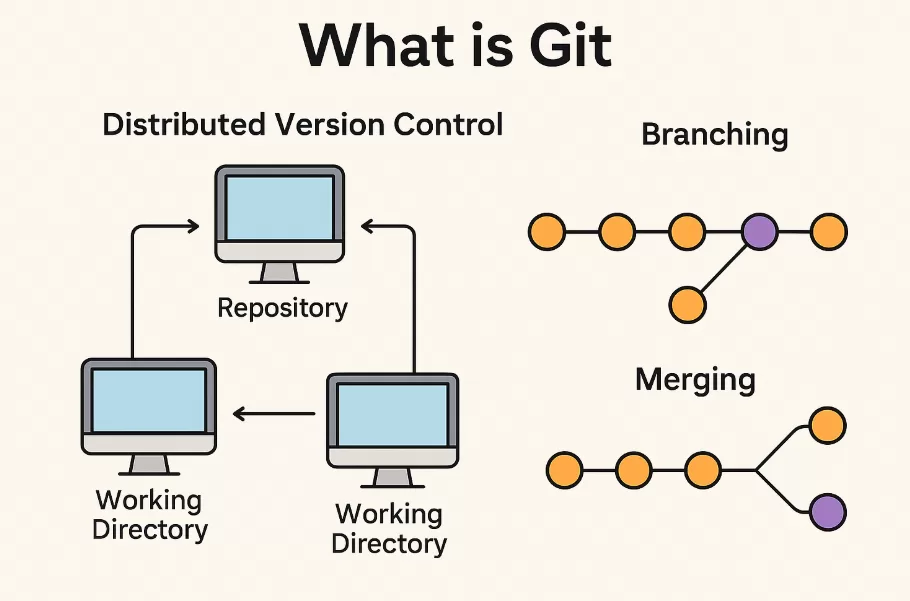
Git is a version control system. That means it helps you track changes in your code, sort of like Google Docs for developers — but offline and way more powerful.
When you’re writing code or building a project, Git allows you to:
- Save versions (called commits)
- Create branches to experiment with new features
- Go back in time if something breaks (aka code time machine 🕰️)
- Collaborate without messing up each other’s work
💡 Real-life example from my life:
When I was working on a simple Python calculator app, I accidentally deleted a working version of my code. Panic mode: ON 😱. But since I was using Git, I just rolled back to the last commit. It was like magic.
Without Git? I would’ve had to rewrite everything. Brutal.
☁️ And What is GitHub?

Now, onto GitHub.
GitHub is a website that hosts your Git repositories online. It makes it super easy to:
- Share your code with others
- Collaborate on teams
- Contribute to open-source projects
- Showcase your portfolio
- Deploy code with CI/CD tools
Think of it like this:
If Git is your local toolbox, GitHub is the garage where you store and show off your tools to the world. You don’t need GitHub to use Git, but using both makes life a lot easier — especially when working with a team or building in public.
🔄 Git vs GitHub – 7 Key Differences You Should Know
Here’s a breakdown of Git vs GitHub using plain English:
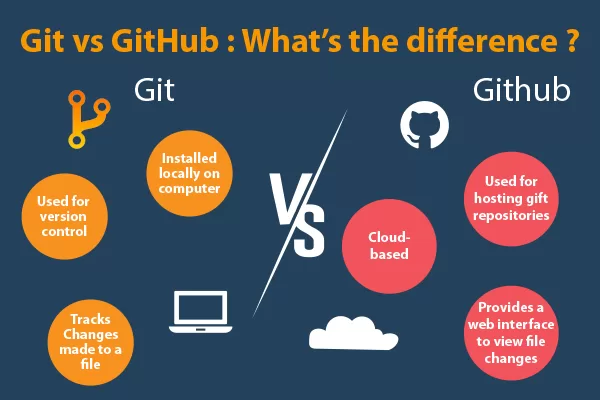
| Feature | Git | GitHub |
| Type | Version Control System | Cloud Platform for Code Hosting |
| Works Offline? | Yes | No (Needs Internet) |
| Use Case | Track code changes | Collaborate & showcase projects |
| Installation | Local software | Web-based platform |
| Interface | Command Line (mostly) | Visual Dashboard |
| Popular For | Managing project history | Teamwork & open-source |
| Ownership | Open Source (Free) | Owned by Microsoft |
👩💻 Why You Should Learn Git and GitHub
Whether you’re aiming to become a full-stack developer, DevOps engineer, or even a freelancer, Git and GitHub are essential.
If you’re looking for practical learning, many institutes now offer hands-on Git and GitHub training as part of a software development course in Chennai.
🤝 How Git and GitHub Work Together – My Daily Workflow
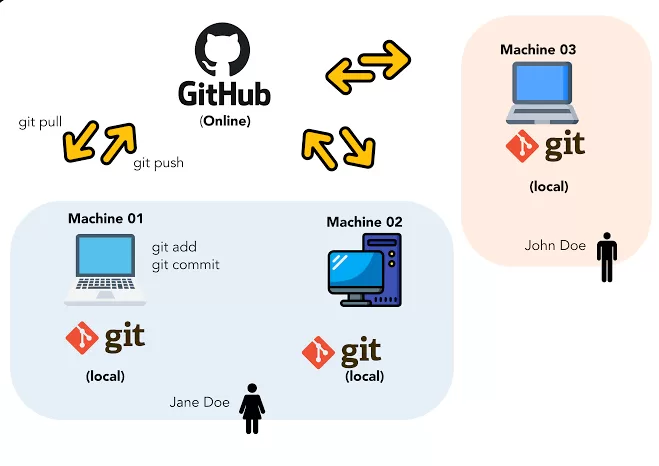
Here’s how I use Git and GitHub together every single day:
- I create a folder and initialize Git using git init.
- I make changes, then stage them with git add .
- I commit those changes: git commit -m “Initial commit”
- I push my work to GitHub using:
git remote add origin https://github.com/myusername/myrepo.git

git push -u origin main
And just like that — my project is live on GitHub. Ready to share. Ready to collaborate.
🤯 Common Misconceptions About Git vs GitHub
Let me clear up a few myths I believed when I started out:
- ❌ GitHub is Git — Nope. Git is the tool, GitHub is the platform.
- ❌ You must use GitHub with Git — Not true. You can use Git entirely offline.
- ❌ GitHub is only for professionals — Wrong again. It’s for everyone — students, hobbyists, pros.
🔧 GitHub in DevOps – Why It’s Crucial
If you’re exploring a DevOps course in Chennai, GitHub is probably part of the syllabus. Why? Because GitHub isn’t just about storing code anymore — it supports:
- CI/CD pipelines via GitHub Actions
- Issue tracking and project boards
- Automation for testing, deployment, and container builds
DevOps practices rely heavily on version control, automation, and team collaboration — and Git + GitHub power all of it.
🌍 GitHub Is More Than Just Hosting — It’s a Community
The magic of GitHub goes beyond code. It’s where the open-source world lives.
Want to contribute to Python, TensorFlow, or even your favorite game engine? It’s all happening on GitHub.
I once submitted a fix to an open-source HTML template. It was just one line. But it felt HUGE. That moment taught me: “My code matters.” That’s what GitHub is really about — empowering developers to build together.
🔁 Git vs GitHub Recap (Use This as a Cheat Sheet)
- Git = Tracks your code history.
- GitHub = Hosts that history and lets others collaborate.
- Use Git locally, use GitHub to go global 🌍
- You can’t push to GitHub without Git.
- You can use Git without ever logging into GitHub.
💭 Final Thoughts — Why It Matters in 2025 and Beyond
In 2025 and beyond, mastering Git and GitHub is like learning how to type for modern developers. Whether you’re just starting out or stepping into a DevOps career, this knowledge is non-negotiable.
So if you’re in Chennai and looking to build a real-world tech skillset, start with a software development or DevOps course that gives you hands-on Git + GitHub experience.
💬 My advice? Create your GitHub account today. Start with small commits. Break things. Fix them. Repeat. That’s how every great developer begins.
🔗 Related Links