Looking to keep your Spotify activity private? You’re in the right place. This Quick & Easy Guide on How to Make Your Spotify Private in 2025 will show you step-by-step how to Make Your Spotify Account Private and protect your listening habits. Whether you’re hiding playlists, listening activity, or starting a private session, we’ve got you covered! 🎧🔒
🔍 Key Highlights
- Step-by-step instructions to Make Your Spotify Account Private in 2025
- How to hide playlists and listening activity
- How to use Private Sessions on Spotify
- How to share private or collaborative playlists securely
- Includes links to related Spotify tips and tricks
🎯 How to Make Your Spotify Private in 2025 (Quick & Easy Guide)
If you’ve ever wondered How to Make Your Spotify Private in 2025 (Quick & Easy Guide), you’re not alone. Many users want to enjoy music without broadcasting their taste or activity to others. Whether you’re concerned about privacy or just want some alone time with your favorite playlists, this guide has everything you need.
Below are the main ways to Make Your Spotify Account Private:
1. 🔐 How to Hide Your Listening Activity on Spotify
Spotify automatically shares your listening activity with your followers unless you turn it off. To hide it:
- Open the Spotify app.
- Go to Settings (gear icon ⚙️).
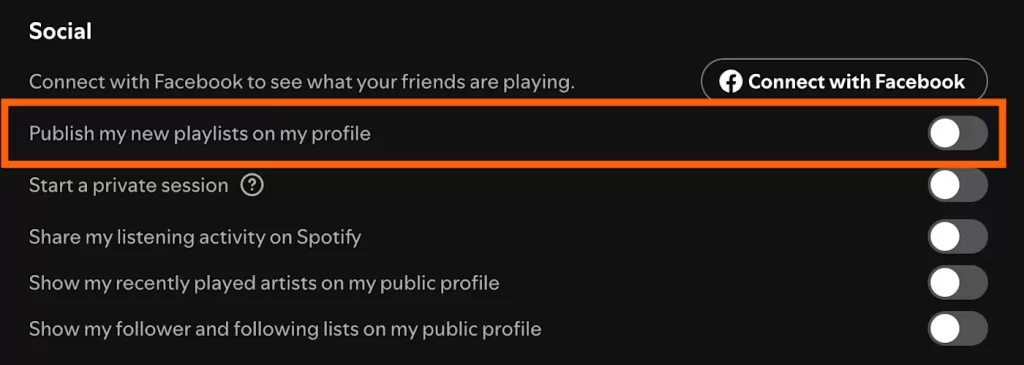
- Scroll to Social.
- Turn off “Listening Activity”.
This will Make Your Spotify Account Private by stopping Spotify from showing your recently played artists and songs.
2. 🕵️ How to Start a Private Session on Spotify
If you want a temporary listening session that no one can see:
- Open the Spotify app.
- Go to Settings > Social.
- Toggle on Private Session.
A private session lasts until you close the app or after 6 hours of inactivity.
3. 📁 How to Make a Playlist Private on Spotify
Spotify lets you make individual playlists private:
- Go to Your Library > Playlists.
- Tap the three dots (…) next to the playlist.
- Select Make Private.
Now, the playlist won’t appear on your public profile.
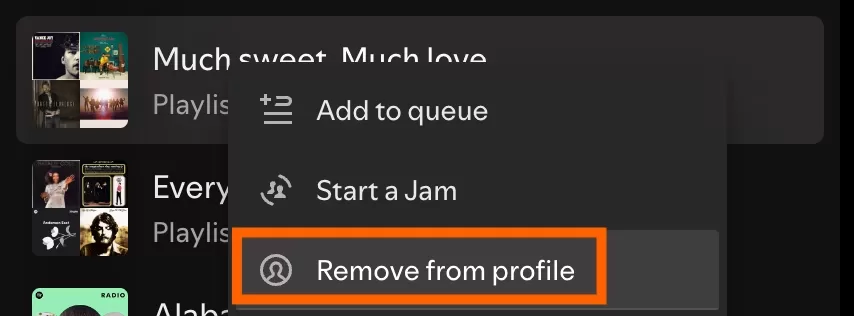
4. 🚫 How to Remove a Playlist from Your Spotify Profile
If you don’t want to make it private but want to hide it from your profile:
- Go to the playlist.
- Tap (…) > Remove from Profile.
This will hide it from your public profile but won’t make it private.
5. 🤫 How to Hide Playlists from Your Spotify Profile
Spotify allows you to keep your favorite playlists to yourself:
- Tap the playlist you want to hide.
- Select “Remove from Profile”.
- For complete privacy, use “Make Private” instead.
6. 🔗 How to Share a Private Playlist on Spotify
Even private playlists can be shared manually:
- Open the private playlist.
- Tap Share > Copy Link.
- Send the link to someone directly.
Only users with the link can access it. Great for sharing secret mixtapes! 🎶

7. 🤝 How to Make a Collaborative Playlist Private
You can invite friends to edit playlists without going public:
- Make your playlist Collaborative.
- Then select Make Private.
This way, collaborators can see/edit, but others can’t discover it.

🔧 Advanced Tip: Manage Spotify Profile Privacy from Desktop
Spotify’s desktop version gives you a little more control:
- Click your profile icon (top right).
- Choose Settings > Social.
- Turn off both:
- Share my listening activity
- Show my recently played artists
For more control, check Spotify’s Privacy Settings 🔗.
🤖 Why Make Your Spotify Private in 2025?
Here are a few reasons to Make Your Spotify Account Private:
- You’re exploring new genres and don’t want to be judged 😅
- You want to listen anonymously
- You’re creating a surprise playlist for someone
- You just value your privacy
🎧 Related Reads
If you’re into streaming and entertainment privacy, you might also enjoy these articles:
🏏 Cricket in Your Pocket: How Apps Bring the Pitch to Every Fan
Learn how cricket apps are transforming fan experiences and making the sport more accessible. internal guide: Top Spotify Tricks Every User Should Know in 2025 🎵
📱 Tech is Changing the Entertainment Industry – Here’s How
Discover how modern tech is revolutionizing how we consume music, movies, and games.
✅ Final Thoughts: How to Make Your Spotify Private in 2025 (Quick & Easy Guide)
By now, you should be fully equipped on How to Make Your Spotify Private in 2025 (Quick & Easy Guide). Whether you’re tweaking visibility settings, making playlists private, or just using a Private Session, Spotify gives you full control. Don’t forget to revisit these tips if Spotify updates their app layout.
🎧 Your music taste is yours alone — protect it, enjoy it, and share it only when you want!