


Python is one of the most popular programming languages because of its simple syntax and readability. When writing Python programs, developers frequently work with variables, functions, classes, and nested functions. Understanding how Python identifies and accesses variables is important for writing reliable and maintainable code.
The Python LEGB Rule explains how Python searches for a variable when it is used inside a function or another scope. LEGB stands for Local, Enclosing, Global, and Built-in. These four levels determine the order in which Python looks for a variable’s value.
Whether you are a beginner learning Python or an experienced developer working on complex applications, understanding the LEGB rule helps you avoid variable-related errors and write cleaner code.
What Is the Python LEGB Rule?
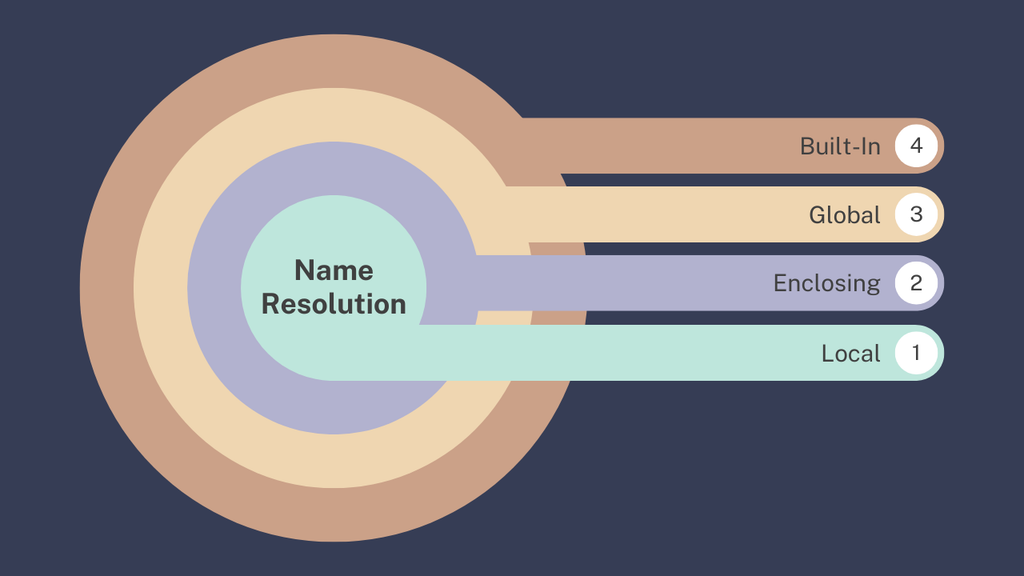
The LEGB rule is a variable name resolution mechanism used by Python. Whenever Python encounters a variable name, it searches through four different scopes in a specific order to find the corresponding value.
The four scopes are:
- Local: Variables defined inside the current function.
- Enclosing: Variables defined in an outer function containing the current function.
- Global: Variables defined at the module level.
- Built-in: Names provided by Python automatically, such as
print(),len(), andsum().
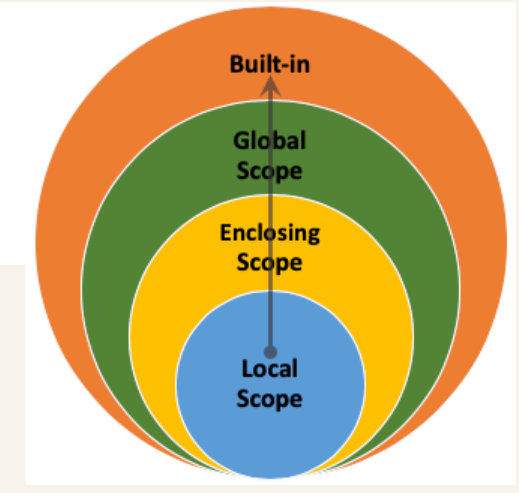
Python searches these scopes from the innermost to the outermost level. Once it finds the name, it uses the associated value.
Understanding the Four Levels of the LEGB Rule
Local Scope
Local scope refers to variables created inside a function. These variables are generally accessible only within that function.
Consider the following example:
def greet(): message = "Hello, Python!" print(message)greet()Output:
Hello, Python!In this example, message is a local variable because it is defined inside the greet() function. Python can access it within that function, but trying to access it outside the function will normally produce a NameError.
Local variables are useful for storing temporary values required to perform a particular task. They also help prevent unrelated functions from accidentally sharing the same variable names.
Enclosing Scope
Enclosing scope applies when one function is defined inside another function. The inner function can access variables belonging to its enclosing function, provided those variables are available in the enclosing scope.
Example:
def outer_function(): message = "Welcome to Python" def inner_function(): print(message) inner_function()outer_function()Output:
Welcome to PythonHere, message is defined inside outer_function() but accessed inside inner_function(). Since the variable does not exist in the inner function’s local scope, Python searches the enclosing scope and finds it.
The nonlocal keyword allows an inner function to modify a variable in its enclosing function rather than creating a new local variable.
def counter(): count = 0 def increase(): nonlocal count count += 1 return count print(increase()) print(increase())counter()Output:
1
2
Enclosing scope is particularly useful for closures, nested functions, callbacks, and situations where a function needs to retain state between calls.
Global Scope
Global scope includes variables defined at the module level, outside functions and classes. These variables can generally be accessed throughout the same module, including inside functions.
Example:
language = "Python"def display_language(): print(language)display_language()print(language)Output:
Python
Python
In this example, language is a global variable. The function can read it because Python searches the global scope after checking local and enclosing scopes.
However, assigning a value to a variable inside a function usually makes that name local to the function unless the global keyword is used.
total = 10def update_total(): global total total = 25update_total()print(total)Output:
25The global keyword tells Python that the function should modify the module-level variable rather than create a local variable.
Global variables can be convenient for configuration values, but excessive use can make programs difficult to test and maintain. Whenever possible, passing values through function arguments is often a clearer approach.
Built-in Scope
Built-in scope contains names that Python provides automatically. These include functions, exceptions, and other standard names that are available without importing additional modules.
Examples include:
print()– Displays information.len()– Returns the number of items in an object.sum()– Calculates the sum of numeric values.range()– Generates a sequence of numbers.type()– Identifies an object’s type.
Example:
numbers = [10, 20, 30, 40]print(len(numbers))print(sum(numbers))Output:
4
100
Python finds len() and sum() in the built-in scope because they are not defined in the local, enclosing, or global scopes.
Avoid naming your variables after built-in functions. For example, assigning list = [1, 2, 3] shadows Python’s built-in list() name and can cause unexpected problems later.
How Python Searches for Variables Using LEGB
Python follows a specific order when resolving a variable name. It begins with the current local scope, checks any applicable enclosing function scopes, searches the global scope, and finally checks the built-in scope.
Consider this example:
name = "Global"def outer(): name = "Enclosing" def inner(): name = "Local" print(name) inner()outer()Output:
LocalThe variable name exists in three scopes, but Python prints "Local" because it finds that variable first in the current function.
If you remove the local assignment, Python uses "Enclosing". If the enclosing assignment is also removed, it uses "Global". If no matching variable exists in any of those scopes, Python may find a built-in name or raise a NameError.
Common Mistakes When Using the LEGB Rule
Understanding the LEGB rule helps prevent several common Python programming mistakes.
1. Confusing local and global variables
Assigning to a name inside a function generally makes it local unless global or nonlocal changes the behavior. Reading that name before assigning it may result in an UnboundLocalError.
2. Overusing global variables
Depending on many global variables can make functions harder to understand and test. Prefer function parameters and return values when appropriate.
3. Overwriting built-in names
Using names such as sum, str, or list for variables can hide the corresponding built-in functions or types.
4. Forgetting the nonlocal keyword
When modifying an enclosing function’s variable, use nonlocal when that is the intended behavior. Otherwise, Python may treat the assignment as creating a local variable.
Why Is the LEGB Rule Important?

The LEGB rule is important because it explains how Python resolves variable names in functions and nested functions. Understanding it helps developers debug errors, manage variable visibility, and write predictable programs.
It is also useful when learning advanced Python concepts such as decorators, closures, recursion, and object-oriented programming. Developers who understand scope can better organize their code and reduce unintended interactions between variables.
Conclusion
The LEGB rule is a fundamental concept in Python programming that describes how variable names are resolved. It consists of Local, Enclosing, Global, and Built-in scopes, which Python checks in that order.
By understanding each scope and learning when to use global and nonlocal, developers can avoid common errors and write more maintainable Python applications. Practicing the LEGB rule with small examples is an effective way for beginners to strengthen their understanding of Python functions and variable scope.
Want to Learn More About Python & Artificial Intelligence ???, Kaashiv Infotech Offers Full Stack Python Course, Artificial Intelligence Course, Data Science Course & More Visit Their Website course.kaashivinfotech.com.