🔥 Introduction
Let’s be honest — every Java developer, from beginner to senior, has stared at an endless if-else chain at least once and thought,“There’s got to be a cleaner way to write this.”And guess what? There is — the Ternary Operator in Java.
According to the JetBrains 2024 Java Developer Ecosystem Survey, over 63% of Java developers said they regularly use ternary operators to simplify conditional logic. Why? Because it makes code shorter, sharper, and easier to maintain — three things recruiters and tech leads love to see in production-level code.
Here’s a fun fact: In FAANG-level coding interviews, hiring managers often look for how clean and efficient your code is — not just whether it works. Replacing verbose if-else blocks with a neat ternary expression can actually score you extra points for readability and performance awareness.
In modern development environments — from Android apps to backend microservices — cleaner, concise code isn’t just a preference; it’s a career skill. If you can express logic in fewer lines without losing clarity, you’re already thinking like a senior developer.
That’s why understanding the Ternary Operator in Java isn’t just another syntax exercise — it’s a step toward writing code that’s smarter, not longer.
🌟 Key Highlights
✅ Learn what the Ternary Operator in Java is and how it replaces bulky if-else conditions
✅ Understand the Ternary Operator algorithm in Java with simple flow and real-life analogies
✅ Explore Ternary Operation in Java through real code examples
✅ Discover the best ternary operator example in Java for interviews and projects
✅ Learn when to use it as an if-else alternative — and when not to
✅ Get developer insights and career tips for writing cleaner, production-ready Java code
💡 What Is the Ternary Operator in Java?
The Ternary Operator in Java is like the Swiss Army knife of conditional logic — small but incredibly powerful. It’s called ternary because it takes three operands, unlike unary (one) or binary (two) operators.
In plain terms, it’s Java’s shorthand for the if-else statement — a way to make quick, elegant decisions inside a single line of code.

Here’s the syntax:
variable = (condition) ? expression1 : expression2;
Let’s break that down simply:
- The condition is checked first.
- If it’s true,
expression1executes. - If it’s false,
expression2executes. - The result gets stored in the variable on the left-hand side.
Or in human language:
“If this condition is true, do that; otherwise, do something else — all in one line.”
🧠 A Quick Example
int age = 20;
String result = (age >= 18) ? "Adult Eligible to vote" : "Minor Not eligible";
System.out.println(result);
Output:
Adult Eligible to vote
Simple, right? That’s the beauty of it. What could’ve been four lines of if-else now fits neatly in one — without compromising clarity.
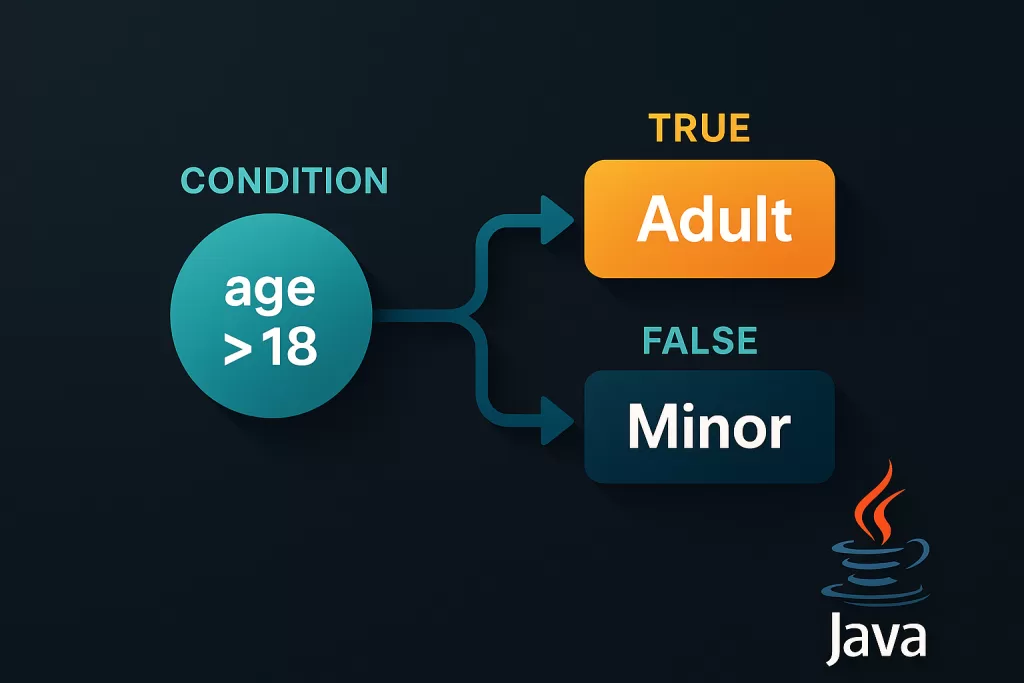
The Ternary Operator algorithm in Java evaluates expressions from left to right. It first checks the condition, then returns one of the two possible results. This makes it both efficient and easy to reason about — especially when writing small decision-making logic like validations, assignments, or return statements.
In fact, many experienced developers use ternary operators to clean up their business logic in frameworks like Spring Boot or Android development, where readability and speed matter.
💡 Pro tip:
When writing production-level code, use the ternary operator only for simple conditions. For anything complex or nested, stick with
if-else— it’s easier to debug and maintain.
⚙️ The Ternary Operator Algorithm in Java
Before you start sprinkling ternary operators across your code, it helps to understand what actually happens behind the scenes. The Ternary Operator algorithm in Java follows a simple yet efficient sequence of steps — very similar to how your brain makes a quick decision.
Here’s how it flows 👇
- Evaluate the condition — Java checks whether the logical statement inside parentheses
(condition)istrueorfalse. - Choose an expression — If the condition is
true,expression1executes; otherwise,expression2executes. - Return a value — The chosen expression’s result is returned immediately.
- Assign it — The result is then assigned to the variable on the left-hand side.
It looks simple — and it is. But under the hood, the Java compiler optimizes ternary operations using short-circuit logic, meaning it never executes both sides of the operator. Only the necessary branch runs.
Let’s visualize this flow through a short example:
int a = 10, b = 20;
int result = (a > b) ? a : b;
System.out.println("The greater number is: " + result);
Step-by-step algorithm flow:
- Step 1: Evaluate
a > b→10 > 20→false - Step 2: Skip
a(true branch), chooseb(false branch) - Step 3: Assign value
20toresult - Step 4: Print
The greater number is: 20
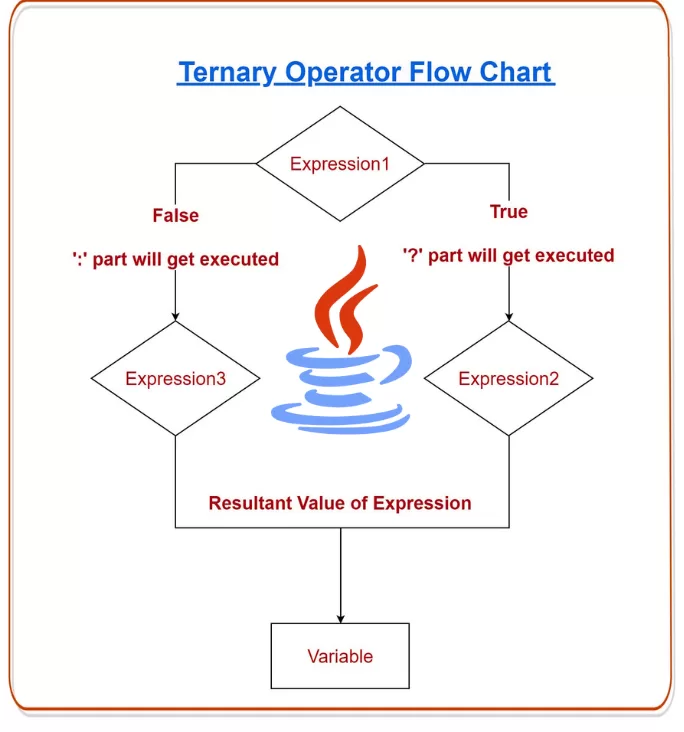
So the Ternary Operation in Java is not just syntactic sugar — it’s also an efficient branching mechanism that executes exactly one expression, saving both time and memory.
💡 Developer Tip:
Avoid using ternary logic for code that involves multiple side effects (like updating files or making API calls). The algorithm is designed for value-based decisions, not process-based control.
💬 Real-World Ternary Operation in Java (with Examples)
Now that you know the algorithm, let’s look at how the Ternary Operation in Java works in real-world scenarios developers face every day.
🧮 Example 1: Quick Decision in User Access Control
You’re building a web app, and you want to show whether a user is admin or regular.
String role = "admin";
String access = (role.equals("admin")) ? "Full Access Granted" : "Limited Access";
System.out.println(access);
Output:
Full Access Granted
This is one of the cleanest if-else alternatives you’ll ever use — no clutter, no braces, just intent.
🧰 Example 2: Finding the Maximum of Three Numbers (Nested Ternary Operator Example in Java)
Sometimes, you’ll see developers use nested ternary operators for short mathematical comparisons:
int a = 15, b = 25, c = 20;
int max = (a > b) ? (a > c ? a : c) : (b > c ? b : c);
System.out.println("Largest number: " + max);
Output:
Largest number: 25
This ternary operator example in Java shows how multiple conditions can fit into a single statement. But while this looks smart, don’t overdo it — deeply nested ternaries can confuse even seasoned developers.
💵 Example 3: Applying Discounts in an E-Commerce App
Let’s take a real business case: pricing logic.
double price = 499.0;
boolean isMember = true;
double finalPrice = isMember ? price * 0.90 : price;
System.out.println("Final Price: " + finalPrice);
Output:
Final Price: 449.1
This small line could exist in thousands of production systems — whether in Amazon, Flipkart, or Zomato — because ternary operators shine in cases where a single conditional value needs to be computed dynamically.
⚡ Example 4: Validating Inputs in a REST API
When validating user input or parameters, ternary logic saves time:
String username = null;
String status = (username != null) ? "Valid" : "Invalid";
System.out.println("User Status: " + status);
Short, safe, and readable — exactly what production-grade code needs.
🧠 Why Developers Prefer the Ternary Operator (Over If-Else)
Developers love the Ternary Operator in Java for the same reason designers love minimalism — less is more.
Here’s why it’s preferred across modern Java projects 👇
✅ 1. Compactness Means Clarity
The ternary operator replaces 4–5 lines of if-else with one elegant line. It’s cleaner to read and maintain — especially in tight loops or lambda expressions.
✅ 2. Faster Decision Flow
While both if-else and ternary operators have the same time complexity O(1), ternary expressions are optimized by the compiler to execute slightly faster during conditional assignments.
✅ 3. Inline Value Assignment
Perfect for returning results directly, especially in return statements or streams.
✅ 4. Better Readability in Return Statements
Example:
return (age >= 18) ? "Adult" : "Minor";
This reads like a sentence — no extra lines, no curly braces.
✅ 5. Cleaner Functional Programming Style
When used with Java Streams or Lambda functions, ternary logic keeps functional chains short and expressive.
💡 Career Tip:
During interviews or code reviews, writing clean ternary-based decisions shows you understand code brevity and logic efficiency — a skill valued in senior and backend roles.
🚫 When Not to Use the Ternary Operator
Even the most elegant tools can be misused. The ternary operator isn’t meant for every situation.
Here’s when to skip it 👇
- ❌ Complex or Nested Conditions — Readability drops fast when ternaries stack.
- ❌ Multiple Side Effects — Avoid if either branch changes program state.
- ❌ When Debugging — It’s harder to place breakpoints inside ternary expressions.
- ❌ When Clarity Matters More Than Brevity — If teammates need time to decode your line, that one-liner isn’t helping.
Think of the ternary operator like espresso ☕ — small, powerful, and effective in moderation. Too much, and you’ll crash your readability.
⚡ Performance Insight
In terms of runtime, both ternary operators and if-else statements are identical in performance — both are evaluated in constant time O(1).
However, readability-driven performance is where ternary wins. Less code means fewer lines for the compiler and your brain to parse.
According to Oracle’s Java documentation, the ternary operator is compiled to the same bytecode as an if-else statement. The real advantage isn’t speed — it’s conciseness and clarity.
That said, here’s a quick stat to put things in perspective:
In a 2024 Stack Overflow Developer Survey, nearly 68% of Java developers said they preferred using ternary operators for simple condition handling due to better readability and fewer syntax errors.
So yes — the Ternary Operator in Java won’t magically speed up your CPU, but it can speed up your workflow, your code reviews, and even your hiring tests.
🧭 Best Practices for Using the Ternary Operator in Java
Writing code isn’t just about getting things to work — it’s about making it clear, predictable, and future-proof. Here are some best practices Java developers (and hiring managers) swear by when using the ternary operator 👇
✅ 1. Keep It Simple and Obvious
The power of the Ternary Operator in Java lies in its simplicity. If you find yourself explaining your ternary logic to a teammate, that’s a red flag. Keep your conditions intuitive and short.
💡 Pro insight: “If you need a comment to explain your ternary, use an
if-elseinstead.”
✅ 2. Match Data Types in Expressions
Both expressions in a ternary operation must return compatible types. Mixing types (like int and String) can cause confusing compiler errors.
Example ❌
int result = (x > 5) ? "High" : 10; // Error: incompatible types
Always ensure both expressions are of the same or compatible type.
✅ 3. Use Parentheses for Clarity
When nesting ternary operators, parentheses are your best friend. They make the order of evaluation crystal clear.
Example ✅
int max = (a > b) ? (a > c ? a : c) : (b > c ? b : c);
✅ 4. Avoid Using It Inside Complex Logic
Don’t bury ternary operators inside long function calls or loops. Keep them at assignment or return levels. This makes debugging and maintenance much easier.
✅ 5. Leverage It in Return Statements
If your function has two simple outcomes, use the ternary directly:
return (score >= 50) ? "Pass" : "Fail";
Clean, expressive, and perfect for short logic.
✅ 6. Combine It with Modern Java Features
Developers working with Java 8+ can combine ternary operators with lambda expressions and streams for elegant conditional pipelines.
Example:
users.forEach(u -> System.out.println((u.isActive()) ? u.getName() : "Inactive User"));
That’s how modern codebases keep logic minimal yet expressive.
⚔️ Ternary Operator vs If-Else Alternative
Let’s face it — no matter how cool the ternary looks, the if-else statement is still the foundation of conditional logic in Java. But when should you use which?
Here’s a quick comparison 👇
| Feature | Ternary Operator | If-Else Alternative |
|---|---|---|
| Syntax | One-liner | Multi-line |
| Use Case | Assigning or returning values | Controlling program flow |
| Readability | Great for short conditions | Better for complex logic |
| Performance | Practically identical | Practically identical |
| Debugging | Harder to step through | Easier to debug |
| Best Used In | Expressions, assignments, lambdas | Blocks, loops, or multiple statements |
💬 Example insight:
A ternary is perfect for simple checks like
String label = (age >= 18) ? "Adult" : "Minor";
But when handling multiple dependent conditions, an if-else or even a switch makes your intent much clearer.
👉 In short:
- Ternary Operator = express logic.
- If-Else = control logic.
❓ Frequently Asked Questions (FAQ)
1. Is the Ternary Operator faster than if-else in Java?
Not really. Both compile down to similar bytecode, so performance differences are negligible. The real advantage lies in cleaner syntax and fewer lines of code.
2. Can I use multiple ternary operators in one line?
Yes, but it’s risky. Nested ternaries can quickly turn confusing. If you must, use parentheses for clarity and test thoroughly.
3. Can I use a ternary operator without assigning it to a variable?
Absolutely. You can directly execute statements inside a ternary (though it’s rare):
(condition) ? System.out.println("Yes") : System.out.println("No");
However, this isn’t best practice. It’s better to assign results or return values.
4. Does the ternary operator work with non-primitive data types?
Yes! It works beautifully with objects, strings, and even custom class instances — as long as both sides return compatible types.
5. How often do real-world developers use it?
A 2024 JetBrains survey revealed that over 60% of professional Java developers regularly use ternary operators in production code for short conditional logic. It’s not just academic — it’s a part of clean, modern coding style.
6. Is it safe to use the ternary operator inside lambda expressions or streams?
Yes, and it’s quite common in modern Java (especially Java 8+). Just ensure your lambda remains readable.
🏁 Conclusion
The Ternary Operator in Java is one of those small language features that quietly separates beginners from fluent developers. It’s not about memorizing syntax — it’s about knowing when brevity enhances clarity.
In interviews, clean one-liners using ternary logic show that you write with intention. In production, they make your codebase more maintainable and readable. But just like any good thing, moderation is key — when logic gets complex, switch back to the good old if-else.
Whether you’re building a Spring Boot microservice, optimizing an Android app, or solving DSA problems for your next interview — mastering the ternary operator gives your Java skills an extra layer of polish.
📚 Related Reads
If you found this guide on the Ternary Operator in Java useful, you’ll love exploring these hand-picked articles that dive deeper into Java and programming logic:
- 🐍 Python Ternary Operator – The Simple Trick to Master Python Conditional Operators Fast!
Learn how conditional operators work in Python and why they’re similar yet more flexible than Java’s ternary logic. - ⚡ Logical Operators in C (AND, OR, NOT) with Real Examples You’ll Actually Use
Strengthen your programming fundamentals by mastering logical operators used across languages. - 💻 Mastering Java Programming Operators – With Real Examples
A complete walkthrough of all Java operators — arithmetic, logical, relational, and conditional — with practical code samples. - 🧱 Abstract Classes in Java: 7 Essential Things You Must Know to Master Java OOP
Understand abstraction, inheritance, and how abstract classes make your OOP design cleaner. - 🔤 7 Things You Must Know About Java String (With Real Examples & Insights)
Deep dive into one of Java’s most-used classes — String — with real-world examples and interview-ready concepts. - 🧬 Inheritance in Java: Complete Guide with Types, Examples, and Best Practices
Learn how inheritance shapes Java’s object-oriented world and explore best practices for scalable design. - 🔁 5 Java Loops You Must Master (My Honest Take as a Developer)
A developer’s take on mastering loops — for, while, and enhanced for — with performance tips and relatable examples.