UI vs UX Design: 7 Key Differences, Real Examples & Why Both Matter More Than Ever in 2025 💥
💬 Let’s Get Real About UI vs UX Design
UI vs UX Design—we hear these terms tossed around like confetti in the design world. But let me ask you something…
👉 Have you ever used an app that looked stunning but made no sense to use?
Or maybe you’ve filled out a simple form online that felt… surprisingly smooth and pleasant?
That’s UX and UI in action. And yes, they’re totally different—but totally inseparable too.
I’ve worked with both UI and UX designers. Heck, sometimes I’ve had to wear both hats in the same week. And trust me, knowing the difference between UI and UX is what saved me from turning a slick-looking app into a confusing mess.
So, let’s cut through the jargon, the AI-generated fluff, and get real about what these terms mean, how they differ, and why you should absolutely care in 2025 (and beyond).
🎯 What is UX Design? (User Experience Design)

Let me start with a story.
A friend of mine recently tried booking a train ticket using an official app. No instructions. Too many popups. Confusing layout. She gave up. UX fail.
UX design is about how a user feels when interacting with your product. It’s the structure, the flow, the logic behind the scenes.
UX = The Invisible Guide
It’s not flashy. It’s not colorful. But it’s what makes or breaks a user’s experience.
Here’s what a UX Designer does:
- Conducts user research
- Maps out user journeys
- Builds wireframes
- Runs usability tests
- Focuses on problem-solving
Think of a UX designer as the person setting up the navigation signs in a museum. The cleaner the layout, the happier the visitor.
🎨 What is UI Design? (User Interface Design)

Now UI is where things get pretty. It’s all the buttons, sliders, images, fonts, and colors you actually see.
Imagine you’re using Spotify. The soothing color palette, the cute icons, the glowing green play button—all that is UI design magic.
UI Designers deal with:
- Color schemes
- Typography
- Spacing and layout
- Responsive design
- Interactive elements
If UX is the blueprint of the house, UI is the paint, lighting, and furniture. You feel it. You react to it.
⚔️ UI vs UX Design: 7 Key Differences That Actually Matter
| 🤖 Aspect | 💡 UX Design | 🎨 UI Design |
| Focus | How it works | How it looks |
| Goal | User satisfaction | Visual delight |
| Tools | Miro, Figma (low-fi), Balsamiq | Figma (hi-fi), Adobe XD, Sketch |
| Process | Research → Flows → Wireframes | Mockups → Prototypes |
| Responsibility | Solve problems | Create interfaces |
| Role | UX Designer | UI Designer |
| Key Deliverables | User flows, wireframes | Visual mockups, style guides |
Still confused about the difference between UI and UX? Here’s the kicker:
UX makes things usable. UI makes them beautiful. You need both.
📱 Real-World UI Design Examples You’ll Recognize Instantly
Let me give you some UI design examples you use every day without even noticing:
- Instagram: Sleek buttons, readable fonts, beautiful color harmony
- Duolingo: Bright illustrations, gamified UI, clean layout
- Airbnb: Elegant forms, calming white space, engaging visuals
Great UI doesn’t scream “Look at me!” It just quietly works.
Want to learn how to build these? Try a free UI/UX course 🎓
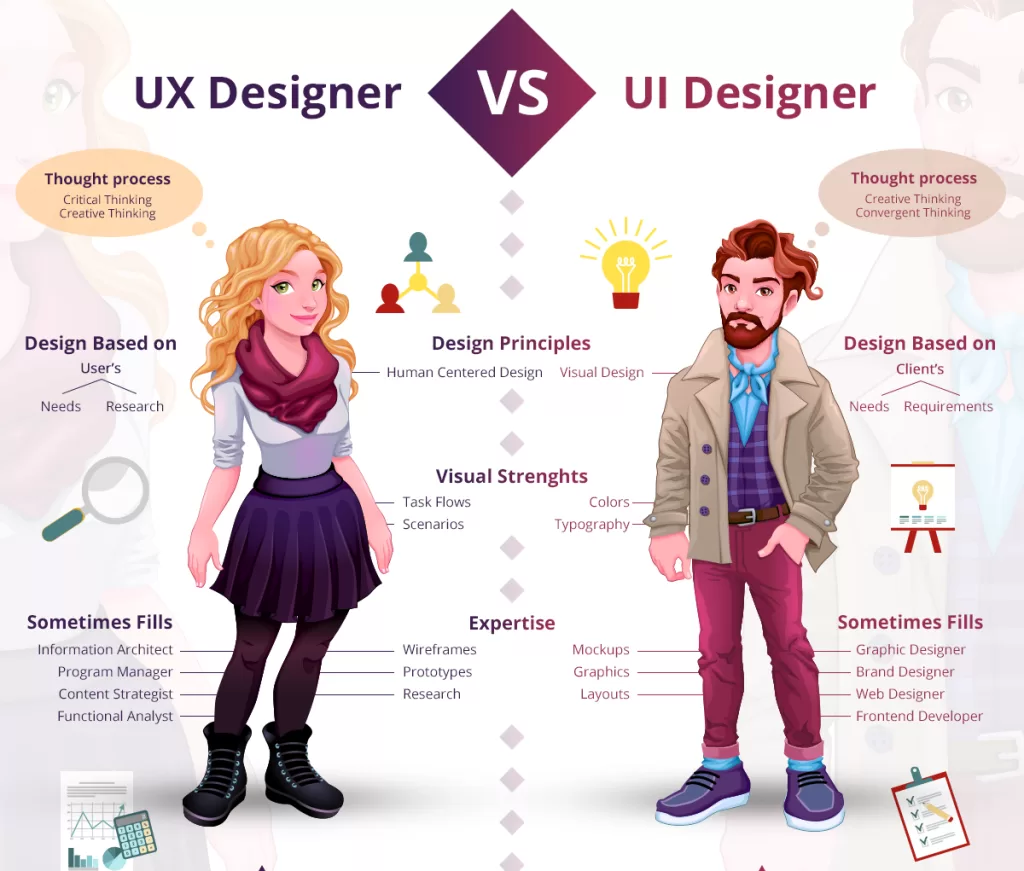
🤝 UX Designer vs UI Designer – Who Does What?
I’ve had clients ask me, “So… can one person do both?”
Technically, yes. Especially in smaller teams. But the truth?
It’s like asking if your chef should also wait tables. Different skills. Different mindset.
UX Designer
- Obsessed with psychology and behavior
- Lives in flowcharts and personas
- Talks to users more than anyone else
UI Designer
- Has an eye for detail, loves playing with colors, typography, and clean layouts
- Lives in Figma
- Talks to developers a lot
In large teams, these roles work together like peanut butter and jelly. No rivalry—just different superpowers.
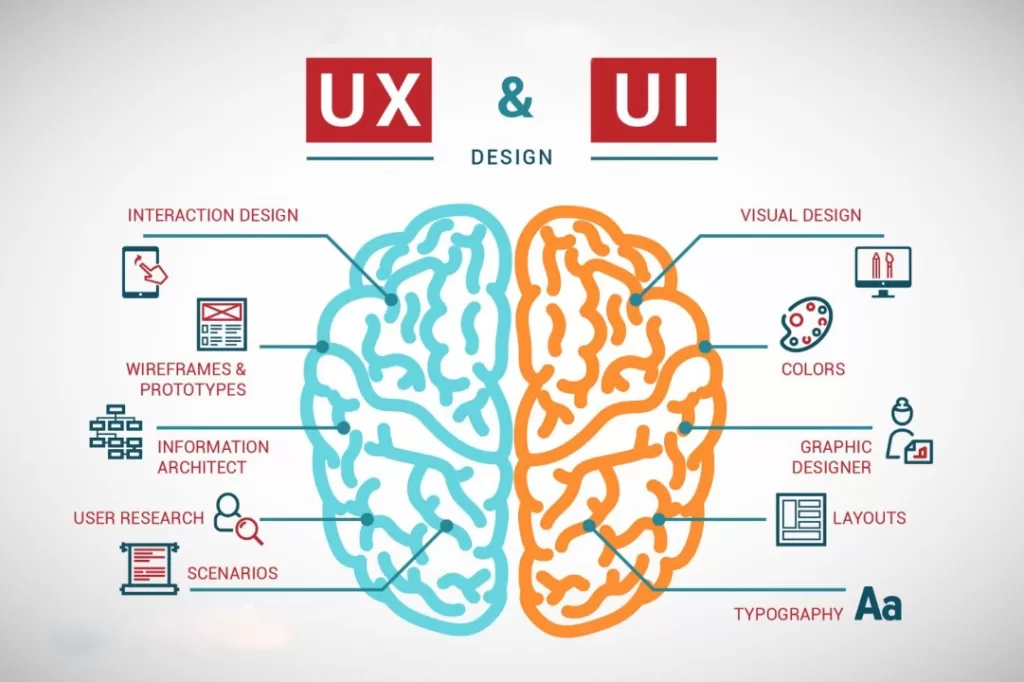
💡 Why UI vs UX Design Matters More Than Ever in 2025
People today have zero patience for clunky design. And in 2025? It’s worse. We’re living in an age of instant swipes and scrolls.
An app might:
- Look beautiful (UI ✅)
- But if it crashes, confuses, or frustrates? Users bounce. (UX ❌)
On the flip side, an app might work brilliantly (UX ✅), but if it looks outdated? People don’t trust it. (UI ❌)
That’s why UI vs UX Design isn’t a debate. It’s a partnership. A collaboration.
You don’t pick one. You embrace both.
🧰 Top Tools Every Beginner UI/UX Designer Should Try in 2025
Here’s what I always recommend for those starting out:
UX Tools:
- Miro – for mind maps & flows
- Maze – user testing made simple
- Balsamiq – low-fidelity wireframes
UI Tools:
- Figma – the holy grail
- Adobe XD – great for prototyping
- Canva – good for quick UI mockups
Bonus: You can explore all these hands-on with this free UI/UX course. It’s where I send my interns.
💬 Final Thoughts: Choose UI and UX – Your Users Will Thank You
If you’re still thinking about UI vs UX Design like a competition, stop right there.
They’re two halves of the same creative brain. One makes things functional. The other makes things lovable.
And in 2025, where digital products are everywhere—from watches to refrigerators—understanding both UI and UX design is your edge.
So next time you’re using your favorite app, stop and think:
- Did I enjoy using this?
- Did it look good?
- Was it easy?
If yes, thank the UI and UX designers behind the scenes.
And if you’re one of them—or want to become one—keep learning. Keep designing. The world needs better experiences.
🔗 Related Links