Software Development is not simply about sitting in front of a laptop and writing hundreds of lines of code. Software Development is a complete journey that starts with an idea, moves through planning and coding, and eventually reaches the hands of real users.
If you’ve ever wondered, “How does a company actually build an application from scratch?” — the answer is largely explained by the Software Development Life Cycle (SDLC).
I remember when I first heard terms such as requirements gathering, system design, testing, deployment, and maintenance. They sounded like completely separate topics. But once I understood the Software Development Life Cycle phases, everything started to connect.
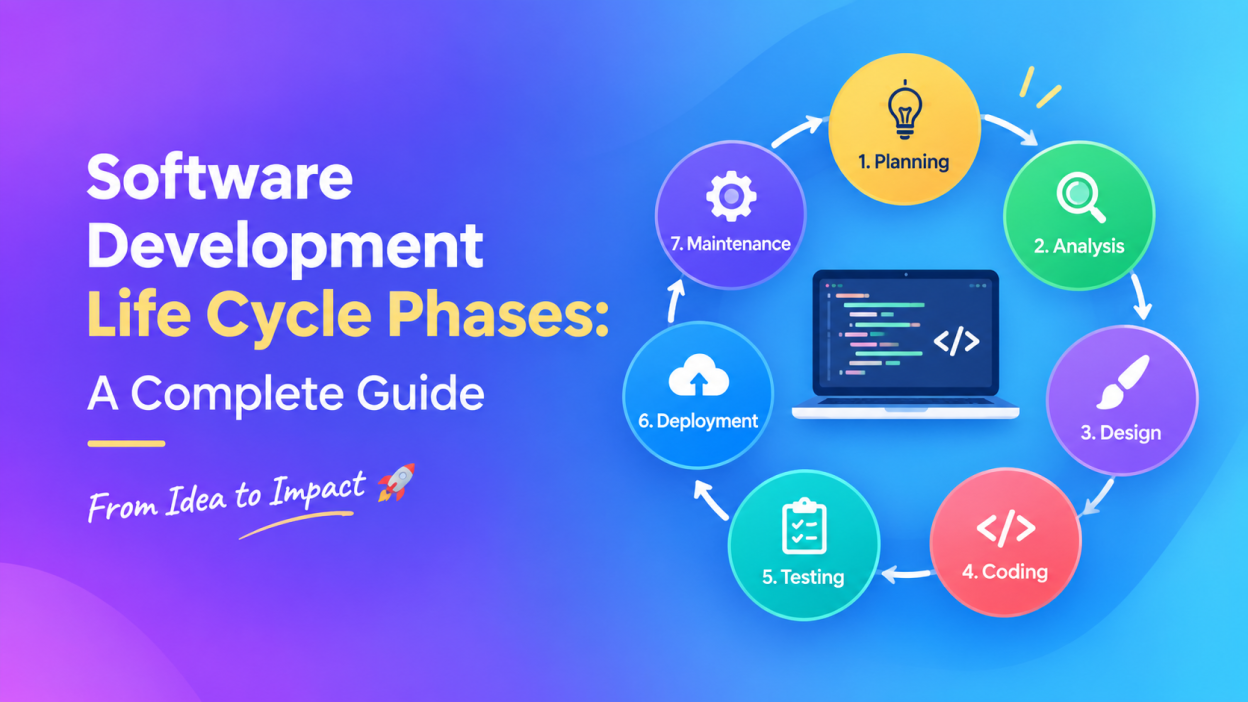
In this guide, I’ll walk you through the 7 major Software Development Life Cycle phases, what happens in each phase, who is involved, and how the process works using a simple real-world example.
Key Highlights
- 💡 Understand what Software Development Life Cycle (SDLC) means.
- 🔍 Learn the 7 Software Development Life Cycle phases.
- 👨💻 Understand what developers do during the coding phase.
- 🧪 Learn why software testing is such an important part of development.
- 🚀 Understand deployment and production.
- 🔧 Learn why software development doesn’t end after deployment.
- ⚖️ Understand Waterfall vs Agile.
- 🔐 See how security fits into the Software Development process.
- 🎯 Learn why SDLC matters for developers, testers, project managers, and beginners.
What Is the Software Development Life Cycle?
The Software Development Life Cycle (SDLC) is a structured process used by software teams to plan, build, test, release, and maintain software.
In simple words: SDLC is a roadmap for building software.
Instead of randomly writing code and hoping everything works, development teams follow a structured process.
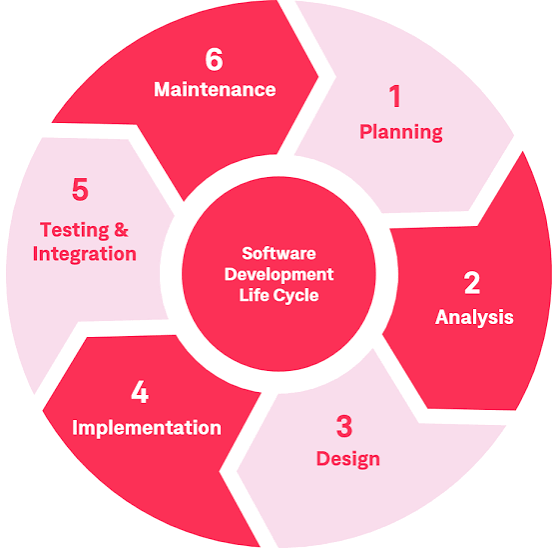
A typical SDLC contains these seven phases:
- Planning
- Analysis
- Design
- Coding
- Testing
- Deployment
- Maintenance
IBM also describes these seven broad phases, while noting that different organizations may organize or combine phases differently depending on their development model.
One important thing to remember: SDLC isn’t necessarily a straight line.
In a traditional Waterfall approach, teams may move through phases sequentially. In Agile Software Development, teams commonly repeat these activities in smaller cycles.
1. Planning – The First Step in Software Development 📋
Every successful Software Development project starts with a question:
What are we actually trying to build?
Before developers start writing code, the team needs to understand the project’s purpose.
For example, imagine a company wants to build an online food delivery application.
The team might ask:
- Who will use the application?
- What problem will it solve?
- What features should it have?
- How much will development cost?
- How long might development take?
- What technologies could be used?
- What risks could affect the project?
This is where the planning phase begins.
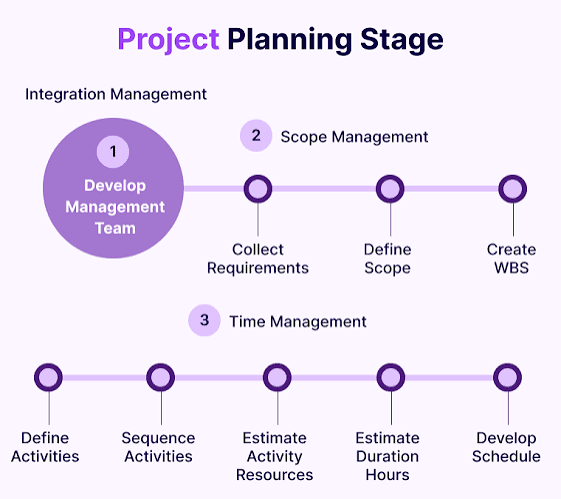
What happens during planning?
The team generally defines:
- Project goals
- Project scope
- Budget
- Timeline
- Resources
- Team requirements
- Potential risks
- High-level features
The planning stage helps prevent a common problem in software projects: building something nobody actually needs.
According to IBM, planning establishes the goals and scope of the project and can help define what the software should — and should not — include.
Real-life example
Suppose the food delivery application initially needs:
- Customer registration
- Restaurant listings
- Food ordering
- Online payment
- Order tracking
Later, someone says:
“Can we also add grocery delivery, movie tickets, hotel booking, and flight reservations?”
Sounds exciting, right?
But adding everything immediately could increase cost, complexity, and development time.
That’s why project scope matters.
2. Analysis – Understanding the Requirements 🔍
Once the project idea is clear, the team needs to understand exactly what users and the business require.
This is the analysis phase of the Software Development Life Cycle.
Here, the team goes deeper.
Instead of saying: “We need a food delivery application.”
The team asks: “What exactly should the application do?”
For example:
Customer requirements
- Users should create an account.
- Users should search restaurants.
- Users should add food to a cart.
- Users should make payments.
- Users should track orders.
Restaurant requirements
- Restaurants should manage menus.
- Restaurants should receive orders.
- Restaurants should update order status.
Admin requirements
- Admins should manage users.
- Admins should manage restaurants.
- Admins should view reports.
The team may document these requirements in a Software Requirements Specification (SRS) or similar requirements documentation.
IBM notes that analysis can involve gathering user requirements, feasibility checks, market information, technical considerations, and resource planning.
Why is analysis important?
Imagine starting construction on a house without deciding:
- How many rooms you need.
- Where the kitchen should be.
- Where the bathroom should go.
- How much land is available.
You might end up breaking walls later.
Software works in much the same way.
Poor requirements can create expensive problems later.
3. Design – Creating the Blueprint 🎨
Now we know what we want to build.
The next question is:
How are we going to build it?
That’s where the design phase comes in.
Think of software design like an architectural blueprint.
Before constructing a building, an architect creates a plan.
Similarly, software teams create a technical design before developers start building the complete application.
What happens during software design?
The team may decide:
- Application architecture
- Database structure
- User interface
- Navigation
- APIs
- Programming languages
- Frameworks
- Security controls
- System components
- Communication between services
For our food delivery application, the team might decide to create:
Frontend
   ↓
Backend API
   ↓
Database
   ↓
Payment Service
The design phase can also include database design, user interface design, architecture decisions, and prototypes.
Example
The developer might choose:
Frontend: HTML, CSS, JavaScript or React
Backend: .NET / C# or Java
Database: SQL Server or PostgreSQL
Hosting: Cloud platform
These choices depend on the organization’s requirements and existing technology stack.
A good design makes development much easier.
4. Coding – Turning the Design Into Software 👨💻
Now comes the part most beginners immediately think of when they hear Software Development:
Writing code.
This is the coding or development phase.
Developers take the requirements and design documents and turn them into actual software.
For example, a .NET developer might create:
- C# classes
- APIs
- Controllers
- Services
- Database connections
- Authentication
- Business logic
A frontend developer may create:
- Web pages
- Forms
- Navigation
- Buttons
- Dashboards
- Responsive layouts
The application gradually starts coming alive.
According to IBM, developers use the requirements and design information created earlier to divide development into manageable coding tasks and build the required components.
Is coding the entire Software Development process?
No.
This is something I wish more beginners understood.
Coding is only one phase of Software Development.
A developer can write beautiful code, but if the application solves the wrong problem, the project can still fail.
That’s why requirements, design, testing, deployment, and maintenance matter just as much.
5. Testing – Finding Problems Before Users Do 🧪
Let’s say the food delivery application has been developed.
Does that mean we’re finished?
Absolutely not.
Now the testing phase begins.
Testing helps the team identify bugs, unexpected behavior, security issues, and failures.
A QA engineer or tester might check:
- Does login work?
- Does registration work?
- Does the search function work?
- Can users add products to the cart?
- Does payment work?
- Does order tracking work?
- What happens when an incorrect password is entered?
- What happens when the internet connection disappears?
Testing isn’t simply about clicking buttons randomly.
There are different forms of testing, including:
- Unit Testing
- Integration Testing
- System Testing
- Acceptance Testing
- Performance Testing
- Security Testing
- Regression Testing
IBM notes that testing can involve both manual and automated approaches, and modern teams may test continuously rather than waiting until the very end.
A simple example
Suppose the application calculates:
Food = ₹500
Delivery = ₹50
Total = ₹550
But the application displays:
Total = ₹500
That’s a bug.
The tester reports it.
The developer fixes it.
The tester tests it again.
This cycle can happen repeatedly.
And honestly, that’s normal.
Finding bugs doesn’t mean the developers failed. Finding bugs before customers encounter them is exactly why testing exists.
6. Deployment – Releasing the Software 🚀
Once the software passes the required checks, it’s time to make it available to users.
This is the deployment phase.
During development, the application might run on a developer’s computer or a testing environment.
Users, however, need access to the production version.
Deployment can involve:
- Servers
- Cloud infrastructure
- Databases
- Domain configuration
- Environment variables
- CI/CD pipelines
- Application configuration
- Monitoring
Sometimes companies don’t release everything to everyone immediately.
They may use approaches such as:
- Beta releases
- Phased releases
- Limited user releases
- Automated deployments
IBM notes that deployment places the software into a production environment where users can access it, and teams may use gradual release strategies before wider availability.
Example
Imagine a company has 1 million users.
Instead of releasing a major update to everyone at once, the team might initially release it to a smaller group.
If everything looks good, they gradually increase the rollout.
That’s a much safer approach for large applications.
7. Maintenance – The Software Development Journey Doesn’t End 🔧
Here’s something beginners often misunderstand.
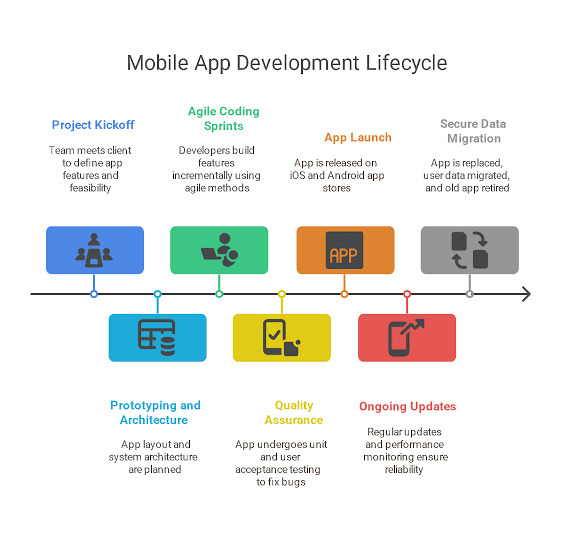
Deployment does not mean the project is finished.
Actually, in many ways, that’s when the real-life journey begins.
Once users start using the application, new problems appear.
Maybe:
- A bug wasn’t discovered during testing.
- Users request a new feature.
- A security vulnerability is discovered.
- A third-party API changes.
- The application becomes slower as the number of users increases.
- The company needs a new payment method.
The development team needs to respond.
That’s the maintenance phase.
Maintenance can include:
- Bug fixes
- Security updates
- Performance improvements
- Feature enhancements
- Database changes
- Monitoring
- Technical improvements
IBM describes maintenance as ongoing post-deployment work that keeps software operating and allows teams to release updates, optimizations, fixes, and improvements.
So the lifecycle looks something like this:
Planning
   ↓
Analysis
   ↓
Design
   ↓
Coding
   ↓
Testing
   ↓
Deployment
   ↓
Maintenance
   ↓
New Requirements
   ↓
Planning Again
And around we go. 🔄
That’s why it’s called a life cycle.
Agile vs Waterfall in Software Development
You may have heard these two words constantly if you’re learning Software Development:
Waterfall and Agile.
So what’s the difference?
Waterfall
Waterfall follows a more sequential approach.
Planning
   ↓
Analysis
   ↓
Design
   ↓
Coding
   ↓
Testing
   ↓
Deployment
The team generally completes one stage before moving to the next.
Waterfall can make sense when requirements are stable and clearly understood. However, changing requirements later can be difficult.
Agile
Agile focuses on smaller, iterative cycles.
Instead of spending months building the entire application before getting feedback, the team develops smaller pieces, reviews them, learns from feedback, and continues improving.
For example:
Sprint 1 → Login
Sprint 2 → Product Search
Sprint 3 → Cart
Sprint 4 → Payment
Sprint 5 → Order Tracking
Agile is especially useful when requirements can change.
Scrum is one popular Agile framework that organizes work into time-boxed iterations called sprints and emphasizes collaboration, inspection, and adaptation.
Why Is the Software Development Life Cycle Important?
You might be thinking:
“Why can’t developers just build the application directly?”
They could.
But imagine 20 developers working on a large application without a common process.
One developer builds one thing.
Another uses a completely different approach.
The tester doesn’t know what the expected behavior is.
The customer changes requirements halfway through development.
Nobody knows what’s supposed to happen next.
Chaos. 😅
The Software Development Life Cycle gives everyone a shared roadmap.
Some major benefits include:
✅ Better planning
Teams understand what needs to be built.
✅ Better quality
Testing and reviews help catch problems.
✅ Lower risk
Teams can identify risks earlier.
✅ Better communication
Developers, testers, business analysts, managers, and stakeholders have clearer responsibilities.
✅ Better resource management
Organizations can estimate people, time, technology, and costs.
✅ Better customer satisfaction
A structured process increases the chance that the final product matches actual user needs.
IBM identifies improved software quality, productivity, risk management, transparency, collaboration, resource management, and customer satisfaction among the major benefits associated with SDLC.
SDLC and Software Security 🔐
Security shouldn’t be treated as something we remember five minutes before deployment.
Modern Software Development teams increasingly integrate security throughout the lifecycle.
For example:
During planning
Ask:
What sensitive information will the application handle?
During design
Consider:
How will authentication and authorization work?
During coding
Use secure coding practices.
During testing
Look for vulnerabilities and security weaknesses.
During deployment
Secure the infrastructure and configuration.
During maintenance
Patch vulnerabilities and monitor the application.
Microsoft recommends integrating security practices throughout the Software Development Life Cycle rather than waiting until the end.
This approach is often associated with Secure Software Development Life Cycle (SSDLC) and DevSecOps practices.
Common Challenges in the Software Development Life Cycle
SDLC gives teams a roadmap, but it doesn’t magically make every project easy.
Teams still face problems such as:
- Poor requirements
- Scope creep
- Communication problems
- Tight deadlines
- Budget limitations
- Technical debt
- Security vulnerabilities
- Changing customer expectations
- Difficult integrations
- Insufficient testing
One of the biggest problems is scope creep.
Imagine starting with: “Let’s build a simple shopping website.”
Then someone adds: “Let’s add AI recommendations.”
Then: “Let’s add live chat.”
Then: “Let’s add voice search.”
Then: “Let’s build a mobile application too.”
Suddenly, the “simple website” has become a massive project.
Good Software Development teams learn to control scope while still responding to important business needs.
Real-World Example of the Complete SDLC
Let’s quickly bring everything together.
Imagine we’re building an online learning platform.
1. Planning
We decide the goal is to create a platform where students can purchase and watch courses.
2. Analysis
We identify requirements such as:
- Student registration
- Instructor registration
- Course creation
- Course purchase
- Video streaming
- Progress tracking
3. Design
We design:
- Database
- User interface
- APIs
- Authentication
- Course architecture
4. Coding
Developers build the frontend, backend, database, APIs, and other components.
5. Testing
QA engineers test:
- Login
- Payments
- Video playback
- Course access
- Progress tracking
- Security
- Performance
6. Deployment
The application is released to production.
7. Maintenance
The team fixes bugs, adds features, improves performance, and handles security updates.
That’s the Software Development Life Cycle in action.
Frequently Asked Questions About Software Development Life Cycle
What are the 7 phases of SDLC?
The commonly described seven phases are:
- Planning
- Analysis
- Design
- Coding
- Testing
- Deployment
- Maintenance
Different organizations may combine, rename, or divide these activities differently.
Is SDLC only for developers?
No.
A Software Development project can involve:
- Developers
- QA engineers
- Business analysts
- Project managers
- UI/UX designers
- DevOps engineers
- Security professionals
- Product managers
- Database professionals
Everyone may contribute at different stages.
Is testing only done after coding?
Not necessarily.
Traditional explanations often place testing after coding, but modern development teams frequently test throughout the lifecycle. IBM specifically notes that continuous testing is used in many SDLC models.
Which SDLC model is best?
There isn’t one universal answer.
Waterfall can work well when requirements are stable.
Agile is often useful when requirements may change frequently.
Other models include V-Model, Iterative, Spiral, Lean, RAD, and Big Bang.
Final Thoughts 💭
When I first look at the Software Development Life Cycle, it can seem like a long list of technical words.
Planning.
Analysis.
Design.
Coding.
Testing.
Deployment.
Maintenance.
But the idea is actually quite simple.
Understand the problem → plan the solution → design it → build it → test it → release it → improve it.
That’s the heart of the Software Development Life Cycle.
And if you’re learning software development right now, don’t feel pressured to memorize every definition immediately. Try to understand why each phase exists.
When you understand the “why”, the technical terms become much easier to remember.
For beginners learning Software Development, I recommend learning the SDLC alongside practical topics such as HTML, CSS, JavaScript, C#, .NET, SQL, Git, software testing, APIs, and databases. You’ll start seeing how the individual pieces fit together into a real project.
One final thought: good software isn’t created simply because someone knows how to code.
It’s created because a team understands the problem, communicates clearly, builds carefully, tests properly, releases responsibly, and keeps improving.
That’s what makes the Software Development Life Cycle so important. 🚀
Want to Learn More About Java ?, Kaashiv Infotech Offers, Full Stack Java Course, Java Course, Data Science Course, Internships & More, Visit Their Website www.kaashivinfotech.com.