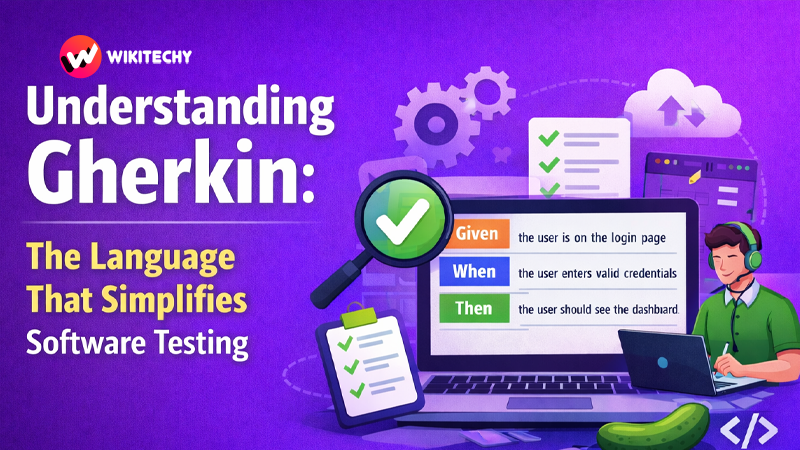
Software testing is a critical part of modern software development. As applications grow more complex, teams need clear communication between developers, testers, and non-technical stakeholders. This is where Gherkin comes into play. Gherkin is a simple, human-readable language used to describe how software should behave. It helps teams collaborate better by turning complex technical requirements into easy-to-understand scenarios.
In today’s Agile and Behavior-Driven Development (BDD) environments, Gherkin has become an essential tool for writing automated tests and defining system behavior. By using plain English sentences, it bridges the gap between business requirements and technical implementation. This article explores what Gherkin is, how it works, why it is widely used in testing, and how beginners can start using it effectively.
What is Gherkin?
Gherkin is a domain-specific language used for writing behavior-driven development (BDD) test scenarios. It is designed to describe software functionality in a way that both technical and non-technical people can understand.
Instead of writing complex test scripts directly in programming languages, testers can write simple statements that describe the expected behavior of the application. These statements are later connected to automation code using testing frameworks like Cucumber.
The beauty of Gherkin lies in its readability and simplicity. It uses structured sentences that follow a logical format so that everyone on the team can easily understand the purpose of a test.
For example:
Feature: Login functionalityScenario: Successful login
Given the user is on the login page
When the user enters valid username and password
Then the user should be redirected to the dashboard
Even someone without programming knowledge can understand what this test is trying to verify.
Why Gherkin is Important in Software Testing
Modern development teams often struggle with miscommunication between developers, testers, and business analysts. Requirements written in complex documentation can easily be misunderstood.
Gherkin solves this issue by creating a common language for the entire team.
Here are some reasons why Gherkin is widely used:
Improves Communication
Because Gherkin uses plain English-like sentences, business analysts, product owners, developers, and testers can all understand the test scenarios.
Supports Behavior-Driven Development (BDD)
Gherkin is the foundation of BDD frameworks such as Cucumber, SpecFlow, and Behave. These frameworks convert Gherkin scenarios into automated tests.
Easy to Read and Maintain
Test scenarios written in Gherkin are clean and structured, making them easy to read, update, and maintain as software evolves.
Connects Requirements with Testing
Gherkin scenarios act as both documentation and automated tests, ensuring the software behaves exactly as expected.
Key Components of Gherkin
Gherkin uses specific keywords to structure scenarios. These keywords make test cases readable and easy to understand.
Feature
The Feature keyword describes the functionality being tested.
Example:
Feature: User Login
This tells us that the test scenarios relate to the login functionality.
Scenario
A Scenario represents a specific test case describing a situation or behavior of the system.
Example:
Scenario: User logs in with valid credentials
Each scenario focuses on a single behavior of the system.
Given
The Given keyword describes the initial context or precondition before the test begins.
Example:
Given the user is on the login page
It sets the stage for the scenario.
When
The When keyword defines the action performed by the user or system.
Example:
When the user enters valid credentials
This represents the main event that triggers the behavior being tested.
Then
The Then keyword describes the expected result.
Example:
Then the user should be redirected to the dashboard
This verifies that the system behaves as expected.
And / But
Gherkin also supports And and But to make scenarios more readable when multiple steps are needed.
Example:
Given the user is on the login page
And the user has a valid account
When the user enters username and password
Then the login should be successful
And the dashboard should be displayed
These additional keywords help maintain a natural flow when writing steps.
Structure of a Gherkin Test File
Gherkin scenarios are typically written in .feature files. These files contain multiple scenarios related to a specific feature.
A basic structure looks like this:
Feature: Shopping CartScenario: Add product to cart
Given the user is on the product page
When the user clicks "Add to Cart"
Then the product should be added to the cartScenario: Remove product from cart
Given the user has added a product to the cart
When the user removes the product
Then the cart should be empty
Each scenario clearly defines the expected behavior of the system.
How Gherkin Works with Automation Tools
Gherkin itself does not execute tests. Instead, it works with automation frameworks such as:
- Cucumber
- SpecFlow
- Behave
- TestComplete
These tools read the Gherkin steps and connect them to step definitions written in programming languages like Java, Python, JavaScript, or C#.
For example:
Gherkin step:
Given the user is on the login page
Automation code example (Java):
@Given("the user is on the login page")
public void openLoginPage() {
    driver.get("https://example.com/login");
}
The automation framework maps the Gherkin sentence to the corresponding code that performs the action.
Advantages of Using Gherkin
Gherkin provides several benefits that make it popular in modern testing environments.
Clear and Understandable
Because the syntax is simple, anyone on the team can read and understand test scenarios.
Better Collaboration
Developers, testers, and product managers can work together when defining features and scenarios.
Living Documentation
Gherkin scenarios serve as documentation that always stays updated with automated tests.
Reusable Steps
Common steps can be reused across multiple scenarios, reducing repetitive code.
Supports Agile Workflows
Gherkin integrates well with Agile and Scrum development processes.
Best Practices for Writing Gherkin Scenarios
To make the most out of Gherkin, teams should follow certain best practices.
Keep Scenarios Simple
Each scenario should focus on one behavior. Avoid mixing multiple test cases in a single scenario.
Use Clear Language
Write steps in a way that non-technical stakeholders can understand.
Avoid Technical Details
Gherkin should describe behavior, not implementation details.
Use Meaningful Scenario Names
Scenario titles should clearly describe the behavior being tested.
Reuse Steps When Possible
Create reusable step definitions to keep automation efficient.
Common Mistakes Beginners Make
While Gherkin is easy to learn, beginners sometimes make mistakes.
One common mistake is writing overly complex scenarios that include too many steps. Another issue is mixing technical implementation details into the Gherkin statements.
Some teams also misuse Gherkin as just another test script rather than using it as a communication and collaboration tool.
Keeping scenarios simple, readable, and behavior-focused helps avoid these problems.
When Should You Use Gherkin?
Gherkin is most useful in projects where:
- Teams follow Behavior-Driven Development (BDD)
- Collaboration between technical and non-technical teams is important
- Automated testing is part of the development workflow
- Requirements need to be clearly documented
For small projects with minimal testing requirements, traditional testing methods might be sufficient. However, in large Agile projects, Gherkin becomes extremely valuable.
Conclusion
Gherkin has transformed the way teams approach software testing and requirement documentation. By providing a simple, structured language for describing system behavior, it allows developers, testers, and business stakeholders to collaborate more effectively.
Its human-readable format ensures that test scenarios are easy to understand, while its integration with automation frameworks makes it powerful for modern continuous testing environments. As Agile development and Behavior-Driven Development continue to grow, Gherkin will remain an important tool for building reliable and well-tested software.
For beginners entering the world of software testing or automation, learning Gherkin is a valuable step toward understanding how high-quality software is designed, tested, and delivered.
If You Want to study Software Testing Course, or any other course & Internship visit www.kaashivinfotech.com