
Ever deployed code that worked perfectly on your laptop but crashed in production? 😫
Nine times out of ten, the culprit isn’t your logic. It’s how your program handles heap memory.
When a program runs, it needs space to store data. But not all memory is created equal. Some space is for quick, temporary tasks. The rest? That’s where the heavy lifting happens. This is where heap memory comes in.
Understanding heap memory isn’t just for system architects. It’s for every developer who wants to write fast, stable code. In fact, studies show that memory-related issues account for nearly 30% of critical production bugs in enterprise applications. 😲
Let’s dive deep. No fluff. Just the raw truth about how heap memory works, why it breaks, and how mastering it can skyrocket your career.
1️⃣ What is Heap Memory?
So, what is heap memory?
Think of your computer’s RAM as a massive warehouse. Heap memory is the largest section of that warehouse. It’s where your program stores objects that need to stick around.
Unlike temporary storage (which we’ll cover in our guide on stack memory), heap memory is dynamic. It grows and shrinks as your application runs.
Key characteristics of heap memory:
- 🌍 Global Access: Any part of your program can access objects stored here.
- 🔄 Dynamic Size: It expands when you need more space and contracts when you don’t.
- 🧹 Garbage Collection: The system automatically cleans up unused data (mostly).
When you write code like User user = new User();, that new User() object lives in heap memory. The variable user? That’s just a reference pointing to the real data in the heap.
Why does this matter?
Because if you lose track of those references, you create a heap memory leak. Your warehouse fills up with junk, and eventually, your app crashes. 💥
2️⃣ How Heap Memory Works Internally 🧠
This is where most tutorials fail. They tell you what it is, but not how it behaves.
In Java, the heap memory structure isn’t one big block. It’s divided into generations. Why? Because most objects die young. 🕯️
The Java Heap Structure
The JVM splits heap memory into specific regions to optimize performance:
- Young Generation: Where new objects are born.
- Eden Space: Most objects start here.
- Survivor Spaces: Objects that survive a cleanup cycle move here.
- Old Generation: Long-lived objects live here.
- Metaspace: Stores class metadata (replaced Permanent Generation in Java 8).
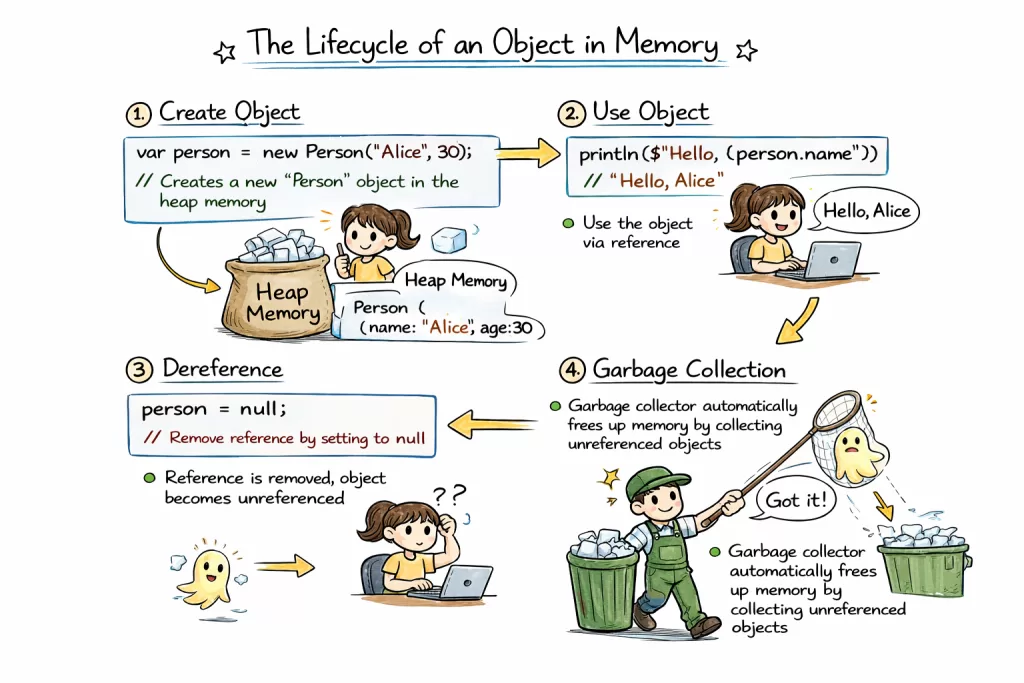
The Lifecycle of an Object
Here’s the flow of heap memory allocation:
New Object ➡️ Eden Space ➡️ Survivor Space ➡️ Old Generation
- Creation: You create an object. It lands in Eden Space.
- Minor GC: When Eden fills up, a “Minor Garbage Collection” runs. Dead objects vanish. Survivors move to Survivor Space.
- Promotion: Objects that survive multiple cycles get promoted to the Old Generation.
- Major GC: When the Old Generation fills up, a “Major Garbage Collection” runs. This is slower and causes pauses. ⏸️
Developer Insight:
Ever noticed your app freezing for a second? That’s likely the Garbage Collector sweeping through heap memory. Understanding this helps you tune your application to avoid these pauses.
3️⃣ Heap Memory Allocation Process ⚙️
How does the system actually give you space?
- Request: Your program asks for memory.
- Allocation: The heap memory manager finds a free block.
- Assignment: It returns a reference to your code.
- Cleanup: When no references point to the block, it becomes garbage.
The Fragmentation Problem
Imagine a parking lot. Cars leave randomly. Eventually, you have plenty of empty spots, but they are scattered. A big truck can’t park because no single spot is large enough.
This is heap memory fragmentation.
Even if you have 1GB of free heap memory, you might not be able to allocate a 100MB object if that space isn’t contiguous. This is why heap memory can feel “full” even when statistics show free space.
4️⃣ Heap Memory in Different Languages 🌐
Heap memory isn’t just a Java thing. Every modern language uses it, but they manage it differently.
Heap Memory in Java
- Management: Fully automatic via JVM.
- Storage: All objects and arrays.
- Risk:
OutOfMemoryErrorif limits are exceeded. - Example:
java String name = new String("Abi"); // Stored in heap
Heap Memory in C#
- Management: Managed by the CLR (Common Language Runtime).
- Storage: Reference types (classes, strings).
- GC: Similar generational approach to Java.
- Example:
csharp Person p = new Person(); // Managed heap
Heap Memory in Python
- Management: Private heap managed by Python Memory Manager.
- Storage: All objects and data structures.
- GC: Uses reference counting + cyclic garbage collector.
- Example:
python a = [1, 2, 3] # List stored in heap
Heap Memory in JavaScript
- Management: V8 Engine (Chrome/Node.js) handles it.
- Storage: Objects, arrays, functions.
- Stack: Primitives live on the stack; objects live on the heap memory.
- Example:
javascript let user = {name: "Abi"}; // Object in heap
Key Takeaway: Regardless of the language, heap memory is where your complex data lives. Understanding the underlying manager helps you debug performance issues faster.
5️⃣ Career Angle: Why This Skill Pays 💰
Let’s talk about your career. 🎯
Junior developers write code. Senior developers write code that scales.
Knowing how heap memory works separates the two. Here’s the data:
- Salary Boost: Developers with strong system design and memory management skills earn 20-30% more on average.
- Interview Success: Heap memory questions appear in 85% of backend engineering interviews at top tech firms.
- Production Stability: Companies lose billions annually due to memory leaks. Fixing these makes you indispensable.
Common Interview Questions:
- ❓ What is heap memory?
- ❓ Why is heap memory slower than stack? (Answer: Dynamic allocation requires more management).
- ❓ How does garbage collection work?
- ❓ What causes a heap memory leak?
Mastering heap memory isn’t just about passing an interview. It’s about building systems that don’t crash when users flood in.
6️⃣ Best Practices & Optimization 🛠️
You don’t need to be a JVM expert to write better code. Just follow these rules.
1. Minimize Object Creation
Creating objects costs heap memory. Reuse them when possible.
- ❌ Bad: Creating new strings in a loop.
- ✅ Good: Use
StringBuilderfor concatenation.
2. Watch Out for Static Collections
Static lists or maps live forever in heap memory. If you keep adding data without removing it, you will crash.
- Why: Static references prevent Garbage Collection.
3. Tune Your Heap Size
Default settings aren’t always best.
- Flag:
-Xmxsets maximum heap memory. - Flag:
-Xmssets initial heap memory. - Tip: Set them equal to avoid resizing overhead during runtime.
4. Monitor Usage
Don’t guess. Use tools like VisualVM or JConsole.
- Look for: Spikes in heap memory usage.
- Look for: Frequent Major GC events.
Real World Stat: Properly tuning heap memory parameters can reduce application latency by up to 40% in high-load systems. 📉
7️⃣ Advantages and Disadvantages ⚖️
Every tool has trade-offs. Here’s the reality of heap memory.
| Feature | Advantage | Disadvantage |
|---|---|---|
| Size | 🟢 Large storage capacity (GBs) | 🔴 Can exhaust system RAM |
| Lifetime | 🟢 Flexible (until GC runs) | 🔴 Unpredictable cleanup times |
| Access | 🟢 Global access across threads | 🔴 Slower access than stack |
| Safety | 🟢 Automatic cleanup (GC) | 🔴 GC Overhead slows CPU |
The Bottom Line:
Heap memory gives you flexibility. But that flexibility comes with a performance cost. Use it wisely.
8️⃣ Visualizing Heap vs. Stack 🎨
Imagine two boxes.
Stack Box:
- Neatly organized.
- Items stacked on top of each other.
- Fast access.
- Contains:
ref1,ref2.
Heap Box:
- Messy warehouse.
- Items scattered everywhere.
- Slower access.
- Contains:
Object A,Object B.
The Connection:ref1 (Stack) ➡️ points to ➡️ Object A (Heap).
If you delete ref1, Object A becomes garbage. The Garbage Collector will eventually sweep it away from heap memory.
(For a detailed comparison, check out our article on stack vs heap memory differences.)
9️⃣ FAQ: Quick Answers
Q: What is heap memory used for?
A: It stores dynamic objects and data that need to persist beyond a single function call.
Q: Why is heap memory slower than stack?
A: Heap memory requires dynamic allocation and garbage collection, whereas stack memory uses a simple LIFO structure.
Q: What happens when heap memory is full?
A: The system throws an OutOfMemoryError and typically crashes the application.
Q: How do you fix a heap memory leak?
A: Identify objects holding unnecessary references and remove them. Use profiling tools to locate the leak.
🔟 Ready to Master Memory Management? 🎓
Understanding heap memory is just the beginning.
To become a top-tier developer, you need hands-on experience. You need to break things, fix leaks, and tune systems in real-time.
Kaashiv Infotech offers specialized courses and internships designed to bridge the gap between theory and practice. 🌉
- 🚀 In-Plant Training: Work on live projects.
- 💻 Expert Mentorship: Learn from industry veterans.
- 📜 Certification: Boost your resume with verified skills.
Don’t let memory errors hold your career back. Master heap memory today.
👉 [Explore Courses at Kaashiv Infotech]
Conclusion 🏁
Heap memory is the engine room of your application. It holds your data, manages your objects, and keeps your program alive.
But it demands respect. Ignore it, and you face crashes. Master it, and you build systems that scale.
Remember:
- Monitor your heap memory usage.
- Understand garbage collection.
- Optimize object creation.
You’ve got the knowledge. Now go write some clean, efficient code. 💻✨
(Stay tuned for Article 2, where we dive deep into Stack Memory and uncover why it’s so much faster.)