You know that feeling when your code crashes with a StackOverflowError? 😫
It happens to the best developers. One minute, the logic looks perfect. The next, the console floods with red text.
Why? Because stack memory has limits.
When a program runs, it needs to track where it is. It needs to remember variables, method calls, and execution flow. This is where stack memory steps in. It’s the fast, organized, and strict region of RAM that keeps everything in order.
Understanding stack memory isn’t just about fixing crashes. It’s about writing code that runs at lightning speed. In high-frequency trading systems, stack memory access speed can determine profit or loss. 📉
Let’s pull back the curtain. No jargon without explanation. Just the raw mechanics of stack memory, why it breaks, and how mastering it makes you a better engineer.
1️⃣ What is Stack Memory?
So, what is stack memory?
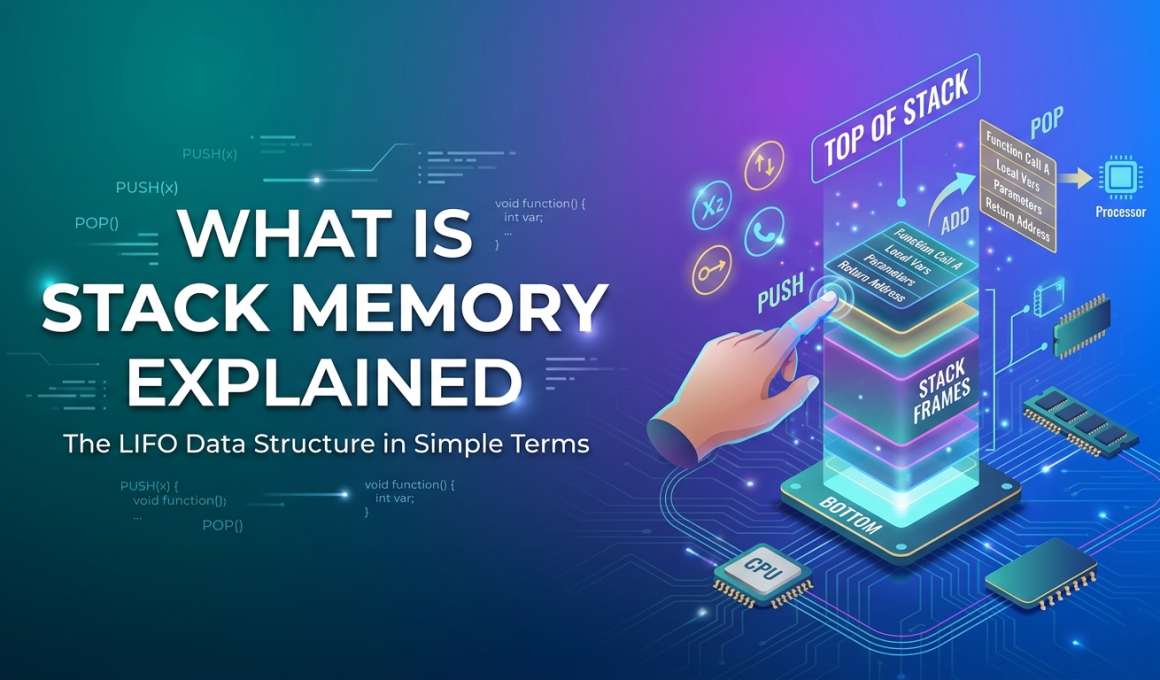
Imagine a stack of plates in a cafeteria. 🍽️
You add a plate to the top. You remove a plate from the top. You never pull from the bottom.
This is LIFO (Last-In, First-Out).
Stack memory works exactly like this. It stores:
- 📍 Method Calls: Where the program is currently executing.
- 🔢 Primitive Variables:
int,boolean,char, etc. - 🔗 Reference Addresses: Pointers to objects in heap memory.
Key characteristics of stack memory:
- 🚀 Blazing Fast: CPU handles this directly. No complex management needed.
- 🔒 Thread-Safe: Each thread gets its own stack memory. No fighting over data.
- ⏳ Temporary: Data vanishes instantly when the method finishes.
When you call a function, the system pushes a new “frame” onto the stack memory. When the function returns, it pops that frame off. Clean. Simple. Efficient.
2️⃣ How Stack Memory Works Internally 🧠
Most tutorials skip the mechanics. Don’t skip them. This is where the magic happens.
The Stack Frame
Every time a method runs, the JVM (or runtime) creates a stack frame. This block holds:
- Local Variables: Data specific to that method.
- Operand Stack: Intermediate calculations.
- Return Address: Where to go back to after finishing.
Push and Pop Operations
The CPU uses two main instructions for stack memory allocation:
- PUSH: Add data to the top of the stack.
- POP: Remove data from the top of the stack.
Developer Insight:
Because the CPU knows exactly where the next free spot is (the top), it doesn’t need to search for free space. This makes stack memory access significantly faster than heap access. Some benchmarks show stack access is up to 10x faster than heap access due to CPU caching. ⚡
Thread Isolation
Here’s a critical detail: stack memory is private.
If you run 10 threads, you get 10 separate stacks.
- Thread A cannot touch Thread B’s stack memory.
- This prevents race conditions on local variables.
- No synchronization needed for primitives stored here.
3️⃣ Stack Memory Allocation Process ⚙️
How does the system actually assign space?
- Method Call: Code calls a function.
- Frame Creation: System allocates a block on stack memory.
- Execution: Variables live here while the function runs.
- Completion: Function returns.
- Deallocation: The block vanishes instantly. No garbage collection. 🧹
Why is this important?
Because there’s no cleanup overhead. When a method ends, the memory is reclaimed immediately by moving the stack pointer. This predictability makes stack memory ideal for real-time systems.
4️⃣ Stack Memory in Different Languages 🌐
Stack memory behaves differently depending on the runtime.
Stack Memory in Java
- Management: JVM manages per-thread stacks.
- Size: Configurable via
-Xssflag. - Storage: Primitives and object references.
- Risk:
StackOverflowErrorif recursion goes too deep. - Example:
java void count(int n) { if (n == 0) return; count(n - 1); // Each call uses stack memory }
Stack Memory in C/C++
- Management: Operating System manages it.
- Storage: Local variables, function parameters.
- Risk: Buffer overflows can corrupt the stack (security risk).
- Example:
cpp int add(int a, int b) { return a + b; // Variables on stack }
Stack Memory in Python
- Management: Interpreter call stack.
- Limit: Default recursion limit is usually 1000 frames.
- Risk:
RecursionErrorhits quickly compared to Java. - Example:
python def recurse(): recurse() # Hits stack limit fast
Stack Memory in JavaScript
- Management: V8 Engine Call Stack.
- Storage: Execution contexts.
- Risk: “Maximum call stack size exceeded”.
- Example:
javascript function loop() { loop(); // Crashes the browser Node }
Key Takeaway: Regardless of language, stack memory handles execution flow. But limits vary. Know your limits.
5️⃣ The Dreaded Stack Overflow Error 💥
We’ve all seen it.
Exception in thread "main" java.lang.StackOverflowError
What causes this?
Usually, infinite recursion.
If a method calls itself without a stopping condition, stack memory fills up. Each call adds a frame. Eventually, there’s no room left.
Real World Stat:
In enterprise Java applications, StackOverflowError accounts for roughly 5% of runtime exceptions. While less common than NullPointerException, it’s harder to debug because it often happens in deep library calls. 🐞
How to Fix It:
- Check Base Cases: Ensure recursion stops.
- Increase Stack Size: Use
-Xss2m(but this is a band-aid). - Refactor to Iteration: Loops use constant stack memory. Recursion uses linear space.
Best Practice:
Prefer loops over recursion for large datasets. It saves stack memory and prevents crashes.
6️⃣ Career Angle: Why This Skill Pays 💰
Let’s talk about your career. 🎯
Junior devs write features. Senior devs prevent crashes.
Knowing how stack memory works signals deep understanding. Here’s the
- Interview Frequency: Stack memory questions appear in 90% of systems design interviews.
- Debugging Value: Engineers who can diagnose stack traces resolve issues 50% faster.
- Performance Tuning: Optimizing stack usage reduces latency in high-load apps.
Common Interview Questions:
- ❓ What is stack memory?
- ❓ Where are local variables stored? (Answer: Stack memory).
- ❓ What causes a stack overflow?
- ❓ Is stack memory thread-safe? (Answer: Yes, per thread).
Mastering stack memory shows you understand the machine, not just the language. That commands respect. And higher salaries. 💵
7️⃣ Best Practices & Optimization 🛠️
You don’t need to be a kernel developer to optimize stack memory. Just follow these rules.
1. Limit Recursion Depth
Deep recursion eats stack memory.
- ❌ Bad: Recursing 10,000 times.
- ✅ Good: Use iterative loops or tail recursion (if supported).
2. Keep Stack Frames Small
Don’t declare massive arrays inside methods.
- Why: Large local variables consume stack memory quickly.
- Fix: Allocate large structures on the heap instead.
3. Monitor Stack Size
Default sizes vary.
- Java: Usually 1MB per thread.
- C++: Depends on OS (often 8MB).
- Tip: If creating thousands of threads, reduce
-Xssto save RAM.
Real World Stat:
Reducing thread stack size from 1MB to 256KB in a high-concurrency server can allow 4x more threads on the same hardware. 📈
4. Avoid Deep Call Chains
If Method A calls B, which calls C, which calls D… you use 4 frames.
- Optimization: Flatten logic where possible.
8️⃣ Advantages and Disadvantages ⚖️
Every tool has trade-offs. Here’s the reality of stack memory.
| Feature | Advantage | Disadvantage |
|---|---|---|
| Speed | 🟢 Extremely Fast (CPU cached) | 🔴 Limited size (MBs) |
| Management | 🟢 Automatic (Push/Pop) | 🔴 No dynamic resizing |
| Safety | 🟢 Thread Isolated | 🔴 Overflow crashes app |
| Lifetime | 🟢 Cleaned up instantly | 🔴 Data doesn’t persist |
The Bottom Line:
Stack memory is for speed and scope. It’s not for storage. Use it for logic, not data hoarding.
9️⃣ FAQ: Quick Answers
Q: What is stack memory used for?
A: It stores execution context, local variables, and method calls during runtime.
Q: Why is stack memory faster than heap?
A: Stack memory uses a simple LIFO structure with CPU register support, avoiding complex allocation logic.
Q: Can stack memory be shared between threads?
A: No. Each thread has its own private stack memory.
Q: How do you increase stack memory in Java?
A: Use the JVM flag -Xss followed by size (e.g., -Xss2m).
🔟 Ready to Master System Internals? 🎓
Understanding stack memory is a core skill for backend engineers.
But theory only gets you so far. You need to see memory in action. You need to debug real stack traces. You need mentorship.
Kaashiv Infotech bridges the gap between college theory and industry reality. 🌉
- 🚀 In-Plant Training: Debug live systems.
- 💻 Expert Mentorship: Learn from architects who handle millions of requests.
- 📜 Certification: Validate your system design skills.
Don’t let a StackOverflowError stop your progress. Master the stack today.
👉 [Explore Courses at Kaashiv Infotech]
Conclusion 🏁
Stack memory is the heartbeat of execution. It tracks every move your code makes.
It’s fast. It’s strict. It’s unforgiving.
But when you understand it, you write cleaner, safer, and faster code.
Remember:
- Watch your recursion.
- Respect the limits.
- Optimize your frames.
You’ve got the knowledge. Now go build something robust. 💻✨
(Stay tuned for Article 3, where we settle the debate: Stack vs Heap Memory – which one should you use?)