


Have you ever wondered how Python remembers a name, age, price, or even a list of items? The answer is Variables in Python. If you are starting your programming journey, learning how to create variables is one of the first things you need to understand.
Variables in Python help us store information and use it whenever we need it in a program. For example, if I want to store a student’s name, I can create a variable called student_name and assign a value to it. Later, I can display that name, combine it with other information, or use it in a calculation.
The good news? Python makes creating variables quite simple. You don’t need to declare a specific data type before assigning a value. Let’s understand how variables work, explore simple code examples, and see how we can use them in real-life applications.
Key Highlights
- What are Variables in Python? Learn the meaning of a variable with simple examples.
- How to create variables: Understand the correct syntax for assigning values.
- Types of values: Explore strings, integers, floats, and Boolean values.
- Variable naming rules: Learn how to choose meaningful variable names.
- Dynamic typing: Discover how Python identifies the type of a variable.
- Real-life examples: See how variables work in shopping, student records, and calculations.
- Common mistakes: Avoid errors when creating and using Python variables.
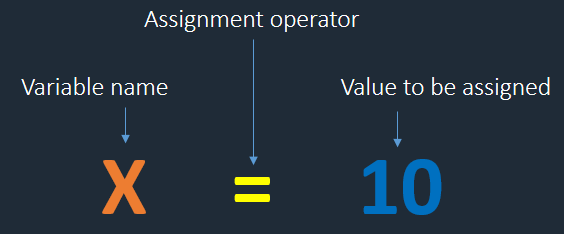
What Are Variables in Python?
A variable is a name that refers to a value in a program. We use variables to store and work with information instead of repeatedly writing the same value.
Think about a shopping application. It needs to keep track of a product’s name, its price, and the quantity a customer wants to buy. We can use variables to represent each piece of information.
For example:
product_name = "Laptop"
price = 45000
quantity = 2

print(product_name)
print(price)
print(quantity)
Output:
Laptop
45000
2
Here is what each variable does:
product_namestores the product name.pricestores the product price.quantitystores the number of laptops.
Notice something important: I didn’t have to write a separate declaration specifying that price is an integer or that product_name is a string. Python determines the type from the value assigned to each variable.
This is one reason why creating Variables in Python is beginner-friendly.
How to Create Variables in Python
Creating a variable is straightforward. We write a variable name, use the assignment operator (=), and provide a value.
Basic syntax:
variable_name = valueLet’s look at an example:
name = "Priya"
age = 25
height = 5.4

print(name)
print(age)
print(height)
Output:
Priya
25
5.4
Let’s break it down:
name = "Priya"assigns the text"Priya"to the variablename.age = 25assigns the integer25toage.height = 5.4assigns the decimal number5.4toheight.- The
print()function displays the values on the screen.
Hashing in Data Structure: 5 Essential Concepts You Need to Understand
What Does the Equal Sign Mean in Python?
This is a small detail that beginners sometimes find confusing.
In Python, the = symbol is called the assignment operator. It assigns a value to a variable.
For example:
salary = 30000This statement assigns the value 30000 to the name salary.
It is not the same as checking whether two values are equal. For comparison, Python uses ==.
salary = 30000

print(salary == 30000)
Output:
TrueHere, the first line assigns a value, while the second checks whether the value equals 30000.

Different Types of Variables in Python
Python variables can refer to different types of values. Let’s explore the common ones.
1. Integer Variables
An integer (int) represents a whole number without a decimal part.
age = 25
students = 40
total_marks = 450

print(age)
print(students)
print(total_marks)
We can use integer variables for ages, the number of students, quantities, and other whole-number values.
2. Float Variables
A float (float) represents a number with a decimal part.
price = 99.50
temperature = 32.5
percentage = 87.75

print(price)
print(temperature)
print(percentage)
Float variables are useful for measurements, prices, percentages, and other decimal values. For financial calculations requiring exact decimal arithmetic, applications may use Python’s decimal module instead.
3. String Variables
A string (str) stores text. We can create a string by placing text inside single or double quotation marks.
student_name = "Arun"
city = "Chennai"
course = 'Python Programming'

print(student_name)
print(city)
print(course)
Output:
Arun
Chennai
Python Programming
For example, a college management system can use string variables to store student names, department names, and course details.
Remember: "25" is a string because it is inside quotation marks, whereas 25 is an integer.
4. Boolean Variables
A Boolean (bool) variable stores one of two values: True or False.
is_logged_in = True
has_completed_course = False

print(is_logged_in)
print(has_completed_course)
Boolean variables are especially useful when a program needs to make decisions.
For example, an application may check whether a customer is logged in before allowing access to an account page.
5. None Values
Python also provides None, which represents the absence of a value.
middle_name = None

print(middle_name)
Output:
NoneWe might use None when a value has not been provided yet. For example, an online form may initially have no middle name entered.
Be careful, though: None is a specific Python value, not the same thing as an undefined variable.
What is the Data Science Life Cycle? Stages, Frameworks & Workflow Explained
Can We Create Multiple Variables in One Line?
Yes! Python allows us to assign values to multiple variables in a single statement.
Assigning Different Values
name, age, city = "Kavya", 24, "Chennai"

print(name)
print(age)
print(city)
Output:
Kavya
24
Chennai
This is called multiple assignment. Each variable receives its corresponding value.
Assigning the Same Value
We can also assign the same value to multiple variables:
x = y = z = 100

print(x)
print(y)
print(z)
Output:
100
100
100
This approach is useful when several variables need to start with the same value. However, when working with mutable objects such as lists, assigning the same object to multiple names can have side effects because all the names refer to that same object.
Rules for Naming Variables in Python
Choosing the right variable name makes code easier to understand. Imagine reading a program containing hundreds of variables named a, b, c, and d. It would quickly become confusing!
Python follows a few naming rules.
- A variable name can contain letters, numbers, and underscores.
- A variable name cannot begin with a number.
- Spaces are not allowed in variable names.
- Python keywords, such as
if,for, andclass, cannot be used as variable names. - Variable names are case-sensitive.
Let’s see some examples.
| Valid variable names | Invalid variable names |
|---|---|
student_name | student name |
age25 | 25age |
total_marks | total-marks |
user_name | class |
price | price@ |
Why Does Python Treat Uppercase and Lowercase Differently?
Consider this example:
name = "Ravi"
Name = "Priya"

print(name)
print(Name)
Output:
Ravi
Priya
Python treats name and Name as two different variable names.
For readable code, I recommend using lowercase names with underscores when a variable name contains multiple words. This style is called snake_case.
For example:
student_age = 21
total_price = 1500
employee_name = "Divya"
These names tell us what the variables represent without needing additional explanation.
Understanding Dynamic Typing in Python
One of the most useful features of Python is dynamic typing. In simple words, you don’t need to specify a variable’s data type when creating it. Python determines the type from the value assigned to it.
Let’s look at an example.
value = 100
print(value)

value = "Hello Python"
print(value)
Output:
100
Hello Python
What happened here?
- First,
valuerefers to the integer100. - Next,
valuerefers to the string"Hello Python".
Python allows this because a variable name can refer to values of different types at different times.
However, dynamic typing doesn’t mean that Python ignores data types. Each value still has a type, and some operations are not allowed between incompatible types.
For example:
age = 25
print(type(age))

name = "Priya"
print(type(name))
Output:
<class 'int'>
<class 'str'>
The type() function helps us identify the type of a value. It’s a handy tool when learning Variables in Python and debugging programs.
Real-Life Examples of Variables in Python
Theory is useful, but I find that variables become much easier to understand when we connect them to situations we already know.
Here are three simple examples.
Example 1: Calculating a Shopping Bill
Imagine you buy three notebooks, and each notebook costs ₹50. How would you calculate the total amount?
product_name = "Notebook"
price = 50
quantity = 3

total = price * quantity

print("Product:", product_name)
print("Total amount:", total)
Output:
Product: Notebook
Total amount: 150
Here, price and quantity are variables used in a calculation. Python multiplies their values and stores the result in total.
We can use the same idea in shopping websites, billing applications, and inventory systems.
Example 2: Calculating Student Marks
Suppose a student scores marks in three subjects. We can store the marks in variables and calculate the total.
english = 85
maths = 90
science = 80

total_marks = english + maths + science
average = total_marks / 3

print("Total marks:", total_marks)
print("Average marks:", average)
Output:
Total marks: 255
Average marks: 85.0
Without variables, we would have to work directly with numbers throughout the program. Variables make the calculations easier to read and update.
Example 3: Employee Salary Calculation
Let’s say an employee earns ₹30,000 per month and receives a bonus of ₹5,000.
basic_salary = 30000
bonus = 5000

total_salary = basic_salary + bonus

print("Basic salary:", basic_salary)
print("Bonus:", bonus)
print("Total salary:", total_salary)
Output:
Basic salary: 30000
Bonus: 5000
Total salary: 35000
This is a basic example of how Variables in Python can represent information used in payroll applications. Real payroll systems would include additional rules, deductions, and taxes.
How to Change a Variable’s Value
A variable’s value can change while a program runs. This is useful when information changes, such as a shopping cart total or a user’s score.
score = 10
print(score)

score = 20
print(score)

score = score + 5
print(score)
Output:
10
20
25
Let’s understand the final statement:
score = score + 5Python takes the current value of score, adds 5, and assigns the result back to score.
Since the current value is 20, the new value becomes 25.
You can also write the same operation more briefly:
score += 5This is called an augmented assignment operator. Similar operators include -=, *=, and /=.
Common Mistakes When Creating Variables in Python
Beginners sometimes make small mistakes when working with variables. The good news is that these mistakes are easy to correct once you understand the rules.
1. Forgetting Quotation Marks
Incorrect code:
name = PriyaPython treats Priya as a name that should already exist as a variable. If it hasn’t been defined, Python raises a NameError.
Correct code:
name = "Priya"
print(name)
2. Starting a Variable Name With a Number
Incorrect:
2name = "Arun"This causes a SyntaxError because Python variable names cannot start with numbers.
Correct:
name2 = "Arun"3. Using a Variable Before Assigning a Value
Consider this code:
print(age)If age has not been defined, Python raises a NameError.
Correct:
age = 25
print(age)
Always make sure the variable exists before trying to use it.
4. Confusing = With ==
Remember this difference:
age = 25This assigns 25 to age.
age == 25This checks whether age equals 25.
Understanding this distinction will help you when you start learning conditions such as if and else.
Why Are Variables in Python Important?
You might be wondering why we need variables when we could simply write values directly into a program.
The reason is simple: variables make programs flexible, reusable, and easier to maintain.
Imagine building a shopping application. If the price of a product changes, you can update the price variable instead of searching through every calculation and replacing the old number.
Variables also help us:
- Store information: Keep names, ages, prices, and other values available for use.
- Perform calculations: Calculate totals, averages, discounts, and more.
- Make decisions: Check values using conditions.
- Repeat tasks: Use variables in loops to process information.
- Organize code: Give meaningful names to the information a program uses.
As you move forward with Python, you’ll see variables in almost every program you write. They are essential for working with functions, lists, dictionaries, classes, and user input.
Frequently Asked Questions About Variables in Python
1. Do I need to declare a variable’s data type in Python?
No. Python determines the type from the assigned value. For example, age = 25 creates a name referring to an integer, while name = "Ravi" refers to a string.
2. Can a Python variable store different types of values?
Yes. You can assign an integer to a variable and later assign a string to the same name. Python supports dynamic typing.
3. What is the difference between a variable and a value?
A variable name is a name you use to refer to information, while a value is the information itself. In age = 25, age is the variable name and 25 is the value.
4. How can I check a variable’s data type?
Use Python’s built-in type() function.
price = 99.50
print(type(price))
Output:
<class 'float'>5. Can I use spaces in Python variable names?
No. Use underscores instead. For example, write student_name rather than student name.
6. Are variables in Python case-sensitive?
Yes. Python treats age, Age, and AGE as different names.
Final Thoughts
Learning Variables in Python is a small step, but it opens the door to writing useful programs. Once you understand how to create variables, assign values, identify data types, and update information, you can start building simple applications of your own.
My suggestion is to practise with information you see every day. Create variables for your name, monthly expenses, shopping bills, or exam marks. Change the values and observe how the output changes.
Don’t worry if you make mistakes at first. Programming becomes easier through practice, not by memorizing every rule at once.
Want to learn more ??, Kaashiv Infotech Offers Data Analytics Course, Data Science Course, Cyber Security Course & More Visit Their Website www.kaashivinfotech.com