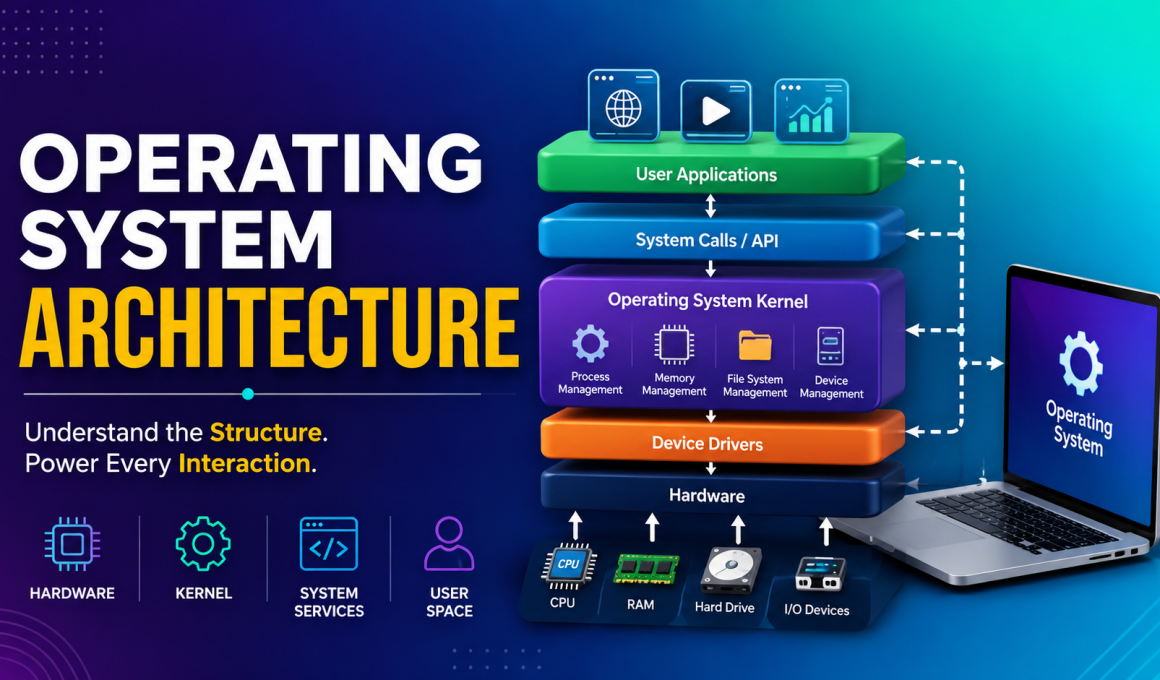
Operating System Architecture: The Foundation Behind Every Computer
Operating System Architecture is something we interact with every day, even if we don’t realize it. Every time I open my laptop, browse the internet, or launch an application, the Operating System Architecture works quietly in the background, making everything run smoothly.
If you’ve ever wondered how an operating system manages hardware, software, memory, files, and applications all at the same time, you’re in the right place.
In this guide, I’ll explain Operating System Architecture in simple words, share relatable examples, and help you understand why it’s one of the most important concepts in computer science.
🌟 Key Highlights
- Understand what Operating System Architecture is
- Learn the major components of an operating system
- Explore different types of operating system architectures
- Understand kernel and user space concepts
- Discover real-world examples of OS architecture
- Learn why architecture impacts performance and security
- Perfect for students, beginners, and IT professionals
What is Operating System Architecture?
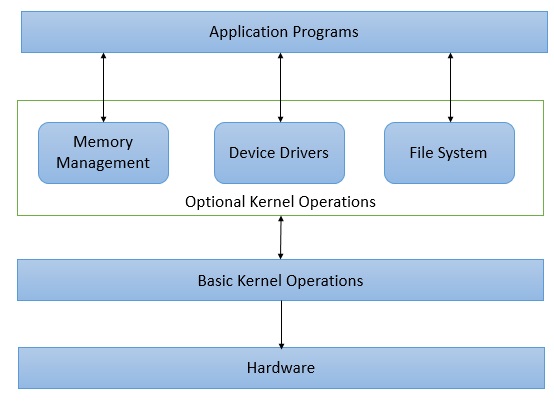
Simply put, Operating System Architecture refers to the design and structure of an operating system.
Think of it like the blueprint of a house.
Before a house is built, architects decide where the rooms, doors, windows, and electrical systems will be placed. Similarly, an operating system requires a structure that determines how various components interact with each other.
An operating system acts as a bridge between:
- Hardware
- Software
- Users
Without proper Operating System Architecture, your computer would struggle to manage resources efficiently.
Why is Operating System Architecture Important?
I remember learning about operating systems for the first time and wondering:
“Why should I care about architecture if my computer already works?”
The answer became clear when I started studying system performance and security.
A well-designed Operating System Architecture helps:
✅ Improve system performance
✅ Enhance security
✅ Manage hardware efficiently
✅ Reduce system crashes
✅ Support multitasking
✅ Simplify software development
In short, the architecture determines how reliable and efficient an operating system will be.
Major Components of Operating System Architecture
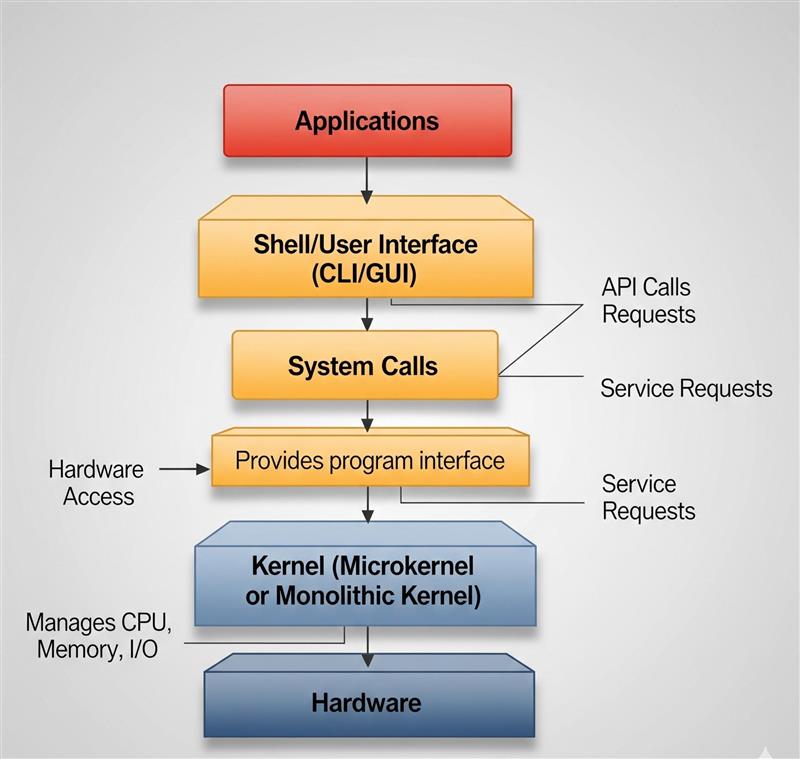
To understand Operating System Architecture, we first need to know its major components.
1. Kernel 🖥️
The kernel is the heart of every operating system.
It directly communicates with hardware and manages system resources.
Functions of the kernel include:
- Memory management
- Process management
- Device management
- File system management
Without the kernel, the operating system cannot function.
Examples:
- Linux Kernel
- Windows NT Kernel
2. User Interface (UI)
The user interface allows us to interact with the system.
There are mainly two types:
Command Line Interface (CLI)
Examples:
- Terminal
- Command Prompt
Graphical User Interface (GUI)
Examples:
- Windows Desktop
- macOS Interface
- Linux Desktop Environments
Most users interact with the GUI daily without realizing the complex Operating System Architecture supporting it.
3. File System
The file system organizes and stores data.
Imagine trying to find a single photo among millions without folders.
Sounds impossible, right?
The file system solves this problem.
Popular file systems include:
- NTFS
- FAT32
- ext4
- APFS
4. Device Drivers
Device drivers act like translators.
They allow hardware devices such as:
- Printers
- Keyboards
- Mice
- Graphics cards
to communicate with the operating system.
Without drivers, hardware would be useless.
5. Memory Management
Memory management controls how RAM is allocated and used.
For example:
When you open:
- Chrome
- Spotify
- Microsoft Word
simultaneously, the operating system allocates memory to each application.
Efficient Operating System Architecture ensures smooth multitasking.
Types of Operating System Architecture
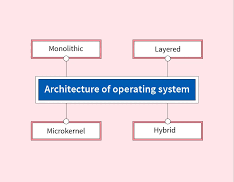
Different operating systems use different architectural designs.
Let’s look at the most common ones.
Monolithic Architecture
In a monolithic architecture, all operating system services run in kernel space.
Advantages
- High performance
- Fast communication
Disadvantages
- Difficult to maintain
- Errors can affect the entire system
Example
- Linux
This is one of the most commonly studied forms of Operating System Architecture.
Microkernel Architecture
A microkernel keeps only essential services inside the kernel.
Other services run in user space.
Advantages
- Better security
- Easier maintenance
- Improved stability
Disadvantages
- Slightly slower performance
Example
- Minix
Many modern researchers consider microkernel-based Operating System Architecture more secure.
Layered Architecture
In this design, the operating system is divided into multiple layers.
Each layer communicates only with adjacent layers.
Think of it like a multi-story building.
Benefits
- Easier debugging
- Better organization
- Simpler maintenance
This approach makes understanding Operating System Architecture easier for students.
Hybrid Architecture
Hybrid architecture combines features of both monolithic and microkernel designs.
Examples
- Microsoft Windows
- Apple macOS
Most modern operating systems use hybrid architecture because it balances performance and security.
User Space vs Kernel Space
One topic that confused me initially was the difference between user space and kernel space.
Here’s a simple explanation.
User Space
Applications operate here.
Examples:
- Web browsers
- Games
- Media players
If an application crashes, the entire system usually remains unaffected.
Kernel Space
Core operating system functions run here.
Examples:
- Memory management
- CPU scheduling
- Device communication
Problems in kernel space can impact the entire operating system.
Understanding this separation is crucial when learning Operating System Architecture.
Real-World Examples of Operating System Architecture
Let’s connect theory with reality.
Windows
Uses hybrid architecture.
Known for:
- Wide software compatibility
- User-friendly interface
Linux
Uses monolithic architecture.
Popular among:
- Developers
- Servers
- Cloud platforms
macOS
Uses a hybrid architecture based on the XNU kernel.
Known for:
- Stability
- Security
- Performance
These examples show how different Operating System Architecture designs serve different needs.
Benefits of Understanding Operating System Architecture
Whether you’re a student, developer, or IT professional, learning Operating System Architecture provides several benefits.
Better Troubleshooting Skills
You’ll understand why systems slow down or crash.
Improved Programming Knowledge
Developers can write more efficient applications.
Stronger Cybersecurity Awareness
You’ll understand how operating systems protect resources.
Career Opportunities
Knowledge of operating systems is valuable in:
- Software Development
- Cybersecurity
- Cloud Computing
- DevOps
- System Administration
Common Misconceptions About Operating System Architecture
Myth 1: Architecture Only Matters to Developers
Not true.
Even IT support professionals benefit from understanding it.
Myth 2: All Operating Systems Use the Same Architecture
Different systems use different designs depending on their goals.
Myth 3: Architecture Never Changes
Operating systems constantly evolve to improve performance and security.
Useful Resources
Internal Links
- What is an Operating System?
- Process Management in Operating Systems
- Memory Management in OS
- File System Explained
- Types of Operating Systems
External Links
These resources provide additional insights into Operating System Architecture and operating system design.
Final Thoughts 💡
When I first started learning computer science, Operating System Architecture felt complicated and intimidating. But once I understood that it’s simply the structure that helps an operating system manage hardware, software, and users, everything became much clearer.
Every click, every application launch, and every file you save relies on the architecture working behind the scenes.
Whether you’re preparing for exams, building a career in IT, or simply curious about how computers work, understanding Operating System Architecture is one of the best investments you can make in your technical knowledge.
The next time you power on your laptop, remember—an incredibly sophisticated architecture is quietly working to make everything happen. 🚀
Kaashiv Infotech Offers Networking Course, Cyber Security Course, Cloud Computing Course Visit Their Website www.kaashivinfotech.com.