CI/CD can sound like one of those technical terms that developers throw around casually, but when you are just starting out, it can feel confusing.
I remember that many beginners hear phrases like “CI pipeline,” “CD pipeline,” “automated deployment,” and “build failed” and wonder what is actually happening behind the scenes.
So, let’s forget the complicated definitions for a moment.
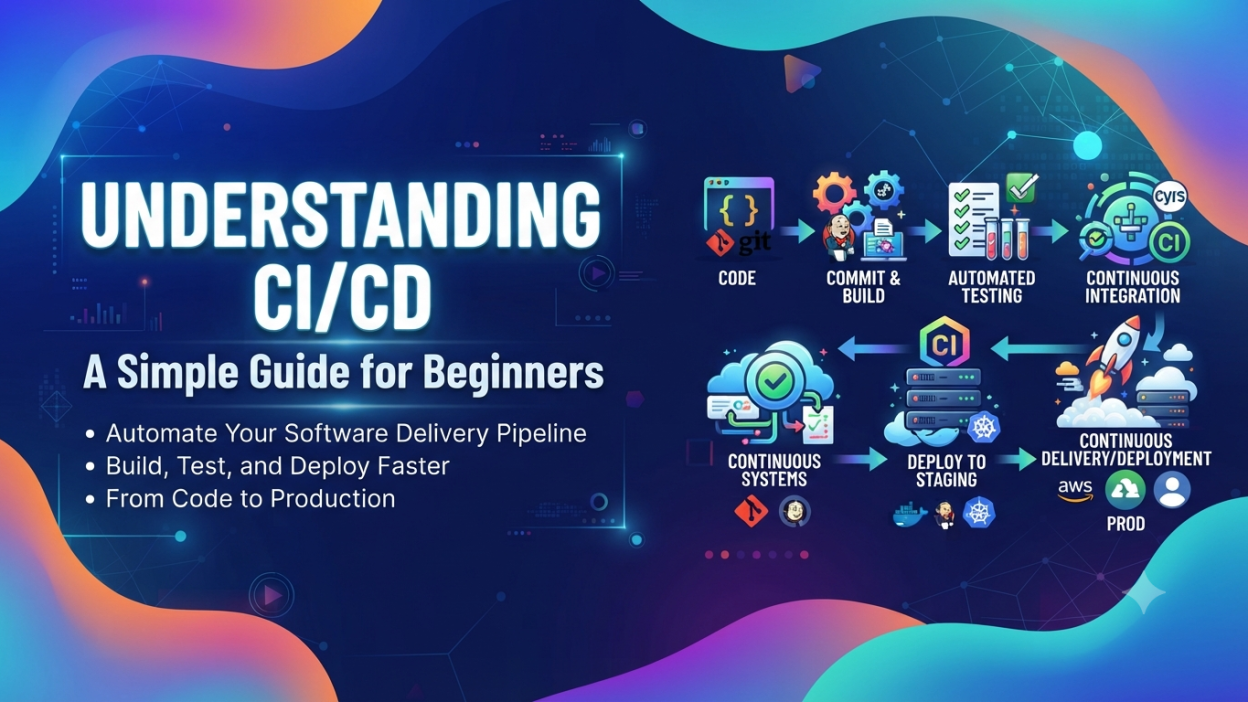
CI/CD is a way of automating the process of building, testing, and delivering software. Instead of a developer manually checking every change, running tests, creating a build, and deploying the application, CI/CD tools can handle many of these steps automatically.
Think about a team working on an online shopping website. One developer changes the payment page. Another works on the login system. Someone else fixes a product-search bug.
What happens when all these changes come together?
This is where CI/CD becomes extremely useful.
In this guide, I’ll explain what CI/CD means, how CI/CD works, the difference between Continuous Integration and Continuous Delivery, common CI/CD tools, real-world examples, and why beginners should understand CI/CD. 🚀
🔑 Key Highlights
- CI/CD helps automate software development and delivery.
- CI stands for Continuous Integration.
- CD can mean Continuous Delivery or Continuous Deployment.
- CI/CD helps developers find bugs earlier.
- Automated testing is an important part of a CI/CD pipeline.
- CI/CD can reduce repetitive manual work.
- Popular CI/CD tools include GitHub Actions, Jenkins, GitLab CI/CD, Azure DevOps, and CircleCI.
- CI/CD is commonly used with Git and GitHub.
- Beginners learning DevOps, cloud computing, or software development should understand the basic CI/CD workflow.
What Is CI/CD? 🤔
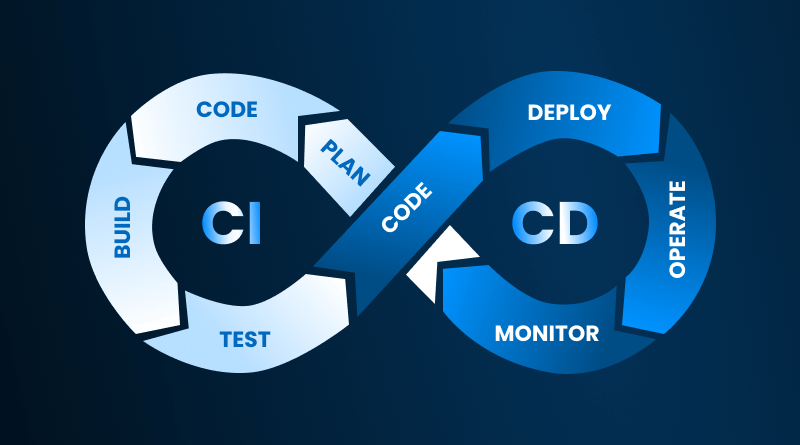
CI/CD means Continuous Integration and Continuous Delivery/Deployment.
In simple words, CI/CD is an automated workflow that helps developers move code from development to testing and, eventually, to users.
Let me give you a simple example.
Suppose I am developing a food-delivery application.
I make a small change to the login page and push my code to GitHub.
Instead of someone manually doing everything, a CI/CD pipeline can automatically:
- Get the latest code.
- Build the application.
- Run automated tests.
- Check whether something is broken.
- Package the application.
- Deploy it to a server, depending on the setup.
That entire automated process is what we commonly call a CI/CD pipeline.
The important idea is this: Developer writes code → code is pushed → automated checks run → application is delivered
That is the basic idea behind CI/CD.
Java vs JavaScript: 3 Key Differences Every Developer Must Know
What Does CI Stand For?
CI stands for Continuous Integration.
Integration simply means bringing developers’ code changes together into a shared project.
Imagine five developers working on the same application.
Developer 1 works on login.
Developer 2 works on payments.
Developer 3 works on the shopping cart.
Developer 4 fixes bugs.
Developer 5 works on the user profile.
If everyone works separately for several weeks and combines everything at the end, problems can become difficult to find.
Instead, developers regularly integrate their changes into the shared codebase.
This is Continuous Integration.
A CI system can automatically build the application and run tests whenever developers push code.
A simple CI flow looks like this:
Write Code → Commit → Push → Build → Test → Report
If the tests pass, the team knows the new change did not break the checks that were configured.
If something fails, the team can investigate it early.
That is one of the biggest benefits of CI.
What Does CD Stand For?
Here is where beginners sometimes get confused.
CD can refer to Continuous Delivery or Continuous Deployment.
They are related, but there is an important difference.
Continuous Delivery
With Continuous Delivery, the application is automatically built and tested and kept ready for release.
However, a person may still need to approve the final production deployment.
For example:
Code → Build → Test → Prepare Release → Manual Approval → Production
The software is ready to deploy, but the final step may require human approval.
Continuous Deployment
With Continuous Deployment, the process can go one step further.
If the automated checks pass, the system can automatically deploy the change to production.
The flow could look like:
Code → Build → Test → Deploy → Users
There is no manual approval step for every release.
So, in very simple terms:
- Continuous Delivery: Ready to release.
- Continuous Deployment: Automatically released.
CI vs CD: What Is the Difference?
Let’s make this easy.
| CI | CD |
|---|---|
| Continuous Integration | Continuous Delivery/Deployment |
| Focuses on integrating code | Focuses on delivering/deploying software |
| Builds the application | Helps prepare or release the application |
| Runs automated tests | Can automate deployment |
| Helps catch problems early | Helps deliver changes faster |
I like to remember it this way:
CI = “Is the new code working with the existing code?”
CD = “Can we safely deliver this software to users?”
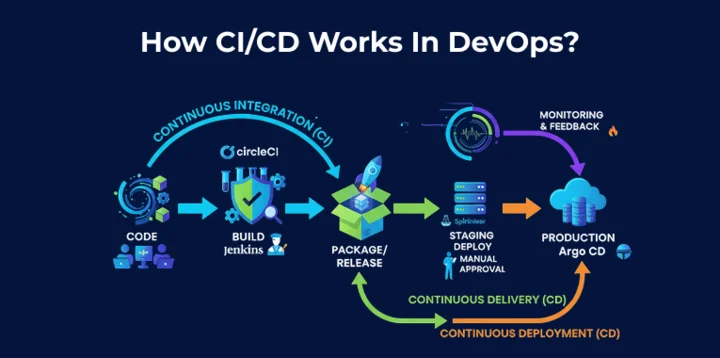
How Does a CI/CD Pipeline Work? 🔄
A CI/CD pipeline is a sequence of automated steps.
Don’t let the word “pipeline” make this sound complicated.
Think of a pipeline like an assembly line in a factory.
A product moves through different stages before it reaches the customer.
Software can work in a similar way.
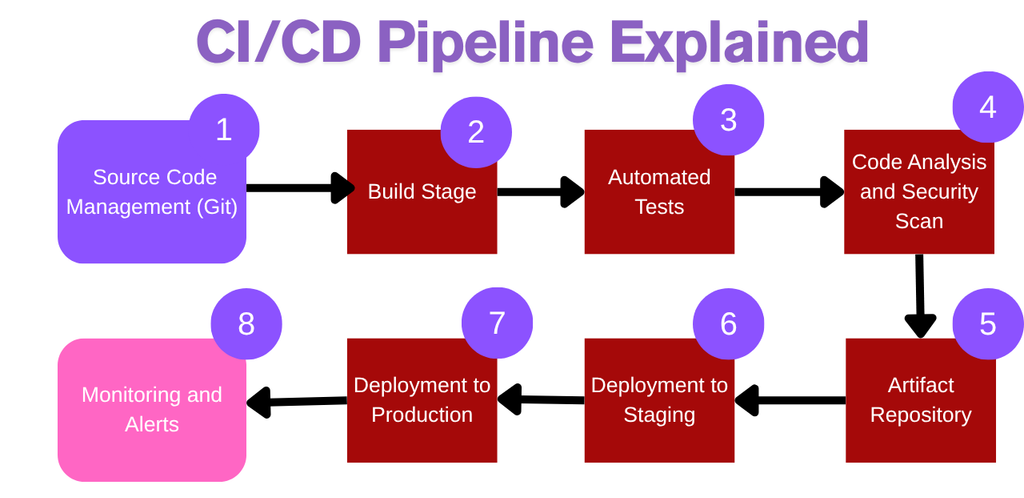
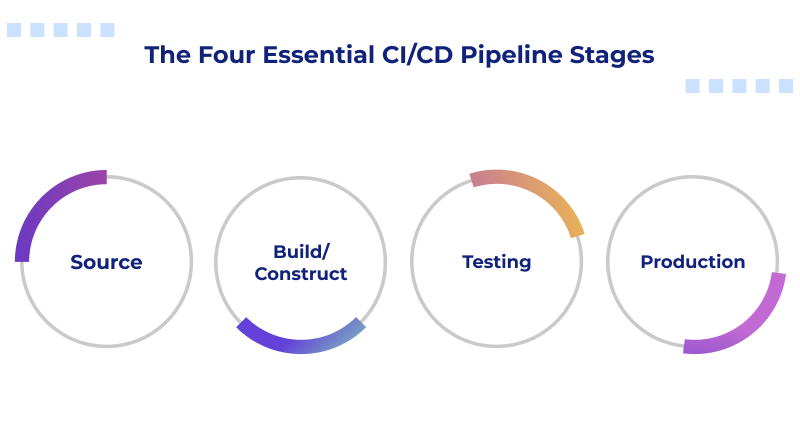
A basic CI/CD pipeline looks like this:
1. Code → 2. Build → 3. Test → 4. Package → 5. Deploy → 6. Monitor
Let’s understand each stage.
1. Code 👩💻
A developer writes or modifies the application.
For example, I might change the login functionality.
I then save my changes and commit them using Git.
2. Push the Code
The developer pushes the code to a remote repository such as GitHub or GitLab.
For example:
git add .
git commit -m "Updated login functionality"
git push
Once the code reaches the repository, a CI/CD workflow can be triggered.
3. Build
The CI/CD system attempts to build the application.
Building basically means preparing the source code and required components into something that can be tested or run.
If the build fails, the pipeline can stop.
For example:
Code
 ↓
Build
 ↓
❌ Build Failed
The developer can then investigate the problem.
4. Automated Testing 🧪
This is one of the most useful parts of CI/CD.
The pipeline can automatically run tests.
For example, suppose an application has a login function.
Tests might check:
- Can a valid user log in?
- Does an invalid password get rejected?
- Does an empty username show an error?
- Does the application respond correctly?
If the tests fail, the pipeline can report the failure.
This helps developers discover problems before the change reaches users.
5. Package the Application
If the build and tests succeed, the application can be packaged.
Depending on the technology, this could involve creating:
- Application files
- Packages
- Containers
- Deployment artifacts
For example, a team using Docker might create a Docker image that contains the application and its required environment.
6. Deploy 🚀
The next stage is deployment.
Deployment means making the application available in an environment.
A typical workflow may have environments such as:
Development → Testing → Staging → Production
Production is the environment used by real users.
For example, after successful testing:
Development
     ↓
Testing
     ↓
Staging
     ↓
Production
Depending on the organization’s setup, deployment can be manual, approved, or fully automated.
Real-Life CI/CD Example
Let’s take something we use every day: an online shopping website.
Imagine I work as a developer for an e-commerce company.
I need to fix a bug where customers cannot apply a discount coupon.
I modify the code.
Then I push my changes.
The CI/CD pipeline starts automatically.
What happens?
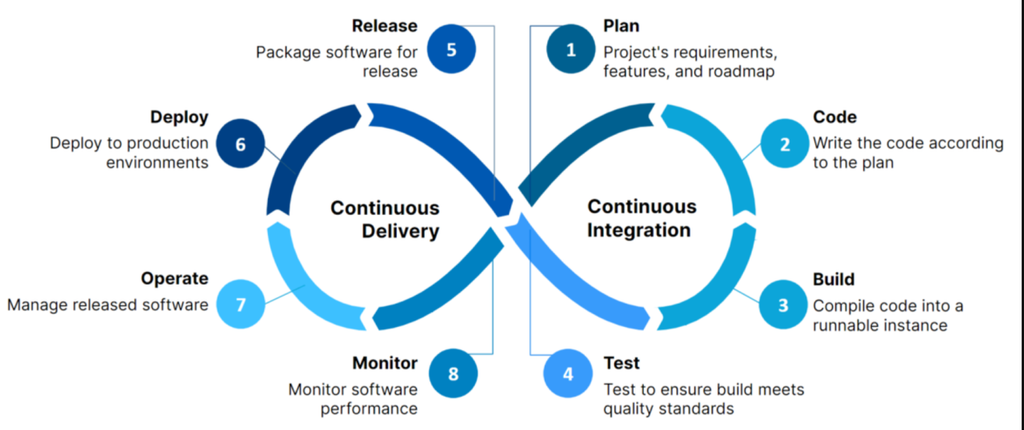
Step 1: Code is received.
Step 2: The application is built.
Step 3: Automated tests run.
Step 4: Tests check whether the coupon functionality works.
Step 5: Other configured tests also run.
Step 6: If everything passes, the application can move toward deployment.
Step 7: Depending on the organization’s CI/CD setup, the change may be deployed to staging or production.
So I don’t have to manually repeat the same sequence every time.
That is the real value of CI/CD.
Java Serialization Explained: A Complete Beginner’s Guide
Why Is CI/CD Important? ⭐
You might be wondering:
“Why can’t developers just test and deploy the application manually?”
They can. But imagine doing that for a large application with dozens of developers and frequent changes.
It becomes repetitive and error-prone.
CI/CD helps teams automate many of those repetitive steps.
Some important benefits include:
1. Faster Development
Developers can integrate and test changes frequently instead of waiting until the end of a project.
2. Early Bug Detection
Automated tests can catch certain problems soon after code changes are introduced.
3. Less Manual Work
Developers don’t have to manually repeat every build and deployment step.
4. Consistent Process
The same automated steps can run repeatedly.
5. Faster Releases
Teams can deliver software updates more frequently when their pipeline is properly designed.
6. Better Collaboration
Developers can work on different parts of an application while regularly integrating their changes.
Popular CI/CD Tools 🛠️
There isn’t one single CI/CD tool that every company uses.
Different organizations choose different tools depending on their technology stack and requirements.
Some commonly used tools include:
- GitHub Actions
- Jenkins
- GitLab CI/CD
- Azure DevOps
- CircleCI
- TeamCity
- AWS CodePipeline
For example, GitHub Actions allows developers to create automated workflows directly within GitHub repositories.
Jenkins is another widely used automation server that teams can configure for building, testing, and deployment workflows.
If you’re a beginner, don’t feel that you need to learn every tool immediately.
Start by understanding the CI/CD concept and workflow first.
The tool comes later.
CI/CD and Git: How Are They Connected?
This is another common beginner question.
Git and CI/CD are not the same thing.
Git is a version control system.
It helps developers track changes to source code.
GitHub is a platform that hosts Git repositories and provides additional collaboration features.
CI/CD is an automation process that can be connected to repositories.
For example:
Developer
   ↓
Git
   ↓
GitHub
   ↓
CI/CD Pipeline
   ↓
Build
   ↓
Test
   ↓
Deploy
So, Git manages code changes, while CI/CD can automate what happens after those changes are pushed.
CI/CD in DevOps
If you are learning DevOps, you will hear CI/CD quite often.
That is because CI/CD is an important part of modern software delivery.
DevOps brings development and operations practices closer together.
CI/CD supports this by automating parts of the software delivery process.
For example:
Development → Integration → Testing → Delivery → Deployment → Monitoring
This helps teams create a repeatable process rather than relying entirely on manual steps.
What Is a CI/CD Pipeline?
A CI/CD pipeline is simply an automated sequence of tasks used to build, test, and deliver software.
For example:
Developer writes code
        ↓
Git commit
        ↓
Push to GitHub
        ↓
CI/CD pipeline starts
        ↓
Build
        ↓
Automated tests
        ↓
Security / quality checks
        ↓
Package
        ↓
Deploy
        ↓
Monitor
Not every pipeline contains exactly these stages.
Real-world pipelines vary from company to company.
Some applications may have additional security checks, code-quality analysis, approval stages, infrastructure steps, database migrations, or monitoring.
What Happens When a CI/CD Pipeline Fails? ❌
This is actually a useful thing to understand.
Suppose I push some code and the automated tests fail.
The pipeline might show:
Build       ✅
Unit Tests  ❌
Deploy      ⏸️
The deployment may stop because a configured quality gate or test failed.
I can then look at the pipeline logs to understand what happened.
Maybe I accidentally changed a function.
Maybe a test failed.
Maybe the application could not build.
The exact reason depends on the pipeline.
This is one reason developers pay attention to CI/CD pipeline logs.
CI/CD Best Practices
Once you understand the basics, there are a few practices worth remembering.
✅ Commit Code Regularly
Small, frequent changes are generally easier to integrate and troubleshoot than huge changes.
✅ Automate Tests
Automated testing gives the pipeline something concrete to verify.
✅ Keep Pipelines Clear
A complicated pipeline can become difficult to maintain.
✅ Secure Secrets
Passwords, API keys, tokens, and other sensitive values should not be hard-coded into source code or exposed in logs.
✅ Monitor Deployments
Deployment isn’t necessarily the end of the story. Teams also need to know whether the application behaves correctly after release.
Is CI/CD Difficult for Beginners?
Honestly, CI/CD can look difficult at first.
When I first break the topic down for beginners, the biggest problem isn’t the concept itself. It’s the number of new words:
pipeline, build, deployment, repository, runner, artifact, workflow, staging, production…
Don’t try to memorize everything at once.
Start with this simple picture:
Write Code
    ↓
Push Code
    ↓
Build
    ↓
Test
    ↓
Deploy
Once this flow makes sense, you can learn the individual tools.
If you’re already learning Git and GitHub, you’re actually starting in the right place.
After that, you can explore a tool such as GitHub Actions and create a small workflow.
How Can Beginners Learn CI/CD? 📚
I would suggest learning CI/CD in this order:
Step 1: Learn Git
Understand:
- Repository
- Commit
- Branch
- Merge
- Pull request
- Push
- Pull
Step 2: Learn GitHub
Understand how developers store and collaborate on code using GitHub.
Step 3: Understand CI/CD Concepts
Learn:
- Continuous Integration
- Continuous Delivery
- Continuous Deployment
- Pipeline
- Build
- Test
- Deployment
Step 4: Learn One CI/CD Tool
Don’t jump between five tools.
Start with one.
For beginners, GitHub Actions is a practical option if you’re already using GitHub.
Step 5: Build a Small Project
For example, create a simple HTML/CSS/JavaScript project.
Then create a workflow that runs automatically whenever you push changes.
That small experiment can make the whole concept click.
Final Thoughts on CI/CD 🚀
CI/CD is not just another DevOps buzzword.
At its core, it is about creating a reliable and repeatable way to move software changes from a developer’s machine toward users.
The basic idea is surprisingly simple:
Write code → integrate it → build it → test it → deliver or deploy it.
The tools may change. The pipeline may become much more sophisticated. A large company may have security scans, multiple environments, approval gates, containers, cloud infrastructure, monitoring, and rollback strategies.
But the basic concept remains the same.
If you’re a beginner, don’t worry about learning everything in one day.
Start with Git → GitHub → CI → CD → CI/CD pipeline → one CI/CD tool.
Once you build a small pipeline yourself, CI/CD becomes much less mysterious. And when you eventually start working on real software projects, you’ll understand why teams rely so heavily on automation. 🚀
Frequently Asked Questions About CI/CD
What is CI/CD in simple words?
CI/CD is a way to automate the process of building, testing, and delivering software.
What is CI?
CI means Continuous Integration. Developers regularly integrate code changes, while automated systems can build the application and run tests.
What is CD?
CD can mean Continuous Delivery or Continuous Deployment. Continuous Delivery keeps software ready for release, while Continuous Deployment can automatically release changes when configured conditions are satisfied.
Is GitHub a CI/CD tool?
GitHub is primarily a platform for hosting and collaborating on Git repositories, but GitHub Actions provides CI/CD workflow automation.
Is CI/CD part of DevOps?
Yes. CI/CD is commonly used as an important part of DevOps practices to automate software integration, testing, delivery, and deployment.
Do I need coding knowledge to learn CI/CD?
Basic programming and Git knowledge will make CI/CD much easier to understand. You don’t need to be an expert programmer to start learning the fundamentals.
Which CI/CD tool should a beginner learn?
A beginner can start with one tool, such as GitHub Actions, rather than trying to learn several CI/CD platforms at the same time.
Want to learn more ??, Kaashiv Infotech Offers Data Analytics Course, Data Science Course, Cyber Security Course & More Visit Their Website www.kaashivinfotech.com.