Have you ever wondered how your computer manages to run multiple applications like a browser, a music player, and a document editor all at the same time without completely freezing up? It feels like magic, but the real wizard behind the curtain is a crucial OS component called the process scheduler.
Think of your computer’s CPU as a single, incredibly powerful chef in a busy kitchen. Orders (processes) are coming in constantly: chop vegetables, boil pasta, grill a steak. The chef can only do one thing at a time. If they spent too long perfecting the garnish on one plate, everything else would burn. A process scheduler is the master kitchen manager who decides which order the chef tackles next, ensuring every meal is prepared efficiently and no customer waits too long.
In this article, we’ll pull back the curtain. We’ll explore what process schedulers are, why they’re indispensable, the different types that work behind the scenes, and the smart algorithms they use to make your computing experience seamless.
What are Process Schedulers?
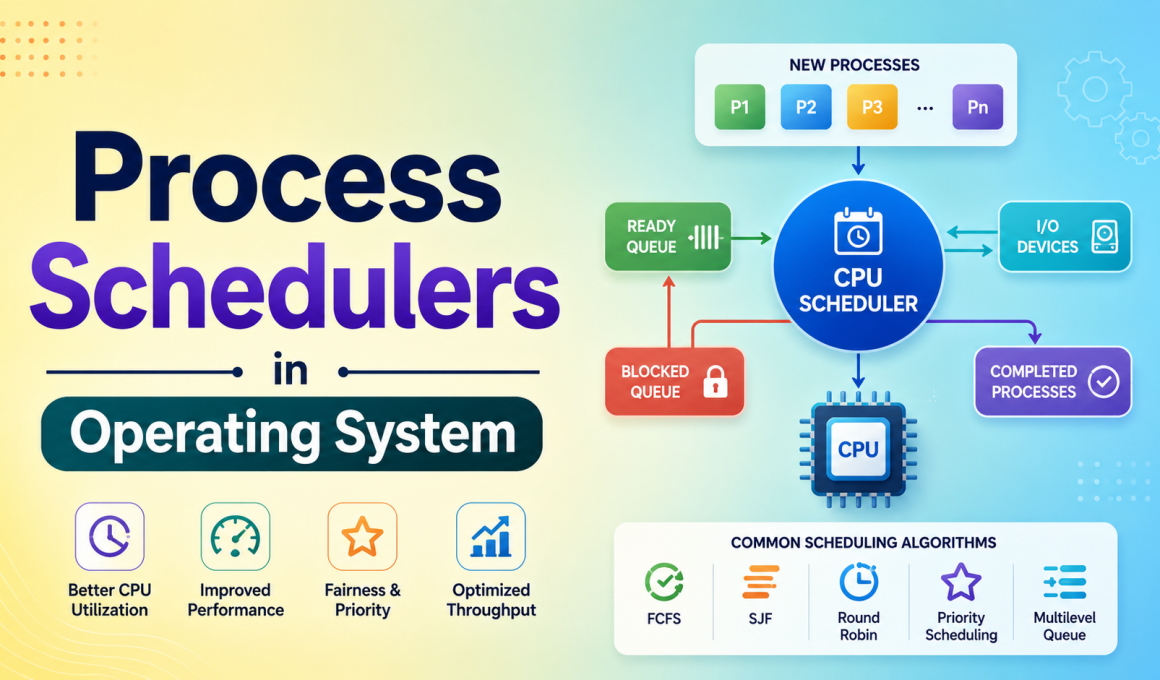
In simplest terms, process schedulers in operating system are specialized programs that decide the order and timing of processes executed by the CPU. Their primary mission is to make the best possible use of the CPU, ensuring it’s almost always busy with useful work (high utilization) while also providing users with quick responses (low response time).
A process can be in one of several states: new, ready, running, waiting, or terminated. The scheduler’s job is to manage the transitions between the ready, waiting, and running states.
Why should you care? Without a scheduler, your CPU might get stuck on one intensive task, making your entire system unresponsive. Schedulers enable the multitasking miracle we take for granted.
Key Takeaways: Why Schedulers Matter
- Maximizes CPU Efficiency: They keep the CPU busy, preventing costly idle time.
- Ensures Fairness: They allocate CPU time to multiple processes, so no single application hogs all the resources.
- Improves Response Time: For interactive systems (like your desktop), they ensure clicks and keystrokes are processed quickly.
- Enables Multiprogramming: They allow multiple processes to reside in memory simultaneously, making the system more productive.
The Three Key Types of Process Schedulers
The OS doesn’t use just one scheduler; it uses a team of three, each with a specialized role. Understanding them is like understanding the different managers in a company: one hires, one handles daily tasks, and one manages mid-term projects.
1. The Long-Term Scheduler
Also known as the job scheduler, this is the gatekeeper. When you double-click an app, it doesn’t immediately jump into the active memory race. The long-term scheduler decides which processes are admitted from the disk (secondary storage) into the main memory (RAM) for execution.
Its main goals are:
- Control Multiprogramming Degree: It determines how many processes are in memory at once. Too few, and the CPU might be underutilized. Too many, and the system slows down due to overhead.
- Balance the Mix: It carefully selects a good mix of I/O-bound processes (which spend more time on input/output, like waiting for user clicks) and CPU-bound processes (which do heavy calculations). This balance keeps both the CPU and I/O devices busy.
Think of it as: A university admissions officer who selects which students get into the dorm (RAM) based on a balanced mix of arts and science majors to keep campus life vibrant.
2. The Short-Term Scheduler
This is the CPU scheduler, and it’s the one we most commonly talk about. It’s incredibly fast and runs frequently (like, every few milliseconds). Its job is to pick one process from the ready queue (processes in memory, loaded and ready to run) and assign it to the CPU.
Why it’s crucial:
- It needs to be lightning fast. Since it’s invoked so often, even a tiny delay in its decision-making hurts overall performance.
- It directly affects responsiveness. Its algorithms determine how snappy your system feels.
Think of it as: A Formula 1 pit crew chief, making split-second decisions on which tire change or fuel strategy to execute next to keep the race car (CPU) on the track and competitive.
3. The Medium-Term Scheduler
This scheduler is all about memory management. Sometimes, there are too many processes in RAM, or a process is waiting for a slow I/O operation (like a network request). The medium-term scheduler steps in to perform swapping.
- Swap Out: It moves a temporarily inactive process from RAM back to the disk. This frees up memory for other ready processes.
- Swap In: Later, it can move the swapped-out process back into RAM so it can resume execution.
Think of it as: A warehouse manager who temporarily moves less-popular inventory (inactive processes) to a remote storage unit (disk) to make space for fast-moving goods in the main warehouse (RAM).
The Backstage Hero: Context Switching
You can’t talk about schedulers without mentioning context switching. This is the technical process that makes multitasking possible.
When the short-term scheduler decides to switch the CPU from Process A to Process B, it’s not an instant teleportation. The OS must:
- Save the state of Process A (its register values, program counter, etc.) into its Process Control Block (PCB).
- Load the saved state of Process B from its PCB into the CPU registers.
- Resume execution of Process B right where it left off.
This switch happens so fast (in milliseconds) that it creates the illusion of parallel execution. While it’s essential, it’s also pure overhead time the CPU spends on management instead of actual work. A good scheduler aims to minimize unnecessary context switches.
Popular Process Scheduling Algorithms
This is where the short term scheduler shows its intelligence. Different algorithms are suited for different scenarios. They mainly fall into two categories:
- Non-Preemptive: Once a process starts, it runs until it finishes or voluntarily yields (e.g., goes into a waiting state). It’s cooperative but can lead to one process blocking others.
- Preemptive: The OS can interrupt a running process to give the CPU to another, higher-priority or more urgent process. This is essential for interactive systems.
Let’s look at four classic algorithms:
1. First-Come, First-Served (FCFS)
The simplest non-preemptive algorithm. Processes are executed in the exact order they arrive in the ready queue.
- Pro: Simple and fair in a basic sense.
- Con: Infamous for the “Convoy Effect.” A single long process can make all the short ones wait behind it, leading to poor average waiting time.
- Best for: Simple batch systems.
2. Shortest Job First (SJF)
This algorithm picks the process with the smallest estimated burst time (CPU time needed) next. It can be non-preemptive or preemptive (called Shortest Remaining Time First, SRTF).
- Pro: Mathematically optimal for minimizing average waiting time.
- Con: Starvation is a big risk. A steady stream of short jobs could prevent a long job from ever running. It’s also difficult to predict the exact burst time of a process.
- Best for: Batch environments where job lengths are known in advance.
3. Round Robin (RR)
The go-to algorithm for time-sharing systems. Each process gets a small, fixed time unit called a time quantum (e.g., 10-100 ms). It runs for that quantum, then gets preempted and moved to the back of the ready queue.
- Pro: Excellent for fairness and responsiveness. Every process gets regular CPU time.
- Con: Performance heavily depends on the time quantum size. Too large, and it behaves like FCFS. Too small, and context switching overhead becomes huge.
- Best for: Interactive/general-purpose operating systems (like Windows, Linux, macOS).
4. Priority Scheduling
Each process is assigned a priority (often a number). The CPU is allocated to the process with the highest priority. It can be preemptive or non-preemptive.
- Pro: Useful for real-time systems where certain tasks are critical.
- Con: Starvation again. Low-priority processes may never run. This is often solved by aging gradually increasing the priority of processes that wait too long.
- Best for: Systems with clear priority distinctions (e.g., real-time OS, system processes vs. user processes).
Conclusion: The Unsung Conductor of the Digital Symphony
Process schedulers in operating system are truly the unsung heroes of computing. They work silently in the background, making millions of micro-decisions every second to deliver the smooth, responsive experience we expect. From the long-term scheduler carefully curating the mix of jobs in memory, to the medium-term scheduler juggling resources, to the short-term scheduler armed with algorithms like Round Robin making the split-second calls that keep your desktop alive, each plays a vital part.
Understanding these concepts demystifies how your computer works and gives you insight into why sometimes, when you have too many tabs open, things start to slow down. It’s a complex ballet of resource management, all aimed at one goal: making a single, powerful CPU appear to be effortlessly doing a dozen things at once for you.
Process Schedulers in Operating System FAQs
Q1. What is a process scheduler in an operating system?
A process scheduler is a core component of the OS that manages and prioritizes the execution of processes on the CPU. Its main goals are to maximize CPU utilization, ensure fair allocation of CPU time, and provide reasonable response times in interactive systems.
Q2. What are the main types of process schedulers?
There are three primary types:
- Long-Term Scheduler (Job Scheduler): Admits processes from disk to memory.
- Short-Term Scheduler (CPU Scheduler): Selects which ready process runs next on the CPU.
- Medium-Term Scheduler: Handles the swapping of processes between memory and disk to manage system load.
Q3. What is the difference between preemptive and non-preemptive scheduling?
In non-preemptive scheduling, a process runs until it finishes or voluntarily yields the CPU. In preemptive scheduling, the OS can interrupt and pause a running process to give the CPU to a higher-priority or more urgent process, leading to better system responsiveness.
Q4. How does the Round Robin scheduling algorithm work?
Round Robin assigns a fixed time slice (quantum) to each process in the ready queue. The process runs for that duration, is then preempted, and placed at the back of the queue. This cycle repeats, giving each process an equal share of CPU time over a period, which is ideal for multi-user systems.
Q5. What is the role of context switching in process scheduling?
Context switching is the mechanism that allows the CPU to stop executing one process and start another. The scheduler triggers a context switch. During the switch, the state of the old process is saved, and the state of the new process is loaded. While essential for multitasking, it represents pure overhead, so efficient schedulers try to minimize unnecessary switches.
Q1. What is a process scheduler in an operating system?
A process scheduler is a core component of the OS that manages and prioritizes the execution of processes on the CPU. Its main goals are to maximize CPU utilization, ensure fair allocation of CPU time, and provide reasonable response times in interactive systems.
Q2. What are the main types of process schedulers?
Long-Term Scheduler (Job Scheduler): Admits processes from disk to memory.
Short-Term Scheduler (CPU Scheduler): Selects which ready process runs next on the CPU.
Medium-Term Scheduler: Handles the swapping of processes between memory and disk to manage system load.
Q3. What is the difference between preemptive and non-preemptive scheduling?
In non-preemptive scheduling, a process runs until it finishes or voluntarily yields the CPU. In preemptive scheduling, the OS can interrupt and pause a running process to give the CPU to a higher-priority or more urgent process, leading to better system responsiveness.
Q4. How does the Round Robin scheduling algorithm work?
Round Robin assigns a fixed time slice (quantum) to each process in the ready queue. The process runs for that duration, is then preempted, and placed at the back of the queue. This cycle repeats, giving each process an equal share of CPU time over a period, which is ideal for multi-user systems.
Q5. What is the role of context switching in process scheduling?
Context switching is the mechanism that allows the CPU to stop executing one process and start another. The scheduler triggers a context switch. During the switch, the state of the old process is saved, and the state of the new process is loaded. While essential for multitasking, it represents pure overhead, so efficient schedulers try to minimize unnecessary switches.

![Salary of a DevOps Engineer in India [2026]](https://www.wikitechy.com/wp-content/uploads/2026/06/Salary-of-a-DevOps-Engineer-in-India-2026-380x220.png)