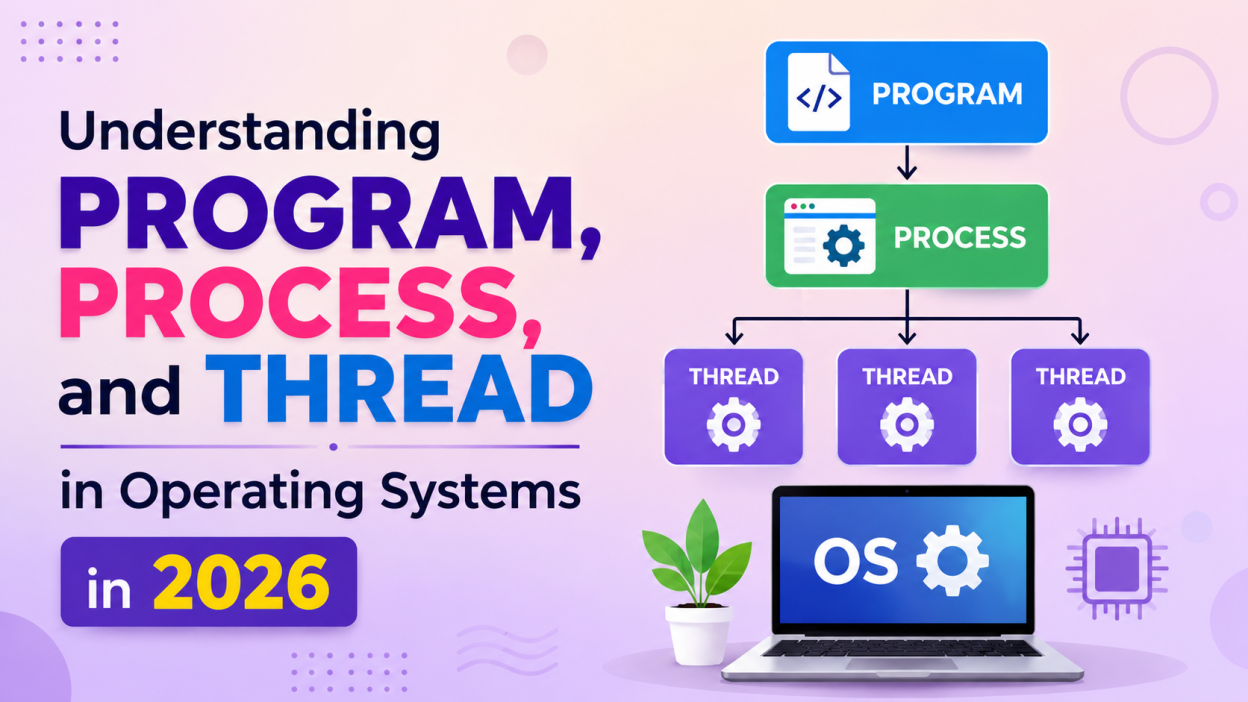
Operating systems manage everything happening inside a computer, from launching applications to handling memory, CPU usage, files, and network communication. To understand how an operating system works internally, three important concepts you need to know are Program, Process, and Thread.
These terms are closely related, but they are not the same. A program is a set of instructions stored on a device, a process is a program that is currently running, and a thread is the smallest unit of execution within a process.
Understanding the difference between a program process and thread in os is essential for students learning Operating Systems, Computer Science, Software Development, and System Programming.
In this article, we will explore these concepts, how they work, their differences, and how modern operating systems use them in 2026.
What Is a Program?

A program is a collection of instructions written to perform a specific task. It is usually stored as a file on a storage device such as an SSD or hard drive.
For example, when you install a web browser, the browser’s executable files are stored on your computer. These files contain the instructions required to run the browser.
A program is passive because it does not perform any task until the operating system loads and executes it.
Examples of Programs
Some common examples include:
- Google Chrome
- Microsoft Word
- VLC Media Player
- Python scripts
- Java applications
- C/C++ executable files
- Database applications
Consider a simple Python program:
print("Hello World")The Python file contains instructions, but simply storing the file does not mean the instructions are currently executing. When you run the file, the operating system and Python interpreter begin executing those instructions.
That running instance becomes a process.
What Is a Process?

A process is a program that is currently being executed.
When you open an application, the operating system creates a process and allocates resources to it.
For example, when you open a web browser, the operating system may create one or more processes associated with that application.
A process generally has access to resources such as:
- CPU time
- Memory
- Registers
- Program counter
- Stack
- Heap
- Open files
- Input/output resources
The operating system keeps track of these resources so that multiple processes can run safely on the same computer.
Example of a Process
Suppose you have a program called:
calculator.exeWhen it is stored on your SSD, it is a program.
When you double-click it and the operating system starts executing it, it becomes a process.
So, the basic relationship is:
Program → Execution → Process
What Is a Thread?
A thread is the smallest unit of CPU execution within a process.
A process can contain one thread or multiple threads.
For example, a modern web browser may perform several tasks at the same time:
- Loading a webpage
- Processing JavaScript
- Playing audio
- Handling user input
- Rendering graphics
- Downloading files
These tasks can be handled using multiple threads.
Threads within the same process generally share the process’s resources, including its memory space.
Simple Example
Imagine a music application.
One thread can handle:
Music playback
Another thread can handle:
User interface
Another thread can handle:
Downloading album artwork
Another thread can handle:
Network communication
All these threads can belong to the same process.
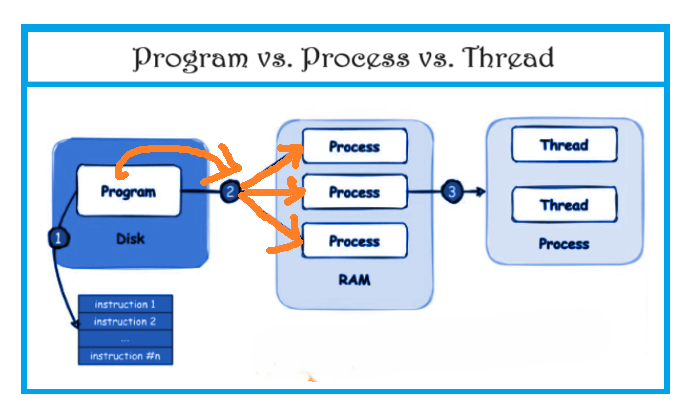
Program vs Process vs Thread
The easiest way to understand the relationship is:
Program = Instructions
Process = Running program
Thread = Execution path inside a process
For example:
Program
   ↓
Operating System loads it
   ↓
Process
   ↓
One or more threads
   ↓
CPU executes threads
Key Characteristics of a Program
A program is generally:
- Passive
- Stored on secondary storage
- Made up of instructions
- Not actively consuming CPU resources
- Independent of a particular execution instance
The same program can be executed multiple times, resulting in multiple processes.
For example, if you open the same application twice, the operating system may create multiple execution instances depending on how the application is designed.
Key Characteristics of a Process
A process is:
- Active
- Executing or waiting for execution
- Assigned resources by the operating system
- Associated with a process ID
- Isolated from other processes in its virtual address space
Operating systems use a unique identifier called a Process ID (PID) to identify processes.
For example:
Process: Chrome
PID: 4521
The exact PID depends on the operating system and changes each time processes are created.
Key Characteristics of a Thread
A thread:
- Exists inside a process
- Represents an execution path
- Shares many resources with other threads in the same process
- Has its own stack
- Has its own program counter and CPU register state
- Can execute independently
Because threads share resources, communication between threads can be faster than communication between separate processes. However, shared memory also introduces synchronization challenges.
Process Memory Layout
Understanding process memory helps explain why processes and threads are different.
A typical process has several memory regions:
+----------------------+
|       Stack          |
+----------------------+
|        Heap          |
+----------------------+
|   Data Segment       |
+----------------------+
|   Code / Text        |
+----------------------+
Code Segment
Contains the executable instructions of the program.
Data Segment
Contains global and static variables.
Heap
Used for dynamically allocated memory.
Stack
Used for function calls, local variables, and execution-related information.
When multiple threads exist inside a process, they typically share the process’s code, data, and heap, while each thread maintains its own stack and CPU execution state.
Process Control Block
The operating system needs to maintain information about every running process.
This information is stored in a structure commonly called the Process Control Block (PCB).
A PCB may contain:
- Process ID
- Process state
- Program counter
- CPU register information
- Scheduling information
- Memory management information
- Accounting information
- I/O status information
A simplified representation looks like this:
Process Control Block
----------------------
PID
Process State
Program Counter
CPU Registers
Memory Information
Scheduling Information
I/O Information
The PCB allows the operating system to manage and resume processes.
Process States
A process does not continuously execute on the CPU. It moves through different states during its lifetime.
Common process states include:
New → Ready → Running → Waiting → Terminated
New
The process is being created.
Ready
The process is ready to run but is waiting for CPU time.
Running
The CPU is currently executing the process.
Waiting or Blocked
The process is waiting for an event, such as an I/O operation.
Terminated
The process has finished execution.
A simplified flow looks like this:
             +-------+
             |  New  |
             +---+---+
                 |
                 v
             +-------+
             | Ready |
             +---+---+
                 |
                 v
            +---------+
            | Running |
            +----+----+
              /     \
             /       \
            v         v
       +---------+  +---------+
       | Waiting |  |Terminated|
       +----+----+  +---------+
            |
            v
         +------+
         |Ready |
         +------+
Process Scheduling
Modern operating systems often have many processes competing for CPU time.
The operating system’s scheduler decides which process or thread should execute.
Common scheduling concepts include:
- First-Come, First-Served
- Shortest Job First
- Priority Scheduling
- Round Robin
- Multilevel Queue
- Multilevel Feedback Queue
Modern operating systems also consider factors such as CPU cores, priorities, responsiveness, power efficiency, and workload characteristics.
What Is Multitasking?
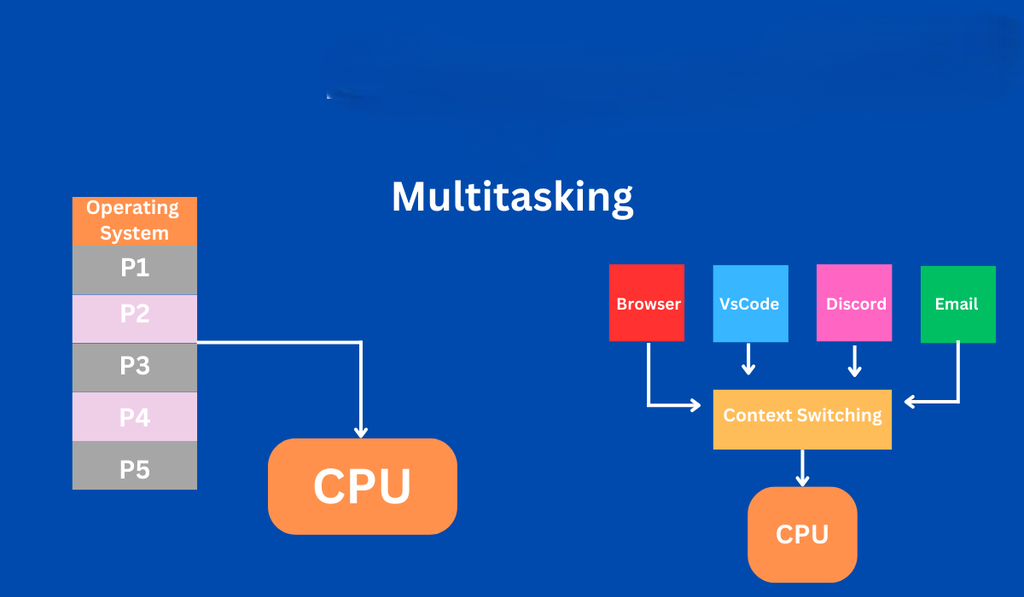
Multitasking means allowing multiple processes or tasks to make progress during the same period.
For example, you might simultaneously:
- Listen to music
- Browse the internet
- Download a file
- Edit a document
The CPU switches between runnable tasks extremely quickly, creating the impression that everything is running simultaneously.
On modern multicore systems, multiple threads can also genuinely execute at the same time on different CPU cores.
What Is Multithreading?
Multithreading is the ability of a process to contain multiple threads that can execute different tasks.
Consider a video editing application.
One thread might handle:
User InterfaceAnother:
Video ProcessingAnother:
Audio ProcessingAnother:
File I/OThis allows the application to remain responsive while performing computationally expensive operations.
Single-Threaded vs Multithreaded Process
A single-threaded process contains one main execution path.
Process
   |
   └── Thread 1
A multithreaded process contains multiple execution paths.
Process
   |
   ├── Thread 1
   ├── Thread 2
   ├── Thread 3
   └── Thread 4
Multithreading can improve responsiveness and performance, particularly when applications have independent tasks or can take advantage of multiple CPU cores.
Process vs Thread
The biggest difference between a process and a thread is resource ownership and isolation.
A process typically has its own virtual address space and operating-system-managed resources.
Threads within the same process share much of that process’s address space.
For example:
Process A
+----------------------+
| Thread 1             |
| Thread 2             |
| Thread 3             |
| Shared Memory        |
+----------------------+

Process B
+----------------------+
| Thread 1             |
| Thread 2             |
| Shared Memory        |
+----------------------+
Process A and Process B are normally isolated from each other, while the threads inside Process A can directly access shared process memory.
Process Communication
When separate processes need to exchange information, they generally use Inter-Process Communication (IPC) mechanisms.
Common IPC techniques include:
- Pipes
- Message queues
- Shared memory
- Sockets
- Signals
- Files
For example, a browser process and another application may communicate through operating-system-supported mechanisms rather than directly sharing normal process memory.
Thread Communication
Threads within the same process can communicate by accessing shared memory.
For example:
Process
 |
 +-- Thread A
 |      |
 |      +-- Shared Data
 |
 +-- Thread B
        |
        +-- Shared Data
This makes communication efficient, but it can also create problems.
Race Conditions
A race condition occurs when multiple threads access shared data concurrently and the final result depends on the timing of their execution.
For example:
Thread A → reads balance
Thread B → reads balance
Thread A → updates balance
Thread B → updates balance
If access is not properly synchronized, one update may overwrite another.
Operating systems and programming languages provide synchronization mechanisms such as:
- Mutexes
- Semaphores
- Locks
- Condition variables
- Atomic operations
These mechanisms help coordinate concurrent execution.
Context Switching
A CPU can execute only a limited number of hardware threads at once. When the operating system switches execution from one task to another, it performs a context switch.
The operating system saves the current execution state and loads another task’s state.
A simplified process looks like this:
Process A Running
       ↓
Save State of A
       ↓
Load State of B
       ↓
Process B Running
Context switching allows multiple processes and threads to share CPU resources.
However, context switching has overhead because the operating system and hardware must preserve and restore execution state.
Process Creation
Operating systems provide mechanisms for creating processes.
On Unix-like systems, process creation traditionally involves mechanisms such as fork() and exec().
For example:
fork();can create a new process, while exec()-family functions can replace the process’s program image with another program.
Windows provides APIs such as CreateProcess() for creating a new process.
The exact behavior and APIs differ between operating systems.
Thread Creation
Programming languages and operating systems provide different mechanisms for creating threads.
For example, in Java:
Thread thread = new Thread(() -> {
    System.out.println("Hello from thread");
});

thread.start();
The thread can execute concurrently with other application work.
Python also provides threading support:
import threading

def task():
    print("Hello from thread")

thread = threading.Thread(target=task)
thread.start()
The practical performance characteristics depend on the language runtime, operating system, workload, and whether the task is CPU-bound or I/O-bound.
Why Threads Are Useful
Threads can be useful when an application needs to handle multiple activities.
For example, a server might need to handle many client requests.
Instead of processing everything sequentially:
Request 1
   ↓
Request 2
   ↓
Request 3
a concurrent design can allow multiple requests to make progress:
          Server
        /    |    \
       /     |     \
 Thread 1 Thread 2 Thread 3
   |         |         |
Client A   Client B   Client C
Modern server applications may use threads, asynchronous I/O, event loops, processes, or combinations of these approaches.
Program, Process, and Thread in Real Life
Consider opening a web browser.
The browser’s executable files stored on your computer represent the program.
When you launch the browser, the operating system creates one or more processes.
Inside those processes, multiple threads can perform different tasks.
For example:
Browser Program
      ↓
Browser Processes
      ↓
+------------------------+
| UI Thread              |
| Rendering Thread       |
| Network Thread         |
| JavaScript-related     |
| Worker Threads         |
+------------------------+
The exact architecture varies by browser and version, but modern browsers commonly use process isolation and multithreading to improve responsiveness, performance, and security.
Program vs Process vs Thread: Comparison
| Feature | Program | Process | Thread |
|---|---|---|---|
| Nature | Passive | Active | Active |
| Definition | Set of instructions | Running program | Execution unit inside process |
| CPU usage | No | Yes, when scheduled | Yes, when scheduled |
| Memory | Stored as a file | Has virtual address space | Shares process memory |
| Identity | File/application | Process ID | Thread ID |
| Resources | No execution resources | Owns/manages process resources | Uses shared process resources |
| Communication | Not applicable | IPC mechanisms | Shared memory and synchronization |
| Creation cost | Not applicable | Generally higher | Generally lower |
| Isolation | Not applicable | Stronger isolation | Less isolation |
| Failure impact | Not applicable | Often isolated from other processes | A thread failure can affect its process |
Process vs Thread: Which Is Better?
There is no universal answer.
Processes are useful when isolation, security, and independent resource management are important.
Threads are useful when shared memory, responsiveness, and efficient concurrency are important.
For example:
Use processes when:
- Strong isolation is required
- Applications should be independent
- Fault containment is important
- Separate address spaces are beneficial
Use threads when:
- Tasks need to share data
- Low-overhead concurrency is useful
- An application needs responsive background work
- Multiple tasks belong naturally to the same application
Modern applications frequently combine both approaches.
Threads and Multicore CPUs
Older computers often had a single CPU core, so multitasking mainly relied on rapidly switching between tasks.
Modern computers commonly have multiple CPU cores.
This means multiple threads can execute in parallel when enough hardware execution resources are available.
For example:
CPU
+--------+--------+--------+--------+
| Core 1 | Core 2 | Core 3 | Core 4 |
+--------+--------+--------+--------+
    |        |        |        |
 Thread 1 Thread 2 Thread 3 Thread 4
This can significantly improve performance for workloads that can be effectively parallelized.
However, simply creating more threads does not automatically make a program faster. Excessive threads can increase scheduling overhead, memory consumption, contention, and synchronization costs.
Concurrency vs Parallelism
These two concepts are often confused.
Concurrency means multiple tasks can make progress during overlapping periods.
Parallelism means multiple tasks are actually executing at the same time on different processing resources.
For example:
Concurrency:
Task A → Task B → Task A → Task C

Parallelism:
Core 1 → Task A
Core 2 → Task B
Core 3 → Task C
A multithreaded application can be concurrent without achieving significant parallel execution, depending on the runtime and hardware.
Threads in Modern Software Development
Threads remain important in 2026, but modern software development has several approaches to concurrency.
Applications may use:
- Native threads
- Thread pools
- Asynchronous programming
- Event-driven architectures
- Processes
- Coroutines
- Worker pools
- Distributed services
For example, a web server might use a thread pool rather than creating a brand-new thread for every request.
A thread pool maintains a collection of reusable worker threads:
              Thread Pool
          +----------------+
          | Thread 1       |
          | Thread 2       |
          | Thread 3       |
          | Thread 4       |
          +----------------+
             ↓ ↓ ↓ ↓
          Incoming Tasks
This reduces the overhead of repeatedly creating and destroying threads.
Why Students Should Understand These Concepts
Program, process, and thread are fundamental concepts for anyone studying:
- Operating Systems
- Computer Science
- Software Engineering
- Cloud Computing
- DevOps
- Backend Development
- System Programming
- Cybersecurity
- Distributed Systems
They are also common topics in technical interviews.
Interviewers may ask questions such as:
What is a process?
A process is a running instance of a program with its own operating-system-managed execution context and virtual address space.
What is a thread?
A thread is an execution unit within a process that shares many process resources with other threads.
What is the difference between a process and a thread?
Processes generally provide stronger memory isolation, while threads within the same process share memory and resources.
Can a process have multiple threads?
Yes. A process can contain multiple threads executing different parts of the application.
What is a context switch?
It is the process of saving the execution state of one task and restoring the state of another so the CPU can switch between them.
Common Misconceptions
A Program and Process Are Not the Same
A program is a set of stored instructions.
A process is an executing instance of those instructions.
A Thread Is Not a Smaller Process
A thread is an execution unit within a process. Threads generally share the process’s memory and resources rather than having completely separate address spaces.
More Threads Do Not Always Mean More Performance
Creating too many threads can actually reduce performance because of scheduling overhead, synchronization, memory usage, and contention.
Multitasking Is Not Always the Same as Parallelism
A system can support concurrent tasks even when they are not all executing simultaneously.
Final Thoughts
Understanding programs, processes, and threads is one of the most important foundations of operating systems.
A program is a passive collection of instructions stored on a device. When the operating system loads and executes that program, it becomes a process. A process can contain one or multiple threads, which represent individual execution paths.
The relationship can be remembered easily:
Program
   ↓
Running Program
   ↓
Process
   ↓
One or More Threads
   ↓
CPU Execution
Once you understand these concepts, topics such as CPU scheduling, multitasking, multithreading, synchronization, deadlocks, process communication, memory management, and parallel programming become much easier to understand.
For students and developers in 2026, these concepts remain highly relevant because modern applications—from browsers and mobile apps to cloud services and high-performance systems—depend heavily on efficient process and thread management.
Kaashiv Infotech Offers Networking Course, Cyber Security Course, Cloud Computing Course Visit Their Website www.kaashivinfotech.com.