Character Animation Techniques – Character animation is an important part of motion graphics because it brings characters, illustrations, and visual stories to life. From animated advertisements and educational videos to social media content and explainer videos, character animation helps designers communicate ideas in an engaging and memorable way.
Creating effective character animation requires more than moving an illustration across the screen. Animators must understand movement, timing, expressions, body language, and storytelling. Even a simple character can feel realistic and interesting when its movements are planned carefully.
Modern animation tools such as Adobe After Effects, Blender, and Adobe Animate make it easier to create character animations for different purposes. However, learning the right techniques is essential for producing smooth, professional results.
In this article, we will explore ten useful character animation techniques, how they work, and how beginners can apply them to motion graphics projects.
What Is Character Animation in Motion Graphics?
Character animation is the process of making illustrated, 2D, or 3D characters move and express emotions. These movements can include walking, running, talking, jumping, waving, and reacting to different situations.
In motion graphics, character animation is often combined with typography, shapes, icons, transitions, and visual effects. This combination helps communicate complex information in a simple and attractive format.
For example, an animated character explaining a software product can make a promotional video more relatable than a presentation containing only text and screenshots.
Character animation is commonly used in advertisements, educational videos, mobile applications, games, animated presentations, and digital marketing campaigns.
10 Best Techniques for Character Animation
1. Squash and Stretch
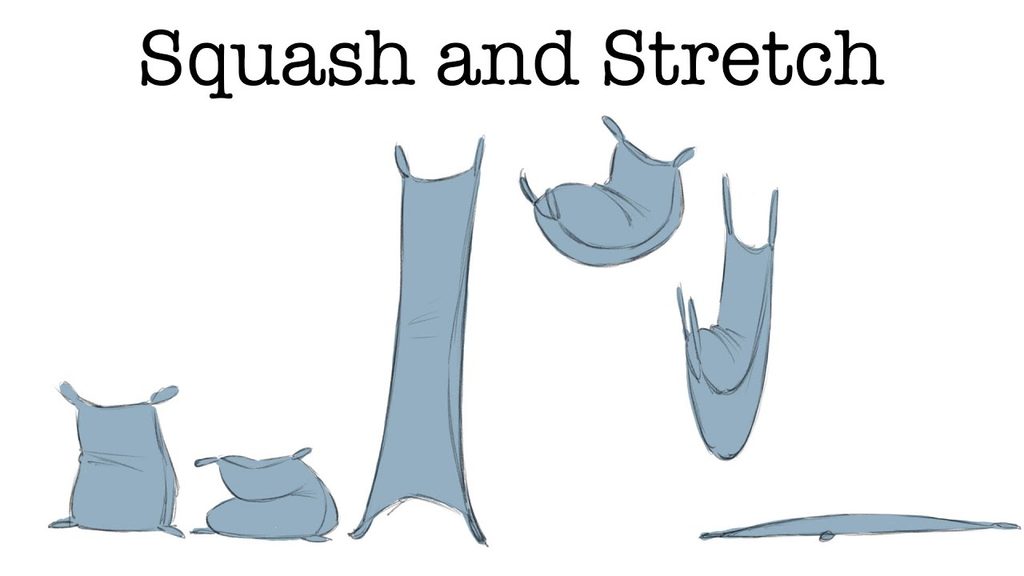
Squash and stretch is one of the most useful animation techniques for creating flexible, lively character movements. It changes a character’s shape during movement to communicate speed, impact, and weight.
For example, when a cartoon character jumps, its body may stretch upward during takeoff and squash slightly when landing. These changes make the movement more energetic and expressive.
In motion graphics, this technique works well for animated mascots, playful characters, and short promotional videos. However, the deformation should suit the character’s design and maintain a believable sense of volume.
2. Anticipation
Anticipation is a small movement that prepares the audience for a larger action. Without it, character movements can appear sudden or mechanical.
For example, a character might bend its knees before jumping or pull its arm backward before throwing a ball. These preliminary movements help viewers understand what the character is about to do.
In motion graphics, anticipation can also be used before a character points toward text, reveals a product, or waves at the audience. Designers should keep these movements clear and appropriately timed so that the main action remains easy to follow.
3. Timing and Spacing
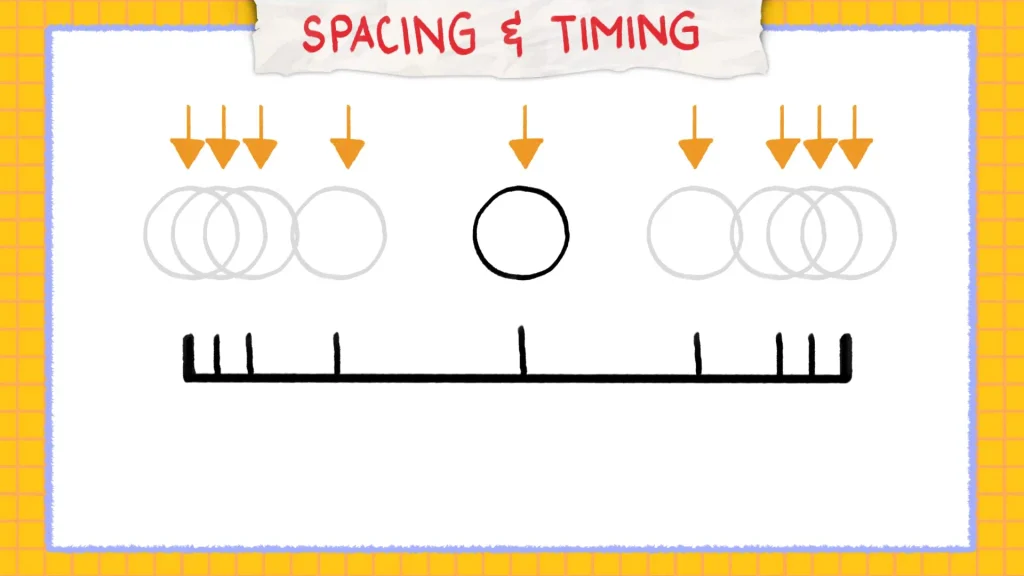
Timing determines how long an action takes, while spacing describes the distance a character travels between successive frames. Together, they influence the perceived speed, weight, and personality of a character.
A quick head turn may communicate surprise, while a slow head movement can suggest curiosity or hesitation. Similarly, a heavy character usually benefits from slower, weightier movements than a lightweight cartoon character.
Animators can adjust keyframes and spacing to create different effects. Practising with simple actions, such as walking, waving, and jumping, helps beginners understand how movement changes when timing is adjusted.
4. Ease In and Ease Out
Ease in and ease out make character movements accelerate and decelerate gradually instead of moving at a constant speed. This technique creates smoother transitions between poses.
For example, when a character moves toward a button on the screen, it can start slowly, accelerate, and then slow down as it reaches the target. This makes the action feel more controlled and natural.
In Adobe After Effects, animators can apply Easy Ease to keyframes and refine the motion using the Graph Editor. Similar controls are available in many animation applications.
However, easing should match the action. A sudden impact may require a sharp movement, while a gentle gesture benefits from smoother acceleration and deceleration.
5. Follow-Through and Overlapping Action
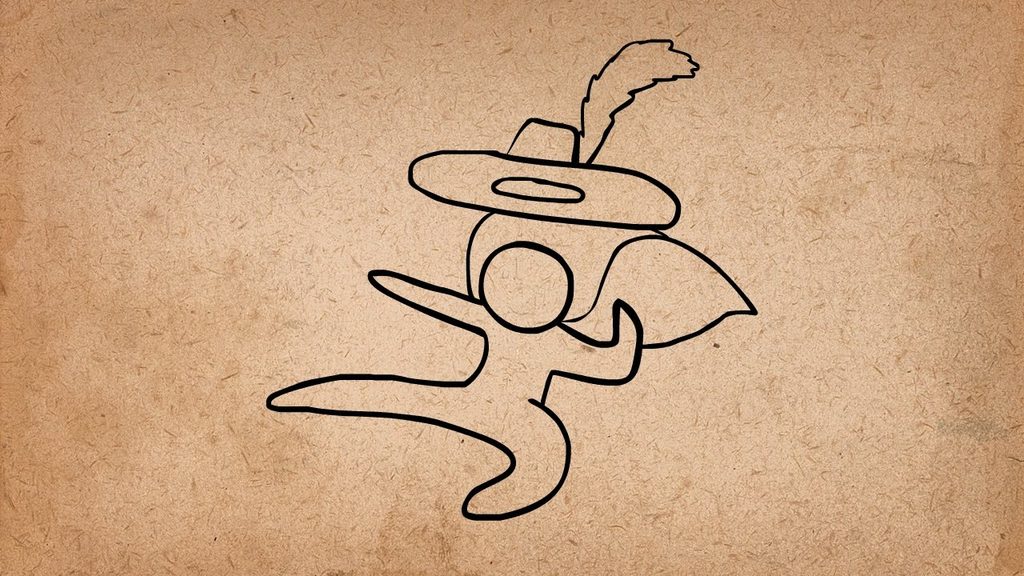
Follow-through and overlapping action help make characters feel less rigid. Follow-through occurs when parts of a character continue moving after the main body has stopped. Overlapping action occurs when different body parts move at different times.
For example, when a character turns its head, its hair, clothing, or accessories may continue moving briefly. During a walking animation, the arms and legs should also coordinate without moving in exactly the same pattern.
These techniques are especially useful for animated mascots, cartoon characters, and characters with loose clothing or long hair. In digital animation, they can be created using additional keyframes, parenting, or suitable rigging controls.
6. Pose-to-Pose Animation
Pose-to-pose animation involves creating important character poses first and then building the movement between them. It is an effective approach for planned motion graphics projects because it gives animators control over the timing and composition of each action.
For example, a character explaining a service might begin in a standing pose, point toward a heading, look at an icon, and finish with a friendly smile. Animators can establish these poses before refining the transitions.
This approach is particularly useful for explainer videos, advertisements, and animated presentations. It also makes revisions easier because the main actions are defined before smaller details are added.
Beginners should focus on clear silhouettes and readable poses before spending time on secondary movements.
7. Lip-Sync Animation
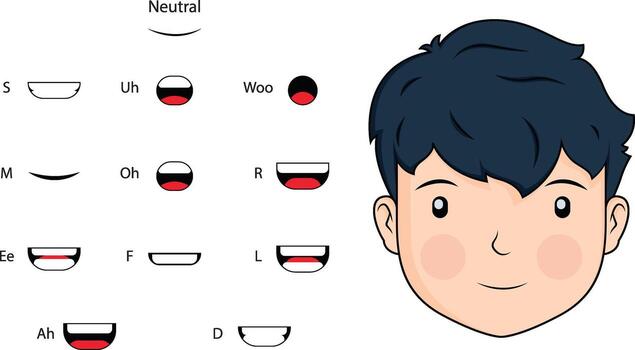
Lip-sync animation matches a character’s mouth movements with spoken dialogue or recorded audio. It is important when characters explain information, tell stories, or interact with other characters.
A basic lip-sync workflow begins by recording or importing the dialogue. The animator then identifies important sounds and adjusts mouth shapes to match them. Common mouth shapes represent sounds such as M, B, and P, as well as open vowels.
Facial expressions, eye movements, and small head gestures can make the performance more convincing. However, mouth movement alone is not enough; the character’s expression should also reflect the meaning and emotion of the dialogue.
Lip-sync animation is widely useful for educational videos, animated advertisements, tutorials, and social media content.
8. Facial Expressions and Body Language
Facial expressions and body language help audiences understand what a character feels without relying entirely on dialogue. A smile may communicate happiness, raised eyebrows can suggest surprise, and a lowered head may indicate disappointment.
Body language adds further meaning. A confident character might stand upright with open gestures, while a nervous character may look away or move its hands repeatedly.
When animating expressions, designers should coordinate the eyes, eyebrows, mouth, head, and body. Small changes can often communicate emotions more effectively than exaggerated movements.
This technique is valuable in storytelling, brand mascots, educational animations, and character-driven explainer videos.
9. Secondary Action
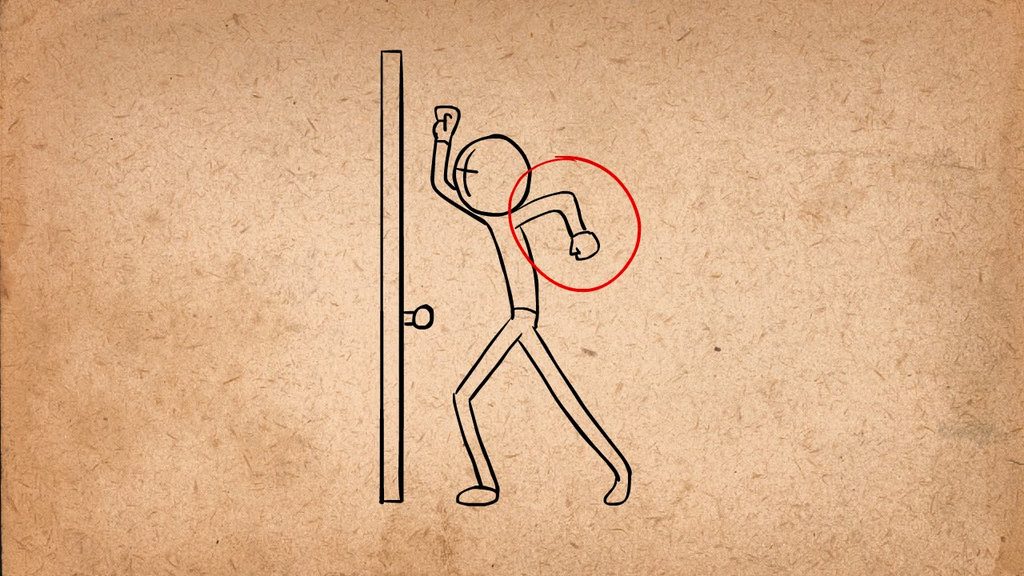
Secondary action refers to an additional movement that supports the character’s main action without distracting from it.
For example, while a character walks and talks, it might blink, move its head slightly, or gesture with one hand. These smaller movements help the character appear active and expressive.
In motion graphics, secondary actions can also include a character adjusting its posture while introducing a product or looking toward a graphic element as it appears on the screen.
The key is balance. Too many simultaneous movements can make the scene confusing. Animators should establish the primary action first and then introduce secondary movements that strengthen the character’s performance.
10. Exaggeration and Clear Staging
Exaggeration makes important movements and expressions more noticeable, while staging ensures that the audience can easily understand what is happening.
For example, a character reacting to surprising news might open its eyes wider and move backward slightly. A character presenting a new feature could use a clear pointing gesture while the feature appears beside it.
Good staging involves arranging the character, text, background, and other elements so that the main message receives attention. Contrast, spacing, composition, and carefully planned movement all contribute to clarity.
In motion graphics, exaggeration is particularly useful for short videos, where the audience must understand an action quickly. It should remain consistent with the intended style and tone of the project.
Microsoft Learn+1
Tools for Character Animation in Motion Graphics
Choosing suitable software can make the animation process more efficient. The best tool depends on whether the project uses 2D illustrations, vector characters, or 3D models.
- Adobe After Effects: Useful for animating layered illustrations, motion graphics, character rigs, and visual effects.
- Adobe Animate: Suitable for 2D character animation, frame-by-frame drawing, and interactive animated content.
- Blender: Useful for 3D character modelling, rigging, animation, and rendering.
- Toon Boom Harmony: Designed for professional 2D animation workflows, including character rigging and traditional drawing techniques.
Beginners should choose one tool and practise basic movements before exploring complex rigs and advanced effects.
Common Mistakes to Avoid
Even well-designed characters can look unnatural when animation principles are not applied consistently. Watch out for these common mistakes:
- Stiff movements: Add appropriate easing and overlapping action.
- Poor timing: Adjust the duration and spacing of keyframes.
- Unclear poses: Make sure the character’s action is easy to recognise.
- Excessive effects: Avoid adding unnecessary movements that distract from the main message.
- Weak expressions: Coordinate facial movements with body language and dialogue.
- Inconsistent character design: Maintain the character’s proportions and visual style throughout the animation.
Reviewing animations at normal playback speed helps reveal problems that may not be obvious when examining individual frames.
Conclusion
Character animation is an important skill for creating engaging motion graphics. Techniques such as squash and stretch, anticipation, timing, easing, pose-to-pose animation, lip-sync, and secondary action help characters move naturally and communicate emotions effectively.
Beginners should start with simple exercises, including a bouncing character, a walking cycle, and a basic talking animation. Once these fundamentals are understood, they can combine multiple techniques to create more expressive scenes.
With regular practice, careful observation, and the right animation software, designers can develop character animations for advertisements, educational content, explainer videos, and digital storytelling projects.
Ultimately, successful character animation is not about adding as much movement as possible. It is about making every movement meaningful, clear, and appropriate for the story.
Want to learn more, Kaashiv Infotech Offers, UI UX Course, Front End Development Course, Full Stack Development Course & More, Visit Their Website www.kaashivinfotech.com.