If you are stepping into the world of programming, chances are someone has already told you to start with C. And honestly? They are absolutely right. C Language Basics form the foundation of almost every modern programming language out there. Whether you want to build operating systems, embedded devices, or game engines – C gives you the power and control you need.
In this guide, we will break down everything you need to know about C programming in a simple, easy-to-understand way. No jargon overload. No confusing explanations. Just clear, practical knowledge that helps you start coding from day one.
What is C Programming?
Let us start with the basics. C is a high-level, general-purpose programming language that developers use to build a wide range of applications. From operating systems like Windows and Linux to compilers, databases, and even gaming software C is everywhere.
What makes C special is its simplicity combined with power. It lets you write low-level code while still maintaining a high-level structure. This is why it is often called a “mid-level” language.
Many popular languages like C++, Java, Python, and C# have borrowed heavily from C. So, when you learn C, you are not just learning one language you are building a strong foundation for many others.
History of C Programming Language
Understanding where C came from helps you appreciate why it works the way it does.
- 1970s — Birth at Bell Labs: Dennis Ritchie developed C at Bell Labs as an improvement over the B language. The main goal was to support the development of the Unix operating system.
- 1980s — Rising Popularity: C gained massive popularity because of its portability and efficiency. Developers loved how they could write code once and run it on different machines.
- 1990 — ANSI Standardization: The American National Standards Institute (ANSI) created a standard definition for C, known as C89 or C90 (ISO/IEC 9899:1990). This made C a universally accepted language.
- 1999 — C99 Standard: A new version called C99 introduced exciting features like single-line comments (//), inline functions, and the ability to declare variables anywhere inside a block.
This evolution shows how C has continuously adapted to meet the needs of developers over the decades.
Basics of C Language: Key Features
Before diving into syntax and code, let us look at what makes C unique. Here are the standout features:
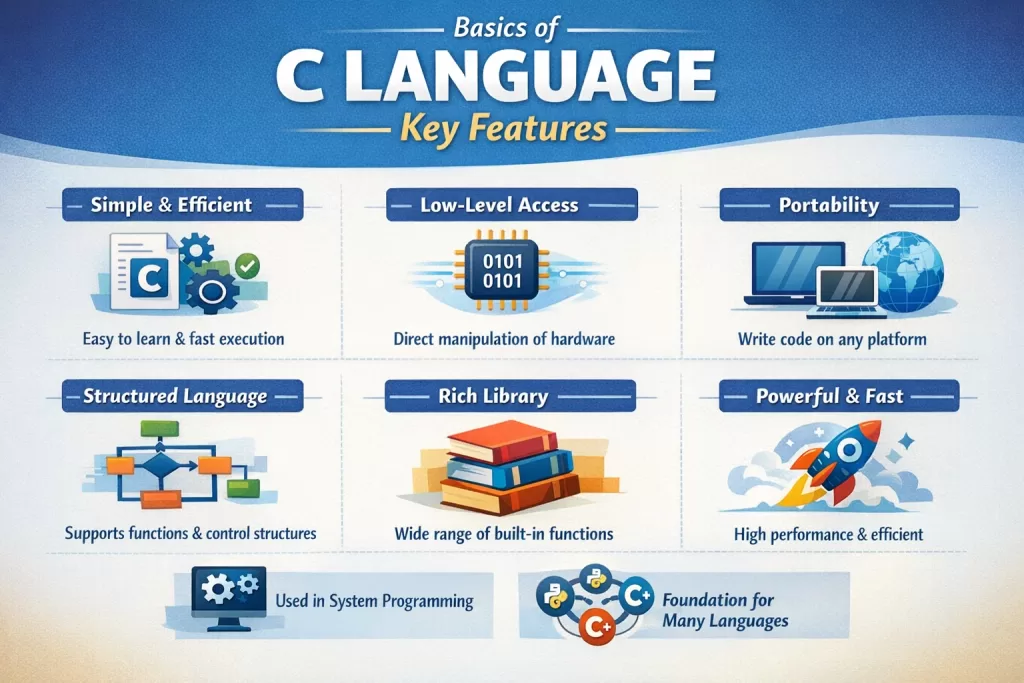
- Procedural Language: C follows a step-by-step approach to solve problems. You write instructions in a specific order, and the computer executes them one by one.
- Mid-Level Language: It combines high-level readability with low-level hardware control.
- Modular Programming: You can break your code into smaller functions or modules, making it easier to manage and reuse.
- Statically Typed: The data type of a variable is determined during compilation, which helps catch errors early.
- Rich Library Support: C comes with a standard library full of predefined functions like
printf(),scanf(), andstrlen(). - Portable: Write your code on one machine, and it can run on another with minimal or no changes.
- Supports Advanced Features: Recursion, bit manipulation, multithreading, and pointer arithmetic are all supported for faster and more efficient execution.
Basics of C Language: Identifiers
Identifiers are names you give to variables, functions, arrays, and other user-defined elements in your code. Think of them as labels that help you identify different parts of your program.
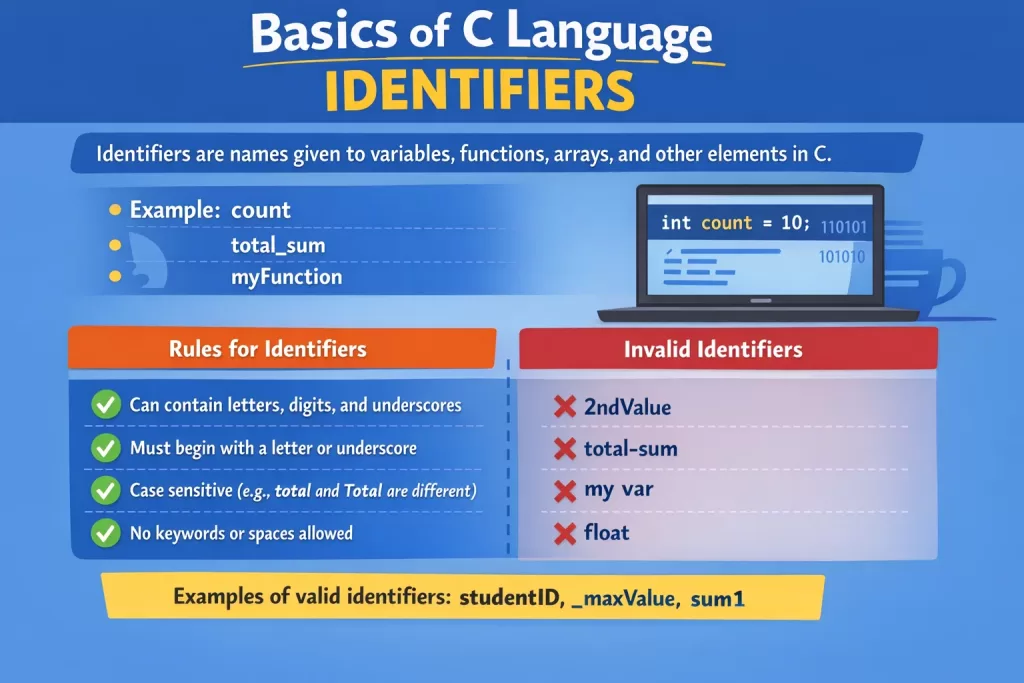
Here are the rules for creating identifiers in C:
- An identifier can start with a letter (uppercase or lowercase) or an underscore (_).
- After the first character, you can use letters, digits, or underscores.
- You cannot use special symbols like @, $, %, or punctuation marks.
- C is case-sensitive, which means
myVariableandmyvariableare two different identifiers. - You cannot use C keywords as identifiers.
Example:
Cint studentAge;      // Valid identifier
float _salary;       // Valid identifier
int<em> 2ndPlace</em>;        // Invalid — starts with a digit
char my-name;        // Invalid — contains a hyphen
Basics of C Language: Constants
Constants are fixed values that do not change during program execution. They are also called literals. C supports various types of constants, including integers, floating-point numbers, characters, strings, and pointers.
You can define constants using the const keyword.
Example:
Cconst int maxNumber = 100;
const double PI = 3.14159;
const char greeting[] = "Hello World";
Once you declare a constant, its value cannot be modified. This makes your code safer and more predictable.
Basics of C Language: Keywords
Keywords are reserved words in C that have special meanings. You cannot use them as variable names or function names. C has 32 keywords, and each one serves a specific purpose.
Here is the complete list of C keywords:
| Keyword | Keyword |
|---|---|
| auto | void |
| break | volatile |
| case | while |
| char | const |
| continue | for |
| default | goto |
| do | if |
| double | int |
| else | long |
| enum | register |
| extern | return |
| float | short |
| goto | signed |
| if | sizeof |
| int | static |
| struct | switch |
| typedef | union |
| unsigned |
Understanding these keywords is essential because they form the building blocks of every C program you will write.
Basics of C Language: Comments
Comments are notes you add to your code to explain what it does. The compiler completely ignores them, so they have zero impact on program execution.
C supports two types of comments:
- Single-line comments: Start with
//and continue until the end of the line. - Multi-line comments: Enclosed between
/*and*/. These can span multiple lines.
Example:
C// This is a single-line comment

/* This is a multi-line comment.
   It can span as many lines as you need. */
Good commenting habits make your code readable and maintainable.
Basics of C Language: Data Types
Data types define what kind of value a variable can hold. C supports three major categories of data types:
1. Primary or Primitive Data Types
These are the most basic data types in C:
- int: Stores whole numbers (e.g., 5, -10, 100)
- float: Stores decimal numbers with single precision (e.g., 3.14)
- double: Stores decimal numbers with double precision (e.g., 3.14159265)
- char: Stores a single character (e.g., ‘A’, ‘z’)
- void: Represents the absence of a value
2. User-Defined Data Types
These are data types created by the programmer:
- struct: Groups different data types under one name
- union: Similar to struct but shares memory among members
- enum: Defines a set of named integer constants
- typedef: Creates an alias for an existing data type
3. Derived Data Types
These are built from primitive data types:
- Arrays: Collection of elements of the same type
- Pointers: Variables that store memory addresses
- Functions: Blocks of code that perform specific tasks
Basics of C Language: Statement Terminator
Every statement in C must end with a semicolon (;). This is one of the most common mistakes beginners make forgetting the semicolon.
Example:
Cconst int maxNumber = 100;
const double PI = 3.14159;
const char greeting[] = "Hello World";
Without the semicolon, the compiler will throw an error. Always double-check your statements before compiling.
Why Learn C Programming?
You might be wondering with so many modern languages available, why bother learning C? Here is why C still matters:
- Easy to Learn: C has a relatively simple syntax compared to many modern languages.
- Strong Foundation: Since many languages are based on C, learning it gives you a deep understanding of programming concepts.
- High Demand: C is used in operating systems, embedded systems, and game development fields that always need skilled developers.
- Portability: C programs can run on different platforms with minimal changes.
- Compiled Language: C code is compiled before execution, which means faster performance.
- Procedural Thinking: C teaches you to think logically and break problems into smaller steps.
Basics of C Language: Hello World Program
Every programmer’s journey starts with the “Hello World” program. Here is how you write it in C:
C#include <stdio.h>  // Include standard input/output library

int main() {
    // Print "Hello, world!" on the console
    printf("Hello, world!\n");

    return 0;  // Return 0 to indicate successful execution
}
Output:
textHello, world!
Let us break this down:
#include <stdio.h>– This includes the standard input/output library, which gives us access to functions likeprintf().int main()– This is the entry point of every C program.printf()-This function prints text to the console.return 0– This tells the operating system that the program executed successfully.
Conclusion
Mastering C Language Basics is one of the best investments you can make in your programming career. From understanding identifiers, constants, and keywords to working with data types and writing your first program every concept builds on the previous one.
C teaches you how computers actually think. It gives you control over memory, performance, and system-level operations that higher-level languages abstract away. Whether you are a complete beginner or a professional looking to strengthen your fundamentals, C is the perfect starting point.
Frequently Asked Questions (FAQs)
What is an algorithm in C?
An algorithm in C is a step-by-step set of instructions designed to solve a specific problem. It is written in C language syntax and can be executed by a computer. Algorithms form the logic behind every C program.
What is a data type in C?
A data type in C defines the kind of value a variable can store, such as integers, floating-point numbers, characters, or strings. Common data types include int, float, char, and double.
What is a loop in C?
A loop in C is a control structure that repeats a block of code multiple times until a specific condition is met. C supports for, while, and do-while loops for iteration.
What is a compiled language?
A compiled language like C translates the entire source code into machine code before execution. This process is done by a compiler, and the resulting executable file runs directly on the hardware, making it faster than interpreted languages.
What is C programming used for?
C programming is used for developing operating systems, embedded systems, compilers, gaming applications, database systems, and more. It is also widely used in teaching programming fundamentals due to its simplicity and power.
What is a data type in C?
A data type in C defines the kind of value a variable can store, such as integers, floating-point numbers, characters, or strings. Common data types include int, float, char, and double.
What is a loop in C?
A loop in C is a control structure that repeats a block of code multiple times until a specific condition is met. C supports for, while, and do-while loops for iteration.
What is a compiled language?
A compiled language like C translates the entire source code into machine code before execution. This process is done by a compiler, and the resulting executable file runs directly on the hardware, making it faster than interpreted languages.
What is C programming used for?
C programming is used for developing operating systems, embedded systems, compilers, gaming applications, database systems, and more. It is also widely used in teaching programming fundamentals due to its simplicity and power.